


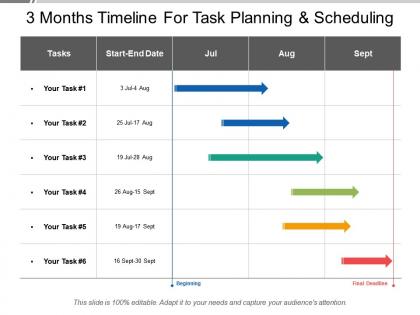
3 months timeline for task planning and scheduling




Try Before you Buy Download Free Sample Product
 Impress Your
 Audience
 100%
100% Editable
 Save Hours
 of Time


Task planning and scheduling presentation slide is helpful in detailing the project management. You can notify the listing of various things related to project such as milestone activities and deliverable which usually intended start as well as finish dates. In most of the engineering and construction industries, the development and maintenance of the project schedule is essential so you can share its details with the help of project schedule PowerPoint template. An accomplished milestone consists of several activities and a lot of work so you can take help of task planning presentation for setting schedule goals and monitoring progress. By taking help of 3 months scheduling slide, you can share with your team that how you can prepare a schedule, analyze the action sequence, monitoring the status of the project. 90 days timeline PPT is an effective tool which helps you in discussing the complex project as you can simplify the complex projects by dividing it. Our 3 Months Timeline For Task Planning And Scheduling get you together with the best. Combine forces and create energy.
People who downloaded this PowerPoint presentation also viewed the following :
3 months timeline for task planning and scheduling with all 5 slides:
Achieve the desired impact at every event with our 3 Months Timeline For Task Planning And Scheduling. Avoid being ineffective or inefficient.

FAQs for 3 months timeline for task
So you'll want to break down your tasks first, then guess how long each one takes (spoiler: you'll be wrong at first, but whatever). Figure out which tasks can't start until others are done - that dependency stuff trips everyone up. Always pad your timeline by like 20-30% because life happens. Set some milestones too so you're not flying blind. Here's the thing though - review it weekly and tweak as needed. I used to think timelines were these rigid things, but they're more like... rough guides? The whole thing only works if you're honest about adjustments.
Deadlines are basically your priority filter - they help you figure out what actually matters vs what can wait. I always start by mapping out which tasks are blocking other people, since those usually can't slide. When everything feels urgent (ugh, the worst), you gotta look at which deadlines are actually set in stone vs ones you can negotiate. Dependencies are key though - what work unlocks other stuff for your team? Then just rank by how soon they're due and business impact. Honestly, I'd pick your three biggest deadlines this week and work backwards from there. Makes it way less overwhelming.
So there's a bunch of good options depending on what you need. Microsoft Project and Asana are pretty solid if you want detailed scheduling stuff. For simpler visual timelines, Trello and Monday.com work great. Honestly though, sometimes I just throw together a Gantt chart in Excel or Google Sheets - works fine if it's not super complicated. Oh, and if you're doing brainstorming sessions with the team, Lucidchart and Miro are really good for that collaborative thing. I'd probably just start with whatever tool you guys are already using for projects, then see if you need something fancier later.
Honestly, timeline visuals are a lifesaver because everyone finally sees the same picture. No more "wait when's this due?" panic texts. You'll spot who's blocking what way faster, and dependencies become super obvious. When priorities inevitably change (ugh), you can actually show people why their "quick favor" derails everything else. I'd say grab whatever tool your team's already using - don't overthink it. Focus on making handoffs really clear between people. Trust me, those awkward "oh I was waiting for you" moments basically disappear.
Ugh, timeline delays are the worst but totally fixable. Start by running tasks in parallel instead of one after another - that's your quickest win. Pull people off less important stuff to tackle the real bottlenecks. You can also cut scope temporarily, like pushing those nice-to-have features to later (I know, I know, nobody wants to hear that). Overtime is always an option but don't burn your team out over it. Oh, and map out your critical path first - you'll be surprised where you actually have wiggle room to shuffle things around.
First thing - dump all your tasks onto paper or whatever. Then figure out which ones can't start until something else wraps up. Those are your dependencies. I like drawing messy arrows between them (looks chaotic but works). Gantt charts are clutch here - Asana's decent, or honestly just a spreadsheet if you're basic like me. Work backwards from your deadline and give yourself breathing room between connected tasks. Oh, and color-coding different streams helps you catch where things might get jammed up. You'll spot what can run at the same time too.
Honestly, stakeholder feedback is like your sanity check when building timelines. They'll spot resource issues and dependencies you totally missed. I've learned people always know about random conflicts coming up that aren't obvious from the outside - saved me so many times. Get their input early and keep asking throughout the project. The trick is actually using what they tell you to tweak deadlines and shift tasks around, not just nodding and ignoring it. Otherwise you're just setting yourself up for chaos later.
Okay so basically pull up your last 3-5 projects and see how off your estimates actually were. I bet you'll find patterns - like testing always takes way longer or client feedback drags on forever (seriously, why does approval always take twice as long?). Track where the delays actually happen, not just when stuff gets done. Maybe you're terrible at estimating design phases but pretty good with development time. Once you know your blind spots, you can pad those areas when planning new projects. Way better than just guessing and hoping for the best.
Honestly, I'd put milestones at natural stopping points - like when you finish a big deliverable or wrap up a phase. Space them 2-3 weeks apart tops, any longer and you'll lose track. Make them super specific too, not wishy-washy stuff like "work on design." I always tie mine to the critical path so I can catch delays before they spiral. Oh, and put them right before your riskiest parts of the project - that's where things usually go sideways. The trick is treating each one like a mini win instead of just another boring checkpoint.
Okay so the methodology totally dictates how you'll plan everything. Waterfall means you map out the whole thing upfront - requirements, design, dev, testing - and boom, your timeline's locked in. Agile breaks stuff into these little 1-2 week sprints instead. Way less scary honestly when you're looking at some huge project. You keep adjusting timelines based on what you figure out each sprint. Kanban's different - it's more about steady flow without hard deadlines. I'd probably go Agile for most things tbh. But yeah, pick your methodology first, then your timeline follows naturally.
Honestly, timelines are lifesavers for catching problems early. You'll spot dependencies that could jam things up, resource conflicts, totally unrealistic deadlines - all before they bite you. Think of it as your early warning system. Buffer time becomes way easier to plan when you can see the risky stuff laid out. Your stakeholders will actually get it too when everything's visual, and they might even help solve problems (shocking, I know). Try color-coding by risk level - makes the sketchy parts jump right out at you.
Ugh, the worst thing you can do is be super optimistic with time estimates. Like, everything takes way longer than you think it will. Don't pack your schedule back-to-back either - leave buffer time between tasks. I learned this the hard way lol. Dependencies between tasks will mess you up too, so map those out first. Oh and definitely factor in review cycles and approvals, plus those random urgent things that always pop up. Keep your timeline simple though - if updating it becomes a whole project, you've gone too far. Always add at least 20% extra time. Seriously, that buffer is a lifesaver.
Ugh, remote work timing is so tricky! You'll definitely need way more buffer time since everything just takes longer when you can't tap someone on the shoulder. I totally bombed my first remote project because of this. Breaking big tasks into smaller chunks with frequent check-ins helps a ton - otherwise stuff disappears into the void. Time zones are obviously a nightmare for deadlines too. Get everyone on the same project management tool where you can actually see what's happening. The worst part is having to spell out everything that would normally be a quick conversation. But honestly, once you adjust it's not terrible.
Start with completion rates and timeline accuracy - those are your bread and butter. I'm kind of obsessed with scope creep tracking because holy hell does that stuff sneak up on you. Resource utilization matters too, especially watching how work gets distributed across your team. Quality metrics are huge since nobody wants to ship garbage just to hit a deadline. Honestly though? Pick like 2-3 that actually matter for your specific project first. Don't go crazy with tracking everything or you'll spend more time on spreadsheets than actual work. Once those become habit, then add more.
Dude, you've gotta build in wiggle room or you'll lose your mind. I always add like 20-30% buffer time because stuff WILL go wrong - dependencies break, scope creeps, random fires pop up. Had a project last year where we stuck religiously to our original timeline and it was a disaster. Check in regularly to see what's actually happening vs what you planned. Don't be scared to shuffle priorities when reality smacks you in the face. Honestly, treating timelines like they're set in stone is just asking for trouble. Think of them more like... rough guides that evolve as you figure things out.
No Reviews