


3 months calendar view for multiple project activities




Try Before you Buy Download Free Sample Product
 Impress Your
 Audience
 100%
100% Editable
 Save Hours
 of Time


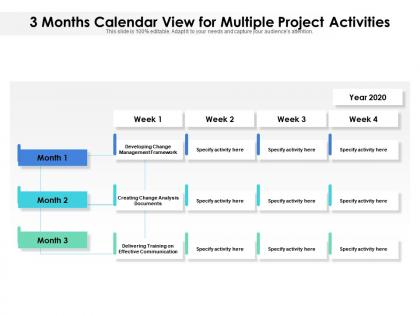
Create a work schedule in an easy manner by employing 3 Months Calendar View For Multiple Project Activities slideshow. By using our appealing PPT graphic, you can create a calendar for each team project by mentioning due dates and project milestones. Easily compare project timelines to organize high-priority tasks with the help of project schedule calendar PPT infographic. Prioritize your work and assign resources to the most valuable work by incorporating our readily available PPT theme. This visually appealing PPT slideshow will help to depict the ways to plan your project collaboratively. Furthermore, it will help to provide a high-level view of scheduled tasks by day, week, month, and year. This planning multiple projects PowerPoint visual allows you to create a project plan for your team as well as other team members. Highlight the strategies to manage and track multiple projects at the same time by using this easy-to-use PowerPoint template. Hence, get a consolidated view of your resource utilization by downloading this eye-catching scheduling multiple project tasks PPT layout.
People who downloaded this PowerPoint presentation also viewed the following :
3 months calendar view for multiple project activities with all 2 slides:
Use our 3 Months Calendar View For Multiple Project Activities to effectively help you save your valuable time. They are readymade to fit into any presentation structure.
FAQs for 3 months calendar view for
You need tasks, realistic time estimates, and dependencies - that's the big one everyone screws up. Figure out which tasks can't start until others are done first. Dependencies will make or break your whole schedule, trust me. Add some buffer time because stuff always runs late (Murphy's Law and all that). Resource assignments matter too - who's actually doing what? Set clear milestones so you can track if you're on course. Oh, and identify your critical path - those are the tasks that'll push back your deadline if they slip. Start basic, then get fancy later.
Honestly, Gantt charts are total lifesavers for project stuff. They show everything on one timeline - tasks, deadlines, what's blocking what. Super easy to spot bottlenecks and see where your team's swamped. I'm kind of obsessed with them now for anything complicated. The trick is updating them regularly so you catch problems early. You can shift things around before everything falls apart. My old manager never used them and... yeah, that didn't go well. Start basic with just big milestones, then add more detail once you get the hang of it.
Honestly, task prioritization is what makes or breaks project scheduling. Without it you're basically winging it and hoping for the best. Figure out which tasks actually matter most and which ones depend on others finishing first - that's your starting point. This helps you spot your critical path and put resources where they'll do the most good. When stuff inevitably goes wrong (and it will), you'll know what to focus on instead of panicking. I can't tell you how many projects I've watched crash because people thought everything was equally important. Spoiler: it never is. Rank by impact first, then map out dependencies.
Honestly, getting your resources and scheduling right is huge for keeping projects on track. Tasks get pushed back when you can't get the right people or they're tied up elsewhere. Map out who's doing what early - I learned this the hard way on my last project when two teams needed the same developer. Resource conflicts will mess up your timeline faster than anything else. Oh, and definitely pad your schedule for this stuff because conflicts always pop up. It's kinda like that dinner analogy - can't cook if someone's hogging the kitchen!
Honestly, there are a few ways to handle this mess. You can crash activities by throwing more people at them, or fast-track by overlapping tasks that usually run back-to-back. Resource leveling helps too - basically just redistributing work so nobody's drowning. Buffer time is clutch, though I know it's probably too late for that now. Weekly check-ins are a lifesaver because small delays turn into disasters way faster than you'd think. Oh, and don't forget you can re-baseline your whole schedule after big changes and adjust milestones to keep everyone happy.
Dude, you HAVE to keep stakeholders in the loop or your project will implode. Seriously, I've watched entire timelines get wrecked because someone forgot to update the right person. Without regular communication, you get scope creep and those fun last-minute surprises that nobody wants. Weekly check-ins are your best friend here - they help you spot problems early instead of scrambling later. Also, write everything down! I know it's boring but trust me, you'll thank yourself when someone claims they "never agreed to that." Dependencies and deadlines mean nothing if people don't actually know about them.
Honestly, Microsoft Project is still king for construction and engineering stuff - you can't beat it for detailed Gantt charts. Asana and Monday.com are way better for marketing teams though, super intuitive. If you're doing software dev, just go with Jira since it'll mesh with whatever you're already using. Oh, and manufacturing folks seem to love Smartsheet because it's basically Excel that doesn't suck for project management. But here's the thing - grab free trials of like 2-3 options first. The best tool is literally whichever one your team won't complain about using every day.
So Agile is super flexible - you work in short sprints (like 2-4 weeks) instead of planning everything upfront like Waterfall does. Way more adaptable when things change, which they always do anyway. You're constantly adjusting based on what you learn. Waterfall is more predictable but honestly kind of unrealistic? Like, who actually knows exactly what they'll need 6 months from now. The downside is less certainty about timelines. I'd start with 2-week sprints if you're switching over - easier transition that way.
Honestly, the hardest part is remembering all the stuff that'll slow you down. Look at how complex the work actually is, then think about your team's skills and availability. Dependencies are huge - they'll bite you every time. I always add 10-20% buffer because interruptions happen constantly (learned this the hard way). Historical data from similar projects helps tons if you have it. Resource constraints matter too, especially if you're using new tech the team hasn't touched before. But here's the thing - don't estimate alone at your computer. Actually talk to whoever's doing the work. They know way more about the gotchas than you do.
Honestly, I just build buffers into everything from the start. When I'm planning, I look at what could go sideways and add extra time to those tasks - usually like 10-20% more. Critical stuff gets backup plans too. I probably overdo it sometimes (my timelines can look pretty padded), but scrambling to fix things later is way worse. Oh, and I set up regular check-ins to see if new risks pop up. The whole trick is being real about Murphy's Law - if something can break, it probably will. Better to have breathing room you don't need than be stressed about deadlines.
Oh man, the biggest mistakes? You'll always think tasks take way less time than they actually do. Seriously, double whatever you first estimate. Dependencies are another killer - like when you realize halfway through that three different things need to happen before you can even start the main work. Scope creep will destroy you too. "Just one tiny change" somehow turns into rebuilding everything. I've been there! My advice: add 30% buffer time to everything, draw out all the dependencies so you can actually see them, and be ruthless about saying no to random additions. Something will definitely break - plan for it.
Honestly, milestones are game-changers because they force you to actually look at where you're at instead of just crossing your fingers. Breaking those massive projects into bite-sized chunks? Way less overwhelming. Your team can't BS their way through status updates when there's a real deadline hitting Friday - trust me on this one. You'll catch problems while they're still fixable instead of watching everything blow up later. Stakeholders stay happy because they see consistent progress. I'd say every 2-3 weeks works best, maybe shorter if things are moving fast.
Think of dependencies as the "you can't do X until Y is done" rules in your project. Like, obviously you can't paint a wall before building it. Map these out early or you'll create impossible timelines that'll drive everyone nuts. The big win is finding your critical path - that's the chain of tasks that controls how long everything takes. Honestly, most project disasters I've seen happen because someone ignored these relationships. Short version: figure out what depends on what, then plan around your bottlenecks.
Figure out which deadlines absolutely can't move first - those are your anchors. Everything else? Keep it loose. I learned this the hard way when I used to stress about every tiny task deadline. Build buffer time around your big milestones, but let teams figure out their own path to get there. Don't micromanage the daily stuff unless it affects other people's work. Dependencies are where you need to be strict. Internal processes should bend when things go sideways (and they will). It's basically non-negotiable checkpoints with flexible routes between them.
Check your Schedule Performance Index (SPI) weekly - it shows if you're running behind or ahead. Cost Performance Index (CPI) does the same for budget stuff. Milestone completion rates are honestly way more useful than the fancy formulas though. Resource utilization matters too since it shows if people are actually working efficiently. Oh, and critical path analysis catches bottlenecks before they mess everything up. Don't wait until the end to look at this data - I learned that one the hard way. Early detection means you can fix problems instead of just writing post-mortems about what went wrong.
No Reviews