


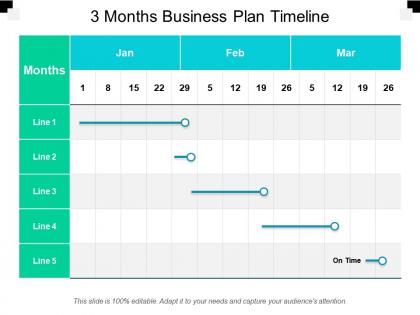
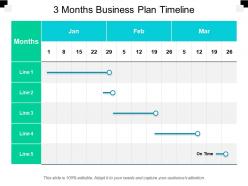
3 months business plan timeline




Try Before you Buy Download Free Sample Product
 Impress Your
 Audience
 100%
100% Editable
 Save Hours
 of Time


Every organization is unique and each one has to face different challenges to achieve their target so they can use 3 Months Business Plan Timeline presentation template to plan something to overcome the challenges. The business planning timeline helps in pointing to the strength and weakness of any business project. You can discuss different business activities which offer different problems and opportunities as well. You can tell your team about the different business systems and skills that required to accomplish business objectives by using business planning skill slide. The business strategy plan template helps in focusing on short-term and long-term plans which accelerate the business sale. You can discuss the benchmarks and guidelines of the project with the help of 90 days business timeline template. Business plan structure PPT slide help in discussing the promotion strategies to promote the product and services offered by an organization. The organization performance can get improved when you prepare a business plan strategy presentation and you can share this template with your team. Settle disputes with our 3 Months Business Plan Timeline. They will even out the debate.
People who downloaded this PowerPoint presentation also viewed the following :
3 months business plan timeline with all 5 slides:
Ensure an instrumental contribution with our 3 Months Business Plan Timeline. Guide folks on implementing important changes.
FAQs for 3 months
Okay so you'll want the obvious stuff - market research wrapped up, product dev phases, launch date, first revenue goals. Hiring key people, funding rounds, customer acquisition numbers too. But here's the thing - don't get crazy optimistic with your dates because investors will totally call you out on unrealistic timelines. Oh and if you need regulatory approvals or partnership deals, throw those in there. Expansion phases are good too. Each milestone needs a real date and something you can actually measure, otherwise what's the point? You can't track progress if everything's just vague goals, you know?
Dude, seriously - throw a timeline in there. Investors hate wading through paragraphs of "we'll eventually do this stuff." Show them a visual roadmap instead. Map out your milestones, funding rounds, product drops, all that important stuff. Most people process visuals way better anyway (I know I do). Plus you'll catch yourself if your deadlines are totally unrealistic. Even a basic Gantt chart works, or just draw a horizontal line with dates. It forces you to think through which things depend on other things happening first. Trust me, it'll make your whole pitch flow better.
Honestly, the worst thing you can do is be way too optimistic about timing. Like, everything takes forever compared to what you think. Don't pack a bunch of milestones super close together either - you need buffer time because stuff WILL go wrong. I learned this the hard way lol. Also watch out for task dependencies - when one thing gets delayed, it screws up everything else down the line. My advice? Add like 20-30% extra time to each big milestone. Sounds excessive but trust me, you'll actually hit your deadlines for once.
Quarterly minimum, but monthly's way better if you're moving fast or just starting out. Seriously, annual updates are basically useless now - everything shifts too quick. I always tell people to set a recurring reminder because otherwise you'll forget (I definitely do). Your timeline needs to match what's actually happening, not what you hoped would happen months ago. Short bursts work better anyway. Check your milestones, move deadlines around, pivot when stuff isn't working. The whole point is staying flexible while everyone knows what we're focusing on right now.
Honestly? Monday.com or Asana are great for business plan timelines - they handle all the milestone/dependency stuff visually. Canva has decent timeline templates if you want something dead simple, or just use Google Sheets with basic formatting. Lucidchart and Visio work too but they're kind of a pain to learn initially. The real trick is picking something your team will actually update regularly. I always tell people to start with whatever you already know how to use - you can get fancy later once you've got the timeline basics down. No point choosing the "perfect" tool if nobody touches it after week one.
No Reviews