

4 Step Service Request Management Process




Try Before you Buy Download Free Sample Product
 Impress Your
 Audience
 100%
100% Editable
 Save Hours
 of Time


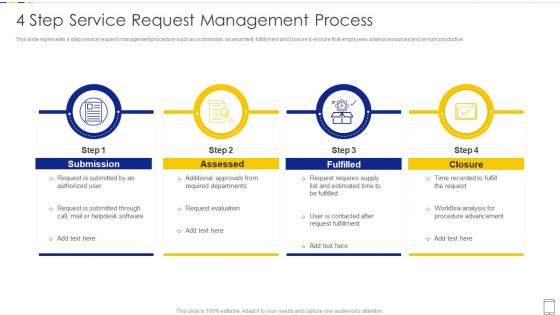
This slide represents 4 step service request management procedure such as submission, assessment, fulfillment and closure to ensure that employees assess resources and remain productive.
People who downloaded this PowerPoint presentation also viewed the following :
4 Step Service Request Management Process with all 6 slides:
Use our 4 Step Service Request Management Process to effectively help you save your valuable time. They are readymade to fit into any presentation structure.






FAQs for 4 Step Service
Honestly, the biggest win is just not losing stuff anymore - no more emails disappearing into the black hole. Everything gets tracked in one place, which is huge. Response times get way faster too since there's actual structure to how things get handled. Your users can solve basic problems themselves instead of bugging IT constantly. Real-time tracking means people stop asking "did you get my request?" every five minutes (thank god). The reporting actually helps you figure out what's broken in your process. I'd start by listing out whatever requests you get most often - that's your foundation right there.
Honestly, just use a priority matrix - plot urgency vs impact. High impact/high urgency stuff goes first, duh. But here's the thing: you need actual criteria for each level, otherwise everything becomes "urgent" and you're screwed. Define what counts as high/medium/low for both sides. Impact could be business disruption, user count, revenue hit. Urgency is deadlines, compliance stuff, potential for things to blow up. Write it down so your team isn't guessing every time. Oh, and don't forget to tweak the matrix as you go - what works now might not work in six months.
Dude, automation totally saves your sanity with service requests. Set up auto-routing so tickets hit the right teams immediately. Password resets? Let the system handle those - nobody wants to do that manually anyway. Common questions can get auto-responses too. Honestly, the time savings are incredible. Your response times will drop like crazy, plus your team gets to work on stuff that's actually interesting instead of the same boring requests all day. Oh, and start with whatever you're doing most often - that's where you'll see the biggest impact first.
So I'd definitely start with first resolution rate - you want 80%+ there if possible. Average resolution time matters too, obviously. Customer satisfaction surveys right after resolving stuff will tell you a lot. Honestly, catalog adoption is underrated - like are people even bothering with your self-service portal or just calling anyway? That drives me nuts when it's ignored. Volume trends are key though. Same issues keep flooding in? Your process is probably busted somewhere. I'd nail down these basics first, then get fancy with more detailed metrics once you've got your baseline figured out.
Ugh, visibility is the worst part - requests just vanish into email black holes and nobody knows what's going on. Then you've got approval bottlenecks where stuff sits in someone's inbox forever. Teams end up doing the same work twice because there's no coordination. It's honestly maddening. Without tracking, you can't even figure out where things keep breaking down. My advice? Get everything into one system first - that alone fixes like 70% of the chaos. Set some realistic deadlines for different request types too.
Honestly, user feedback is like having a cheat sheet for what's actually broken. Instead of guessing why people hate your process, they'll straight up tell you - confusing forms, approvals that take forever, radio silence on updates. The crazy part? They often come up with fixes you'd never think of (frustration makes people weirdly creative). Just send a quick survey or follow-up email when requests close. I'd start simple though - ask "What would've made this easier for you?" You'll be surprised how much they'll tell you with just that one question.
Keep it dead simple at first - just do "Hardware," "Software," "Access," and "General IT." Seriously, I've seen teams overthink this and create like 47 categories that nobody uses right. Add more subcategories later when you actually see what kinds of tickets you're getting. Make the names super obvious to regular people, not just tech people. Oh, and consistency is huge - get everyone categorizing stuff the same way or it's basically useless. Set up auto-routing so tickets go straight to whoever handles that type of thing. Way faster than manually sorting everything.
Hey! So Service Request Management is actually baked right into ITIL 4 - it's one of the core practices, not something separate. Works hand-in-hand with Incident and Problem Management to handle all those "can I get access to X" or software requests. Way better than the chaos of random emails flying around (trust me on this one). Key thing is connecting your service catalog to automated approval workflows, plus linking to Change Management when requests get complex. I'd start by mapping what you currently handle against ITIL's standard categories. Shows you exactly where the gaps are.
Honestly? Go with something like ServiceNow, Jira Service Management, or Freshservice - they're pretty solid for ticketing. You'll definitely want automated routing and SLA tracking built in. Trust me, I've watched teams try to use email or spreadsheets and it's just chaos once things get busy. Make sure whatever you pick integrates well with Slack or Teams (or whatever you're already using). Self-service portals are a game changer too - cuts down on so much back-and-forth nonsense. My advice: map out what you're doing now, then demo maybe 2-3 options that actually match your workload.
Honestly, the easiest fix is getting everyone on the same system for requests. Map out what cross-team stuff happens most - like IT tickets that need facilities involved, or HR onboarding that hits multiple departments. Then build standard workflows for those. The visibility thing is huge though - when everyone can see priorities and workloads, you don't get those awkward "hey did you see my email from last week?" moments. Set up automated routing so requests don't sit in someone's inbox waiting to be forwarded. Start small with your most common workflows and build from there.
So there's basically four things you should watch. Average fulfillment time - that's just how long stuff takes from start to finish. First-time resolution rate shows if your team's actually fixing things right the first go-around. User satisfaction scores are pretty obvious - happy users don't blow up your inbox with complaints. Volume trends help you see what's coming so you can plan ahead (this one's honestly underrated). SLA compliance tells you if you're hitting your promised deadlines. Start simple with these, then get fancier later once you've got the basics down.
Honestly, just start with your top 3 compliance headaches and build backwards from there. Healthcare? You'll need HIPAA checks, patient consent flows, clinical approvals - the whole nine yards. Finance is trickier IMO - SOX controls, multi-level approvals for anything money-related, plus audit trails that won't make your compliance folks want to quit. The trick is mapping those regulatory requirements straight into your workflow logic. Configure the approval chains to automatically catch stuff before it becomes a problem. Sounds boring but it actually saves tons of time once it's running.
Dude, training is seriously what makes or breaks the whole thing. When people actually know how to submit requests properly, you get way cleaner tickets and faster fixes. Less of that annoying back-and-forth too. Your support team needs to really understand the tools, otherwise they'll just create weird workarounds that mess everything up. Oh, and good training stops those people who always try to skip the system with "hey can you just quickly..." requests - you know the type. Start with training based on people's roles, then make some simple guides they'll actually look at instead of calling you.
Look at your ticket data first - bet most of it's boring stuff like password resets that people can totally handle themselves. Build out a decent knowledge base and portal for that basic 70%. The key thing (and where most places screw up) is making it actually easy to use, not some nightmare form situation. For the complex troubleshooting stuff, route those straight to your team. Oh, and definitely set it up so people can bail out to human help when they're stuck. Nothing worse than being trapped in a useless self-service loop when you just need to talk to someone.
So with SRM data privacy, you're basically juggling personal info and business data that might fall under GDPR or HIPAA - depends on your industry. The annoying part? Service requests bounce between different teams and systems, which makes tracking everything a nightmare. You'll need solid access controls and retention policies. Map out where your data actually goes (trust me, it's probably messier than you think). Set clear rules about who sees what and how long you keep it. Oh, and make sure you can audit everything later because regulators love their paper trails.
-
The templates are the best in class. Very clear and innovative graphics! I am excited to explore and download more presentations.
-
Happy to found you SlideTeam. You guys are value for money. Amazing slides.