

4 steps problem solving process powerpoint guide




Try Before you Buy Download Free Sample Product
 Impress Your
 Audience
 100%
100% Editable
 Save Hours
 of Time


Make use of our 4 steps problem solving process PowerPoint guide to share information about finding the solutions for the concerns that comes in the way to success with your teammates, investors, shareholders and board of directors. This presentation template enables you to define the problem solving process in the most organized way. Some of the steps are to define the problem, generate alternative solutions, evaluate and select and alternative and implement and follow upon the solution. In today’s competitive world, it is essential for businesses to make their team members understand the concept of problem solving and let them know how to emerge as a winner. This four step PPT slide has been designed by our team of creative designing experts who have better understanding about the importance of sharing the concept. Business leaders are required to implement the solution however it is important that you let your executives know that they are also responsible to come up with solutions. So just download and use it for effective communication. The final image generated by our 4 Steps Problem Solving Process Powerpoint Guide is impressive. It ensures all the elements gel.
People who downloaded this PowerPoint presentation also viewed the following :
Content of this Powerpoint Presentation
Description:
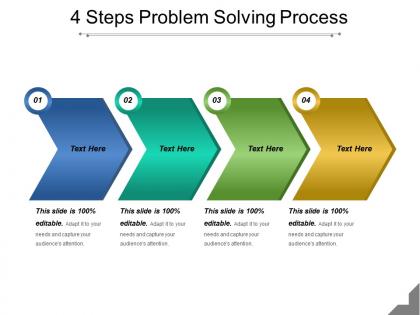
The image depicts a PowerPoint slide titled "4 Steps Problem Solving Process". It features a horizontal, step-by-step diagram composed of four connected arrows pointing right, each representing a step in the process. Each arrow is numbered from 1 to 4 and has a space labeled "Text Here", where specific details of each step can be added. The colors of the arrows transition from blue to green to teal, and finally to yellow as they progress from step 1 to 4.
Use Cases:
This slide is suitable for a variety of industries where structured problem-solving is essential:
1. Consulting:
Use: To outline problem-solving frameworks for clients.
Presenter: Management Consultant.
Audience: Client organizations seeking strategic solutions.
2. Education:
Use: Teaching students the methodology for solving complex problems.
Presenter: Educator or Academic Instructor.
Audience: Students or workshop participants.
3. Healthcare:
Use: Discussing step-by-step approaches for medical diagnostics or healthcare management.
Presenter: Healthcare Administrator or Medical Professional.
Audience: Medical staff, healthcare management teams.
4. Technology:
Use: Software troubleshooting and development process.
Presenter: IT Project Manager or Technical Lead.
Audience: Development teams, stakeholders.
5. Manufacturing:
Use: Process improvement and quality control measures.
Presenter: Quality Assurance Manager.
Audience: Operational teams, quality control staff.
6. Finance:
Use: Strategic planning for financial problem-solving.
Presenter: Financial Analyst or Consultant.
Audience: Investment teams, financial advisors, clients.
7. Marketing:
Use: Developing marketing strategies to overcome business challenges.
Presenter: Marketing Director.
Audience: Marketing teams, company executives.
4 steps problem solving process powerpoint guide with all 5 slides:
Create conditions that encourage integration with our 4 Steps Problem Solving Process Powerpoint Guide. Be able to conjure up a cordial atmosphere.



FAQs for 4 steps problem solving
Okay so basically you wanna start by actually figuring out what the problem is - sounds obvious but most people totally skip this part and just start throwing solutions around. Then gather info, brainstorm ideas, and weigh your options (like what could go wrong, what's realistic, etc). Pick the best one and give it a shot. Here's the thing though - you gotta check back later to see if it actually worked. I've definitely had times where I thought I solved something but just created new problems instead lol. If it didn't work out, try something else or maybe you need to rethink what you're solving in the first place.
Don't just look at what's happening on the surface - keep asking "why" until you get to the real problem. I always try to talk to everyone involved first since my perspective is usually pretty limited. The 5 Whys thing actually works, though sometimes it's more like 3 or 7 depending on how messy things are. People get lazy and stop after the first answer way too much. If it's really complicated with tons of moving parts, those fishbone diagrams can help map everything out. The hardest part is honestly just having the patience to keep digging when you'd rather jump straight to fixing something.
Try brainstorming first - just word-vomit every idea without judging anything. Mind mapping's really helpful too, where you draw connections between related concepts. My personal favorite? The "worst possible idea" technique because it's so freeing and somehow leads to actual breakthroughs. You could also pretend different people are solving your problem - how would your boss handle it vs. your grandma? Breaking things into smaller pieces works well. Oh, and don't expect brilliance right away. Your brain needs to dump all the obvious stuff first before you'll hit something good.
Look, data analysis stops you from just throwing random fixes at problems and hoping they work. You'll actually see what's causing the mess instead of guessing. Patterns become obvious, root causes pop out, and you can tell if your solutions are doing anything useful. Honestly, I used to hate dealing with spreadsheets but they're kind of amazing for this stuff. The numbers show you which fires to put out first. Even basic metrics will surprise you - like when you think customers hate your pricing but it's actually your checkout process that sucks. Just grab some data before you start "fixing" things.
Honestly, teamwork is a game-changer for solving problems. You get all these different brains looking at the same mess from totally different angles. When I'm stuck, my teammates always catch stuff I completely missed - it's wild how obvious their solutions seem afterward. Some problems are just too gnarly for one person anyway. The trick is creating space where people feel safe throwing out even their weirdest ideas. Oh, and actually listen instead of just waiting to jump in with your own thoughts. Try having someone play devil's advocate on purpose - it usually leads somewhere interesting you wouldn't have gone alone.
Honestly, I'd just pick a framework and stick with it instead of flip-flopping constantly. Impact vs effort works great - grab those high-impact, low-effort wins first. Or go by urgency (what's literally breaking right now?). The Eisenhower matrix thing is solid too if you're into that. But here's what really helps me decide: I ask myself "what actually happens if we punt this for another month?" Sounds harsh but it cuts through the noise fast. Also check which problems are blocking other stuff. Those usually need to jump the line.
Honestly, visuals are a game-changer when you're explaining complicated stuff. People can actually follow what you're thinking instead of zoning out halfway through your explanation. I'm obsessed with flowcharts - they're perfect for showing how you got from point A to B, especially when there's multiple decisions involved. Charts help too, particularly before/after comparisons. Your audience will have something to look at later when they're trying to remember your logic. Just don't go crazy with the graphics - keep it simple but include at least one visual that maps out your main reasoning. Trust me on this one.
Ugh, there are so many ways our brains mess with us! Confirmation bias is huge - we just hunt for stuff that proves we're right. Then there's anchoring bias where you get obsessed with your first idea. Availability bias makes us think recent examples are way more common than they actually are. And don't even get me started on sunk cost fallacy. Just because you spent three hours on something doesn't mean it's worth finishing if it sucks. Your brain wants shortcuts, but they backfire constantly. I always try to argue against myself now and come up with multiple solutions before committing. Sounds weird but it works.
Don't wait until you're done to ask people what they think - that's a recipe for disaster. Figure out who actually deals with this problem day-to-day and loop them in from the start. I learned this the hard way once, spent weeks on something nobody wanted lol. Set up quick check-ins where you can show rough ideas and test if you're even solving the right thing. Ask specific questions though, not just "thoughts?" because that gets you nowhere. Small feedback rounds early save you from massive course corrections later. Way better than presenting some polished thing that misses the mark completely.
Dude, seriously - taking time to nail down your problem statement upfront is huge. Your team won't waste time chasing random stuff that doesn't matter. Decisions happen way faster when everyone's actually on the same page about what you're trying to fix. Plus you avoid that annoying scope creep thing that kills projects (been there). The solutions end up being so much better too. I know it feels like extra work, but spend those 20 minutes getting crystal clear on the problem. Trust me, it'll save you from hours of "wait, what are we doing again?" later.
Look, you're basically learning as you go and using what you figure out to improve your next attempt. Try something, see what breaks or works, then adjust. Honestly reminds me of when I'm cooking without a recipe - total disaster the first time usually! But each round gives you better info than just guessing would. Short bursts work better than trying to plan everything upfront. You'll spot stuff you never would've thought of initially. Just make sure you actually stop and think about what happened before jumping into the next round, otherwise you're just repeating mistakes.
So flowcharts are probably your best bet to start - super common and great for mapping out decision points. Mind maps are solid if you're more of a visual thinker and want to see all the branches. Honestly, I swear by fishbone diagrams when I'm trying to figure out what's actually causing a problem (sounds weird but they work). For complex stuff, process maps are clutch. Sometimes though? Just a simple numbered list does the trick. I'd say pick whatever feels right and mess around with different ones until something clicks.
Honestly, I'd compare what actually happened to what you originally wanted to fix. Pick some real numbers beforehand - maybe how much time you're saving or if errors went down. Don't just check after a few days though, that's usually misleading. Give it like a month at least. Talk to people who have to deal with your "solution" too. Sometimes the data looks great but you've accidentally made someone else's job way harder. Been there. Oh, and write down what worked or didn't - you'll definitely forget the details otherwise, and it helps next time you're solving something similar.
Honestly, tech can speed up your problem-solving in some pretty cool ways. AI tools are great for spotting data patterns you'd probably miss on your own. Your team can brainstorm together on collaboration platforms even if you're all working remotely - which is huge these days. Some problems only click when you can actually see them mapped out visually, so digital mapping tools are clutch for that. Oh, and simulation software lets you test ideas without blowing your budget or breaking anything. Automation handles the boring analytical stuff so you can focus on the creative parts. I'd start by figuring out what's slowing you down most, then find a tool for that.
Look, problems never go exactly how you think they will. Your first plan? It'll probably hit some wall you didn't see coming. New info pops up, people change what they want halfway through - it's just how it goes. Being flexible is literally what separates actually solving stuff from just getting frustrated. The smartest people I know treat their initial approach like a rough draft, not gospel. They build in moments to step back and ask "is this still working?" Then they're willing to totally switch gears if needed. Sometimes you even need to reframe the whole problem.
-
Designs have enough space to add content.
-
Illustrative design with editable content. Exceptional value for money. Highly pleased with the product.