

6 point hexagon slides example of ppt presentation




Try Before you Buy Download Free Sample Product
 Impress Your
 Audience
 100%
100% Editable
 Save Hours
 of Time


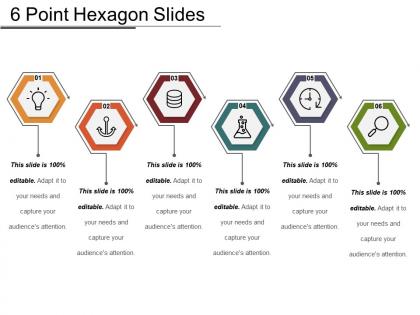
Avail 6 Point Hexagon Slides Example of PPT Presentation to represent the 6 steps of a process. Display a sequential order of tasks or events effortlessly with a hexagon Powerpoint template. You can use this 6 hexagon process diagram to share 6 ways to achieve your goals at work. Represent the 6 different features of a concept vividly. Express the arrangement of steps required for the completion of a task using this hexagonal diagram PowerPoint. Make it easy for your audience to comprehend the task and execute it efficiently. Enhance your PowerPoint presentation with colored illustrations used in the hexagon diagram template. Effortlessly articulate all the steps of a complex process in the form of an easy to understand graphic visual representation. This 6 stage hexagon process diagram is professionally designed for your convenience. Avail it immediately to curate a visually striking yet comprehensive PowerPoint presentation, in less time.
People who downloaded this PowerPoint presentation also viewed the following :
6 point hexagon slides example of ppt presentation with all 5 slides:
Get amidst the growth with our 6 Point Hexagon Slides Example Of Ppt Presentation. They enable you to evolve fast.
FAQs for 6 point hexagon slides example
Hexagon PPT slides offer enhanced visual hierarchy, improved information segmentation, modern aesthetic appeal, flexible content organization, and stronger audience engagement through geometric clarity. These structured layouts streamline complex data presentation by creating distinct content zones, facilitating smoother information flow, and delivering more memorable visual experiences, with many organizations finding that hexagonal designs significantly enhance presentation effectiveness and audience retention.
Hexagon shapes enhance data visualization by creating visually appealing layouts, enabling efficient space utilization, and facilitating clear hierarchical information display through their geometric versatility. These six-sided structures streamline complex data presentation by connecting related concepts seamlessly, supporting step-by-step processes, and delivering improved audience engagement, with many organizations finding that hexagonal designs ultimately enhance comprehension and retention.
When creating hexagon PPT slides, consider visual hierarchy through size variation, balanced spacing between elements, strategic color coding for different categories, consistent alignment patterns, and sufficient contrast for readability. These design principles enhance information flow by creating intuitive pathways, minimizing cognitive load, and establishing clear relationships between hexagonal elements, ultimately delivering more engaging presentations that improve audience comprehension and retention.
Hexagon designs particularly benefit technology, consulting, healthcare, and manufacturing industries where complex processes, interconnected systems, and strategic frameworks need visual clarity. These sectors leverage hexagonal layouts to illustrate everything from molecular structures and supply chains to digital ecosystems and operational workflows, with many organizations finding that hexagon patterns effectively communicate multi-dimensional relationships while maintaining professional credibility.
Hexagon PPT slides enhance engagement by creating visual novelty, breaking monotony, and encouraging active cognitive processing through their unique geometric structure, while traditional rectangular slides offer familiarity and standardized formatting. However, hexagon slides can increase information retention and audience attention when used strategically, with many presenters finding that geometric variety ultimately delivers more dynamic presentations and improved audience interaction.
PowerPoint's built-in shape tools, Adobe Illustrator, Canva Pro, and specialized template platforms like SlideModel offer excellent capabilities for creating custom hexagon templates. These tools streamline design workflows by providing vector-based editing, precise alignment features, and professional formatting options, with many businesses finding that combining PowerPoint's native functionality with external design software delivers the most versatile and scalable presentation solutions.
Hexagon shapes can be effectively used for storytelling in presentations by creating visual pathways, representing interconnected processes, and organizing complex narratives into digestible segments. These geometric elements enable presenters to illustrate step-by-step journeys, showcase relationship networks, and guide audience attention through structured story arcs, ultimately delivering more engaging and memorable presentations.
Corporate branding presentations can leverage hexagons through logo integration, timeline designs, team member showcases, process workflows, and product feature displays. These geometric elements enhance visual hierarchy by creating modular content sections, establishing brand consistency through repeated shapes, and enabling seamless information flow, with many organizations finding that hexagonal layouts deliver more engaging stakeholder presentations and stronger brand recall.
Color psychology in hexagon PPT slides leverages warm colors like red and orange for urgency and energy, cool blues and greens for trust and stability, and contrasting combinations for emphasis and hierarchy. Strategic color application enhances audience retention, guides attention through complex data visualization, and reinforces brand messaging, with many organizations finding that thoughtful color schemes increase presentation effectiveness and stakeholder engagement significantly.
Hexagons serve as versatile visual containers in PowerPoint infographics, enabling structured data presentation through their geometric appeal and efficient space utilization. These six-sided shapes create interconnected networks for process flows, comparison frameworks, and hierarchical displays, with many designers finding that hexagonal layouts enhance visual engagement while maintaining professional aesthetics and improving information retention across business presentations.
Hexagon layouts facilitate brainstorming by providing interconnected spaces for related ideas, encouraging non-linear thinking patterns, and creating visual pathways between concepts. These geometric structures enable teams to map complex relationships, organize thoughts systematically around central themes, and ultimately deliver more comprehensive solutions, with many organizations finding that hexagonal frameworks enhance creative collaboration and strategic planning outcomes.
Common mistakes include overcrowding hexagons with excessive text, using inconsistent sizes and colors, poor alignment that creates visual chaos, and choosing color combinations that reduce readability. These design flaws can overwhelm audiences and diminish message clarity, with many presenters finding that maintaining consistent spacing, limiting text per hexagon, and ensuring proper contrast ultimately delivers more professional presentations and enhanced audience engagement.
Hexagon PPT slides can be adapted for educational settings by organizing lesson objectives, displaying step-by-step processes, comparing multiple concepts, and creating interactive learning modules. These geometric layouts enhance visual learning by breaking complex topics into digestible segments, with many educators finding that hexagonal arrangements improve student engagement and information retention across subjects like science, mathematics, and social studies.
Effective transitions for hexagon slides include morph transitions, fade-through-color effects, zoom animations, rotate-and-scale combinations, and hexagonal wipe patterns. These animations enhance visual flow by creating seamless geometric continuity, emphasizing modular content relationships, and maintaining audience engagement through dynamic movement, with many presenters finding that subtle morphing between hexagonal layouts delivers professional polish while supporting information hierarchy.
**INPUT**: What resources are available for finding high-quality hexagon PPT slide templates? **OUTPUT**: High-quality hexagon PPT slide resources include specialized presentation platforms like SlideTeam, Microsoft Office templates, creative marketplaces, design software libraries, and professional template collections. These platforms streamline presentation development by offering customizable designs, consistent formatting, and industry-specific layouts, with many organizations finding that premium template resources significantly enhance visual impact while reducing design time and costs. *[Word count: 58]*
-
Excellent design and quick turnaround.
-
Easily Editable.