


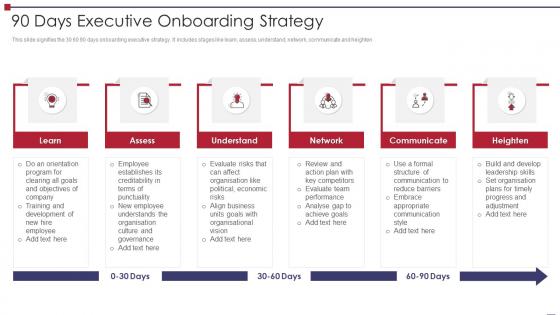
90 Days Executive Onboarding Strategy




Try Before you Buy Download Free Sample Product
 Impress Your
 Audience
 100%
100% Editable
 Save Hours
 of Time


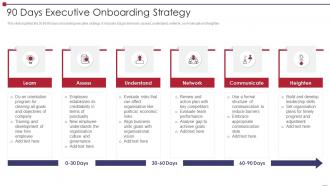
This slide signifies the 30 60 90 days onboarding executive strategy. It includes stages like learn, assess, understand, network, communicate and heighten.
People who downloaded this PowerPoint presentation also viewed the following :
90 Days Executive Onboarding Strategy with all 6 slides:
Use our 90 Days Executive Onboarding Strategy to effectively help you save your valuable time. They are readymade to fit into any presentation structure.





FAQs for 90 Days
Honestly, just hit the big three: what they'll actually be doing day-to-day, your company's vibe/values, and all the boring but necessary stuff like login info and who to bug with questions. Team intros are clutch too - way less awkward than wondering who the hell Sarah from accounting is when she emails you. Break it up with questions so it's not just you talking at them for an hour straight. Nobody wants slide after slide of tiny text either. Oh, and definitely send them notes afterward because first-day brain fog is real and they won't remember half of what you said.
Honestly, visuals are a game-changer for onboarding - way better than those soul-crushing PowerPoint decks nobody wants to sit through. Try infographics for company history, employee video stories, or simple flowcharts that actually make sense. Our brains just process visual stuff better, it's weird but true. Break down your culture and values with pictures instead of paragraphs. A "day in the life" guide works great too - I've seen companies do illustrated timelines that new hires actually remember months later. Way more engaging than reading endless policy docs.
So templates are honestly a lifesaver for onboarding. Each department - HR, engineering, sales, whatever - uses the same basic structure, so new people know what to expect. The actual content is totally different (obviously engineers don't care about sales targets), but the timing and flow stay consistent. You're not starting from scratch every single time, which is huge. I mean, who has time for that? Just grab your company's template, swap in the department stuff, and you're done. Way less stressful than building presentations from nothing.
Honestly, retention rates at 30/60/90 days tell you way more than anything else - that's your gold standard right there. Also track completion rates and how long people actually spend on slides (not just clicking through). Quiz scores help if you've got them built in. Survey people right after they finish about whether stuff made sense. Learning management systems are great for seeing exactly where everyone bails out or has to rewatch sections - super eye-opening data. Don't go crazy trying to measure everything though. Pick maybe 2-3 metrics that actually matter for what you're trying to achieve, then set up monthly dashboards to track them.
Honestly, mix up your learning styles and you'll see way better results. Visual people need screenshots and diagrams - that stuff clicks immediately. Videos work great for auditory learners who prefer hearing explanations. Interactive demos are clutch for hands-on learners (they're the ones who'll actually retain it). Don't forget text-heavy folks who want bullet points to reference later. The real win is combining these - like a video with visual callouts plus a practice section. I'd go through your current slides first and see what you're missing. Most people skimp on the interactive parts, but that's honestly where the magic happens.
Skip the boring culture dump slides - nobody remembers those anyway. Sprinkle real stories throughout instead. Like, show actual Slack convos or photos from team events. Get people from different departments to record quick videos about what working there actually feels like day-to-day. I'd also set up meetings with culture champions during their first week. Oh and definitely share specific examples of your values in action - maybe how everyone pitched in during that crazy deadline last month. The authentic stuff always lands better than stock photos and corporate buzzwords.
Honestly, the worst thing you can do is make templates that are super generic - they just feel like spam at that point. Don't dump everything on someone's first day either, it's brutal. Oh, and update the damn things! I can't tell you how many times I've seen templates still talking about tools nobody uses anymore. Keep the language simple too - no corporate speak nonsense. You need someone actually responsible for each task, otherwise stuff just... doesn't happen. Test it out with a couple people first. What sounds good in theory usually needs tweaking when real humans try to use it.
So basically, when people click through scenarios or answer quiz questions, their brains actually have to work instead of just sitting there. Way better than staring at slides for an hour straight. You're building stronger memory connections when you drag-and-drop stuff or make decisions. Honestly, I think most training is just boring people to death anyway. Try throwing in some workplace decision trees or quick checks after each section - nothing crazy, just stuff that actually matters. People will remember way more instead of spacing out the whole time.
Honestly, Prezi's pretty solid for those smooth zoom effects that keep people engaged. Canva's probably your best bet though - super easy to use and they've got tons of onboarding templates already made. PowerPoint's actually not terrible anymore with their newer animation stuff. Loom works great for recording quick walkthrough videos you can drop right into presentations. Oh, and if you want to get fancy with interactive stuff like clickable areas, check out Genially or H5P. I'd probably just start with Canva since you can customize templates fast without wanting to throw your laptop out the window.
Ugh, this is such a pain point everywhere. I'd say check them quarterly - nothing worse than showing new hires a deck that mentions tools from 2019. Do a full refresh yearly even if things seem fine, because tiny outdated details pile up fast. Set a calendar reminder every three months or you'll totally forget. Oh, and definitely ask your recent hires what felt off - they'll catch stuff you're blind to at this point. Trust me, it's way less awkward than having someone raise their hand mid-presentation asking "wait, do we still use that software?"
Honestly, short post-session surveys work best - ask about clarity and engagement but keep them super brief or nobody fills them out. I'd also do follow-ups at 30 and 90 days to see if the info actually stuck. Manager check-ins are clutch for getting real feedback too, not just the polite survey responses. Track your time-to-productivity metrics and retention rates while you're at it. Oh, and don't rely on just one method - you need multiple angles to figure out what's actually working versus what people think you want to hear.
Hey! So remote onboarding is totally different - attention spans just die on video calls, honestly. Break everything into way shorter chunks and throw in polls or breakout rooms constantly. People zone out so fast otherwise. In-person you can get away with longer presentations and do more group stuff. With remote, your visuals need to be super clear and always have backup plans because tech will fail you. Oh and the pacing thing is huge - you need way more variety. I'd go through your current presentation and flag anything that feels like it drags when you're staring at a screen.
Honestly, mix things up with polls and quick discussions between sections. Nobody should endure 3 hours of policy slides - trust me on that one. Get different team members to share their actual experiences instead of one person talking the whole time. Stories work way better than just listing company values, by the way. Cap each segment at 15-20 minutes, then switch to something interactive. Oh, and have your CEO record a welcome video instead of another boring slide deck. Treat new hires like people, not walking hard drives you're trying to fill up.
Honestly, don't reinvent the wheel here. Your HR platform probably already has decent onboarding templates you can customize - just plug in your company stuff and tweak the timeline. I've watched teams cut their setup time in half doing this. Find templates that match your company size or industry. Then adjust tasks to fit your vibe. Oh, and definitely test it with a few coworkers first - you'll catch weird gaps you missed. Start by checking what templates you already have access to. You might be sitting on gold and not even know it!
Honestly, I'd start with the obvious stuff - attendance and completion rates. See how long people actually stick around during sessions. Post-presentation surveys are clutch for gauging if anyone actually absorbed the info. But here's what really matters: compare 30/60/90-day retention between people who sat through your presentations vs those who didn't. Time-to-productivity is huge too - basically how fast new hires hit their first real milestones. I always forget about that one but it's probably the most telling metric. Start there and you'll figure out pretty quick what's bombing.
-
Good research work and creative work done on every template.
-
Best way of representation of the topic.