


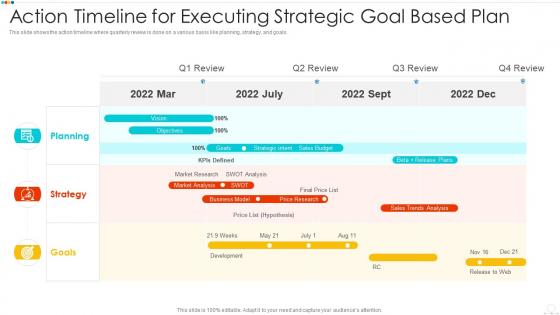
Action timeline for executing strategic goal based plan





Try Before you Buy Download Free Sample Product
 Impress Your
 Audience
 100%
100% Editable
 Save Hours
 of Time


Our Action Timeline For Executing Strategic Goal Based Plan are topically designed to provide an attractive backdrop to any subject. Use them to look like a presentation pro.
People who downloaded this PowerPoint presentation also viewed the following :
Action timeline for executing strategic goal based plan with all 6 slides:
Use our Action Timeline For Executing Strategic Goal Based Plan to effectively help you save your valuable time. They are readymade to fit into any presentation structure.





FAQs for Action timeline for executing strategic
Okay so you need five main things for your timeline. Milestones with actual deadlines - that's your foundation right there. Map out which tasks depend on others so you're not waiting around confused. Figure out who's doing what and when (resource allocation, whatever you want to call it). Build in extra time because I swear everything takes 50% longer than you think. Oh and set regular check-in dates. Honestly, the biggest thing is making it visible to everyone - Gantt charts work great but even a Google sheet does the trick. Just keep updating it when stuff inevitably changes.
Honestly, visual stuff makes timelines so much clearer. Color coding is clutch for grouping similar tasks together, and little icons help you spot different action types instantly. Arrows between steps show what depends on what - super useful. Progress bars let you see completion status without squinting at tiny text. Don't go crazy with fancy graphics though, they'll just distract people. I always start with a clean template that has decent spacing. Then add just enough visual elements to guide someone's eye through everything logically. Works way better than walls of text.
Throw the timeline near the end - after you've sold them on the idea but before questions start flying. People need the "what" and "why" before you dump dates on them. Make it visual, seriously. I've sat through way too many presentations where someone just slaps a boring text list on screen. Nobody's reading that mess. Go with a clean horizontal timeline instead - milestones, who's doing what, key dates. Don't get caught up in every tiny detail either. Stick to what actually matters to whoever's in the room. And walk them through it yourself rather than making people decipher it alone.
Okay so basically it's like having a visual roadmap of when everything needs to happen - all your deadlines and milestones laid out chronologically. Super helpful for catching bottlenecks before they screw you over. Way better than trying to explain some massive spreadsheet to your boss (been there, it's painful). Just start with your big milestones first, then add the smaller stuff and figure out what depends on what. The trick is actually keeping it updated when things change - which they will, constantly. Oh and make sure your whole team can see it, otherwise what's the point?
Oh definitely try Asana first - their free version is pretty solid and you won't hate yourself learning it. Microsoft Project and Monday.com are good too but they're kinda overkill unless you're managing huge stuff. Smartsheet works if your team's already married to spreadsheets. Google Sheets can actually handle simple timelines better than you'd think, though it gets chaotic quick. For presentations, Lucidchart makes everything look way more professional than it probably is. Honestly, most of these integrate with whatever apps you're already using anyway, so you won't have to completely change how you work.
Honestly, go digital if your project's got a bunch of moving pieces or you're constantly changing dates. Physical boards are fine for simple stuff, but once you've got multiple people giving input and deadlines shifting around? Digital saves your sanity. The search function alone is worth it - I can't tell you how many times I've needed to find something from months ago. Remote teammates can jump in and edit stuff in real time too, which beats trying to coordinate in-person meetings. I'd say if it's lasting more than a few weeks or you've got 5+ people involved, just start digital.
Ugh, the timeframe thing gets everyone. I swear people think projects will go perfectly - spoiler alert, they won't. Add at least 20-30% buffer time because something will definitely break. Dependencies are another killer mistake. Like, Bob can't finish his part until Sarah's completely done with hers, but somehow that never makes it into the plan? Wild. Also, don't make your milestones super vague or months apart. You need frequent checkpoints with specific goals so you can actually tell if you're screwed early enough to fix it.
Honestly, color coding is a game changer for timelines. Red for urgent stuff, green when things are done, blue for dependencies - whatever clicks for your team. I usually go with high contrast colors so nothing gets lost. The best part? You can spot bottlenecks immediately instead of hunting through endless text. Stakeholders love it too since they get the big picture in like 5 seconds. Just make a simple legend so everyone knows what's what. Oh, and it's way easier to catch when tasks overlap and might cause drama later.
Honestly, stakeholder feedback is like your sanity check when you're mapping out timelines. Get them involved early because they actually know what's realistic for their teams - way better than finding out halfway through that something's totally undoable. They'll catch the dependencies you missed and tell you straight up if your deadlines are fantasy land. Ask specific stuff about their bandwidth and potential blockers instead of just showing them a pretty timeline. Plus they help you figure out what milestones actually move the needle versus the fluff that sounds good but doesn't matter. I learned this the hard way on a project last year!
Make a basic timeline that everyone can follow, then add extra sections with the technical stuff for people who need it. I like using colors - green for simple steps, yellow for the trickier parts. Don't try to cram everything into one version though. I've watched so many projects fail because they made their timeline way too complicated trying to please everyone. Test it first! Grab someone from each group and have them walk through it. They'll spot weird assumptions you didn't even realize you made. Way better than finding out later that half your audience is completely lost.
NASA's moon landing deadline is probably the best example - that insane 1969 goal made them completely redesign how they worked, doing stuff in parallel instead of one thing at a time. Saved them years. Toyota did something similar, mapping out all their dependencies to cut car development from 6 to 3 years. Buffer (the social media company) started doing 6-week feature cycles and literally doubled how fast they shipped stuff. I think the magic happens because tight deadlines force you to figure out what actually matters and spot problems way earlier. Makes sense when you think about it.
First thing - figure out what depends on what. Can't do task B until A is done? A goes first, duh. Next, focus on the big stuff that actually matters for your goal. Honestly, I always do a sanity check here because sometimes the "logical" way just doesn't work in real life. Check if your team's even available when you need them. Oh, and definitely pad your timeline - I swear everything takes 50% longer than you think it will. One trick I love: color-code everything by priority so you can see what's urgent vs what can wait if things go sideways.
Definitely hit up multiple channels so nobody misses it. Drop it in Slack first, then send an email for the record. Don't forget to update your project boards and shared calendars too. Here's what I've figured out the hard way - always explain WHY the timeline shifted, not just the new dates. People are way less annoyed when they get the reasoning behind it. Oh, and never assume everyone actually read your first message because... they didn't. If it's a big change, just call a quick team huddle so people can ask questions and figure out how it affects their stuff.
Honestly, templates are total lifesavers for timelines. You just skip the whole "staring at a blank page" thing and plug in your actual project stuff - dates, team names, whatever. Seriously saved me so much time, especially when you're doing similar projects over and over. The formatting stays consistent across teams too, which is nice. Plus they already have the common milestones built in, so you're less likely to forget something obvious. Oh and definitely make like 2-3 different ones for your main project types. Trust me, you won't want to go back to starting from scratch.
Basically, short-term stuff you can plan day by day since you actually know what's happening next week. Long-term projects? Totally different beast. You gotta think in chunks - like monthly goals instead of daily to-dos. I learned this the hard way on my last big project, honestly. Way more wiggle room needed too because random crap always pops up months down the line. Short-term timelines usually stick once you set them. But those long ones? You'll be tweaking them constantly, which is totally normal.
-
Innovative and Colorful designs.
-
Excellent work done on template design and graphics.
-
Topic best represented with attractive design.
-
The Designed Graphic are very professional and classic.