


Action tracker phases powerpoint templates





Try Before you Buy Download Free Sample Product
 Impress Your
 Audience
 100%
100% Editable
 Save Hours
 of Time


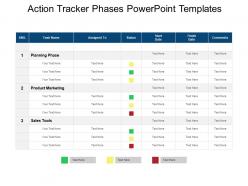
Monitor your project action plan development by downloading our predesigned Action Tracker Phases PowerPoint Template. This action tracker PPT template helps an individual to accomplish objectives, or gatherings of people work together and share learning for the achievement of aggregate goals. This action items tracker PowerPoint template highlights three different phases which are planning stage, product marketing, and sales tools. It also covers separate tabular column highlighting the task name, assigned to status, start date, finish date, and comments. You can make the use of this template slide for designing a creative presentation on task management, goals management, project management, action planning, project development, action steps, product marketing, project progress tracking and more. The editable feature of this project action steps PPT template will let you do the needful changes as per the requirement of the presentation. Tabular format of this template will help you in descriptively explaining your ideas and plans. Download this predesigned Action Tracker Phases PowerPoint Templates. Discredit hostile acts with our Action Tracker Phases Powerpoint Templates. Convince folks to indulge in dialogue.
People who downloaded this PowerPoint presentation also viewed the following :
Action tracker phases powerpoint templates with all 5 slides:
Hand down your experience with our Action Tracker Phases Powerpoint Templates. They will benefit from your existence.
FAQs for Action tracker
So basically, planning is where you figure out what needs doing and who's doing it - getting everyone on the same page. Tracking comes next, and honestly most people are terrible at this part, but it's where you catch problems before they blow up. Review phase is huge - you look at what worked and what was a disaster. I know it's tempting to just wrap things up quickly, but don't skip this step or you'll repeat the same mistakes next time. Then closure is just making sure everything's documented and people know you're done. Pretty straightforward stuff really.
Honestly, planning is where most action trackers either work or completely fall apart. You gotta nail down who's doing what and when - otherwise you'll just have a bunch of random tasks floating around that nobody actually does. I always spend way more time upfront figuring out realistic deadlines and what depends on what else. Trust me, it's worth it. Also map out what might go wrong before it does (saves so much stress later). The whole point is separating real priorities from just... stuff that feels urgent but isn't. Short version: plan more now, panic less later.
Honestly depends on your team size and how complicated things get. Asana and Monday.com are solid for basic stuff - they'll track everything from start to finish without being overwhelming. If your team's more visual, Trello's card system is pretty intuitive (though I know some people find it too simple). Need something beefier? Jira and Microsoft Project have all the bells and whistles for complex projects. But here's the thing - doesn't matter how fancy the tool is if nobody actually uses it. I'd start with something straightforward and upgrade later if you need more features.
Honestly, just keep them in the loop with weekly updates showing what's done and what's stuck. Brief check-ins work great too - they can jump in on priorities or help clear roadblocks. If you can, give them dashboard access so they stop constantly asking "where are we?" (which gets old fast). Regular feedback sessions are clutch. The trick is finding that sweet spot where they're informed but not drowning in details. Maybe start with weekly and adjust from there? Each team's different, but consistency is what really matters.
Track completion rates and whether stuff gets done on schedule - that's your baseline. But honestly? The rework metric tells you everything. If people keep having to redo things, your phases aren't working. Also check if stakeholders are happy and whether you're actually hitting your bigger goals. Don't go crazy with metrics though - pick 3 or 4 max or you'll never look at them. I'd review monthly and tweak things based on what you're seeing. Quality matters too, obviously.
Honestly, the worst part is always scope creep and people just disappearing when you need updates. Weekly check-ins help a ton - way better than trying to track everyone down individually. I learned this the hard way, but spell out every deadline and deliverable from day one. Like, be annoyingly specific about it. Have backup plans ready for anything critical because someone will definitely flake. Don't wait around if people go MIA either. Call them out directly instead of hoping they'll magically show up to the next meeting. Oh, and escalate problems fast - sitting on issues just makes everything messier later.
Don't wait until the end to ask for feedback - weave it into everything. Get people's thoughts on your timeline during planning. Check in regularly while you're actually doing the work to catch issues early. Here's what I've learned though - the review phase is where the magic happens. Actually dig into what worked and what bombed, don't just check boxes. Make it systematic with set touchpoints, not just random "how's it going?" messages. Otherwise you'll forget and then scramble later. Try adding just one feedback checkpoint to whatever you're tracking now.
Honestly, time to switch things up when you're constantly missing deadlines or your team's confused about who does what. If updating the tracker takes longer than actual work - major red flag there. Team growth is another trigger, or when projects get way more complex. Stakeholders complaining about visibility? That's your cue too. I'd probably start by just asking your team what's actually helping vs what's annoying them. The whole point is making progress easier, not creating busy work. Sometimes simpler is just better, you know?
Honestly, turning your tracker into visual stuff is a game changer. Instead of staring at boring spreadsheet rows, you'll actually see what's happening. Progress bars and color-coded charts make bottlenecks super obvious - like when Phase 2 keeps getting stuck (again). Gantt charts are pretty solid for timeline stuff. You can spot patterns across teams way faster than scrolling through data. Even something basic like a red/yellow/green status thing beats walls of text. Start simple though - don't go crazy with fancy dashboards right away.
Honestly, your action tracker is useless without accountability - otherwise it's just a glorified to-do list that sits there collecting digital dust. People need to know someone's actually checking their progress. Regular check-ins are huge for this. When team members realize their tasks will get followed up on (not just forgotten in some spreadsheet), completion rates go way up. Clear ownership helps too - like, who's doing what by when? It's basically the work version of having a gym buddy breathing down your neck. Oh, and make the progress visible so nothing disappears into that black hole we all know too well.
Honestly, good training is what separates trackers that actually work from ones that just collect dust. You want hands-on practice with real scenarios, not some boring slideshow about the four phases. I've watched so many teams completely bail on systems because nobody explained the monitoring part properly! Short sentences work better than long explanations. Designate someone as your go-to support person - trust me, questions will come up constantly during the first few weeks. Oh, and make sure people understand why each step matters, otherwise they'll just skip whatever seems tedious.
Honestly, just pick one method and stick with it - that's the hardest part. Post-action reviews are solid if you can get everyone in a room after each phase. I've seen teams try the meeting minutes approach with a "lessons learned" section, but those usually get lost in people's inboxes. What works better is having a shared doc where anyone can drop insights in real-time when stuff happens. Some folks swear by retrospective templates too. The trick isn't finding the perfect system - it's actually using whatever you choose consistently instead of bouncing around between different approaches halfway through.
Honestly, I'd go with weekly check-ins during the busy phases, then do a deeper monthly review to see if you're still on the right track. Weekly keeps things moving and catches problems before they snowball - I've watched too many good projects crash because people got lazy about reviewing. Bi-weekly could work for longer stuff, but weekly's usually better. Oh and make sure you're actually checking progress against your real goals, not just crossing off tasks. That's where people mess up. Set a calendar reminder right now or you'll totally forget.
Honestly, I've learned the hard way that you can't just trust when someone says "yeah we're done with this part." Always double-check prerequisites yourself before moving forward. Document everything - why you're transitioning, what triggered it, the whole deal. Phase transitions get messy fast if you're not careful about it. Set your "done" criteria upfront so nobody can argue about it later. Status updates should hit all stakeholders right away. Oh and definitely start documenting your transition process now if you haven't. Trust me on this one - you'll want those notes later when things inevitably get chaotic.
Honestly, digital tools are worth it just for cutting out all those manual handoffs that slow everything down. Your team can actually see what's happening in real-time instead of playing the "wait, where are we again?" game. I'm partial to Monday or Asana since they let you build templates for your usual phases - saves so much time once you get it set up. Automated workflows handle the boring stuff too. Tasks just move themselves forward without anyone having to remember spreadsheet updates or follow-up emails. Just map out what you're doing now first, then find something that fits instead of cramming your process into whatever tool looks shiny.
-
Top Quality presentations that are easily editable.
-
Great designs, really helpful.