


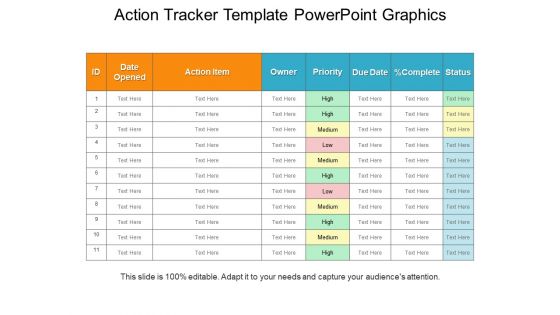
Action tracker template powerpoint graphics




Try Before you Buy Download Free Sample Product
 Impress Your
 Audience
 100%
100% Editable
 Save Hours
 of Time


With this Action Tracker Template PowerPoint Graphics provide a framework for the efficient management of your organization. Help set priorities in your workplace to make your team members work towards a common goal. Use this project status report PPT slide to keep your key stakeholders updated on the progress. Convey communications to update your project team, sponsors, or stakeholders. You can improve organizational support for your team with the help of project status report PowerPoint template. Project overall status to keep your team members updated with our task report PPT slide. A collection of editable and high-quality icons ensure a better design for your presentation. Choose from an array of icons to enhance your PowerPoint presentation. Stay to the point and report what needs to be reported with precision. Mention all the details about your project status in the most simplified form. Create an efficient and impactful presentation in less time with this readily available, professionally designed PPT slide.
People who downloaded this PowerPoint presentation also viewed the following :
Action tracker template powerpoint graphics with all 5 slides:
Thousands of Action Tracker Template Powerpoint Graphics are ready to be added to your presentations. High design on demand.
FAQs for Action tracker
So for your action tracker, you'll want the basics: task description, who's doing it, due date, status, and priority. Oh, and definitely add a notes section - I swear context just vanishes into thin air without it. Creation and completion dates are clutch too for spotting workflow patterns later. Status options should be straightforward: "Not Started," "In Progress," "Blocked," "Complete." Don't overcomplicate it though. People won't use something that's a pain to fill out. Start simple and tweak based on what actually works for your team.
Dude, you need one of these. Basically you assign each task to someone with a deadline, so nobody can play dumb about what they're supposed to do. I'm telling you, the amount of stuff that just disappears without tracking is ridiculous. Everyone can see who's crushing it and who's... not. You'll catch problems way earlier too instead of everything blowing up at the end. Just start with four columns - task, person, deadline, status. Don't overthink it at first, you can get fancy later once people actually use the thing.
Construction and software dev companies swear by these things - honestly, any industry where you're managing tons of deadlines and people. Manufacturing uses them constantly too. Healthcare, consulting, event planning... basically anywhere that dropping the ball costs real money or creates a total mess. I'd probably start simple and then tweak it for whatever weird processes your company has (because let's be real, every company has those). Once you get used to tracking everything properly, you won't know how you survived before. The chaos just melts away.
First thing - figure out what actually matters for your project and swap out the generic stuff. Like if you're doing a product launch, ditch those boring default columns for something useful like "Marketing Channel" or "Launch Phase." Most templates are pretty useless straight out of the box tbh. The good stuff happens when you set up the automated reminders to match how your team actually works. Run it for a week first, then go back and kill whatever's just taking up space on your screen. Priority levels and status categories should reflect real deadlines, not template nonsense.
Ugh, don't be vague with your action items - that's the worst. Instead of "improve website," say "update homepage banner by Friday." Specific stuff actually gets done. Also? Stop assigning everything to yourself or you'll burn out hard (trust me on this one). Keep your tracker simple - just what, who, when, and status. Nobody fills out twenty columns anyway. The key is actually reviewing it weekly with everyone, otherwise it becomes this abandoned document that makes you feel guilty every time you see it. Oh, and update it regularly or people will ignore it completely.
Dude, visual tracking is a game changer. Color-code your priorities and add progress bars for completion status - trust me on this one. When everything's visual, patterns just pop out instead of you squinting at boring spreadsheets forever. Maybe throw in some charts for workload distribution too? I'm honestly obsessed with good color systems, they make my brain happy lol. Start basic with status colors and due dates that stand out. Critical stuff should scream at you immediately. You can always add fancier elements later once you get the hang of it.
Oh definitely! Start with whatever your team's already using - like if you're on Slack, hook that up first for notifications. Jira's solid for dev stuff and bug tracking. Calendar integrations are clutch too (Google Calendar, Outlook) so you don't miss deadlines. Project management tools like Asana or Trello work really well with action trackers. Time tracking's useful if you're into that - Toggl's pretty decent. Microsoft Teams if that's your thing for collaboration updates. Honestly, I'd just add integrations as you go rather than doing everything at once. Way less overwhelming that way.
You basically get one spot where everyone can see who's responsible for what and when stuff's due. No more digging through a million emails to figure out what's happening. Honestly, it kills those awkward moments where you're both staring at each other like "I thought YOU were doing that." Status updates become way easier to read when they're all formatted the same way. Oh, and try doing weekly check-ins where people update their stuff - keeps everyone honest and nothing gets forgotten. Trust me, it's such a relief having everything visible instead of scattered everywhere.
Just start with the basic stuff - task, deadline, status. For personal tracking, throw in your own priority levels and progress notes. Team version needs assignee names and a comments section (trust me, you'll need it when projects go sideways). The visibility thing is key for groups - everyone should see status updates. I'd honestly just build off your individual template first, then add the team layers once you know what works. Don't overthink the structure too much.
So I'd focus on completion rates and how long it takes to actually close stuff out first. Overdue percentages are huge too - gives you that reality check on what's actually happening vs what people say is happening. Owner responsiveness is clutch because you'll know who's keeping their stuff updated and who's ghosting the tracker. Oh and action aging - basically catching those tasks that just sit there rotting forever, you know? Priority breakdown's helpful once you get going. Honestly though, start simple with maybe 3 metrics max. Your team needs to get used to using it before you go crazy with data.
Daily updates work best - I do mine with my morning coffee and it totally helps me figure out what's actually urgent. When things get crazy busy, maybe bump it up to twice a day or just update as you go. Honestly though, being consistent matters way more than how often you do it. Start with every other day if daily feels like too much, but don't let it slide past a week or you'll have a mess to untangle. Oh and definitely set a phone reminder until it becomes second nature - trust me on that one.
Honestly, just stick it on SharePoint or Google Drive so everyone can grab the latest version. Set permissions right from the start - some folks get editing access, others just view-only. Trust me, I've watched trackers become total disasters when too many people are making changes at once! Weekly updates work best instead of expecting people to actually check the thing themselves. Highlight what's done and what's coming up. Oh, and definitely mention any roadblocks or if priorities shifted around. Keep your format consistent too - people need to know exactly where to find stuff without hunting around for it.
Honestly, action trackers are a game-changer for agile teams. You get instant visibility into sprint progress without all the usual red tape nonsense. Just log your tasks, assign owners, set deadlines, and watch status updates happen in real time. Way better than hunting through random emails later! Short sprint cycles mean you need to know what's actually moving vs. what's stuck - this template nails that. Start basic: task, owner, due date, status. That's it. You can get fancy with extra fields once your team figures out what they actually need. Keep it simple at first though.
Dude, color coding changed my life with action trackers! I usually go with red for overdue stuff, yellow when things are due soon - super basic but it works. Way better than reading through endless text to figure out what's urgent. You could also do it by department or task type, whatever makes sense for your team. Just don't go crazy with like 10 colors right away (learned that the hard way). Start with maybe 3-4 max. The main thing is keeping it consistent so everyone knows what they're looking at. Trust me, once you get used to it you'll never go back to those boring spreadsheets.
Honestly, just add a few extra columns to whatever tracker you're already using - "Review Date," "Status Update," and "Lessons Learned." Pick weekly or bi-weekly check-ins, whatever doesn't make your team groan. Here's the thing though: you actually have to USE those review dates or it's pointless. Update statuses, jot down what's blocking you, capture insights. Otherwise you're just making another spreadsheet graveyard. Someone needs to own this process too - can't be everyone's job or it becomes no one's job. The whole point is learning from your actions, not just listing them.
-
Colors used are bright and distinctive.
-
Designs have enough space to add content.