

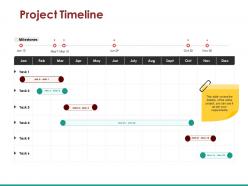
Project timeline powerpoint templates






Try Before you Buy Download Free Sample Product
 Impress Your
 Audience
 100%
100% Editable
 Save Hours
 of Time


Develop competitive advantage with our professionally designed Project Timeline Powerpoint Templates. They will provide you with a useful tool to communicate your message.
People who downloaded this PowerPoint presentation also viewed the following :
Project timeline powerpoint templates with all 5 slides:
Get access to all the assistance you desire with our Project Timeline Powerpoint Templates. Ensure you are able to help yourself.
FAQs for Project
You'll want task names, start/end dates, and who owns what. Duration matters too, obviously. Dependencies are clutch - without them you're just guessing what can happen when. Status tracking is non-negotiable because things change constantly. Milestones help everyone feel like they're actually getting somewhere instead of just drowning in tasks. Oh, and definitely add a notes section for when weird stuff comes up or things get blocked. Keep it visual enough that people can glance at it during meetings and not look confused. Start basic - you can always make it fancier later when your projects get messier.
Templates are honestly a game changer for keeping everyone on the same page. Your whole team sees the same milestones and deadlines in one consistent format. Instead of cramming your workflow into some cookie-cutter system, you can actually adjust things to match how you guys work. When your boss inevitably asks for updates, you won't be scrambling to build something from nothing. New people catch on way faster too since they're seeing the same setup every time. Oh, and definitely start simple - let your team mess around with it after a project or two and suggest what's working (or what isn't).
Honestly, Microsoft Project has everything but it's way too much for most stuff. TeamGantt and GanttProject are solid if you want those visual timeline charts. Google Sheets works fine too - everyone already knows how to use it anyway. Asana's timeline thing is pretty clean, same with Monday.com. I'd probably just go with whatever your team's already using though. Better to have people actually update a basic tool than fight with something fancy they'll never touch. Oh, and Excel obviously works if you're stuck in corporate land.
Dude, project timeline templates are honestly lifesavers. Construction ones already have permits and inspection phases built in, software templates focus on sprints and testing - stuff that actually matches what you're doing. No more starting from zero every single time (my brain thanks me for this). They're great for catching bottlenecks before they bite you and keeping everyone on the same realistic timeline. Plus you can tweak them based on what worked last time. Find one that fits your industry and customize it from there. Trust me on this one.
Honestly, the worst thing you can do is just copy-paste a template and call it done. You've gotta tweak it for your actual team and project - like, really think about who's available when and what depends on what. Buffer time is huge too because we all suck at estimating (I'm terrible at this). Oh, and don't go crazy with details right away, especially early on when everything's still kinda messy. I usually start with the big milestones and fill in specifics later. Trust me, leave room for weird stuff that'll definitely pop up.
Dude, visual stuff is a game-changer for timelines. Color coding saves everyone's sanity - green means good, red means we're screwed, you know the drill. Progress bars and little milestone icons help people actually understand what's happening instead of staring blankly at spreadsheet hell. Gantt charts sound fancy but they're just really good at showing when things need to happen in order. Trust me, half your stakeholders will zone out in meetings unless there's something visual to look at. Oh, and throw in some icons for different teams - makes everything way more scannable when people are hunting for their stuff.
Gantt charts show how tasks connect to each other - like if one thing gets delayed, you can see what else gets messed up. Regular timelines are just straight-line schedules showing what happens when. Way simpler but less helpful for complex stuff. Gantt charts have those little progress bars too which honestly feels pretty satisfying to fill in. They're perfect when your project has tasks that depend on each other. But if you're just doing sequential steps that don't really interact? A basic timeline does the job fine and won't overcomplicate things.
Dude, timeline templates are lifesavers for tracking milestones. They've got built-in checkpoints so you can see what's due when without juggling a million sticky notes. Way easier than keeping everything in your head - trust me on that one. You just customize the milestone markers for whatever you're working on. The visual layout makes it obvious to everyone if you're on track or totally screwed. I always forget about that stakeholder part, but apparently they love seeing where things stand too. Just grab a template that fits your project and drop in your dates.
Start with clarity and scalability - you don't want a visual mess when handling multiple workstreams. Build in filters for team, priority, milestones so people aren't drowning in irrelevant tasks. Always add buffer time between dependent work because coordination delays are inevitable with big teams (learned this the hard way). Color coding and naming conventions should actually make sense for your org, not some generic system. Keep it simple enough that team leads will actually update the thing regularly. Honestly, I'd rather have a basic template that stays current than some fancy setup that gets abandoned after two weeks.
Dude, those timeline templates are lifesavers. They literally map out all your tasks so you can see what depends on what. Way better than juggling everything mentally - I learned that the hard way on my last project! Breaking big stuff into bite-sized pieces with actual deadlines keeps you sane. When your boss randomly asks for updates, you're not frantically trying to remember where everything stands. Honestly, Gantt charts look intimidating but they're pretty straightforward once you mess around with one. Just grab a basic template and tweak it however works for your team.
Honestly, you need to start tracking who's doing what in your timeline templates. I learned this the hard way when my coworker got slammed with like four deadlines in one week - total disaster. Map out resources so you can spot those conflicts before they blow up. It's a game changer for setting realistic expectations with your boss too. Just add some resource columns to whatever templates you're using now. Trust me, catching this stuff early beats scrambling later when everything's already behind schedule and people are stressed.
Dude, mobile timeline templates are seriously clutch for remote teams. Your whole crew can update stuff from their phones, which means you actually get real-time updates instead of waiting for people to boot up their laptops. I'm way more likely to check project status when I'm just scrolling on my phone anyway - probably you too. Bottlenecks become obvious fast. Quick status updates happen naturally. Plus stakeholders stay happy without you being glued to your desk all day. Just make sure whatever template you pick syncs across devices or you'll hate yourself later.
Honestly, just start with whatever your team already knows how to use - no point fighting that uphill battle. Project complexity matters a lot though. Simple stuff? Gantt charts are perfect. But if you're dealing with something messy and constantly changing, you'll probably want Kanban boards or at least detailed milestone tracking. Team size plays into it too - bigger groups need more structure. Oh, and think about your audience. Executives want the 30,000-foot view, but your actual team needs to see all the nitty-gritty details. Real-time collaboration is nice if people actually use it, but don't overthink it at first.
Ditch the traditional phases and go with sprint cycles instead. Break everything into 1-4 week iteration blocks with retrospective time built in. Gantt charts are honestly pretty useless for agile stuff anyway - you're better off focusing on sprint goals and user story targets that can actually flex when things change. Buffer time between sprints is clutch for planning sessions. Here's what works: create a basic sprint template you can just copy and tweak as needed. Let your team mess with it until it fits your actual workflow. Way more realistic than trying to stick to some rigid timeline that'll probably fall apart by week two.
Honestly, timelines are like your early warning system for when stuff's about to go sideways. You can spot bottlenecks before they happen and see which tasks might drag on longer than expected. Dependencies become super obvious when you map everything out - which is huge because that's usually where projects get messy. I always throw in buffer time because there's literally always something unexpected (though let's be real, it shouldn't be that unexpected after the third project). The best part? You'll see how one delay can domino through everything else, so you can actually plan around it.
-
Great designs, really helpful.
-
Content of slide is easy to understand and edit.