

Android App Development Powerpoint Presentation Slides





Try Before you Buy Download Free Sample Product
 Impress Your
 Audience
 100%
100% Editable
 Save Hours
 of Time


A mobile operating system is a software framework that allows other applications, known as an application program, to operate. Here is a professionally designed Android App Development that provides an overview of the mobile app development firm that makes apps for different operating systems, its mission, successful projects, and its vision. This OS Development PowerPoint presentation covers the reasons to invest in mobile apps, their market share, and revenue. Additionally, this App Development PPT introduces iOS, its architecture, and the benefits of iOS app development for business. Furthermore, this template includes a detailed overview of android, including the development process of apps on android, its architecture, and the benefits of android apps. Also, this iOS Apps PPT covers the mobile app development strategy that includes web apps, native apps, and hybrid apps, along with its pros and cons, respectively. This Mobile OS PowerPoint also caters to the estimated budget and timeframe to develop an app for both operating systems. Lastly, this Mobile Development deck comprises a 30-60-90 days plan, a roadmap, and a dashboard for iOS and Android mobile app monitoring. Get access now.
People who downloaded this PowerPoint presentation also viewed the following :
Content of this Powerpoint Presentation
Slide 1: This slide introduces Android App Development. Begin by stating Your Company Name.
Slide 2: This slide depicts the Agenda of the presentation.
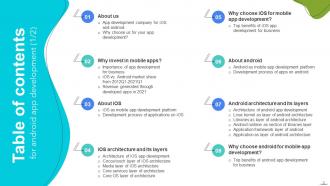
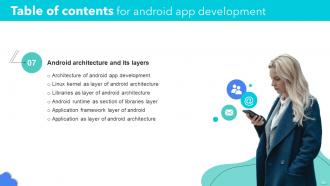
Slide 3: This slide includes the Table of contents.
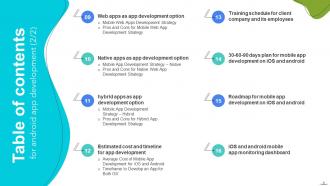
Slide 4: This is yet another slide continuing the Table of contents.
Slide 5: This slide highlights the Title for the Topics to be covered in the next template.
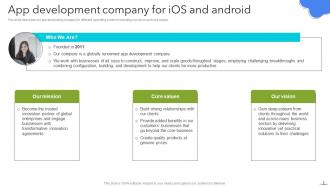
Slide 6: This slide describes the App development company for iOS and android.
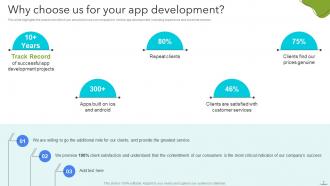
Slide 7: This slide lists the Reasons for choosing the concerned Company for your app development.
Slide 8: This slide incorporates the Heading for the Topics to be discussed further.
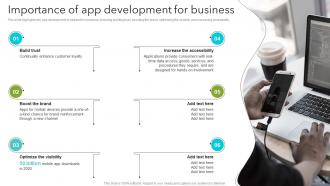
Slide 9: This slide highlights the Importance of app development for business.
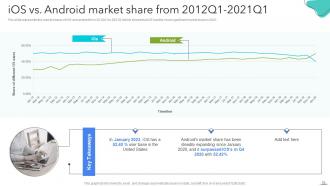
Slide 10: Tis slide exhibits the comparison between iOS vs. Android market share from 2012Q1-2021Q1.
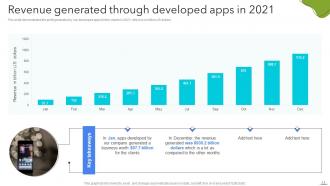
Slide 11: This slide demonstrates the Revenue generated through developed apps in 2021.
Slide 12: This slide contains the Title for the Ideas to be discussed in the upcoming template.
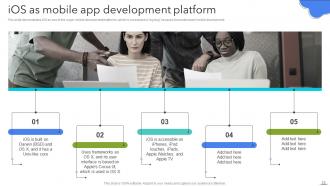
Slide 13: This slide depicts iOS as one of the major mobile development platforms.
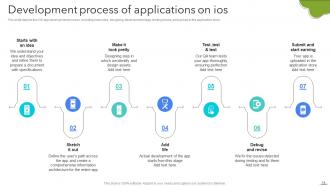
Slide 14: This slide illustrates the Development process of applications on ios.
Slide 15: This slide elucidates the Heading for the Contents to be discussed further.
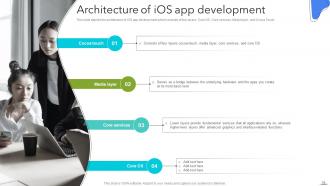
Slide 16: This slide reveals the Architecture of iOS app development.
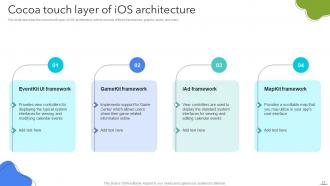
Slide 17: This slide describes the Cocoa touch layer of iOS architecture.
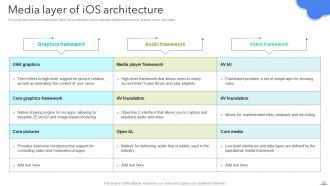
Slide 18: This slide showcases the Media layer of iOS architecture.
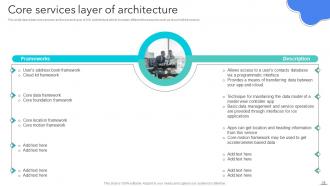
Slide 19: This slide mentions the Core services layer of architecture.
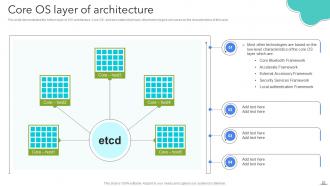
Slide 20: This slide illustrates the Core OS layer of architecture.
Slide 21: This slide includes the Heading for the Topics to be covered next.
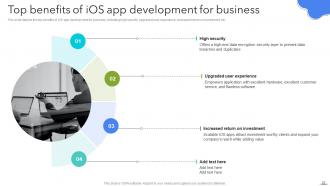
Slide 22: This slide shows the Top benefits of iOS app development for business.
Slide 23: This slide includes the Title for the Ideas to be discussed further.
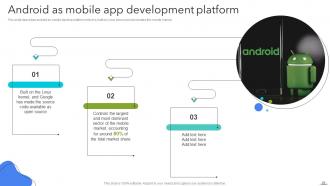
Slide 24: This slide describes Android as mobile app development platform.
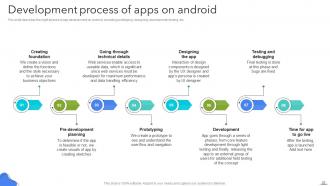
Slide 25: This slide discusses the Development process of apps on android.
Slide 26: This slide incorporates the Heading for the Topics to be covered next.
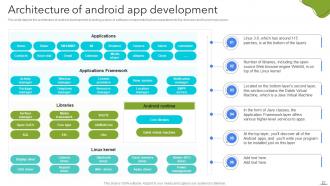
Slide 27: This slide displays the Architecture of android app development.
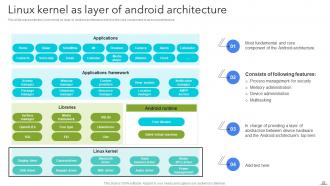
Slide 28: This slide reveals the Linux kernel as layer of android architecture.
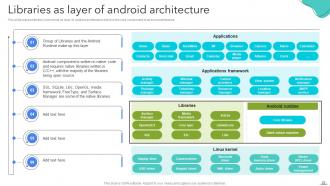
Slide 29: This slide presents Libraries as layer of android architecture.
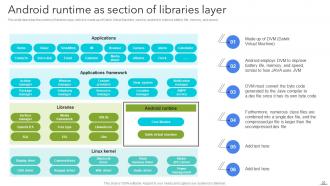
Slide 30: This slide elucidates the Android runtime as section of libraries layer.
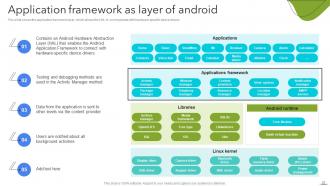
Slide 31: This slide shows the Application framework as layer of android.
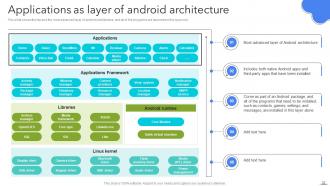
Slide 32: This slide depicts Applications as layer of android architecture.
Slide 33: This slide contains the Heading for the Topics to be covered further.
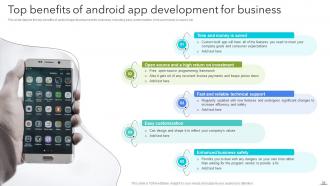
Slide 34: This slide represents the Top benefits of android app development for business.
Slide 35: This slide includes the Title for the Contents to be covered in the upcoming template.
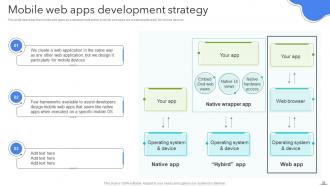
Slide 36: This slide displays the Mobile web apps development strategy.
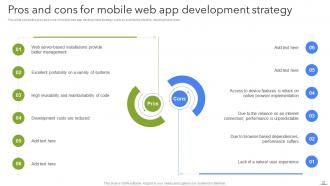
Slide 37: This slide exhibits the Pros and cons for mobile web app development strategy.
Slide 38: This slide elucidates the Main Heading for the Ideas to be discussed further.
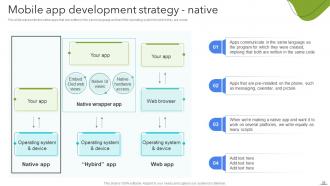
Slide 39: This slide showcases the Mobile app development strategy - native.
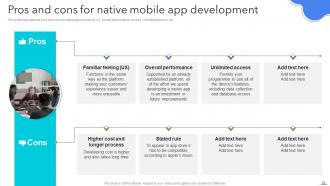
Slide 40: This slide highlights the Pros and cons for native mobile app development.
Slide 41: This slide includes the Title for the Topics to be covered in the forth-coming tenplate.
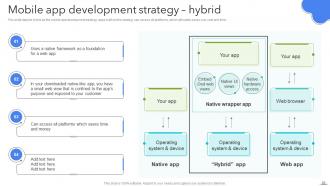
Slide 42: This slide depicts hybrid as the Mobile app development strategy.
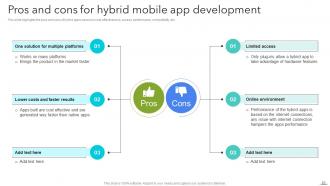
Slide 43: This slide highlights the Pros and cons for hybrid mobile app development.
Slide 44: This slide contains the Heading for the Contents to be discussed further.
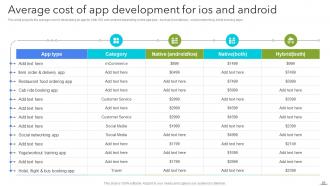
Slide 45: This slide projects the Average cost of app development for ios and android.
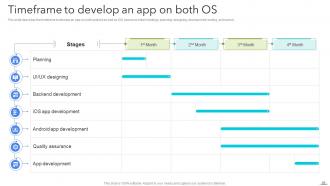
Slide 46: This slide presents the Timeframe to develop an app on both OS.
Slide 47: This slide incorporates the Main heading for the Ideas to be discussed further.
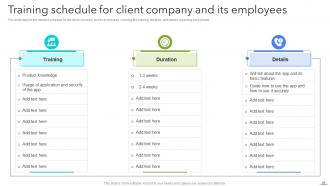
Slide 48: This slide depicts the Training schedule for client company and its employees.
Slide 49: This slide includes the Title for the Topics to be discussed in the upcoming slides.
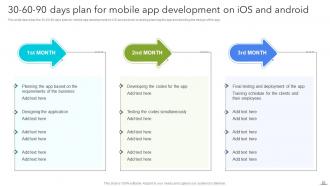
Slide 50: This slide provides information about the 30-60-90 days plan for mobile app development on iOS and android.
Slide 51: This slide reveals the Heading for the Contents to be covered in the forth-coming template.
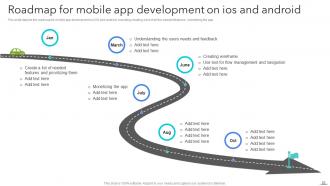
Slide 52: This slide shows the Roadmap for mobile app development on ios and android.
Slide 53: This slide elucidates the Heading for the Ideas to be discussed further.
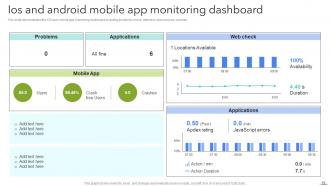
Slide 54: This slide demonstrates the Ios and android mobile app monitoring dashboard.
Slide 55: This is the Icons slide showcasing all the Icons used in the plan.
Slide 56: This slide states the Additional Company information.
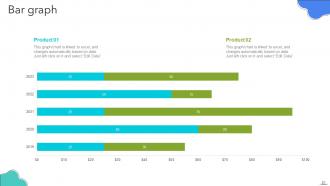
Slide 57: This is the Bar graph slide.
Slide 58: This slide includes the Post it notes for reminders and deadlines.
Slide 59: This is the Idea generation slide for encouraging innovative ideas.
Slide 60: This is the Puzzle slide for showcasing some Organization related information.
Slide 61: This is Our goals slide for stating Organization's long-term goals.
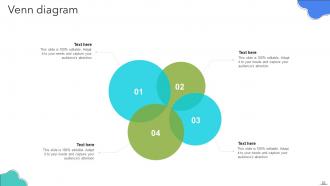
Slide 62: This slide illustrates the Venn diagram for revealing some relevant company information.
Slide 63: This is the Thank You slide for acknowledgement.
Android App Development Powerpoint Presentation Slides with all 68 slides:
Use our Android App Development Powerpoint Presentation Slides to effectively help you save your valuable time. They are readymade to fit into any presentation structure.








FAQs for Android App Development
Definitely start with Android Studio - it's Google's official IDE and makes life way easier. Kotlin's your best bet for programming since Google's pushing it hard now (Java works too but feels outdated). The Android SDK comes bundled for device APIs and testing stuff. Git's obviously a must for version control. Gradle handles builds but it's already baked into Android Studio so don't worry about that separately. Firebase is clutch if you need backend stuff like user auth or databases - though honestly you might not need it right away. Android Studio + Kotlin covers most of what you'll need to get started.
Honestly depends on what you're working with. Got a Java/Kotlin team? Native's gonna give you the smoothest performance and you won't fight with APIs. Cross-platform like Flutter or React Native is clutch when you need both iOS and Android fast - especially with smaller teams. I've seen some pretty solid cross-platform apps lately, not gonna lie. Graphics-heavy stuff though? Native's still king. Oh, and anything weird with hardware features gets messy cross-platform. I'd literally just list out your must-haves first and see what works.
So there's four layers you gotta know: Linux Kernel handles hardware stuff, then HAL (Hardware Abstraction Layer), Android Runtime with libraries, and Application Framework where your apps live. Honestly? Focus on Application Framework first - that's where you'll be working most of the time anyway. It's got all your APIs for activities, services, content providers, broadcast receivers. Each layer stacks on top of the previous one which keeps everything pretty organized. I'd really drill down on those Application Framework components since they directly affect how you build apps and handle user stuff.
So the Android Manifest is like your app's resume - it tells the system what your app actually does before it runs. You've got all your components listed there (activities, services, receivers), plus permissions and API requirements. Without it, Android literally has no idea how to launch your app or what it's supposed to do. It's where you set which activity starts first, what permissions you need, screen orientations, all that stuff. Honestly, whenever something's not working right, I always check the manifest first - saved me tons of headaches with launch issues and weird permission bugs.
Start with Google's Material Design stuff - it'll save you headaches later. Your buttons need to be at least 48dp or people will rage-tap trying to hit them. Also check your contrast ratios for accessibility (boring but necessary). Don't get cute with navigation - just use bottom tabs or the hamburger menu. Everyone knows how those work already. Android has like a million screen sizes so test early, test often. Oh and prototype with actual humans first. What makes perfect sense to you will probably confuse the hell out of regular users.
So there's basically three things you should tackle first. Images are usually the biggest culprit - compress them with WebP and lazy load stuff that's below the fold. Bundle your API calls instead of making a million separate requests, and definitely cache the data you use all the time. Memory leaks are honestly the worst because they creep up on you slowly. Android Studio's profiler is pretty solid for catching bottlenecks, though the UI takes some getting used to. Start with reducing your APK size and keeping heavy operations off the main thread - those'll give you the biggest bang for your buck performance-wise.
Start with a security audit of your current code - you'll probably find some scary stuff. Input validation is huge for stopping injection attacks, and definitely use HTTPS for all network calls. Encrypt sensitive data everywhere, honestly ProGuard is pretty solid for code obfuscation too. Don't store credentials in plain text (I see this way too often). OAuth handles authentication well, just be smart about app permissions. Oh and update your dependencies regularly - old libraries are like leaving your front door unlocked. Data encryption both in transit and at rest isn't optional anymore.
Retrofit is what you want - seriously the best option for Android REST calls. Create your interface methods for each endpoint, set up your data models, then point it at your base URL. I wasted so much time with raw HTTP clients before discovering this. If you need auth headers, throw in an interceptor. Handle responses with callbacks or RxJava depending on what you're comfortable with. Just get one simple GET working first though. Once that's solid, the rest falls into place pretty easily.
Three things to focus on: use AndroidX libraries for backward compatibility, test across different API levels, and stick to material design guidelines. Fragment lifecycle is still a pain honestly, but those compatibility libraries help a ton. Set your minSdkVersion and targetSdkVersion properly in the manifest. Test on both new flagships and older budget phones - screen densities will break your layouts in weird ways you didn't expect. Grab some old test devices from your team or just use the emulator with different configs. Works pretty well for catching most issues.
Only ask for permissions when you actually need them - don't be that app that wants everything upfront. Runtime permissions work best for camera/location stuff. Be super clear about what data you're collecting and why. Users actually do read privacy policies now (crazy, right?). Encrypt stored data and use Android's Privacy Dashboard if you can. Honestly, being transparent from the start beats being sketchy every time. It reduces uninstalls too. Oh, and those permission dialogs? Actually explain yourself instead of just demanding access.
Memory leaks will destroy you - especially with listeners and static references that hang around forever. Configuration changes are another killer if you don't handle them right. Don't block the UI thread either, makes everything feel sluggish and users hate that. Use lifecycle-aware components and always do null checks. Move heavy stuff to background threads. I learned this the hard way but test on different screen sizes early, not when you're already behind schedule. Android versions too. Get these basics down and you'll dodge so many annoying bugs later.
Start with JUnit for unit tests on your business logic, then add Espresso for UI stuff. I used to totally skip unit tests when I was starting out - such an idiot move lol. They catch tons of bugs before users see them. Get your CI/CD running tests automatically on every commit. Test your main user flows first, then build out from there. Oh and write tests while you're coding features, not after. That's when you'll actually do it. Start small but seriously, start today.
Dude, just use Retrofit and Glide - trust me on this. Retrofit makes your API calls actually readable instead of messy callback hell, plus it handles all the JSON stuff automatically. Glide is a lifesaver for images because it does caching, resizing, memory management, all that tedious crap. I tried doing image loading manually once and wanted to throw my laptop out the window. These libraries have been around forever and work in like millions of apps, so way more solid than whatever you'd code yourself. Honestly wish someone told me about them sooner.
There are a few routes you can go with monetizing. In-app purchases work really well - especially for games or productivity stuff. Ads through AdMob are solid too, though honestly they can be super annoying if you're not careful about placement. Freemium's probably the most common approach I see - basic version's free, then you charge for the good features. Subscriptions make sense if you're offering ongoing services. I'd probably start with just one method first, see what your users actually do, then maybe add more later. Oh and match whatever you pick to how people actually use your app.
Version codes go in your build.gradle - bump those for every Play Store release. Version names are what users see, so use semantic versioning like 1.2.3. Git is absolutely essential (seriously, how did people code before it?). Always increment that version code, even for tiny bug fixes. Set up develop/main branches and tag your releases properly. Oh, and automate the version bumping in CI/CD if you can - trust me, you'll forget to update it manually at least once and feel like an idiot when the build fails.
-
The website is jam-packed with fantastic and creative templates for a variety of business concepts. They are easy to use and customize.
-
Top Quality presentations that are easily editable.