

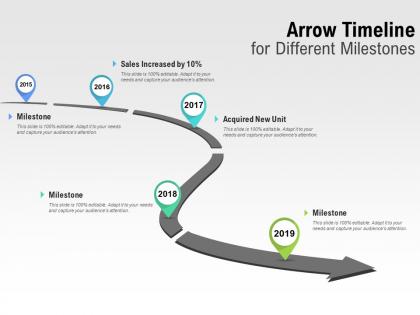
Arrow timeline for different milestones




Try Before you Buy Download Free Sample Product
 Impress Your
 Audience
 100%
100% Editable
 Save Hours
 of Time


Achieve far beyond the dream you have with our Arrow Timeline For Different Milestones. They enable you to blow past your goals.
People who downloaded this PowerPoint presentation also viewed the following :
Arrow timeline for different milestones with all 5 slides:
Develop better global access with the backing of our Arrow Timeline For Different Milestones. Discover fresh avenues to exploit.
FAQs for Arrow timeline
Dude, arrow timelines are such a game changer! Your audience can follow complex stuff without their brain melting. I'm probably obsessed with them at this point - use them for project phases, historical events, basically anything that moves forward in time. The arrows naturally guide people's eyes where you want them to look. Don't need to be a design wizard either, they work in PowerPoint or whatever you're using. Honestly way better than those snooze-fest bullet points everyone defaults to. Give them a shot next time!
Arrow timelines make your project data way more interesting - like turning a boring spreadsheet into something people actually care about. You're basically creating a story that goes from problem to solution, and honestly, it works so much better than those endless task lists. The visual flow makes it super easy to spot risks early (which saves your butt later). Plus everyone stays on the same page about where you're headed. I've been using this approach lately and the difference in engagement is crazy. Try mapping your next project like a story arc - you'll be surprised how much people get into it.
Ok so for your arrow timeline - make those arrows thick enough to actually guide people's eyes but don't go overboard. Space everything out evenly between milestones. I'd probably use darker colors for stuff that's already done and lighter shades for future things. Keep your text readable and the same size throughout (seriously, mixed fonts look terrible). Don't cram a ton of text in there - white space is your friend! Flow should go left to right obviously, and if it's going online, check how it looks on mobile too. Oh and pick colors that actually make sense together.
Honestly, color choice will totally make or break your timeline. High contrast is key - you need your arrows to pop against the background. I've watched people create these insane rainbow disasters that nobody can follow! Two or three colors max, seriously. Use one main color for your timeline arrow, then maybe an accent color for big milestones. Oh, and definitely check that your text is still readable - sounds obvious but you'd be surprised. Here's something I learned the hard way: always test it in grayscale too since some people are colorblind.
Yeah, arrow timelines are super flexible! Manufacturing folks usually track production stages and quality checks. Healthcare teams focus more on patient milestones and compliance stuff. The colors and icons change based on your field too - finance people are obsessed with their quarterly markers, obviously. Time scales go from hours to years, which is pretty cool. You can add custom fields for whatever data matters to your industry. Most integrate with existing tools too, though I haven't tested that part myself. I'd start by figuring out what milestones actually matter to your team first.
Honestly, short labels are your friend here - like 2-4 words tops. "Launched Beta" hits way better than "Beta Version" since action verbs just work better. Pick a format (all caps or title case, whatever) and stick with it through the whole thing. Labels should go either above OR below your timeline consistently - don't scatter them around like confetti lol. Make the text big enough that people can actually read it without squinting. The real test? Show it to someone else first. If they don't get your story immediately, you've got more work to do. Trust me on this one.
Oh man, arrow timelines are seriously a game-changer! I use them for basically everything - history lessons, science processes, even when we're tracking character arcs in novels. Kids actually pay attention because it's visual instead of boring text walls. The cause-and-effect stuff becomes so much clearer too. Try making it collaborative - grab some whiteboard space or use Padlet if you're feeling digital. Give them a basic template and let them hunt down the key moments themselves. Honestly works better than lecturing about dates and events. Your students will probably surprise you with what they catch that you missed.
Oh nice, there's tons of good options! Lucidchart and Visio are pretty solid - they've got decent template libraries. Canva works too if you want something simpler. Honestly though? PowerPoint is actually great for this stuff and you probably already have it. I've made some decent timelines just messing around in there. If it's more like project management timelines, Smartsheet or Monday.com have built-in features that are super helpful. Hell, I've even seen people whip up impressive ones in Google Drawings when they're desperate. I'd just start with whatever you know best and see how it goes.
Honestly, arrow timelines are genius because they cut through all the clutter. You're basically giving people a roadmap instead of dumping every detail on them at once. The arrows show clear cause and effect - boom, this led to that, then this happened. Way better than those messy infographics that make your brain hurt, right? Pick maybe 5-7 big moments that actually moved the needle. Don't overthink it. The arrows will guide people through your story without them getting sidetracked by random stuff that doesn't matter.
Honestly, the worst thing you can do is cram way too much text on each milestone - people won't read paragraphs on a timeline, they just won't. Keep spacing consistent between points or it looks messy. Oh and don't use random colors just because they're pretty - they should actually mean something. Your timeline needs to flow the right direction too (sounds obvious but you'd be surprised). Dates are crucial obviously. I always run mine by someone else first because what makes sense to me doesn't always click for others. Clean and simple wins every time.
Honestly, arrow timelines beat the regular linear ones most of the time. The arrows just make everything flow better - your eye naturally follows from point A to B to C, you know? They're way more dynamic looking too. Linear ones are fine if you're just showing dates or whatever, but arrows really shine when there's dependencies or decision points involved. Like when your project has actual momentum and direction to it. I always go with arrows when I want people to actually *get* the progression instead of just... staring at a boring chart. Makes stakeholders way more engaged with the whole timeline thing.
Typography can totally make or break your arrow timeline. Different font weights and sizes help create a clear hierarchy - think bigger for milestone titles, smaller for dates and descriptions. I'd stick with sans-serif fonts since they stay readable even when things get cramped (serif fonts just look messy at small sizes). Keep text sizes consistent within each type of element, and don't forget about contrast against your background colors. Oh, and definitely check how it looks on mobile - I've seen way too many timelines that look perfect on desktop but are completely unreadable on phones.
Oh totally! Icons are a game-changer for arrow timelines. Use a calendar for deadlines, checkmarks for finished stuff - people get it instantly. Screenshots work great for product launches too. Plain text timelines are honestly pretty boring and nobody wants to read through all that. The visual breaks help your eye move through the story naturally. Just don't go crazy mixing different icon styles or it'll look messy. I learned that the hard way on a project last month. Keep them the same size and you're golden.
Vertical timelines are clutch when you're cramped for horizontal space or dealing with tons of content. Mobile screens especially - they just work better that way. Reading top to bottom feels way more natural for storytelling too, like you're actually progressing through events. Honestly, scrolling vertically is what everyone's used to anyway. I'd only go horizontal if you've got wide screens and short, punchy content blocks. Oh and definitely mock up both versions with your real content first - sometimes what sounds good in theory looks weird in practice. Trust me on that one.
Make your big milestones way bigger than the regular ones - size really matters here. Colors work great too, like red for deadlines or gold for achievements. Bold text helps a lot. I'd add little callout boxes with extra details about why each milestone is crucial. Honestly, some people think going overboard looks tacky, but sometimes you need that extra visual punch. Oh, and try grouping related stuff with light background shading - it creates these nice clusters that actually tell a story instead of just looking like random dots on a line.
No Reviews