


Bcp Audit Scope And Objectives Powerpoint Presentation Slides




Try Before you Buy Download Free Sample Product
 Impress Your
 Audience
 100%
100% Editable
 Save Hours
 of Time


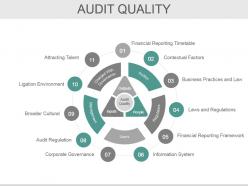
Want to present well defined and solid audit PPT presentation related to business continuity planning? You need not to look anywhere as our team of experts have come up with 47 slides ready-made Bcp Audit Scope And Objectives Powerpoint Presentation Slides. This PPT template deck will be the right choice for you as there are many slides included to the related topic like type of audit, purpose of audit system, audit objective, audit procedure, audit development life cycle, key stages of audit, audit flow, implementation steps, audit quality and many more. These PowerPoint presentation slides will save you a lot of time and effort. This PPT sample presentation can be used by operation managers auditors and audit teams of any given business as the templates in this presentation are fully editable and can go well on both normal and widescreen format. There are amazing detailed slides for example like audit quality further sub categorized or explained with content like financial reporting timetable, contextual factors, business practices and law, audit regulation, attracting talent etc. This continuity of operations planning (COOP) presentation is going to take your PPT to the next level. So, do not wait and download this Bcp Audit Scope And Objectives Powerpoint Presentation Slides and be proactive in your approach. Take full benefit from our pre-made business continuity planning presentation. Our Bcp Audit Scope And Objectives Powerpoint Presentation Slides will gladden the gathering. They will appreciate the aesthetics.
People who downloaded this PowerPoint presentation also viewed the following :
Content of this Powerpoint Presentation
Slide 1: This slide introduces BCP Audit Scope And Objectives. Add your compant name here and begin.
Slide 2: This is an Agenda slide with text boxes. State your agendas here.
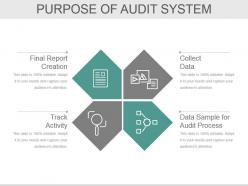
Slide 3: This slide states the Purpose Of Audit System with the following steps- Collect Data, Data Sample for Audit Process, Track Activity, Final Report Creation.
Slide 4: This slide states Audit Objective such as- Accuracy, Valuation, Classification, Disclosure, Validity, Completeness, Cutoff, Ownership.
Slide 5: This slide showcases the Types Of Audit Procedure- Data Selection, Reliability Validation, Relevance Confirmation.
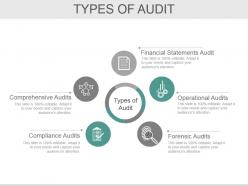
Slide 6: This slide showcases five Types Of Audit- Operational Audits, Financial Statements Audit, Forensic Audits, Compliance Audits, Comprehensive Audits.
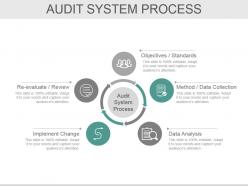
Slide 7: This slide showcases Audit System Process with- Objectives / Standards, Method / Data Collection, Data Analysis, Implement Change, Re-evaluate / Review.
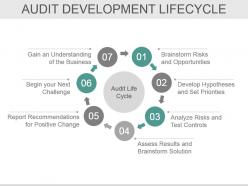
Slide 8: This slide showcases Audit Developement Lifecycle with 7 steps- Brainstorm Risks and Opportunities, Develop Hypotheses and Set Prionties, Analyze Risks and Test Controls, Report Recommendations for Positive Change, Assess Results and Brainstorm Solution, Begin your Next Challenge, Gain an Understanding of the Business. We have mentioned some steps over here to give you an idea. You can make use of these or add your own.
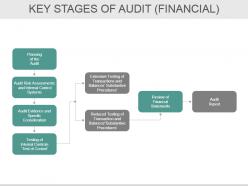
Slide 9: This slide presents Key Stages Of Audit (FINANCIAL) flow chart involving- Audit Evidence and Specific Consideration, Testing of Internal Controls ‘Test of Control’, Planning of the Audit, Audit Risk Assessments and Internal Control Systems further divided into- Extensive Testing of Transactions and Balances’ Substantive Procedures, Reduced Testing of Transaction and Balances”SubstantivepRocedures.
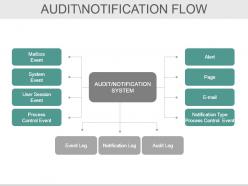
Slide 10: This slide presents Audit\Notification Flow system in a flow chart form. We have showcased few of its components, you can make use of them as per your requiremnt.
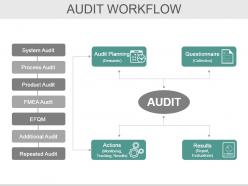
Slide 11: This slide shows Audit Workflow divided ino 4 main categories- Results (Report, Evaluations), Questionnaire (Collection), Audit Planning (Demands), Actions (Monitoring, Tracking, Results).
Slide 12: This slide showcases Audit Report Process Flowchart.
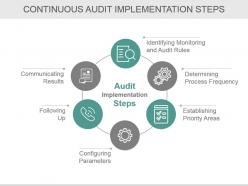
Slide 13: This slide shows Continuous Audit Implementation Steps. Some of them are- Identifying Monitoring and Audit Rules, Determining Process Frequency, Establishing Priority Areas, Following Up, Configuring Parameters, Communicating Results.
Slide 14: This slide presents Audit System Conversion in a funnel diagram form with icon imagery.
Slide 15: This slide showcases Audit Quality. We have mentioned few of its components and factors, you can make of these or add as per your need.
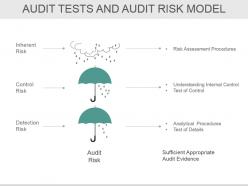
Slide 16: This slide presents Audit Tests And Audit Risk Model with 3 of the risks- Inherent Risk, Control Risk, Detection Risk. You can add your own as per need.
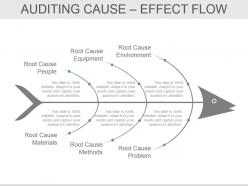
Slide 17: This slide showcases Audit Cause – Effects Flow in a fish bone diagram form.
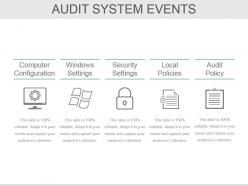
Slide 18: This slide shows Audit System Events- Computer Configuration, Windows Settings, Security Settings, Audit Policy, Local Policies.
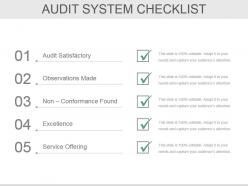
Slide 19: This slide presents Audit System Checklist with the following components- Audit Satisfactory, Observations Made, Non – Conformance Found, Excellence, Service Offering.
Slide 20: This slide presents Audit System Icon Set. Use as per requiremnt.
Slide 21: This slide is titled Additional Slides to move forward. You can change the slide content as desired.
Slide 22: This is VISION slide to state your vision, mission, goals etc.
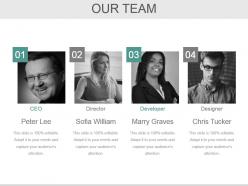
Slide 23: This slide showcases Our Team with Name and Designation to fill.
Slide 24: This is an About Us slide. State team/ company specifications here.
Slide 25: This is Our Goal slide. State your goals here.
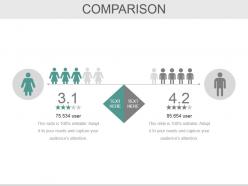
Slide 26: This is a Comparison slide. You can compare the male and female ratio in it.
Slide 27: This slide shows Financial score. State financial aspects here.
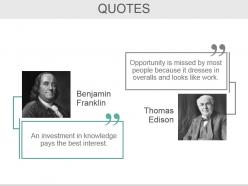
Slide 28: This is a Business Quotes slide to convey company's message, beliefs etc.
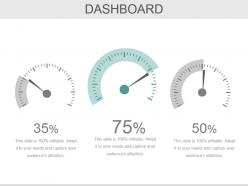
Slide 29: This is a Dashboard slide to state metrics, kpis etc.
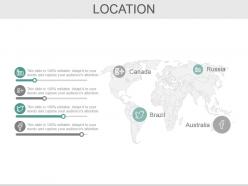
Slide 30: This is a Location slide to show global growth, presence etc. on a world map image.
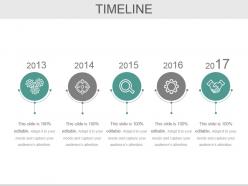
Slide 31: This is a Timeline slide to present important dates, journey, evolution, milestones etc.
Slide 32: This is a Post It slide to mark events, important information etc.
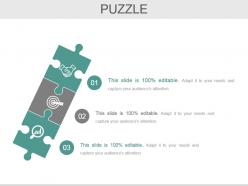
Slide 33: This is a Puzzle pieces image slide to show information, specifications etc.
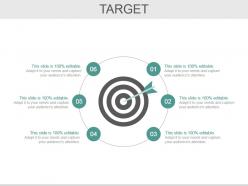
Slide 34: This is a Target image slide. State targets, etc. here.
Slide 35: This is a Circular image slide. State specifications, information here.
Slide 36: This is a Newspaper slide to highlight something or add memorabilia.
Slide 37: This is a Venn diagram image slide to show information, specifications etc.
Slide 38: This is a Mind map image slide to show information, segregation, specifications etc.
Slide 39: This is a Matrix slide to show information, comparison specifications etc.
Slide 40: This is a Lego image slide to show information, specifications etc.
Slide 41: This is a Silhouettes image slide to show people related information, specifications etc.
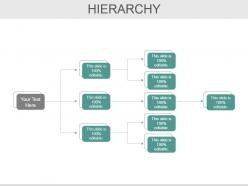
Slide 42: This is a Hierarchy slide to show information, organization structural specifications etc.
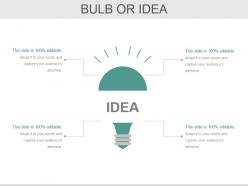
Slide 43: This is a Bulb or Idea image slide to show information, ideas, specifications etc.
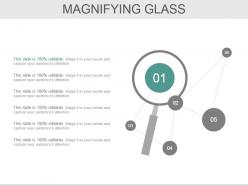
Slide 44: This slide shows a Magnifying Glass with imagery and text boxes to go with.
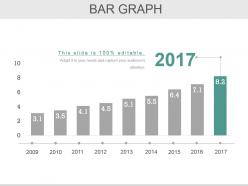
Slide 45: This slide presents a Bar Graph for product growth etc.
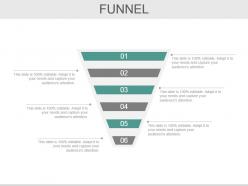
Slide 46: This is a Funnel image slide to show funneling aspects etc.
Slide 47: This is a Thank You slide with Address# street number, city, state, Contact Numbers, Email Address.
Bcp Audit Scope And Objectives Powerpoint Presentation Slides with all 47 slides:
Our Bcp Audit Scope And Objectives Powerpoint Presentation Slides are a great form of expression. They allow you to articulate clearly.










FAQs for Bcp Audit Scope And Objectives
So for your BCP audit, hit the big stuff first: risk assessment, business impact analysis, and recovery strategies for your critical processes. Communication procedures and who's doing what when disaster strikes - that's crucial. Testing schedules matter way more than people think, honestly. Most plans look great on paper but nobody's actually practiced them. Check your vendor continuity arrangements and backup facilities too. Don't skip the governance structure and training programs either. People can't execute what they've never learned. Map everything back to your most critical business functions and you'll be solid.
Map your BCP against ISO 22301 or NIST before the audit hits. Make a compliance checklist showing how each section covers your industry regs - SOX, HIPAA, whatever. This mapping thing always uncovers gaps you missed, which honestly saves you later. Have your testing and update docs ready to show auditors. They want to see ongoing process, not just that you checked boxes once. Oh, and don't just meet the bare minimum standards - show them how you stay current when regulations change. That's what separates the good BCPs from the ones that barely scrape by.
Start with reviewing your BCP docs against standards like ISO 22301. Then run tabletop exercises - honestly these are the best part because you see how people actually react when things go sideways. Do gap analysis to find where reality doesn't match your procedures (there's always a disconnect). Interview key people too. Oh, and if you've had past incidents, definitely dig into those responses. Focus your tabletops on communication channels and decision-making authority. Recovery time objectives matter, but the human element usually breaks first.
First thing - map your audit goals to what actually matters for your business and how much risk you can handle. Obviously hit the basics like recovery times, backups, communication plans. But here's what trips people up: don't ignore the people side of things. Staff training, who makes decisions when everything's on fire, vendor dependencies - I've watched so many companies get burned because they only focused on the tech stuff. Test your teams AND your systems. Oh, and be specific with your goals. "Validate 4-hour recovery" beats "test if it works" every time.
Look, risk assessment is basically your cheat sheet for figuring out what to actually audit in your BCP. Start with your company's risk register or business impact analysis if they have one - saves you tons of time. You'll spot the high-risk processes and critical stuff that could really mess things up if they fail. Way smarter than just auditing random things and crossing your fingers. Focus your energy on the disruptions that could genuinely tank the business, not every little hiccup. Honestly, most companies waste so much time on low-impact areas when they should be laser-focused on what actually matters.
At minimum, do BCP audits yearly. But that's really just baseline stuff. How often you actually need them depends on your specific situation - new risks popping up, industry regulations, whether your business has changed much. Companies in high-risk sectors sometimes do quarterly reviews, which honestly seems like overkill to me unless you're in finance or healthcare. Major changes are the real trigger though. New office locations, tech overhauls, restructuring - that's when you need to audit sooner. I'd say plan your annual schedule but don't be rigid about it when big shifts happen.
Look at four main things: RTO/RPO performance, how well your team actually knows the plan, and response times. Did systems come back when you promised they would? Test people regularly - drills show you who's paying attention and who isn't. Track how fast teams jump into action during real problems too. Honestly though, the ultimate test is pretty simple - did business keep running when stuff hit the fan? I'd start with whatever benchmarks you set originally, then just watch the trends. Sometimes the boring metrics tell you more than the fancy dashboards anyway.
So first thing - dig into their training records and actually talk to people at different levels. See if they know what they're supposed to do when things go sideways. Scenario questions work great for spotting gaps (way better than just asking "did you learn anything?"). Watch some of their drills too if you can. Check if new people get proper orientation and whether the training makes sense for each department. Honestly, mixing document reviews with real conversations is your best bet - paperwork lies but people don't.
Don't go too broad with your scope - I learned this the hard way on my first audit. You'll get stuck reviewing everything but understanding nothing deeply. Pick your most critical business functions and actually define what systems/departments you're covering. Being vague here will bite you later. Start small, maybe 3-4 key processes max. Short timelines work better too - like, way better than these massive 6-month projects that drag on forever. Once you've got those basics down solid, then you can expand. Trust me, it's so much easier to explain a focused audit to leadership than some sprawling mess that touches every department.
First thing - figure out who runs the important stuff. Department heads, IT people, compliance teams, operations managers. Talk to them early because honestly, these conversations tell you way more than surveys ever will. What scares them most about business continuity? Ask about their biggest dependencies and what would totally screw them if it failed. Also dig into any regulatory stuff they're stressed about - that's usually where the real pain points are. Then use all that info to build your audit plan around what actually matters to them, not just some cookie-cutter checklist.
Honestly, start with what you already have - no point buying new stuff right away. Automated risk assessment tools will save your sanity, plus business impact analysis software makes the whole process way less painful. SharePoint works fine for tracking documents if you're not feeling fancy, but there's specialized BCP software too. Survey tools are clutch for getting stakeholder feedback without endless meetings (thank god). Also grab some audit management tools - they keep your workflows consistent and create proper evidence trails. Oh, and definitely test your communication systems with actual platforms designed for that. Find your gaps first, then fill them with tools that'll actually save you time.
Honestly, just treat BCP audits like going to the doctor - do them regularly and don't ignore what they tell you. I'd start with quarterly checks where you test actual scenarios, update those contact lists (they're always outdated), and make sure your backup systems aren't just decorative. Most companies are awful at following through though - they find problems and then... nothing happens. Document what's broken and actually fix it. Update your procedures when stuff fails during drills. Block out time next quarter for your first round, even if it's basic. Way better than scrambling when everything's on fire.
Look at four things when picking your BCP recovery strategies. Can you actually pull this off with what you've got? That's feasibility. Does it hit your recovery time goals? Cost vs benefit make sense? And how much risk does it actually cut? Oh, and don't treat every system like it's equally important - some stuff matters way more than others. Test these strategies under real pressure, not just on paper. Make sure you've got the right people or vendors who can actually execute when things go sideways. Start with your most critical business functions first, then work down the list.
Don't just check if you have communication templates - that's basically useless. Test the actual workflow: who hits the panic button for communications? How do you keep stakeholder lists updated? Does your messaging actually match what's happening operationally? Honestly, most companies treat crisis communication like some side task instead of core business. Focus on timing too - when do customers get notified versus when systems come back online? Run tabletop exercises that really stress-test your communication flows. The dependencies between communication and recovery steps are where things usually fall apart.
Honestly, the worst part is dealing with incomplete docs and people who get weird when you question their emergency plans. Can't really blame them though - nobody likes having their work scrutinized. Most BCPs have never been tested either, so they look solid but fall apart in practice. Here's what works: be upfront that you're there to help, not criticize. Get stakeholders involved in planning the scope so they feel ownership. Run some tabletop exercises too - way better than just reading procedures on paper. Build trust from day one. Make it feel collaborative instead of like you're there to tear everything down.
-
It saves your time and decrease your efforts in half.
-
Nice and innovative design.