



 0 Comment
 Customer Reviews

Think before you click — even the tech giants who invented and commercialized the original tools of brilliance have slipped. Google and Facebook—two of Silicon Valley’s most powerful players—fell victim to a staggering $100 million scam between 2013 and 2015. The weapon? Simple emails and fake invoices. The hacker impersonated a trusted vendor and misled the sharpest minds. It took years to uncover the fraud. From Sony Pictures to Twitter, Fortune 500s to everyday users—all have been caught in the net of cleverly crafted scams.
Phishing has become a serious threat. It is estimated that 3.4 billion phishing emails are sent out every single day. This emphasizes the importance of awareness as the first line of defense. Organizations must build a security-first culture, where every employee knows that every email, every link, every “just to be sure” login could be a potential trap. Regular phishing awareness training isn’t optional—it’s a necessity in today’s digital world.
Get ready to empower employees and combat cyber dangers right away with just a click.
Awareness is your firewall—keep it updated.
Check out SlideTeam’s Top 10 Phishing Awareness Templates with Samples and Examples to teach employees about phishing and its risks. Use these templates as a resource for in-house training, awareness campaigns, or just to serve as a visual reminder. Download these to safeguard yourself and your organization against potential phishing attacks: email phishing, spear phishing, whaling, vishing, and smishing. The 100% editable and customizable nature of the templates allows you to edit your presentations. The content-ready slides give you the much-needed structure.
Download these PPTs to learn more about cybersecurity and raise awareness about phishing scams.
Train minds. Create caution.
Template 1: Types of Phishing Attacks PPT
Empower your team with anti-phishing training. Check out this PPT Template to discuss types of phishing attacks in detail. This is perfect for any phishing prevention module or social engineering awareness program. It illustrates email phishing, spear phishing, whaling and smishing. The table also includes sections, such as description, target, method, tools, risks and prevention. Download this to enhance your cybersecurity awareness strategy for digital threat awareness. Get it today!
Social Engineering Awareness: Arm yourself with ready-to-use PPT Templates designed to outsmart cybercriminals and insider threats alike.

Template 2: Identifying Phishing Scams
Need to conduct an online scam detection? This PPT Slide discusses how to spot phishing attacks. It is a reliable source for fraud prevention training, information security training, and data protection training. It illustrates actions such as checking URLs, looking for typos, strange attachments, verifying the sender, looking for urgency indicators, asking questions, reporting suspicion, and using security tools. This component of the email security awareness module helps in raising awareness and protecting oneself from online risks.

Template 3: Common Phishing Techniques and Tactics
A successful phishing attack costs companies an average of $4.88 million. Provide yourself with sensible and effective cyber threat education for phishing prevention. This PowerPoint Presentation demonstrates common phishing techniques and tactics for employee’s security training. It demonstrates strategies, such as spear phishing, URL spoofing, pop-up phishing, email spoofing, malware attachments, and urgency tactics. Use it to create a spear phishing defense and stop attacks.

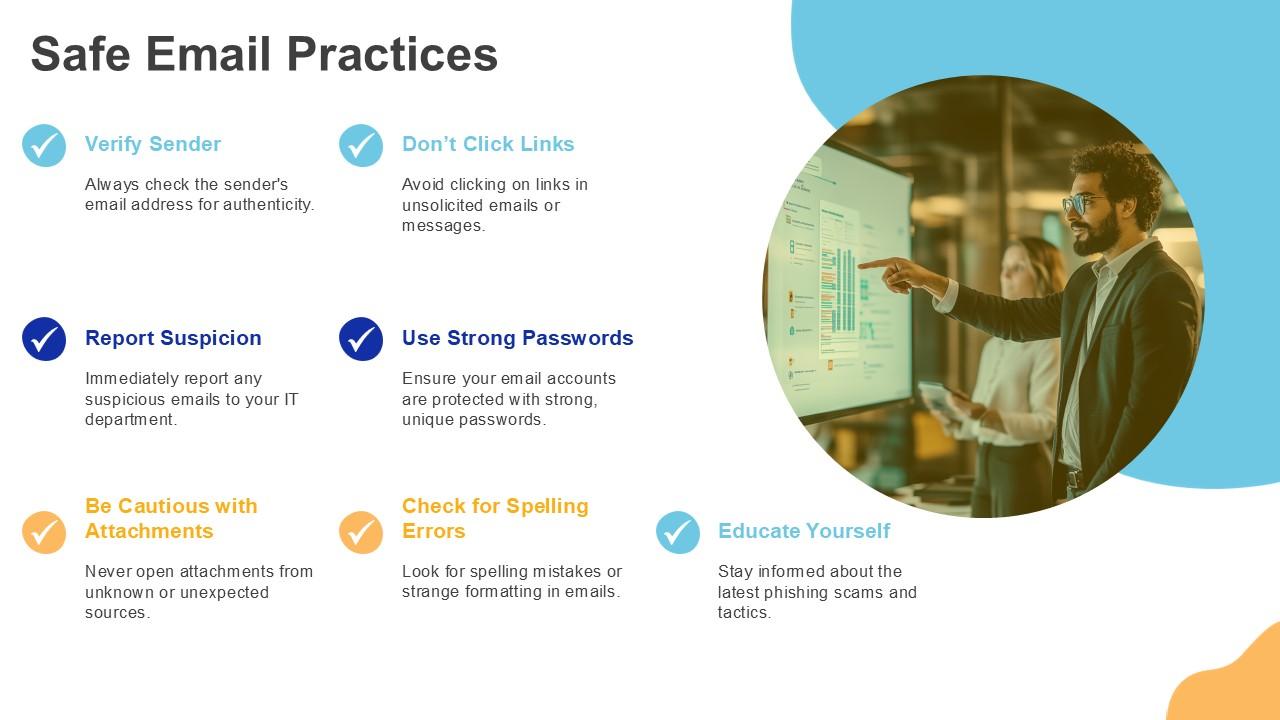
Template 4: Safe Email Practices
It is necessary to possess email security awareness to safeguard your organization, your data, and yourself. Use this PPT Layout to demonstrate safe email practices. It addresses practices such as verifying the sender, reporting suspicion, being careful with attachments, not clicking links, using strong passwords, checking for spelling errors, and educating yourself. This email scam education can help you stay safe online. Save it today!
Template 5: Training Delivery Methods
The effectiveness of phishing prevention efforts depends on the selection of training delivery methods. This PPT Design highlights training delivery methods for anti-phishing training. It displays live workshops, online modules, simulated phishing exams, monthly newsletters, and more. Create your cybersecurity awareness plan and select the best means of delivery. Get it today!

Template 6: Cultural Change in Organizations
Adopting a security-first mindset in the workplace is possible with well-planned information security training. This PPT Slide explains ways to drive cultural change for cybersecurity awareness. It includes leadership, policy, training, feedback, reporting, and phishing simulation exercises. Download now to streamline your social engineering awareness strategy.

Template 7: Case Studies: Phishing Incidents
Use this PowerPoint Template to illustrate phishing case studies. Real-world examples, as depicted, enhance understanding of phishing prevention strategies for both individuals and organizations. Download now and start your data protection training.

Template 8: Best Practices for Employee Engagement
Employee cybersecurity awareness training is critical for developing a safe workplace. Download this PPT Slide to learn about effective practices in employee engagement for social engineering awareness. It contains regular fraud prevention training, interactive scenarios, a feedback system, a recognition programs, and collaborative tools. Save it now to modify the security awareness program.

Template 9: Building a Phishing Response Team
This PPT Layout provides an example of a phishing response team. This helps in identifying critical roles and responsibilities in phishing prevention. Set up a phishing report system and continue your data protection training. Grab it today!

Template 10: Conclusion and Next Steps
This PPT Design discusses the conclusion and next steps for company cybersecurity awareness. This allows you to assess your phishing readiness or refresh your anti-phishing training program. Download it to track phishing report rates, phishing simulation outcomes, and information security training completion. Get it today!

******
Think before you click – always.
Use SlideTeam’s PPT Templates to train employees to recognize the catch, avoid the trap, and respond confidently. Get it now to make people more cyber-aware and hard to trick.
PS Examine Top Phishing Training Templates with methods and practical examples to enhance your defenses against cybercrime.
FAQs on Phishing Awareness
1. Why is phishing awareness important for organizations and individuals?
Phishing awareness is critical for both businesses and individuals, as phishing attacks are one of the most prevalent and successful cyber dangers. Sharing sensitive information, such as passwords, financial information, or corporate data, can result in data breaches, financial loss, identity theft, or reputational harm. It may also lead to regulatory fines and a loss of customer trust in a business.
2. How can phishing awareness training reduce security risks?
Phishing awareness training can mitigate security threats in the following ways:
a) It provides individuals with the information necessary to detect and respond to phishing attacks.
b) Recognize suspicious emails, avoid clicking on harmful links, and confirm requests for critical information.
c) Develop a security-conscious culture.
d) Reducing the likelihood of data breaches, financial losses, and reputational harm.
e) Improves the organization’s overall cybersecurity protection.
3. What types of phishing attacks should employees be aware of?
Employees should be aware of the following types of phishing attacks:
a) Email Phishing: Emails requesting sensitive information or carrying harmful links.
b) Spear Phishing: Targeted and often personalized to specific persons or organizations.
c) Vishing (Voice Phishing): Fraudulent phone calls requesting private information.
d) Smishing (SMS Phishing): Phishing efforts made through text messaging.
e) Whaling: Targets high-level executives or leaders for critical company information.