





 0 Comment
 Customer Reviews

The report's finished. Three pages of security data nobody's going to read.
That's not cynicism—it's the pattern. Security teams collect the numbers. Compliance wants the numbers. Leadership asks for the numbers. And then someone has to stand up in a boardroom and explain what the numbers actually mean. Whether the organization is safer than last quarter. Whether the budget spent on endpoint controls did anything real.
Most security professionals know what they're measuring. Patch rates, vulnerability counts, incident response timelines. The harder part is making that data legible to people who aren't living inside the SOC every day. There's a specific tension in security reporting: the people who understand the metrics rarely present them, and the people who need to act on them often can't parse what they're seeing.
That's before you get to the formatting problem.
Someone has to build the deck. Someone has to decide which numbers go on the first slide, which trends get a chart, how to visualize a Mean Time to Detect improvement without making it look like you're just celebrating reaction speed rather than prevention. The wrong layout buries the insight. The right one surfaces exactly what a CISO—or a CFO—needs to make a decision.
Security dashboards aren't just reporting tools. They're arguments. A well-built security metrics presentation says: here's where we stand, here's what changed, here's what it cost, here's what comes next. Done right, it's a document that justifies budget, demonstrates compliance, and builds organizational trust in the security function.
SlideTeam's pre-designed templates exist for this exact moment—when you have the data but need the structure. Ready-made frameworks for Cybersecurity Benchmarks, KPI dashboards, incident response tracking, and more. Templates that handle the visual architecture so you can focus on the analysis.
Here's what's available.
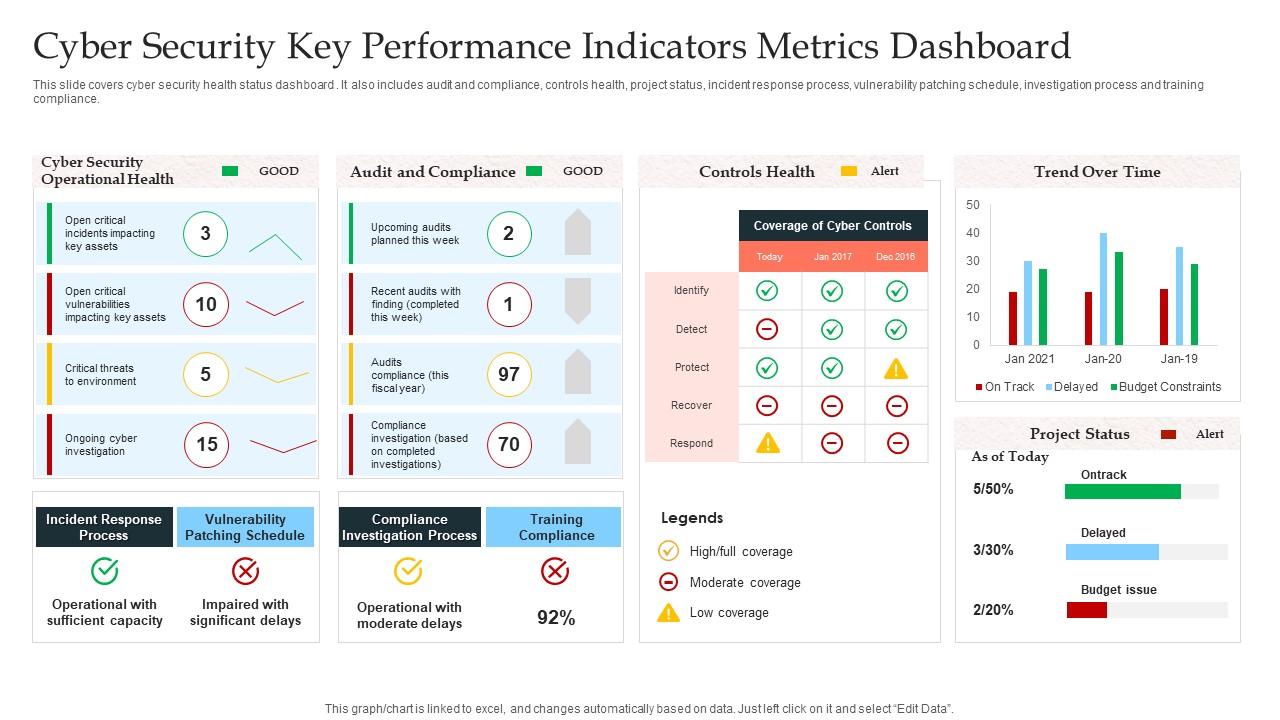
Template 1: Cyber Security Key Performance Indicators Metrics Dashboard
Commanding attention from slide one, this dashboard delivers a complete cyber security health status overview in one unified view. Color-coded panels give instant clarity on audit and compliance, controls health, and project status. Incident response process timelines sit alongside vulnerability patching schedules for seamless operational oversight. Training compliance tracking ensures your workforce readiness is never overlooked. This template empowers CISOs and security analysts to present Security KPIs with authority and precision. Transform your cybersecurity reporting presentations today. Download this dynamic template now and unlock crystal-clear security posture communication.
Download this PowerPoint Template
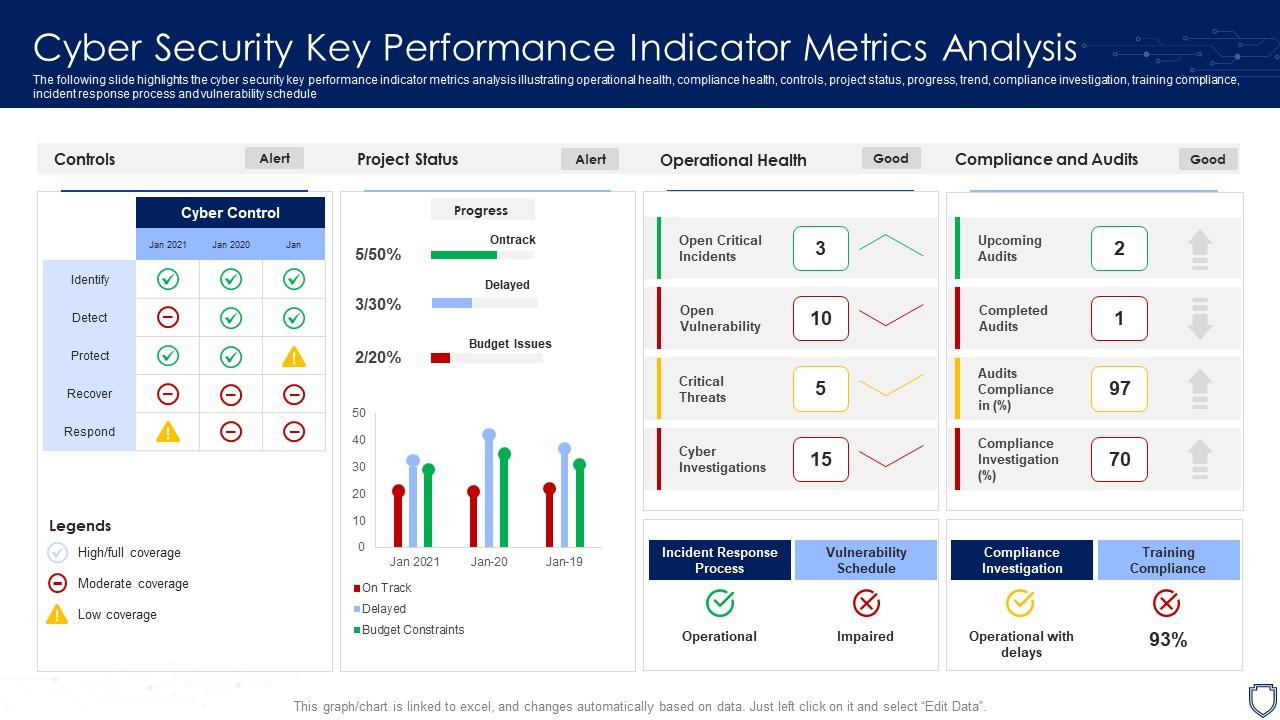
Template 2: Cyber Security Key Performance Indicator Metrics Analysis
Elevate every security review meeting with a structured analysis of operational and compliance health. This template captures trend data, project progress, and compliance investigation status. Incident response process timelines and vulnerability schedule tracking give stakeholders instant visibility into risk management metrics. Training compliance indicators keep workforce readiness front and center for every executive briefing. Build persuasive Cyber Security KPI analyses that drive decisions, not just awareness. Transform your security performance presentations today. Download this dynamic template now and unlock the reporting clarity your organization needs.
Download this PowerPoint Template
Template 3: KPI Dashboard Metrics Security PowerPoint PPT Bundles
Twelve purpose-built slides combine to create a complete security metrics reporting powerhouse for any audience. Each slide translates complex data—stats, figures, and charts—into persuasive, audience-ready visuals. The bundle accelerates your Security Dashboard Metrics workflow, covering KPI tracking, compliance status, and threat assessment in one cohesive package. Flexible layouts adapt to boardroom briefings, audit presentations, and cross-team security reviews with equal authority. This deck empowers security leaders to present Cybersecurity Benchmarks with confidence and speed. Transform your security performance presentations today. Download this dynamic bundle now and unlock a complete reporting toolkit.
[product_image id=615623]
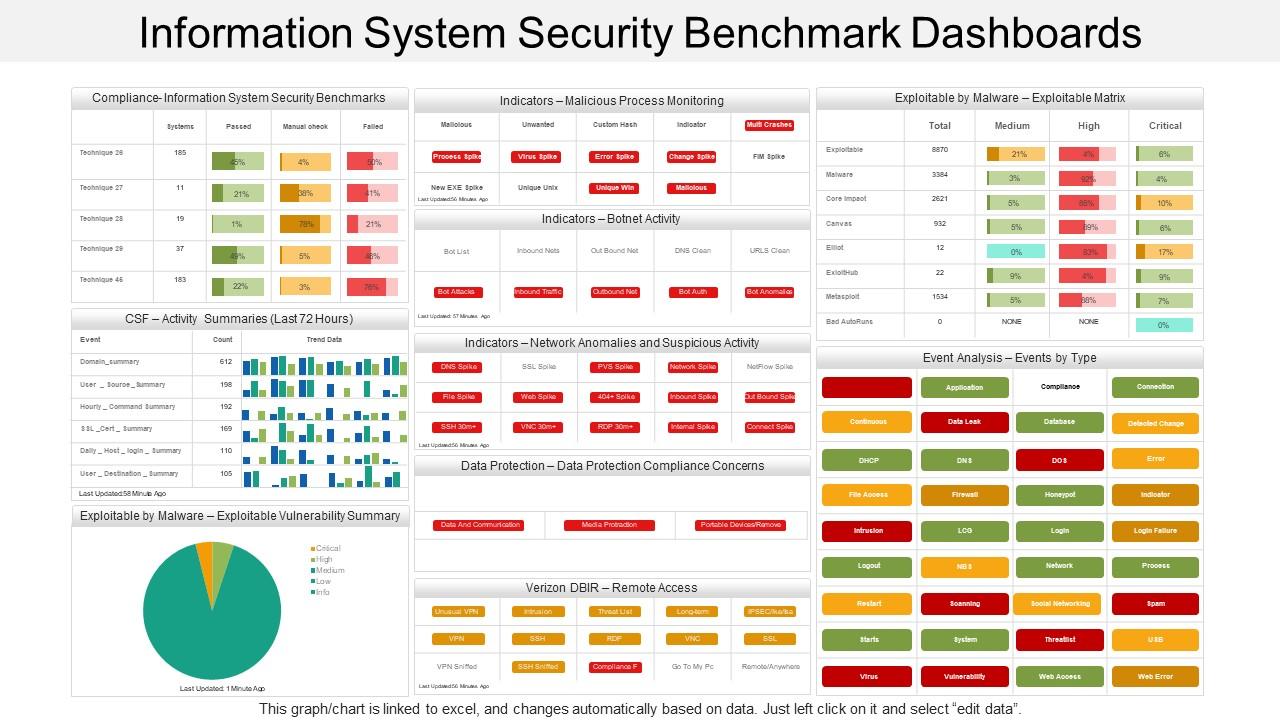
Template 4: Information System Security Benchmark Dashboards
Security benchmarks mean little without a clear visual anchor for leadership conversations. This PPT template is built for CISOs and IT security managers who need to present information security metrics across three structured stages. It maps Information Security Strategy, Plan, and Protection together in a single dashboard view. Use it to anchor Security Posture Assessment discussions with boards or auditors. The template is 100% editable and customizable.
Download this PowerPoint Template
Template 5: KPI Metrics Dashboard to Track Cyber Threat Management PPT
Focused on cyber threat visibility, this KPI dashboard drives clarity on risk score, compliance status, and threat level in one view. Heat-mapped risk indicators create immediate visual priorities, so leadership grasps current exposure without needing a briefing walkthrough. Current Risk Status and Threats By Owners panels translate raw threat intelligence metrics into named accountability. Operational status monitoring ensures your team never loses sight of active risk conditions. This template is built for presenting security awareness program outcomes with measurable precision. Transform your cyber threat tracking presentations today. Download this dynamic template now and unlock real-time risk visibility.

Download this PowerPoint Template
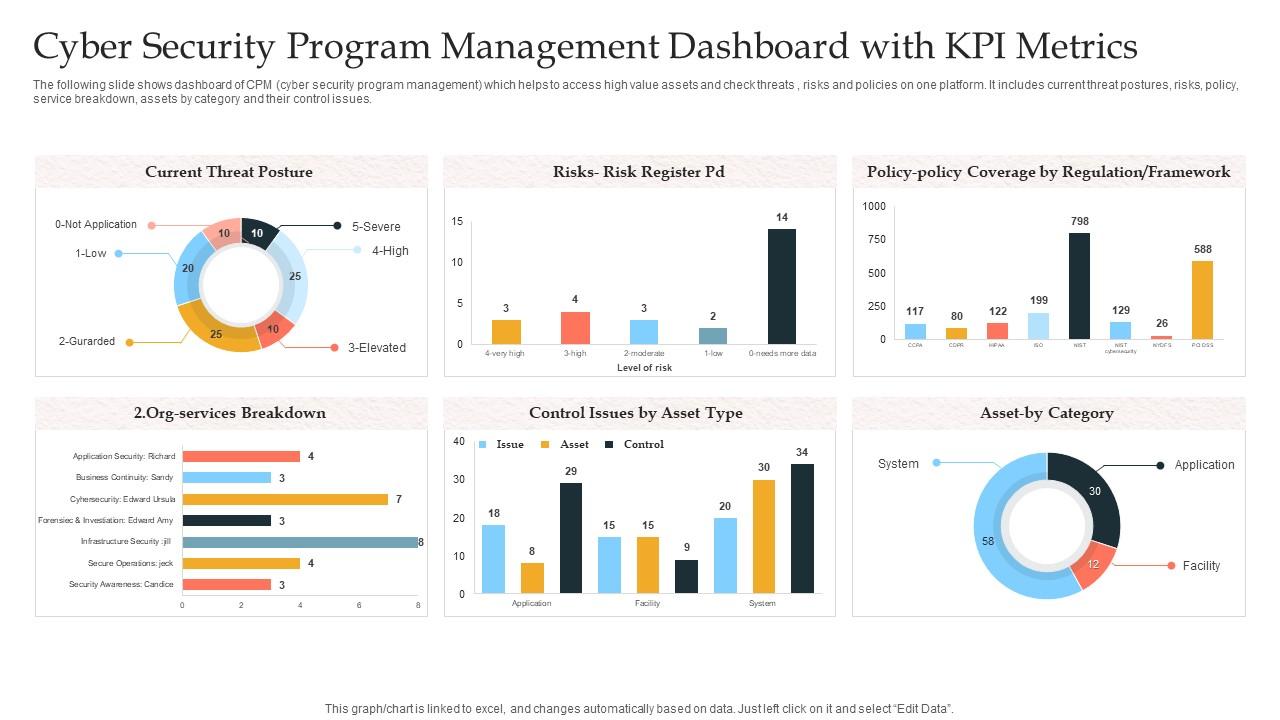
Template 6: Cyber Security Program Management Dashboard with KPI Metrics
Cyber security program management gets complex fast — assets, threats, risks, and policies rarely live in one place. This PPT preset consolidates CPM program data into a single, scannable dashboard built for security officers and program leads. Current threat postures, policy compliance, service breakdowns, and asset control issues are all visible at a glance. It's a practical tool for cyber security metrics reviews with leadership or risk committees. The template is 100% editable and customizable.
Download this PowerPoint Template
Template 7: KPI Metrics Tracking Cyber Threat Management Awareness Dashboard
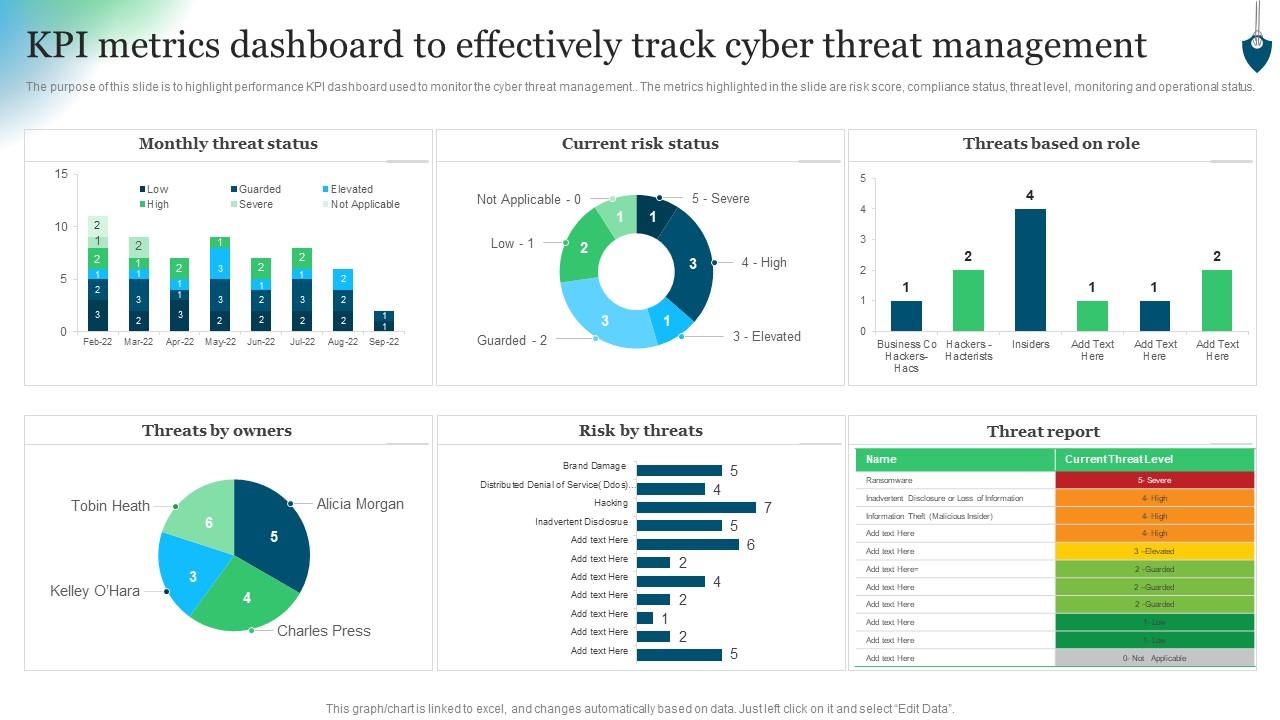
Precision in cyber threat management reporting starts with a layout built for real-time monitoring decisions. This template captures Monthly Threat Status, Current Risk Status, and Threats Based Role in a dashboard designed for operational clarity. Compliance status panels and threat level indicators give security teams and executives a shared view of organizational exposure. Risk score visualization makes Incident Response Metrics immediately actionable for any audience, from analysts to board members. Build outstanding security awareness and threat management presentations that move leadership to act. Transform your reporting today. Download this dynamic template now and unlock decisive threat management communication.
Download this PowerPoint Template
Template 8: Cyber Security Threat Dashboard with KPI Metrics
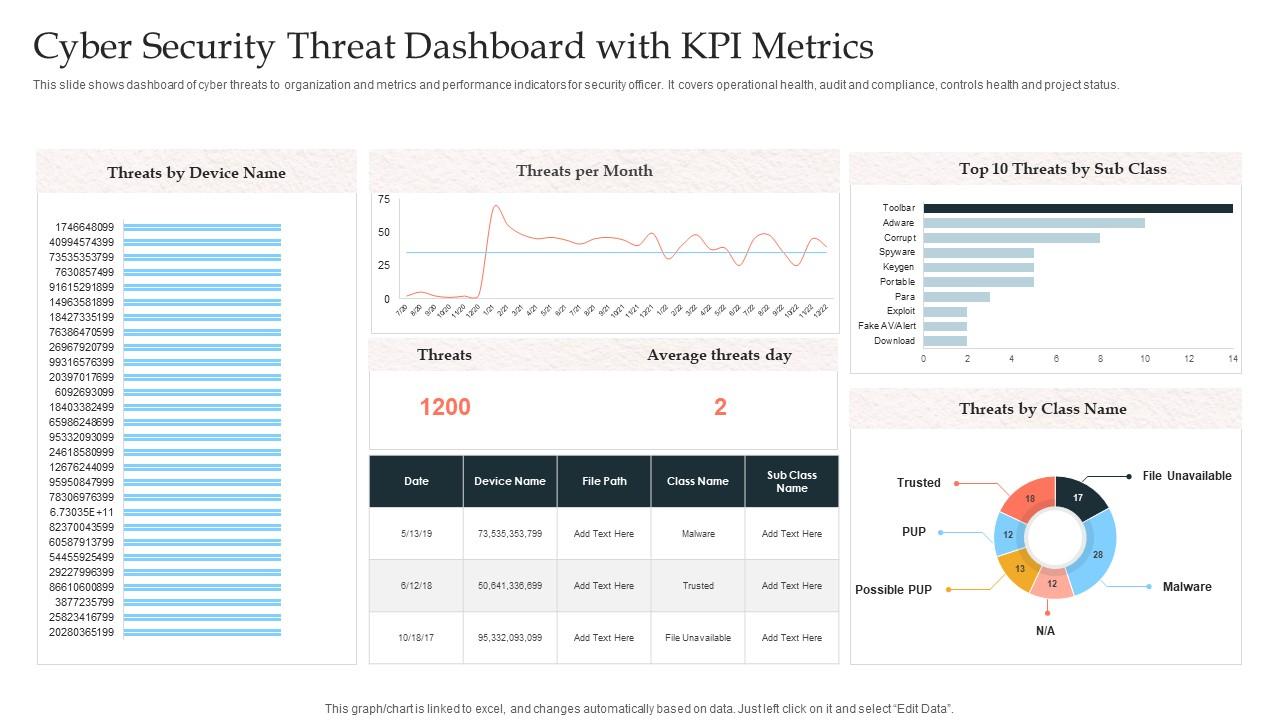
Operational health and audit compliance rarely get presented side by side — this PPT template changes that. This PowerPoint slide is built for security officers who need to communicate threat posture and controls health in one structured dashboard. It covers operational health, audit and compliance, controls health, and project status for SOC Performance Metrics reviews. Use it when briefing leadership on security metrics across multiple program areas simultaneously. The template is 100% editable and customizable.
Download this PowerPoint Template
Template 9: Four-Stages Funnel Diagram for Security Metrics Strategy Infographic
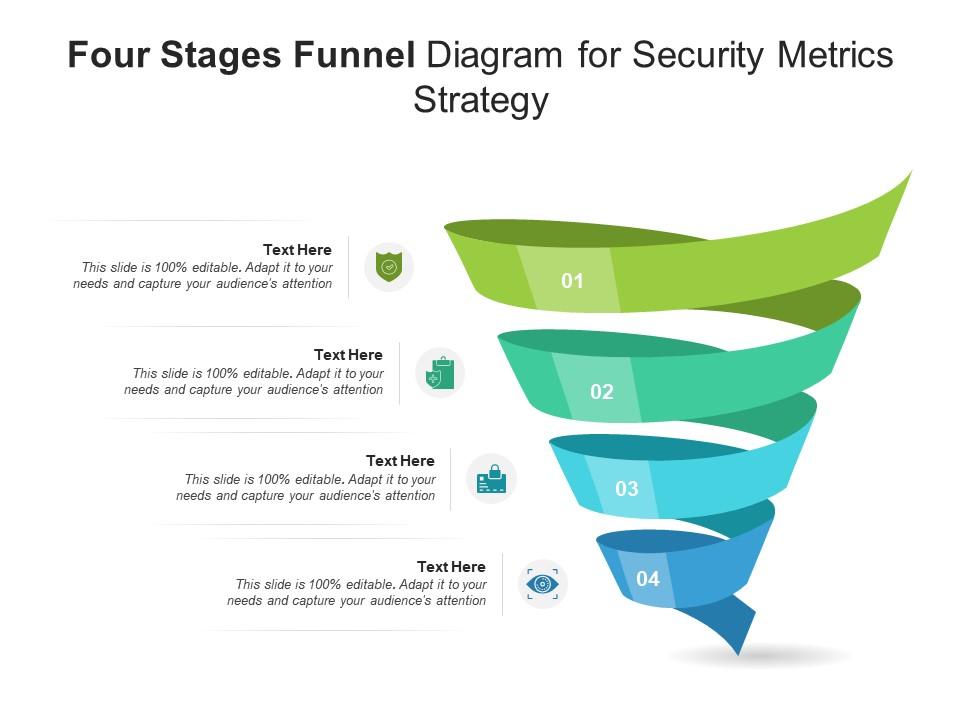
Presenting a security metrics approach in four stages requires a structure that holds its logic visually. This PPT preset uses a clean funnel diagram to walk practitioners through a layered security metrics strategy. It's a practical tool for risk managers and security analysts building Vulnerability Management or Cyber Risk Quantification presentations. Use it to structure a board briefing or internal security review with clear visual flow. The template is 100% editable and customizable.
Download this PowerPoint Template
Template 10: Cyber Security Incident Response Monitoring Key Metrics Dashboard
Incident response effectiveness is hard to communicate without the right measurement frame. This PowerPoint slide is built for security teams who need to present KPI data on their cyber security incident response program to leadership. Satisfaction rate, tickets by channel, and tickets by priority give a grounded view of response quality and workload. It fits directly into information security metrics reporting for CISOs presenting program outcomes. The template is 100% editable and customizable.

Download this PowerPoint Template
Template 11: Essential SIEM Dashboard Metrics for Security Analysts PPT Outline
SIEM data is only useful when analysts can act on it quickly. This PPT preset is built for security analysts who need to present SIEM Metrics in a structured, audience-ready format. It gives a visual framework for surfacing threats, event volumes, and detection patterns without burying the signal in noise. Use it for SOC Performance Metrics briefings or cross-team security reviews. The template is 100% editable and customizable.
[product_image id=1701355]
Template 12: Essential Security Strategies for Modern Businesses PPT Information
Modern businesses face a wide security surface — and leadership needs a clear picture of the response. This PowerPoint slide is built for security leads and CISOs presenting essential security posture and defense approaches to business stakeholders. It covers the core security domains that matter most in board-level and risk committee conversations. Use it to anchor IT Security Assessment discussions with a structure that non-technical audiences can follow. The template is 100% editable and customizable.
[product_image id=1594570]
Template 13: Cyber Security Metrics to Monitor and Improve Protection PPT Structure
Monitoring and improving cyber protection demands a presentation framework that makes progress visible and concrete. This deck combines striking visual design with structured layouts purpose-built for Cyber Security Metrics reporting across any audience. Data-driven charts and clear metric panels convert complex protection data into compelling security performance narratives. Flexible slide structures support everything from patch management reviews to executive risk briefings with equal precision. This template empowers security teams to monitor, report, and improve organizational defense with speed and clarity. Transform your cybersecurity presentations today. Download this dynamic deck now and unlock your security reporting potential.
[product_image id=1501085]
Template 14: Cyber Security Metrics to Enhance Organizational Defense PPT Slides
Organizational defense is easier to strengthen when the metrics telling the story are clear and well-structured. This PPT preset is built for security professionals presenting defense posture improvements, cyber security metrics, and risk reduction outcomes to leadership. The deck covers boardroom pitches and client briefings equally well, with a visual design that makes complex data readable at a glance. Use it when you need to demonstrate how security investments translate into measurable organizational protection. The template is 100% editable and customizable.
[product_image id=1539607]
Template 15: Cyber Security Key Metrics Monitoring Dashboard PPT Guidelines
Security monitoring dashboards need to communicate fast — this PPT template is built for exactly that. This deck is designed for security managers and analysts who need to present key metrics, threat trends, and control statuses in a visually coherent monitoring dashboard. It supports Network Security Monitoring and Endpoint Security Metrics briefings where leadership needs real-time clarity, not slides dense with raw data. A strong visual identity makes this deck suitable for both internal reviews and external compliance reporting. The template is 100% editable and customizable.
[product_image id=1611234]
Template 16: Building a Cyber Security Framework PPT Outline
Building a cyber security framework is a long process — and getting leadership aligned requires a presentation that holds its structure. This PPT preset is built for security architects and program leads who need to walk stakeholders through framework design, Compliance Metrics, and control implementation stages. It supports both internal alignment sessions and board-level security governance reviews. Use it when the audience needs to see the framework logic, not just the outcomes. The template is 100% editable and customizable.
[product_image id=1539198]
Template 17: Cyber Security Key Performance Indicator Metrics Analysis PPT Information
Presenting KPI analysis for cyber security programs demands slides that make complex indicator data immediately clear. This complete deck delivers structured layouts for communicating operational health, compliance trends, and control performance across any stakeholder audience. Twelve thoughtfully crafted slides give security analysts and CISOs the framework to build rigorous, persuasive KPI narratives. Every layout is optimized for adapting security performance data to executive, audit, or team-level review contexts with precision. This template empowers security leaders to present indicator analysis that drives real organizational decisions. Transform your security KPI presentations today. Download this dynamic deck now and unlock authoritative performance reporting.
[product_image id=1469349]
Template 18: KPI Metrics Dashboard on Security Awareness Program for Action
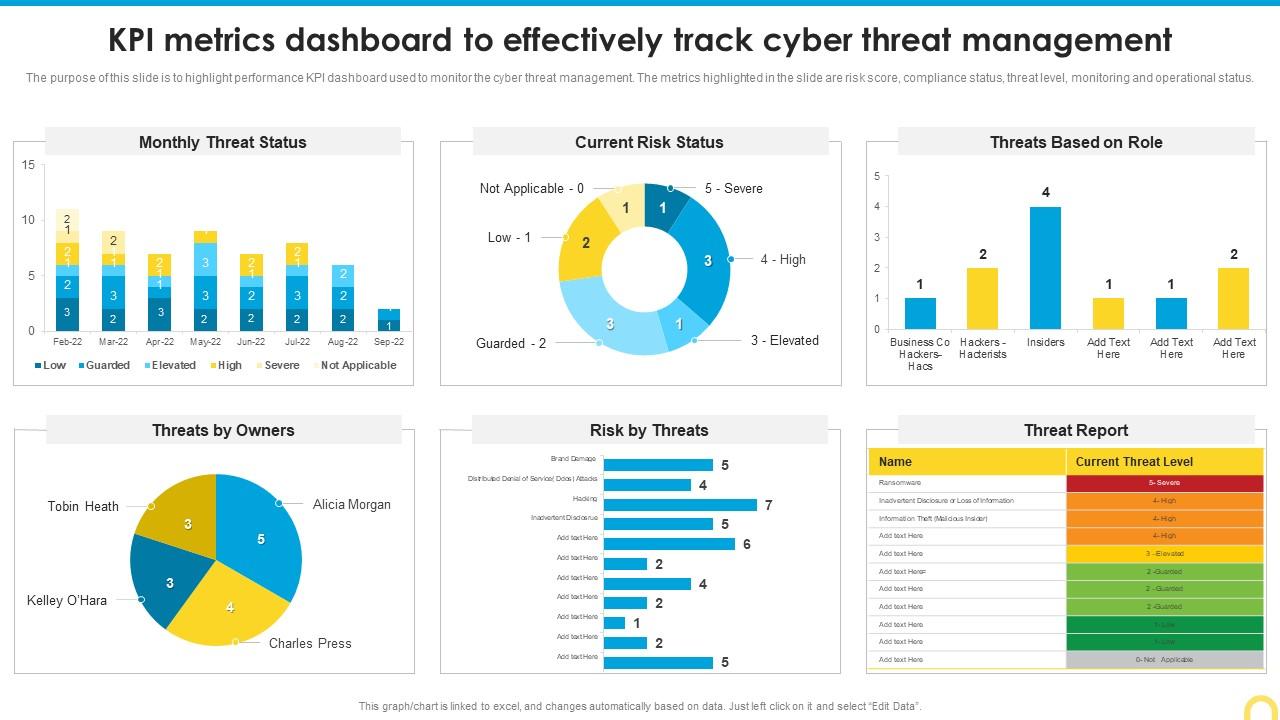
Cyber threat management KPI dashboards work best when risk score, compliance, and threat level share one visual frame. This PowerPoint slide is built for security program managers who need to present threat monitoring data to leadership clearly and concisely. It supports Threat Management and Metrics Dashboard discussions, giving stakeholders a single view of operational and compliance status. Use it to anchor security awareness program reviews with data that justifies both investment and next steps. The template is 100% editable and customizable.
Download this PowerPoint Template
Template 19: Security Score Metrics Evaluation of Cybersecurity Training Dashboard
Measuring a cybersecurity training program's impact requires more than completion rates — this deck captures the full risk picture. This PPT preset is built for security awareness managers who need to present training KPI dashboards covering security score, category breakdown, and high-risk participant data. It gives HR and security leadership a grounded, data-backed view of workforce risk posture. Use it when presenting cybersecurity training outcomes to leadership or compliance teams requiring evidence of program effectiveness. The template is 100% editable and customizable.
[product_image id=1136506]
Template 20: Top Business Metrics Every Owner Should Monitor Regularly PPT Structure
Business owners rarely have time to dig into raw data — this PPT preset brings the key metrics to the surface. This PowerPoint slide is built for business leaders who need to monitor operational and security performance metrics in a clear, structured format. It supports regular business review meetings where owners need to see what's working, what's drifting, and where to act. Use it to anchor recurring performance reviews or investor briefings with a metrics framework that translates data into decisions. The template is 100% editable and customizable.
[product_image id=1781305]
Elevate Your Security Metrics Reporting with SlideTeam
SlideTeam's PowerPoint templates are the best in the industry for security metrics reporting. These content-ready slides save hours of design work while delivering professional-grade KPI dashboards, compliance tracking, and threat intelligence visuals that executives can act on. Use these ready-made frameworks to present your security posture with clarity and authority. Deploy these templates to justify budgets, demonstrate compliance, and drive meaningful organizational security decisions.
FAQs on Security Metrics
How do you determine which security metrics are relevant to your organization's risk appetite?
Start with your organization's defined risk tolerance — what threats keep leadership awake. Map metrics directly to those threats. Prioritize metrics tied to assets that carry the highest business impact. If a metric doesn't change a decision or trigger a response, it's not relevant. Review quarterly; risk appetite shifts as the business changes.
What distinguishes a vanity security metric from an actionable one?
A vanity metric looks good but doesn't change behavior. Total vulnerabilities scanned is vanity; percentage remediated within SLA is actionable. Actionable metrics connect to a decision: escalate, remediate, or allocate budget. If no one changes what they do after seeing the metric, it's vanity.
How should security teams balance qualitative and quantitative metrics when reporting to executives?
Quantitative metrics — patch rates, Mean Time To Detect, incident counts — give executives measurable progress. Qualitative context explains why a number moved. Lead with the number, follow with the narrative. Executives need both: the data to justify spend and the story to understand exposure. Keep the ratio roughly 70% quantitative, 30% qualitative.
What are the most effective ways to measure the success of a security awareness training program?
Track phishing simulation click rates before and after training. Measure the percentage of staff reporting suspicious activity. Monitor Security Score changes for high-risk participant groups. Reduction in user-originated incidents is the strongest outcome signal. Completion rates alone tell you nothing about behavior change.
How do mean time to detect (MTTD) and mean time to respond (MTTR) differ in practice, and why do both matter?
Mean Time To Detect measures how long a threat goes unnoticed; Mean Time To Respond measures how fast the team acts once detected. A fast MTTR with a slow MTTD means threats linger too long before anyone sees them. Both matter because detection gaps and response delays carry separate cost implications — reducing one without the other leaves real risk on the table.
What role do security metrics play in justifying cybersecurity budget requests to leadership?
Security metrics translate operational risk into financial terms leadership understands. Show cost-per-incident trends, remediation time, and compliance gap exposure alongside budget asks. Tie proposed investments directly to metric improvements — for example, faster patch cycles reducing vulnerability window. Leaders fund what they can measure; metrics make the case concrete.
How can organizations avoid the pitfall of measuring what is easy rather than what is meaningful?
Build your metrics list from risk outcomes, not data availability. Ask: what decision does this metric support? If the answer is none, drop it. Establish a formal review process where each metric is challenged annually. Involve leadership in defining what matters — ownership creates accountability for meaningful measurement.
What metrics best capture the effectiveness of a zero-trust architecture implementation?
Focus on lateral movement attempts blocked, percentage of traffic authenticated via identity verification, and policy exception rates. Track privileged access reviews completed on schedule. Reduction in implicit trust grants over time signals real zero-trust progress. Authentication failure rates and micro-segmentation coverage are also strong leading indicators of architecture effectiveness.


