

Business Annual Meeting And Events Schedule Calendar




Try Before you Buy Download Free Sample Product
 Impress Your
 Audience
 100%
100% Editable
 Save Hours
 of Time


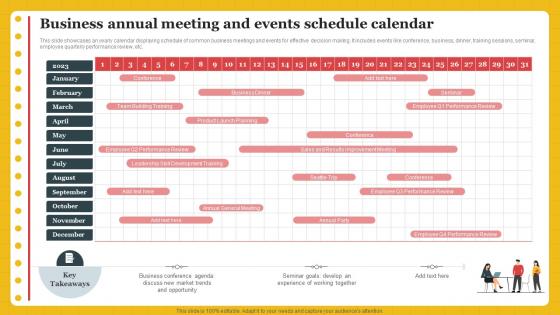
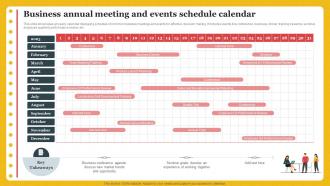
This slide showcases an yearly calendar displaying schedule of common business meetings and events for effective decision making. It includes events like conference, business, dinner, training sessions, seminar, employee quarterly performance review, etc.
People who downloaded this PowerPoint presentation also viewed the following :
Business Annual Meeting And Events Schedule Calendar with all 6 slides:
Use our Business Annual Meeting And Events Schedule Calendar to effectively help you save your valuable time. They are readymade to fit into any presentation structure.





FAQs for Business Annual Meeting And
Okay so basics first - date, time, location (or Zoom link if it's virtual). Add your agenda with rough time slots for each thing. Who's presenting what? Include that too. Don't forget prep work people need to do beforehand - nobody likes being blindsided. Contact info for questions is clutch. Build in buffer time because meetings ALWAYS run long, it's like a law of physics or something. If you're voting on stuff, explain how that'll work. Parking situation? Food? Tech setup? All that boring but necessary logistics stuff. Send it out two weeks early so people can't complain they didn't have enough notice.
Honestly, the biggest game-changer is just being consistent with your meeting schedule. People can actually plan ahead instead of that chaotic "when's everyone free?" dance we all hate. Survey your stakeholders first about timing preferences - this part's crucial but everyone skips it. Space meetings out so you're not overwhelming people, but don't go radio silent for months either. I learned this the hard way when I tried quarterly meetings and lost all momentum. Regular touchpoints keep conversations flowing naturally. Build the schedule around what actually works for your group, not some generic template.
Honestly, I'd start with whatever your team's already using for project stuff - no point learning something new if you don't have to. Asana and Trello are pretty solid for tracking all your meeting tasks and deadlines. Monday.com's decent too. If you need something heavy-duty, Microsoft Project works but it's kind of a pain for just annual meetings tbh. Google Workspace is clutch when multiple people need to edit schedules at once. Oh, and Calendly or Doodle will save your sanity when you're trying to get everyone's availability lined up.
Ugh, time zones are such a pain for global meetings! What I've learned is you want to aim for mid-morning in one major region - that way others get early morning or evening instead of some horrible 3am slot. Definitely rotate which region gets the "good" time each year though, otherwise people get bitter. Oh and here's something that actually works - just ask everyone what times suck least for them rather than guessing. I used to think I could figure it out myself but people's schedules are weird.
Go with a 60/40 split - way more discussion than presentation time. Cap any presentations at 15 minutes tops, then jump straight into Q&A or breakouts. I swear, nothing kills a meeting faster than back-to-back PowerPoints for hours. Mix things up with panels or fishbowl discussions instead of the usual lecture format. Oh, and build in breaks between topics - people's brains need a minute. Your attendees showed up to actually participate, not sit there like bumps on a log, so give them tons of chances to talk throughout the day.
Check your attendance rates first - that's the obvious one. But honestly, engagement matters way more than just showing up. Are people actually participating or just sitting there? Look at whether folks follow through on action items afterward, because that's where you'll see if meetings actually work. If attendance tanks suddenly, you probably hit a busy season or holiday period. Survey people afterward for real feedback. Different orgs work better on different days - maybe try switching up when you meet? I've seen teams completely change their success rate just by moving from Mondays to Wednesday afternoons.
Honestly, scheduling tools are a game changer now - you can poll people across time zones without losing your mind. Hybrid platforms let remote folks actually participate instead of just watching awkwardly. I'd start with something that syncs everyone's calendars because those email chains where you're trying to find a date? Pure torture. Look at your past meeting data too - like when did people actually show up vs when they bailed? Super helpful for timing. The analytics stuff sounds boring but it's actually pretty useful for seeing what worked before. Build everything else around a solid scheduling platform and you'll save yourself so much headache.
Oh totally go through that old feedback first! Seriously, I've watched so many people skip this step and then act shocked when the same problems come up again. Check what people were actually complaining about - maybe morning slots bombed or everyone was burned out from sessions running too long. Those post-meeting surveys from the last couple years? Gold mine. Just make a quick list of the biggest complaints and plan around them. Like if everyone kept saying back-to-back presentations were brutal, don't do that again. Pretty obvious but you'd be surprised how often teams forget.
Start by surveying everyone 4-6 weeks out to see what they actually care about. Set up a simple voting system for proposed topics - honestly, having data makes agenda decisions way easier to defend later. I like sorting everything into "must discuss," "should discuss," and "nice to have" piles. Put your critical stuff early when people still have brain power. Always build in buffer time because these things never stay on schedule. Oh, and send the draft around early so people can complain before you finalize it, not during the meeting.
Honestly, do it twice a year - right after your meeting ends and then maybe 6 months out from the next one. We got totally screwed once because our usual venue was booked solid by the time we checked. The immediate post-meeting thing is clutch because you'll actually remember what sucked and what didn't. Then that 6-month checkpoint? Perfect timing to lock down your venue and speakers before everyone's calendar gets insane. Just throw it on your calendar as a recurring thing. Seriously, you'll hate yourself if you're scrambling last minute again.
First things first - check your room sizes against expected turnout. Nothing kills the vibe like cramming 50 people into a space meant for 20. Survey folks beforehand about their top picks so you can shuffle room assignments if needed. Don't pit popular sessions against each other either (marketing vs sales strategy = bad move). Mix skill levels and departments thoughtfully - some combos just work better for breakouts. Oh, and line up your facilitators early because that's always harder than you think it'll be. Honestly, the pre-planning survey saves you so much headache later.
Look, your theme basically controls everything about timing. Start with your keynote to set the "Innovation in Healthcare" vibe, then stack your breakouts so they actually build on each other. Morning = perfect for heavy analytical stuff when brains are working. After lunch though? That's when interactive workshops actually work - people need to move around anyway. Also check if your speakers can even show up when you want them, and whether you need weird tech setups. I always map out the key theme pieces first, then figure out the schedule. Way easier than doing it backwards.
Honestly, you gotta bake the structure right into your meetings from day one. Give everyone like 3-5 minutes max and actually stick to it (good luck with that one person who always rambles). Try round-robin so everyone talks before anyone goes twice. Anonymous questions work great too - the quiet people finally speak up. Oh, and switch who's presenting each time. Same voices every meeting gets old fast. Don't just hope people will naturally participate because they won't. Make it structured or it'll be chaos.
Run multiple tracks at the same time - beginner, intermediate, advanced covering the same stuff. People can pick what fits them. I've seen this crush it at tech conferences where they do "Intro to X" alongside "Advanced X Implementation." Another option is hybrid sessions. Start with basics for 15-20 minutes, then go deeper. Newcomers get the foundation, experts don't fall asleep (well, hopefully). Just label everything clearly on your agenda so people know what they're getting into. Nothing worse than showing up to what you think is a beginner session and getting completely lost.
Oh man, visual templates are seriously a lifesaver for annual meetings! You can break everything into chunks with colors and icons instead of drowning people in text walls. Color-coding different tracks or sessions? Chef's kiss - makes scanning so much faster. People can actually spot their breaks and important stuff without squinting at boring lists. Plus everything looks consistent, which honestly matters more than you'd think when folks are already overwhelmed. I'd start simple with a basic grid and add fancy stuff later. Trust me, your attendees will thank you.
-
Excellent design and quick turnaround.
-
Incredibly beautiful designs that will help you get noticed! These eye-catching templates are perfect for corporate presentations that can be altered to fit any occasion or taste.