


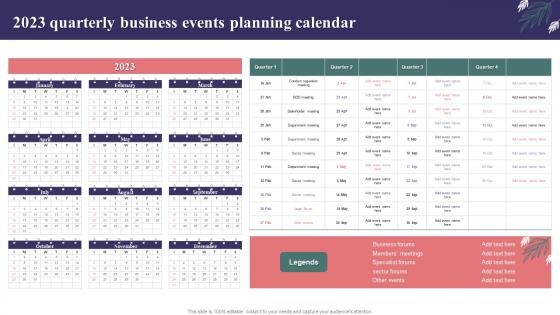
2023 Quarterly Business Events Planning Calendar




Try Before you Buy Download Free Sample Product
 Impress Your
 Audience
 100%
100% Editable
 Save Hours
 of Time


Our 2023 Quarterly Business Events Planning Calendar are topically designed to provide an attractive backdrop to any subject. Use them to look like a presentation pro.
People who downloaded this PowerPoint presentation also viewed the following :
2023 Quarterly Business Events Planning Calendar with all 6 slides:
Use our 2023 Quarterly Business Events Planning Calendar to effectively help you save your valuable time. They are readymade to fit into any presentation structure.





FAQs for 2023 Quarterly Business
Definitely hit all the big federal ones - New Year's (it's Jan 2 this year since the 1st is Sunday), MLK Day, Presidents Day, Memorial Day, July 4th, Labor Day, Thanksgiving, Christmas. Veterans Day and Columbus Day are worth adding too since some clients still care about those. Oh, and throw in the major religious holidays like Easter, Passover, Rosh Hashanah, Yom Kippur - trust me, you don't want to accidentally schedule a big meeting during Passover. Better to over-mark than miss something important. I always color-code mine by type so the team knows what's what.
So first thing - grab a calendar and mark all the big holidays plus those random niche ones that might work for your brand. Black Friday's obvious, but like National Donut Day? Could be gold if you're in food. Work backwards from your biggest sales targets to see when the hype needs to start building. Honestly, most people forget to block out prep time and then wonder why they're stressed. Color-code different campaign types so you don't accidentally plan three major launches in December (been there). The weird holidays are sometimes the best tbh - way less competition.
Honestly, this saved my butt last year. When you merge your financial calendar with business dates, you can actually see the train wrecks coming. Like when quarterly taxes, payroll, and that huge vendor payment all hit the same week - because of course they do. Having everything in one place means you spot those cash flow disasters before they happen. Your team can make better spending choices throughout the year instead of that usual month-end panic. I'd start with the big financial deadlines first, then add your project stuff. Makes budgeting feel way less like guesswork.
Hey! So first thing - dig into last year's numbers, that's your gold mine right there. Look for those obvious seasonal spikes: back-to-school in August, holiday madness Nov-Dec, New Year fitness stuff in January. But honestly, every industry's different - like tax software absolutely kills it Q1 while travel bookings go nuts before summer hits. I'd pick your top 3 seasonal moments and start prepping campaigns like 6-8 weeks early. Oh, and don't just copy what everyone else does - your specific business probably has weird little patterns that are pure money if you spot them.
Yeah, mark all the big trade shows and conferences that hit your industry. Tech folks need CES in January, WWDC in June - you know the drill. Retail's gotta track back-to-school, Black Friday madness, holiday shopping. Manufacturing and B2B companies should watch those fiscal year-ends when everyone stops making decisions (learned that one the hard way). Healthcare and finance have those compliance deadlines you can't mess with. Honestly, just make a shared calendar with your team and color-code everything by how critical it is. Makes life so much easier.
Honestly, get a 2023 business calendar - it's a game changer for avoiding those "wait, why is everything due when half the team is on vacation" disasters. Map out your project phases against actual working days so you're not scrambling around holidays. I always color-code mine by project stream because spotting overlaps becomes way easier. You'll catch bottlenecks early too, like when Q4 suddenly has three major deadlines in one week (why does this always happen?). Share it with your team so nobody's working off different assumptions about timelines.
Honestly, just start with Google Calendar or Outlook - they're free and sync everywhere. I always end up going back to these even when I try fancy stuff. Your team can easily share them too. Asana's pretty solid if you want more visual project tracking with calendar views. Monday.com does the same thing but costs more (worth it though if you have budget). Oh, and Canva works if you need something that looks good for presentations. But seriously, Google Calendar first - you can always make it prettier later or export the data somewhere else.
Honestly, plain text calendars are just dead on arrival - nobody bothers reading them anymore. Visual templates actually get people's attention though. Color code different departments, throw in your brand stuff, maybe add some icons or graphics to break things up. Progress bars for quarterly goals work really well, or team photos for big meetings. Even simple illustrations for company events help (though don't go overboard or it'll look like a kindergarten poster). The trick is starting with something clean, then customizing it with your company colors and key visuals. Trust me, people will actually look at it.
Honestly, just grab your 2023 calendar and start marking up the big company stuff first - product launches, busy seasons, whatever matters for your industry. Then break your annual goals into quarterly pieces that actually line up with those dates. I still print out calendars for this because I'm weird like that, but seeing it visually really helps. Don't forget holidays and when people usually take vacation - learned that one the hard way! The whole point is getting your team to see why certain deadlines exist and when everything needs to happen.
Honestly, just treat it like any other business goal you'd plan out. Pick 3-4 big green projects and spread them across the year - maybe an Earth Day thing, some energy audits during quieter months, waste reduction stuff. Don't dump it all on your team at once or they'll hate it. Block out time quarterly for training and checking how you're doing. I've seen this work way better when companies actually schedule it instead of just winging it. Oh, and definitely review your vendors too - some of them are surprisingly behind on this stuff. Makes the whole year feel less... corporate-y, if that makes sense.
Start by checking how holidays land this year against your past sales data. Easter's super early (April 9th) and the weekday/weekend combos are gonna mess with normal shopping patterns. Thanksgiving being late (Nov 23rd) means you're looking at a crazy compressed holiday season - honestly that's what trips up most retailers. Pull data from years with similar calendar layouts if you have it. Don't forget to factor in whatever economic weirdness is happening right now. Build some buffer scenarios because let's be real, something always goes sideways. Get your models running soon so you can tweak them as actual numbers roll in.
Honestly, just ask your team what matters to them instead of guessing. I totally screwed up once by scheduling something during Eid - learned that lesson the hard way! Sure, add the obvious stuff like Christmas and Easter, but don't forget Diwali, Lunar New Year, Ramadan, Indigenous Peoples' Day. Regional things matter too depending on where your people are from. Different harvest festivals, various New Year celebrations - that kind of stuff. A quick survey works way better than just googling random world holidays and hoping you got it right.
Oh dude, quarterly revenue and monthly cash flow are must-haves obviously. Customer acquisition costs too. Don't sleep on employee satisfaction scores quarterly - turnover is such a pain and gets expensive fast. Website traffic, conversion rates, and inventory turnover monthly will keep you sane operationally. But seriously, stick to maybe 5-7 metrics max or you'll go crazy drowning in spreadsheets. Set up some automated dashboard that pulls everything monthly so you're not panicking trying to put together reports when Q4 rolls around. Trust me on that one.
Honestly, the biggest game-changer for me has been setting "core hours" when everyone's actually online - like 10am-2pm or whatever works. Color-coding is clutch too. I mark everything as in-person, virtual, or hybrid so people aren't showing up to the wrong thing (happened way too often last year). Buffer time around meetings is huge since people are dealing with kids, commutes, whatever. Always have a dial-in backup and record the important stuff. Oh, and those regular check-ins with remote folks? Total lifesaver for catching things before they become problems.
Honestly, a good business calendar is like a secret weapon for team vibes. Mark your company milestones, team wins, and weird holidays - suddenly everyone has stuff to get excited about together. Shows you actually plan ahead too, instead of scrambling around major holidays like an idiot. My old team went absolutely nuts for "Bring Your Pet to Work Day" once we put it on the official calendar. The trick is letting your team help decide what goes on there. Ask what they care about. You'll be surprised how much people perk up when they feel heard about this stuff.
-
SlideTeam has helped me take my presentation to the next level. Everyone at the office is impressed! I’ll be using their designs for a long-long time.
-
“Love it! I was able to grab an exciting proposal because of SlideTeam.”