

Business Hospitality Management Event Calendar




Try Before you Buy Download Free Sample Product
 Impress Your
 Audience
 100%
100% Editable
 Save Hours
 of Time


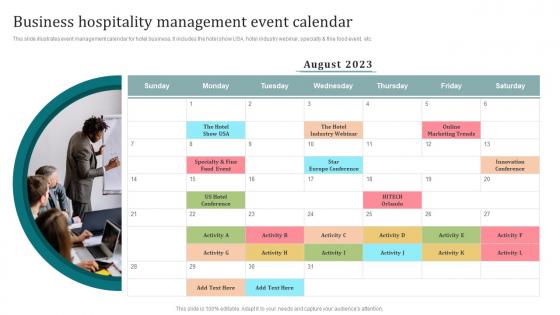
This slide illustrates event management calendar for hotel business. It includes the hotel show USA, hotel industry webinar, specialty and fine food event, etc.
People who downloaded this PowerPoint presentation also viewed the following :
Business Hospitality Management Event Calendar with all 6 slides:
Use our Business Hospitality Management Event Calendar to effectively help you save your valuable time. They are readymade to fit into any presentation structure.





FAQs for Business Hospitality
Start with the obvious stuff - event name, date, time, location. Can't really skip those! Guest list with contact info is next, plus catering details and any weird requirements like AV gear or dietary stuff. Budget tracking saved my butt last time, so definitely include that along with vendor contacts. RSVP deadlines are crucial - people will ghost you otherwise. Oh, and throw in a notes section for random changes because something always comes up. Make it detailed enough that if you get sick, someone else could actually pull it off.
Oh man, event calendars are honestly game-changers! People love having control over their schedule - they can browse the full agenda, filter by what actually interests them, and build their own lineup. Makes them way more likely to show up. You can throw in some fun stuff too like session ratings or networking suggestions. I'm telling you, humans are weirdly obsessed with checking things off lists, so lean into that. The real magic happens when you add push notifications for bookmarked sessions though. Super simple but your attendance will definitely spike.
Just stick with Google Workspace or Microsoft 365 honestly - they're boring but they work and play nice with everything else. Eventbrite's good for ticketed stuff. I've watched so many teams go overboard with like 5 different apps that can't sync properly, then spend half their time just managing the tools instead of actual planning. Super annoying. Start with shared Google Calendar for your team. Maybe add Asana later if you need help tracking all the vendor chaos and logistics. That's it though - resist the urge to add more until you're actually drowning without them.
Update it weekly at minimum, but daily is way better if you can manage it. Events are constantly shifting - speakers bail, venues get double-booked, budgets change. We totally missed this amazing networking thing once because our calendar was like two weeks out of date. Such a waste! Your team can't make good calls about which events to hit if they're working with old info. I'd set up a Monday morning reminder to review everything, and get everyone in the habit of calling out changes when they hear about them. Trust me, staying on top of it saves so much headache later.
Definitely include client entertainment stuff, team building activities, and networking events. Industry conferences are big too. Honestly, don't sleep on the seasonal parties - holiday events and summer BBQs are where people actually let their guard down and real connections happen. Trade shows and product launches should be on there. Award ceremonies too if you do those. Oh, and any community events you sponsor. Mix it up between internal team stuff and external client-facing events. I'd probably sort them by who's coming (internal/external/both) and how important they are. Makes budgeting way easier and you won't accidentally double-book your CEO or whatever.
Oh totally! Start with your brand colors and fonts - that makes the biggest visual impact. If your brand's fun and casual, write event descriptions the same way instead of sounding all corporate-y. I'd honestly focus on just 2-3 elements at first because trying to customize everything gets overwhelming fast. Categories and tags are easy wins too. The whole point is making it feel like part of your actual website, you know? Your logo should definitely be in there somewhere. Layout tweaks can wait until later - colors and voice are what people notice first anyway.
Honestly, social media is your best friend for filling seats at hospitality events. Post some behind-the-scenes prep shots and highlights - people hate feeling left out. The FOMO factor is real! When attendees share their food pics and networking moments, you're getting free promotion without lifting a finger. Stories work great for real-time updates too. I'd stick with Instagram Stories and LinkedIn since that's where your business crowd hangs out anyway. Oh, and don't forget to keep posting after the event - those shared experiences keep people talking and coming back.
Honestly, feedback from past events is pure gold when you're planning what's next. Track attendance, how happy people were, any disasters that happened - you'll start seeing patterns emerge. Like maybe those Q3 networking things always suck (been there), but people go crazy for morning coffee meetups over evening stuff. I learned this the hard way lol. Collect feedback after every single event, then actually look at it when you're building next quarter's calendar. Adjust your timing, venues, formats based on what the data tells you. Short version: let past mistakes guide future wins.
Dude, definitely highlight those local partnerships in your calendar. People love supporting businesses that actually care about the community instead of just swooping in to make money. Your partners will promote the events to their people too, which is basically free advertising. Those community-minded attendees? They're usually your best participants - way more engaged than random people. I'd put partner logos right up front and maybe do a little "community spotlight" thing in the descriptions. It's win-win since you're building relationships for future stuff too.
Honestly, event calendars are like your secret weapon for getting people to actually show up. They build anticipation and let people plan ahead instead of scrambling last minute. I always focus on what's in it for them - like "meet industry leaders" or "exclusive sneak peek" - rather than just boring date/time stuff. When you send out monthly previews consistently, it creates this FOMO thing where people don't want to miss what's happening at your company. Plus it keeps you top-of-mind, which is huge. Trust me, once you start doing compelling event descriptions in your calendar updates, you'll see those RSVP numbers actually climb.
Honestly, start with the basics - how many people showed up and actually seemed engaged while they were there. Post-event feedback is gold too. Then look at the business stuff: leads generated, meetings you booked afterward, any deals that came from connections made there. ROI matters obviously - just compare what you spent vs what you got back in partnerships or sales. Social mentions are cool if that's your thing, but don't get too caught up in vanity metrics. Pick maybe 4 metrics max that actually match why you're doing these events. Otherwise you'll drown in data and lose focus on what really moved the needle.
Dude, you need multiple ways to reach people fast. Push notifications through your app are huge - everyone's glued to their phones anyway. Email blasts work too, but honestly SMS hits different when it's actually urgent. Oh, and don't forget someone needs to babysit your social media and website with updates. The real trick? Set everything up so one click sends info everywhere at once. Trust me on this - tell people something's happening even if you're still figuring out details. They'd rather hear "hey, we're dealing with an issue" than wonder if you've just disappeared.
Okay so visual storytelling is where it's at - make a themed calendar that actually matches your brand or the seasons coming up. QR codes are pretty cool too, link them to exclusive stuff or early bird deals. Interactive elements work really well... flip cards showing event details, or maybe a timeline people can scroll through. Honestly PDFs are the worst - they just disappear into email hell! Oh and make it shareable on social with good graphics for each event. I'd start with just one creative thing and see how people react first though.
Yeah, timing is everything with events. Spring and summer are when everyone wants to party, so expect to pay premium prices for venues and catering. January and February? Total ghost towns - avoid unless you have to. Holiday season works great for corporate stuff though. I'm actually a huge fan of fall events. People are back from vacations, ready to work, and you'll get way better deals. Book your summer events super early or you're screwed for availability. But honestly, if budget's tight, those off-season dates can save you serious money.
Honestly, most virtual events are pretty forgettable these days, so you need to stand out. Creative titles help - like "Behind-the-Scenes Strategy Session" instead of boring meeting names. Make it interactive with breakout rooms, live polls, or actual workshops people can participate in. Nobody wants another passive webinar they half-watch while checking email. Try weird timing too - maybe a 7 AM "Virtual Coffee Chat" or evening networking where you ship cocktail kits beforehand. Sounds extra but it works. The whole point is creating something they can't get anywhere else, you know?
-
No second thoughts when I’m looking for excellent templates. SlideTeam is definitely my go-to website for well-designed slides.
-
Innovative and creative templates with high-quality designs. Helped me with my presentation as the slides were easy to edit.