

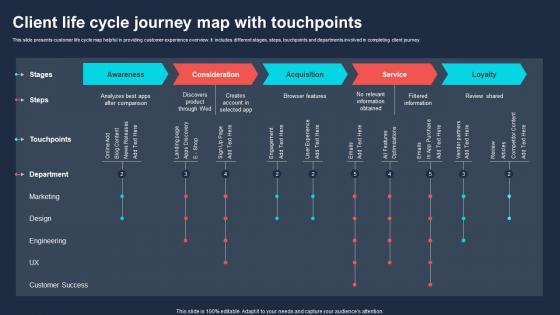
Client Life Cycle Journey Map With Touchpoints




Try Before you Buy Download Free Sample Product
 Impress Your
 Audience
 100%
100% Editable
 Save Hours
 of Time


This slide presents customer life cycle map helpful in providing customer experience overview. It includes different stages, steps, touchpoints and departments involved in completing client journey.
People who downloaded this PowerPoint presentation also viewed the following :
Client Life Cycle Journey Map With Touchpoints with all 6 slides:
Use our Client Life Cycle Journey Map With Touchpoints to effectively help you save your valuable time. They are readymade to fit into any presentation structure.






FAQs for Client Life Cycle Journey
So you need five key things for a client journey map that actually works. Start with solid personas - get super specific about who these people are and what motivates them. Map every touchpoint from when they first hear about you through after they buy. Here's what most people miss though: the emotional stuff matters more than you'd think. Track how customers feel at each step because that's what really drives decisions. Oh, and don't skip the pain points - those show you exactly where to improve. The whole map should tell a story your team can use to make real changes.
Look at your support tickets and complaints first - that's where the real pain points hide. Don't just assume you know what bugs people. Phone calls beat surveys every time because clients actually tell you what's driving them crazy (surveys are too polite, honestly). Check your analytics for where people bail out of processes too. But here's what's weird - sometimes the touchpoints that matter most aren't the big obvious ones. Could be a random confirmation email that ruins everything. Map the whole journey out, then focus on what clients say hurts most and what'll actually move your business forward.
Honestly, you can't build a decent journey map without personas first - they're what tell you who you're actually designing for. A working mom rushing through your app? Completely different experience than some college kid with all the time in the world. Each persona brings their own baggage, frustrations, and goals that shape every single touchpoint. I'd start with maybe 2-3 solid ones, then create separate journey maps for each. Otherwise you're just making up some generic path that doesn't match how real people actually behave. Trust me, the differences will surprise you.
Honestly, I'd pull data from everywhere first - your website analytics, CRM, support tickets, the works. That shows you the actual customer paths. But here's the thing that most people skip: just call 5-10 customers and ask them directly. I swear you'll find stuff that never shows up in spreadsheets. Your sales and support teams are sitting on goldmines too since they hear complaints all day. Heat mapping tools are pretty clutch for seeing where people get stuck. Oh, and those session recordings where you watch people navigate? Pure gold. Mix all that hard data with the messy human stuff, then test your theories with real people.
Miro and Mural are probably your safest picks - they've got templates already built in which is clutch. Lucidchart's solid too if your team uses it for other stuff. But honestly? I've seen people make killer journey maps in PowerPoint or Figma. Whatever works, you know? The real trick is interviewing your actual clients first - that's where the gold is. Don't overthink the tool choice. Start with something your team already knows how to use, then maybe upgrade later if you need bells and whistles. Way better than spending weeks learning fancy software when you could be mapping.
Grab feedback from all your big touchpoints and slap it right on your journey map. Surveys and interviews are obvious, but don't sleep on support tickets or random stuff clients mention during calls - that's where the real gold is sometimes. Color-code everything by sentiment so you can actually see patterns. The biggest thing? Compare what they're really feeling vs what you thought they'd feel. Trust me, you'll be wrong more often than you think. I'd focus on your top 3 touchpoints first, then expand from there. Update it quarterly or you'll forget.
Don't map what you *think* happens - talk to actual clients first. Seriously, so many teams just wing it based on guesswork and then wonder why their map is useless. Keep things simple too. I've seen gorgeous, complex maps that nobody ever looks at again. Focus on the messy stuff, not just when everything goes perfectly. Oh, and get people from different departments involved since clients deal with sales, support, product, whatever. The biggest thing though? Update it regularly. These aren't museum pieces - your client journey changes, so should your map.
Update it every 6-12 months, but honestly? I learned the hard way that sticking to just annual updates isn't always enough. We totally missed some huge pain points during a product launch once. Watch for triggers like new product features, different touchpoints, or when customer feedback starts sounding off compared to your current map. Data patterns shifting is another big red flag. Oh, and definitely set a calendar reminder - I always think I'll remember but never do. If customers keep mentioning experiences that don't match what you've mapped out, time for a refresh.
You know how customers get pissed when they have to repeat their story to every department? That's what happens when teams work in silos. Getting everyone on the same page about the customer journey fixes this mess. Sales knows what support deals with, marketing stops overpromising stuff that can't be delivered, and support actually gets why people are frustrated when they call in. Honestly, most companies are terrible at this - but when you map out the whole experience together, suddenly those handoffs don't suck anymore. Everyone sees how their work connects to the bigger picture.
So basically, journey mapping shows you where customers hit roadblocks and get annoyed. Think of it like watching someone navigate your business - you'll see exactly where they struggle or almost bail out. The cool part? You get their emotional journey too, not just the steps. Honestly, most companies are shocked by how many friction points they didn't know existed. Pick one customer type first (don't try to map everyone at once - that's overwhelming). Focus on their biggest headache and work from there. It's way more eye-opening than you'd expect.
Focus on the metrics that actually move the needle for your business - customer satisfaction, NPS, conversion rates at each touchpoint, and churn rates. Time-to-conversion matters too. Support ticket volume is honestly underrated because it shows you where people are getting stuck. Don't go overboard though. Pick maybe 5-7 metrics max that tie back to your goals. I made the mistake of tracking everything early on and it was just noise. Customer lifetime value gives you the bigger picture context. Start simple and add more as you figure out what's working.
Honestly, visual elements are a game-changer for journey maps. You want people to instantly spot the problems without reading a novel, right? I always use red for frustrating moments and green for the good stuff. Icons work great too - like little symbols for different channels or actions. The whole point is making it super scannable. Think dashboard vibes where someone can walk up and immediately get what's happening with your customers. Color coding is probably the most effective trick though. Trust me, stakeholders will thank you when they can grasp the entire client experience in like 30 seconds instead of squinting through walls of text.
So after you figure out what's bugging your clients, rank them by how much damage they're doing vs how easy they'd be to fix. Go for the low-hanging fruit first - those little annoying things that are simple to solve but make people way less frustrated. The bigger stuff needs more planning obviously. Add check-ins where clients feel ghosted, or maybe build some self-service tools. Honestly, half the time it's just about being clearer upfront about what to expect. You'll need other departments on board since these issues usually touch everything. Don't go crazy trying to fix it all though - pick 2-3 big ones and see what happens first.
Honestly, tech has completely changed the game for mapping client journeys. Instead of guessing what customers do, you can actually track their behavior across different platforms using analytics and heat mapping tools. Mobile apps make everything way more complicated than those simple funnels we used to draw - which is annoying but also gives you better insights. The cool part? Automation updates your maps in real-time when behaviors change. I'd start adding digital analytics to whatever process you're using now. You'll probably find gaps you had no idea were there. Trust me on this one.
Okay so journey mapping is basically like stalking your clients in a helpful way - you figure out exactly when they're getting confused or stressed during their whole experience with you. I was honestly shocked at how different my client types actually are when I first did this. The magic happens when you spot those 2-3 moments where they really need different approaches. Maybe someone's overwhelmed by too many options, or they don't know what comes next. That's when you switch up your communication style or share different resources based on where they're at. Don't try to personalize everything though - just focus on the spots that'll actually move the needle.
-
Understandable and informative presentation.
-
The templates are easy to get, and the chat customer support is excellent.