Customer Journey Map Template How To Design The Best Customer Experience For Your Services

Rating:
100%
Customer Journey Map Template How To Design The Best Customer Experience For Your Services
Slide 1 of 6
Favourites Favourites

Try Before you Buy Download Free Sample Product

Audience Impress Your
Audience
Editable 100%
Editable
Time Save Hours
of Time
The Biggest Sale is ending soon in
0
0
:
0
0
:
0
0
Rating:
100%
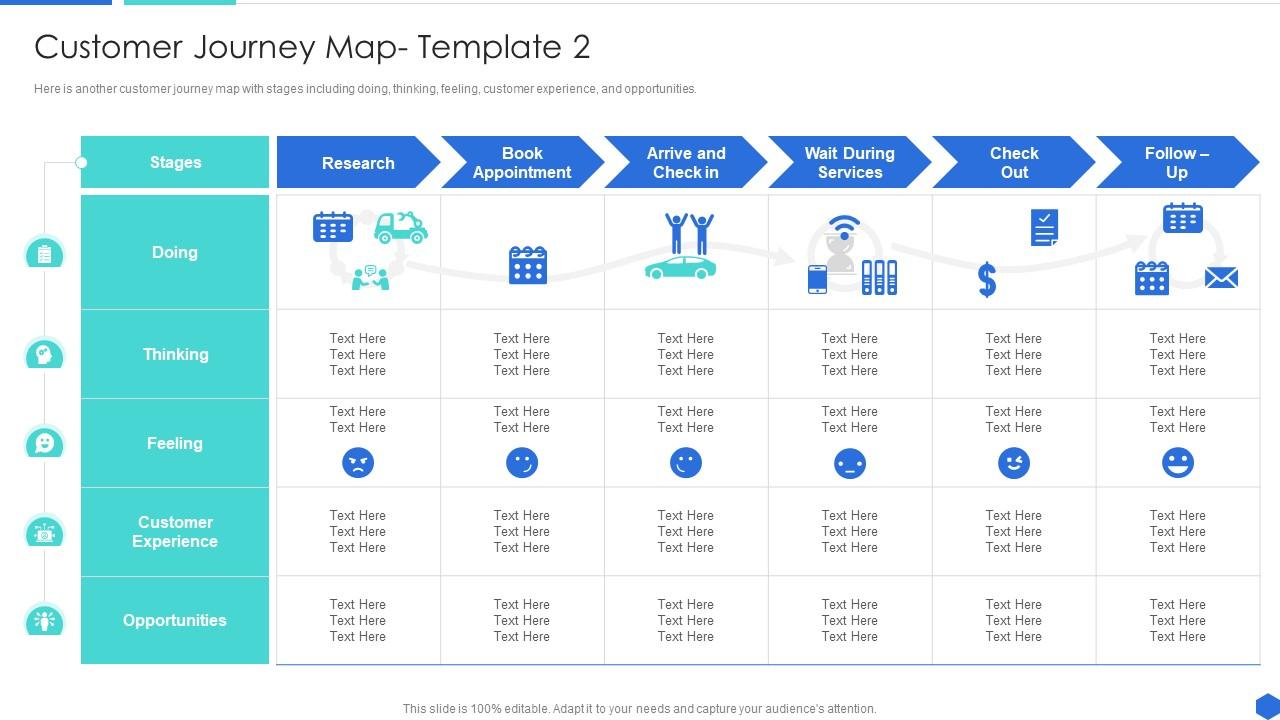
Here is another customer journey map with stages including doing, thinking, feeling, customer experience, and opportunities. Present the topic in a bit more detail with this Customer Journey Map Template How To Design The Best Customer Experience For Your Services. Use it as a tool for discussion and navigation on Customer Experience, Opportunities, Thinking. This template is free to edit as deemed fit for your organization. Therefore download it now.
FAQs for Customer Journey Map Template How To Design The Best Customer Experience

So customer journey mapping - you'll want five main things to make it actually work. First, nail down your personas and what they're trying to accomplish. Map every single touchpoint too. The emotions and pain points at each step? That's honestly where the gold is buried. Also track which channels they're using and their actions. Behind-the-scenes processes matter more than you'd think, even though customers never see that stuff. Oh, and get your team involved from day one - otherwise you'll just end up with a pretty chart nobody uses.

So customer journey mapping is basically like being a detective - you follow your customers around (not literally lol) and see where they're getting stuck or pissed off. Walk through their whole experience step by step, starting with just one customer type. The cool part is tracking emotions too, not just what they do. Like, why did they bail at checkout? Were they confused or just annoyed? Once you spot these problem areas, you can fix the obvious stuff and maybe add some nice touches where it actually matters. Trust me, you'll find way more issues than you think.

Don't assume you know what customers think - use real data instead. Most teams try mapping every tiny interaction and just get buried in details. Focus on the moments that actually matter. Here's the thing though - your internal team probably has blind spots about customer experience. Get feedback from actual customers and loop in people from sales, support, whoever talks to them daily. Otherwise you're just guessing. Keep it simple, stick to key touchpoints, and have a plan for what you'll do with insights. Nobody wants another chart collecting dust on the wall.

Yeah, you totally need different journey maps for each customer segment. Makes no sense to lump everyone together - a brand new customer versus someone who's been buying from you for years? Completely different experiences. I'd pick your top 2-3 segments and map them separately. Each group has their own pain points and decision process, so their touchpoints won't match up either. It's way more work upfront, I'll admit, but you'll spot opportunities you'd miss otherwise. Generic maps are basically useless - learned that the hard way!

Honestly depends what you're working with budget-wise. Miro and Mural are solid starting points - super easy to use and your team can actually collaborate without wanting to throw their laptops. Lucidchart's good if you like things more structured. UXPressia and Smaply are the fancy options built specifically for journey maps, but they'll cost you. Here's the thing though - I've literally seen people create incredible maps in PowerPoint. Or on whiteboards! The tool doesn't make or break it. Just pick whatever your team won't abandon after two weeks because honestly, the insights you get are what actually matter.

Honestly, I'd say every 6-12 months at minimum. But if you're constantly launching stuff or your website's getting major updates, do it more often. Customer behavior shifts fast these days. The biggest mistake? Companies fall in love with their old maps even when they're completely wrong. Don't be that company. Treat them like living docs that actually evolve. Keep an eye on your support tickets and feedback - when you start seeing patterns that don't match what's on your map, time for a refresh. Way better than realizing six months later you've been working off fantasy land.

Look, customer feedback is like your reality check for journey maps - it shows what's actually going down vs what you think is happening. I'd grab feedback from every touchpoint to spot pain points and those emotional ups and downs you missed. Honestly? I've seen gorgeous maps that were total garbage because nobody asked real customers! Surveys work great, plus interviews, support tickets, even social media rants. Oh and don't make this a one-and-done thing - that's where people mess up. Update your maps every few months with fresh feedback so they actually mean something.

Honestly, data analytics is a game-changer for customer journey maps. You're basically replacing guesswork with cold hard facts. Web analytics, CRM data, customer feedback – all that stuff shows you what people *actually* do versus what you assumed they'd do. Where are they really dropping off? Which channels do they love? How long does each step take? The data tells the real story. You'll find pain points you totally missed and weird shortcuts customers figured out themselves. Oh, and here's the thing – start by checking what data you already have. I bet there's way more useful info just sitting there than you think.

So basically, a current state map is the messy reality of what your customers go through right now - all the annoying stuff included. Future state maps? That's your dream version after you fix everything. Here's the thing though - current state helps you spot all the problems first. Then your future state gives everyone something concrete to aim for. The real value comes when you compare both maps side by side. That gap between them becomes your actual to-do list for fixing the worst customer pain points first. Makes total sense when you think about it that way.

Honestly, the best cross-functional journey mapping happens when everyone actually sits in the same room together - those separate feedback surveys are pretty much useless. Get your sales folks talking about what they hear on calls while marketing walks through how people find you. Support can jump in with the frustrating stuff customers complain about. The trick is giving each team ownership over their piece of the journey so nobody's like "oh I thought you were handling that." Start with everyone dumping their current customer touchpoints on a board, then piece it all together. Oh and definitely schedule those check-ins or it'll just collect dust.

So you'll want to look at both hard numbers and the softer stuff. Track conversion rates, customer satisfaction scores, and support resolution times - but don't ignore customer feedback and what your support team is hearing. I'd say check these monthly against your baseline from before you made the map. The mistake I see constantly? Teams get obsessed with just the data and totally miss what customers are actually saying. Time-to-resolution improved but people still sound frustrated? That tells you something. If the problem areas you mapped out aren't getting better, your map probably needs work.

Think of emotional touchpoints as those moments that make customers either love your brand or totally hate it. You know how you still remember that one restaurant where the server was super rude? Same thing. People get frustrated when your site crashes during checkout, but they'll also remember if you throw in surprise free shipping. Our brains are funny - we forget practical details but hang onto feelings forever. I'd honestly focus on just 3 big emotional moments first rather than trying to fix everything. Find where your customers feel most stressed or excited, then make those experiences intentionally better.

Okay so digital transformation totally complicates customer journey mapping but also makes it way better. People jump around between your app, website, social media, even those annoying chatbots - honestly tracking it all can be a nightmare sometimes. The good news? You get so much more data now. Real-time behavior stuff, personalization opportunities, plus you'll catch friction points that would've been invisible before. I'd say start with mapping out all your digital touchpoints first. Then add the old-school ones on top. It's messy but worth it once you see the full picture.

Journey maps are honestly a game-changer for this. Start by tracking one customer's emotions and pain points at each stage - like someone just researching needs educational stuff, but once they're comparing options? That's when you hit them with demos and reviews. Match your message to where their head's at. Different channels work better at different times too - email works great early on, retargeting ads during the "maybe" phase. Don't try to do everything at once though. Pick one persona and nail just 2-3 key touchpoints first.

Dude, definitely look at Starbucks - they mapped out their whole coffee experience and found stuff like confusing menu boards were killing the vibe. Airbnb's journey map is solid too, especially how they handled the weirdness people feel about staying in a stranger's house. Amazon's obsessed with removing any friction from buying to delivery, which honestly makes sense given how much we all use them. You can find simplified versions of their actual maps online as case studies. Super helpful as starting templates when you're building your own.

Ratings and Reviews

100% of 100
Review Form
Write a review
Most Relevant Reviews
  1. 100%

    by Coy Wallace

    “I really like the convenient operation and professionalism I saw on the SlideTeam website. I want to express my regards and appreciation to the team.”
  2. 100%

    by Darnell Tucker

    I am really satisfied with their XYZ products. Used their slides for my business presentations and now I am taking their help for my son's high-school assignments. Super satisfied!!

2 Item(s)

per page: