

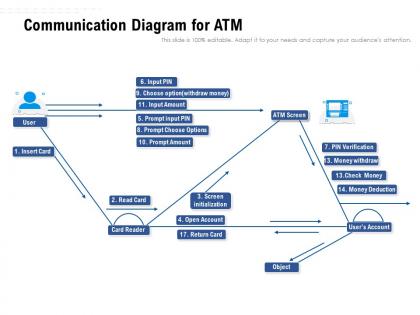
Communication diagram for atm




Try Before you Buy Download Free Sample Product
 Impress Your
 Audience
 100%
100% Editable
 Save Hours
 of Time


Our Communication Diagram For Atm are explicit and effective. They combine clarity and concise expression.
People who downloaded this PowerPoint presentation also viewed the following :
Communication diagram for atm with all 2 slides:
Give your audience a fulfilling experience. They will find our Communication Diagram For Atm elevating.
FAQs for Communication
So you've got four main pieces: the ATM, the person using it, the bank's system, and that card network that handles authorization. Communication protocols are where it gets interesting - PIN checks, balance requests, all that transaction stuff flowing back and forth. Some people go crazy with middleware and security layers (honestly makes the whole thing look like spaghetti). Start with the basics though. Show how data moves when someone withdraws cash or makes a deposit. You can always add more complexity later if you need it for whatever you're working on.
Dude, that ATM communication diagram is clutch for network stuff. Shows you exactly how data packets bounce between switches, routers, all your endpoints. You can actually trace where everything goes instead of just poking around blindly. Honestly saved my butt so many times when things break. Protocol layers, connection types, timing - it's all mapped out so you get why data flows the way it does. I always check the diagram first now before diving into troubleshooting. Way better than spending hours guessing what's wrong. Trust me on this one.
So you're gonna see ATM protocol first (duh), then TCP/IP handling the network stuff. SSL/TLS handles encryption, HTTP/HTTPS for web transactions. DNS pops up since ATMs need to resolve addresses - honestly forgot about that one for a sec. Some diagrams still show X.25 or Frame Relay but those are basically dead now. The whole thing's layered to show how your card swipe travels up through network and security layers to hit the bank's systems. I'd start with transport layer and work up from there.
ATM virtual circuits are like pre-planned routes for your data packets - kinda like GPS mapping out the best highway before you start driving. So you set up the connection first, then send your data (that's why it's connection-oriented vs IP just yeeting packets wherever). Each circuit gets VPI/VCI labels that switches read to know where to forward stuff. Pretty neat system actually. Oh and when you're drawing ATM diagrams, don't forget you'll need both the physical network layout AND the virtual circuit paths - they're usually totally different routes which trips people up.
Check the line styles first - solid lines are usually PVCs (permanent virtual circuits) and dashed ones are SVCs (switched virtual circuits). The VPI/VCI numbers on the labels will help you track specific paths too. Honestly, ATM diagrams look like spaghetti when you first start, but the pattern becomes obvious once you've seen a few. Look for bandwidth or QoS markings near connections - they're super helpful. My advice? Trace one connection type at a time instead of trying to figure out the whole mess at once. Makes it way less overwhelming.
So first thing - set up clear swimlanes for your customer, ATM, and bank system. Number your message flows or you'll confuse yourself later (trust me on this one). I used to forget about error cases but you gotta show what happens when someone's broke or their card's busted, not just the smooth transactions. Keep your naming consistent throughout - super annoying when you don't. Oh and resist cramming every little detail in there. Focus on the main interactions that actually matter. Build it simple first, then you can always add more complexity if needed.
So basically these diagrams show you QoS stuff by labeling the traffic classes right on the connection paths. You'll see CBR, VBR, ABR, and UBR marked on the virtual circuits. Plus bandwidth allocations, cell loss priorities, delay requirements - all that determines how your data gets prioritized. Way easier than digging through config files honestly. Each connection has these little parameter boxes that tell you what service guarantees you're getting for different traffic. Makes troubleshooting so much faster when you can actually see it visually instead of guessing.
Honestly, the scale gets crazy fast - hundreds of switches turn your diagram into total chaos. Hierarchical stuff is a nightmare to show clearly, especially with virtual circuits jumping across different physical paths. I've literally seen diagrams that look like someone threw spaghetti at a wall. ATM's connection-oriented setup makes it worse since you're dealing with both permanent and switched virtual circuits. Don't try cramming everything into one massive diagram - you'll hate yourself later. Break it into focused chunks instead. Start simple, use layers, and save yourself the headache.
Dude, ATM communication diagrams are seriously your best friend for troubleshooting. Instead of drowning in log files (ugh), you get this visual roadmap showing exactly where data's flowing. Trace the paths and boom - you'll spot bottlenecks, dead connections, or packet drops way faster. They show actual vs expected traffic patterns too, so you can tell if problems are hitting the physical layer, virtual circuits, or specific switches. Honestly, I learned this the hard way after wasting entire afternoons debugging blind. Pull up your comm diagram first thing - you'll thank me later.
For ATM stuff, I'd go with draw.io (they renamed it to diagrams.net or something). It's free and has decent templates for system flows. Lucidchart's pretty good too - handles sequence diagrams well. Your company might already have Visio licenses, but honestly that thing feels ancient now. Oh, and if you're into the whole "diagrams as code" thing, PlantUML is actually really cool for version control. But yeah, I'd just start with draw.io. Once you pick something and get used to it, you'll stop wasting time switching between tools.
Honestly, that ATM diagram is like a cheat sheet for figuring out where your network's gonna break first. You can see exactly which links are getting crushed and plan upgrades before stuff starts failing. Super useful when you need to convince the boss to spend money - way better than just guessing what you'll need. Plus it shows you backup routes and traffic patterns, so you're not just randomly buying hardware and hoping it works. My old manager used to love these things for budget meetings. Build your growth plan around what the diagram actually shows instead of making stuff up.
So basically, end-to-end ATM diagrams show the whole data path from start to finish without all the messy details in between. You can focus on what actually matters - how your app talks across the network instead of tracking every single hop. It's like mapping the main highway between cities rather than every street corner, you know? Really helpful for figuring out bandwidth needs and where things might bottleneck. Honestly, I always start with these big-picture paths first when I'm designing something, then worry about the nitty-gritty topology stuff later.
So basically the physical layer just moves raw bits through the actual cables and fiber - that's the easy part. Meanwhile up above, the logical layer is doing all the smart stuff like organizing those bits into ATM cells (53 bytes each, weirdly specific I know) and figuring out where they should go using VPI/VCI headers. It's kinda like having a mail carrier who just delivers packages while someone else sorts them and writes the addresses. When things break, you can usually tell which layer screwed up - physical problems look like signal issues, logical ones show up as routing failures or messed up cell headers.
JPMorgan Chase and Bank of America both used communication diagrams when they upgraded their ATM networks for mobile deposits and contactless stuff. The diagrams mapped out every interaction between ATMs, bank servers, and third-party processors. Would've been chaos without them, honestly. 7-Eleven did something similar when connecting their ATMs to point-of-sale systems - though I'm not sure why you'd want to use a 7-Eleven ATM, but whatever. If you're doing any ATM project, definitely check out how these companies documented their communication flows first. Trust me, it'll save you hours of debugging headaches later.
Honestly, visual diagrams are a game-changer for this stuff. Non-tech people just shut down when you hand them pages of specs - I've seen it happen so many times. But show them a clean diagram with arrows and boxes? Suddenly they get how the ATM actually talks to the bank and card networks. Use the same colors and symbols throughout so they can follow the whole journey from card swipe to getting their cash. I'd start broad with the big picture, then get into the weedy technical details if they want more. Way easier than explaining it verbally too.
No Reviews