

Communication Plan And Approval Process Powerpoint Ppt Template Bundles




Try Before you Buy Download Free Sample Product
 Impress Your
 Audience
 100%
100% Editable
 Save Hours
 of Time


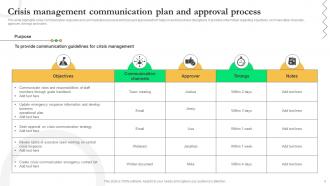
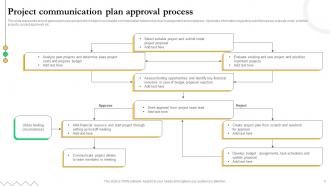
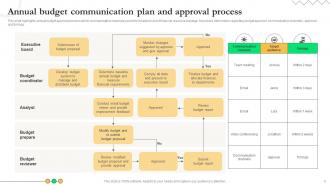
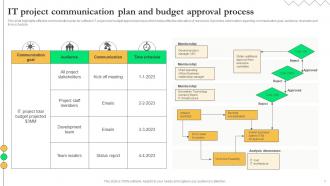
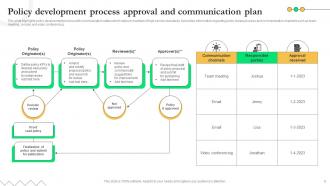
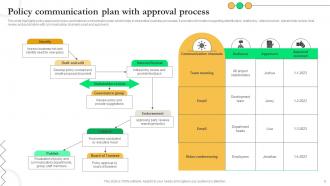
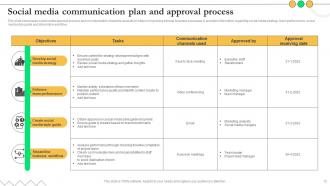
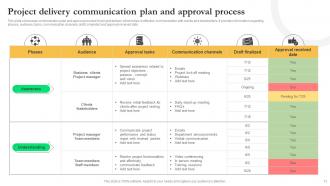
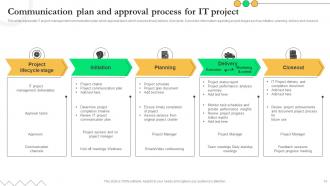
Introducing our comprehensive Communication Plan and Approval Process PowerPoint PPT presentation, a crucial tool to streamline your organizations communication initiatives. Navigate the complexities of Budget Communication and Approval seamlessly, empowering you to allocate resources strategically and effectively. Learn how to secure Internal Communication Approval promptly, ensuring seamless coordination and alignment among teams. Discover the structured Crisis Management Approval Process, equipping your organization to respond swiftly and effectively during challenging times. Unveil expert strategies for Policy Development Approval Communication, facilitating smooth policy implementation and adherence. With visually compelling slides and expert guidance, this PPT empowers you to optimize communication efforts while maintaining financial prudence. Elevate your communication game and drive success across your organization. Get this presentation now and unlock the potential for effective communication budgeting and approval.
People who downloaded this PowerPoint presentation also viewed the following :
Communication Plan And Approval Process Powerpoint Ppt Template Bundles with all 23 slides:
Use our Communication Plan And Approval Process Powerpoint Ppt Template Bundles to effectively help you save your valuable time. They are readymade to fit into any presentation structure.





FAQs for Communication Plan And Approval Process Powerpoint
So you need clear objectives first - figure out your main goal, then work backwards from there. Target audience is huge too, plus what messages you're actually sending them. Don't forget to map out your channels and timeline (seriously, without deadlines this stuff never happens). Oh and assign who's doing what! I learned this the hard way - everyone just assumes someone else is handling it. Build in feedback loops too so you can pivot if things aren't landing right. Honestly, the timeline thing is probably what kills most communication plans. Start with your objective though, that's your north star for everything else.
Honestly, a communication plan just saves you from those awkward "wait, nobody told me that" situations. Map out who needs what info first - your boss probably wants the big picture stuff while your teammates need the nitty-gritty details. Set up regular check-ins and actually stick to them (this is where most people mess up). Different people need different things at different times, so don't blast everyone with the same updates. Trust me, when projects get crazy - and they always do - having those clear channels already set up is huge. It's way better than scrambling to explain things after the fact.
Track your open rates and click-throughs first - that's the basic stuff. But honestly? The real gold is in engagement metrics across all your channels. Are people actually responding to surveys or doing what you asked? I get way too excited when response rates are high lol. Don't just look at numbers though. Check if your key messages are landing and what the feedback sentiment looks like. The ultimate test is behavior change - did they actually take action after getting your communications? That's when you know it worked.
Dude, figure out who you're talking to first. Executives just want the big picture stuff - ROI, outcomes, that kind of thing. Your front-line people need the nitty gritty details and actual deadlines. I bombed this once by sending tech specs to our CEO... yeah, that went nowhere. Mix up how you send info too. C-suite loves those fancy dashboards, but your project teams probably just want a straightforward email or Slack message. Honestly, just make a quick list of your main audiences and jot down what each group actually cares about. Game changer.
Dude, tech is literally everything for comm plans now. You need Slack or Teams for keeping your team coordinated, social platforms for getting your message out there, email automation for the targeted stuff. Analytics dashboards show you what's actually hitting vs what's flopping. Pick platforms where your audience already hangs out - don't chase whatever's trendy if your people aren't there. I learned this the hard way lol. Map out where they are first, then build around that. Without decent tools you're basically shouting into the void.
Honestly, just start asking for feedback regularly and actually do something with it. Send quick surveys after big announcements. Grab people for 5-minute chats about what's working. Maybe set up anonymous channels too - some folks won't speak up otherwise. Here's the thing though: most "feedback loops" are basically black holes where input goes to die. Don't be that person. Show people how their suggestions changed what you did next. I'd start with pulse checks after your next announcement and see how it goes. Build from there once you get the hang of it.
Honestly, most people either hate change or get totally overwhelmed when you dump too much info on them at once. You'll mess up the timing at first - we all do. Getting different departments to say the same thing? Good luck with that. Leadership says they support communication until budgets get cut, then suddenly it's not a priority anymore. Oh, and figuring out if your messages actually worked is weirdly hard to measure. Start with one simple message and test it on a small group first. See what happens, then tweak it before going company-wide. Trust me on this one.
Honestly, I check mine every month - quarterly feels too long and stuff changes fast. When big projects hit or the org restructures? Update it right away, don't wait. I learned this the hard way when I kept sending budget updates to people who'd switched departments lol. Monthly works because you can spot when your messaging isn't landing or you're using the wrong channels. Set a phone reminder though, because I always forget otherwise. Just do a quick "what worked, what didn't" review. Takes like 20 minutes but saves you from looking clueless later.
White space is your best friend - don't cram everything together. Use clear headings and stick with the same fonts throughout. Bold your key points so people can skim and still get the main ideas (which honestly, most will do anyway). Your visuals should actually mean something, not just look pretty. Brand colors and fonts help everything feel cohesive. Oh, and definitely run it by a couple colleagues first. They'll spot weird stuff you missed and tell you if something's confusing. Testing saves you from looking dumb later.
Oh man, cultural stuff will totally derail your comms if you're not careful. We once pushed out this campaign globally without tweaking it first - complete disaster lol. Different places have totally different vibes about being direct vs beating around the bush, formal vs casual, all that. Like some cultures want all the context spelled out, others just want the quick hits. Colors and images can be weird too depending on where you are. I'd definitely dig into how your audience actually talks and thinks first. Maybe run your stuff by some locals before you hit send? Trust me, it's worth the extra step.
So here's what I'd do - grab 3-4 solid stories that back up whatever you're trying to communicate. Customer wins work great for this. People remember stories way better than boring statistics, it's just how our brains work. Behind-the-scenes stuff is gold too because it makes your company feel more human. For bigger announcements like product launches, think problem-solution-outcome structure. Short and punchy. Then just tweak those same stories for different audiences - what works in an email might need adjusting for social media. Honestly makes everything feel less corporate and more genuine.
Okay so first things first - dig up those strategic planning docs that are probably buried somewhere in your email. I know, I know, they're boring as hell, but you actually need to know what your company's trying to accomplish this year. Once you've got that, connect your communication goals directly to their business priorities. Let's say they want 20% better customer retention - then your messaging should be all about showing customers why they matter and highlighting your value. Every email, every campaign, every whatever should tie back to what leadership actually cares about. Don't just blast stuff out randomly because it feels like you should be doing something.
Honestly, just pick one communication method and stick with it religiously - that's the hardest part. Weekly updates work great, or maybe monthly all-hands if things move slower. I'd rather overcommunicate than have people wondering what's happening (learned that the hard way). Set up shared dashboards or simple email digests so info's always there. Create spaces where people can ask questions without feeling dumb about it. Share the good stuff AND the problems - people aren't stupid, they know when you're hiding things. Consistency matters more than being fancy about it.
Don't wait until everything's on fire to figure out your crisis plan - build it into your communication strategy right away. Pick who talks to the press, who updates staff, who watches social feeds. Draft template responses for typical disasters beforehand because nobody thinks straight when the shit hits the fan. Also set clear triggers for what actually counts as a "crisis" needing these protocols. Update your contact lists regularly and do practice runs every few months. Honestly, most companies skip the testing part and then wonder why nothing works when they're scrambling.
Honestly, just keep it simple. RACI charts are clutch for mapping out who needs what info - saves so much confusion later. For tracking stuff, Asana or Monday work great. Audience mapping is huge too, even if it's just a basic spreadsheet (I know, I know, spreadsheets are boring but they work). Slack handles daily convos obviously. Oh, and definitely grab feedback with something like SurveyMonkey once you've got your plan running. Here's the thing though - pick ONE tool per category max. Otherwise you'll get overwhelmed and end up using none of them properly.
-
Presentation Design is very nice, good work with the content as well.
-
Like always a great experience with you guys. Always there on the drop of hat to help.