


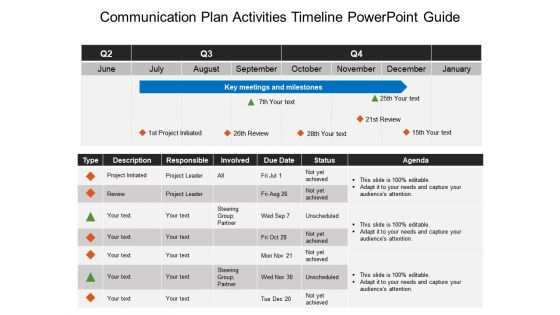
Communication plan activities timeline powerpoint guide





Try Before you Buy Download Free Sample Product
 Impress Your
 Audience
 100%
100% Editable
 Save Hours
 of Time


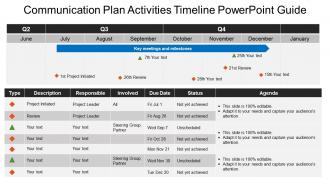
Increase your business integrity with our communication plan activities timeline PPT slide. It allows you to communicate your business tasks in a streamlined manner. It further allows your employees to know about their role and responsibility in a particular task. This communication process PPT design helps in motivating your operational teams to work with more efficiency so that it results in bringing more business profits. This project communication plan PPT slide design further defines the roadmap of exchanging your business information from sender to receiver. It further helps your management to take important business decisions to improve your business productivity. Explain your project timelines which are based upon your organizational communication plan with this PPT layout. It further helps in developing some result oriented business strategies. Thus, use this professionally designed communication model PowerPoint design to evaluate as well as analyze your organizational growth in such an info-graphical manner. Click on the download link given below to start now. Create a dazzling effect with our Communication Plan Activities Timeline Powerpoint Guide. They will be left gasping for more.
People who downloaded this PowerPoint presentation also viewed the following :
Communication plan activities timeline powerpoint guide with all 5 slides:
Improve their expertise with our Communication Plan Activities Timeline Powerpoint Guide. Empower folks to acquire greater capability.
FAQs for Communication plan activities
So you'll want to map out your key milestones first, then figure out who you're talking to at each phase. List out specific deliverables with deadlines - and seriously, add buffer time because stakeholders will 100% come back with changes at the worst possible moment. Build in feedback loops and approval checkpoints so stuff doesn't get stuck. Oh, and specify which communication channels you're using for each touchpoint. The whole thing needs clear timing and ownership. I'd throw it in a shared doc or something where everyone can see real-time updates instead of playing email tag.
Honestly, it's a total lifesaver for avoiding those awkward "wait, what's going on?" moments that kill project momentum. You'll know exactly when to loop people in and who needs updates. Think of it like a roadmap for conversations - sounds boring but trust me, once you get used to it you won't want to work without one. Instead of panicking when things go sideways, you're already ahead of it. My advice? Start with your big milestones and work backwards. Figure out what people need to know and when they need to know it.
Honestly, Asana's probably your best bet - I'd start there since it's free and super intuitive for mapping out campaigns. Monday.com and Trello are solid too if you want something more visual. Gantt charts will save your life when you're trying to see how all the pieces fit together. Microsoft Project is decent if your company's already paying for it, but ugh, the interface feels so outdated. Actually, don't sleep on Google Sheets either - sometimes simple is better when you just need to track deadlines without getting fancy. Test out Asana first though, seriously.
Honestly, I just go with weekly updates as my default and see how it feels. High-pressure projects? Daily check-ins for sure. But if it's some long-term thing that's cruising along smoothly, you can probably stretch it to bi-weekly or even monthly. Better to annoy people with too many updates than get those frantic "wait, what's going on??" texts later - trust me on that one. If you're getting bombarded with status questions between your scheduled updates, that's your sign to communicate more often. Just ask your main stakeholders what they want upfront. Saves everyone headaches.
Oh man, you're gonna run into some annoying stuff for sure. Resource conflicts are the worst - like when everyone suddenly needs the same designer or your key people get yanked into other projects. Then there's always that one person who takes forever to approve things (seriously, why is there always one?). Your time estimates will probably be off too, especially with complex content that ends up being way harder than you thought. Plus random things pop up - holidays you forgot about, surprise company news, market drama. Just build in extra time and have backup plans ready.
Honestly, you need to set up regular check-ins and actually stick to them - don't just plan them then never follow up. Map out when you'll give updates and get feedback throughout the whole thing. I've watched so many projects where people are super pumped at the start, then you literally never hear from them again halfway through (so annoying). Give people options for how they want to communicate - some folks love meetings, others just want quick emails. But here's the thing: ask for their input and then actually use it. Show them their feedback made a difference. That's how you keep people caring about your project instead of just checking out.
Honestly, feedback is like your sanity check for timing. You ask stakeholders and team members how things are going, and boom - you'll catch if you're rushing people or if your messages aren't clicking. I've watched too many projects crash because nobody bothered asking "is this pace working?" until it was way too late. Don't wait until the end to get input. Build in check-ins throughout your timeline so you can actually adjust deadlines or add buffer time when needed. Small tweaks early beat major headaches later.
Honestly, visual stuff makes such a difference for timelines. Try color coding by department or how urgent things are. Icons work great too - different ones for emails, meetings, social media posts, whatever. Progress bars are clutch because people can instantly see what's done vs what's still coming. Even just bolding your deadlines helps way more than you'd think. Oh, and pick one system and don't change it halfway through or you'll confuse everyone. I learned that the hard way on my last project lol.
Definitely give yourself way more buffer time - like 24-48 hours instead of same-day responses since everyone's in different time zones. Front-load your planning phase too, seriously learned this the hard way! You can't just pop over to someone's desk anymore, so build in more check-ins and status updates. Oh and create windows for async communication so people can jump in when it works for them. The biggest thing? Be super explicit about deadlines since you won't have those random coffee conversations to clarify stuff.
Okay so first thing - check if you're actually hitting your deadlines and how fast info gets to people. Then look at engagement stuff like open rates and whether folks are doing what you asked them to do. I always test if people remember the main points because honestly, what's the use if it all goes in one ear and out the other? Response rates matter too. Oh, and if you're doing surveys, definitely track feedback scores. Here's the thing though - don't go crazy with metrics. Pick maybe 3-4 that actually connect to what you're trying to accomplish and stick with those.
Honestly, cultural stuff will mess up your timeline way more than you think. Some places make decisions super fast, others need like five rounds of meetings with everyone and their boss. Plus holidays are totally different everywhere - I learned that the hard way once. You'll need extra time for translations and getting messaging right for each market. Different approval chains too depending on how hierarchical things are locally. I'd tack on at least 20-30% more time than you originally planned. Map out the cultural quirks for each market early so you're not scrambling later.
Honestly, I've messed this up so many times. Short projects (under 3 months) - don't plan more than 2-4 weeks ahead or everything changes on you. Medium ones can handle 6-8 weeks, and big initiatives maybe 3-6 months tops. But here's the thing - I used to be way too optimistic about long-term planning and just ended up with useless docs gathering dust. You'll want review points every few weeks no matter what, because stuff always shifts. Oh, and start shorter than feels right. It's weird but you can stretch timelines easier than cramming them down later.
Honestly, just assume everything will take longer than you think. Map out what could blow up your timeline first - approvals getting stuck, your dev team hitting weird bugs, stakeholders going MIA. Been there way too many times! Add like 20-30% buffer to anything on your critical path. Also set up check-ins every couple weeks so you can course-correct before it's too late. Oh, and have backup plans for your biggest risks. Trust me, you'll be so much less stressed when things inevitably get messy and you're not pulling all-nighters trying to salvage everything.
Honestly, just tell people the second you know something's changed - waiting makes it worse. Fire off a quick message first, then follow up with the full details about what happened and new dates. I learned this the hard way lol. Email works for the paper trail, but if it's urgent definitely call or Slack them too. The thing is, don't just say "we're delayed" - tell each person specifically how it affects their stuff. That's what actually helps them adjust their plans. Oh and always give them clear next steps so they're not just sitting there wondering what to do.
Check your timeline monthly at minimum. Fast projects? Every 2-3 weeks is better. Stuff always shifts - new people jump in, priorities change, you know how it goes. The key is spotting drift before it messes up your whole messaging strategy. I always set a calendar reminder (sounds boring but works). Major milestone changes or budget shifts? Update immediately. Oh, and agile projects are the worst for this - they're constantly moving. But honestly, staying on top of it saves so much headache later.
-
Great product with effective design. Helped a lot in our corporate presentations. Easy to edit and stunning visuals.
-
Helpful product design for delivering presentation.