


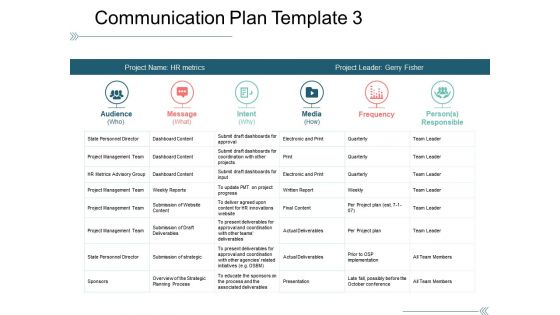
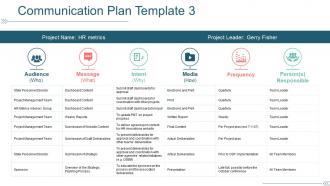
Communication plan template 3 ppt examples slides





Try Before you Buy Download Free Sample Product
 Impress Your
 Audience
 100%
100% Editable
 Save Hours
 of Time


Give folks cause to join the journey with our Communication Plan Template 3 Ppt Examples Slides. Explain the exciting itinerary.
People who downloaded this PowerPoint presentation also viewed the following :
Communication plan template 3 ppt examples slides with all 5 slides:
Handle intermittent attention with our Communication Plan Template 3 Ppt Examples Slides. Get folks to display consistent focus.
FAQs for Communication plan template 3
Honestly, just start with the basics - what you're trying to achieve and who needs to hear it. Figure out your key messages for each group (they'll be different, trust me). Pick your channels - email, Slack, whatever works for your team. Timeline with actual dates is crucial, plus who's doing what. The stakeholder roles thing is probably the most important part because that's where everything falls apart if you're not clear. Oh, and definitely build in ways to check if people actually get what you're saying. Keep it simple at first - you can always make it fancier later once you see what works.
Honestly, just think about who needs what info first. Executives? They want the big picture and ROI stuff. Your actual project team needs all the nitty-gritty details and deadlines. I always end up color-coding everything because I'm weird like that, but whatever works. Different people need updates at different speeds too - some want weekly check-ins, others just care about major milestones. Match your delivery method to how they actually prefer getting info. Email works for some, others need face-to-face meetings or dashboards they can check themselves. Create separate templates for each group within your main plan.
Make it clean and scannable - lots of white space, consistent fonts, clear headings. Color-coding is clutch for different sections or priorities (honestly can't function without good color-coding). Bold text or callout boxes help your important stuff pop. Use tables and bullets for complex info like timelines. Oh, and definitely test it with a few teammates first. If they look confused or start squinting at it, you need to simplify. The whole point is making communication smoother, not giving people headaches trying to decode your template.
Pick a few key metrics that actually matter for what you're trying to do - email opens, meeting turnout, survey responses, that kind of stuff. Most templates come with KPIs already baked in, which is nice. The real trick is remembering to check them regularly instead of just setting them up and forgetting about them (guilty as charged). Numbers tell you if people saw your stuff. Feedback tells you if they got it. I'd start with maybe 2-3 metrics max - tracking everything gets overwhelming fast. Set up monthly check-ins to see how you're doing and tweak things.
Tech basically runs the whole show when it comes to communication plans. You're gonna need project management tools for timelines, collaboration platforms so your team can actually give input, and automation stuff to schedule everything across different channels. I mean, trying to do all this manually sounds like pure hell honestly. The trick is picking tools that actually talk to each other - otherwise you're stuck copying data around constantly. Oh, and definitely check what your team's already comfortable using before buying anything new. Way easier than forcing everyone to learn something from scratch.
Honestly, I'd say every three months is a good baseline. But it really depends on your situation - if stakeholders keep changing or your project scope shifts constantly, you'll need to update it more often. Some crazy-busy environments require monthly tweaks. Major red flags that mean time for an update: new risks, feedback showing your approach sucks, or just general chaos happening. Don't get too hung up on the schedule though. Set those quarterly reminders, but if something big changes next week? Just update it then. Better to stay flexible than stick to some arbitrary timeline when your world's falling apart.
Oh man, the worst thing you can do is treat it like some unchanging rulebook. People get way too rigid with these things. Don't blast every tiny update to executives who honestly don't care, but also don't leave your team in the dark about stuff they actually need. I've seen so many projects where someone creates this perfect plan on day one then never touches it again - meanwhile the whole project has shifted! And please, actually think about what each group needs instead of just copying some generic template. Oh, and track if it's working. Sounds obvious but most people skip that part entirely.
Start with feedback built right into your template - don't do what I always do and forget until the last minute lol. Add sections for how you'll collect responses and who handles what by when. Include questions like "How will people actually respond to this?" Short check-ins work better than waiting forever between reviews. I'm honestly terrible at remembering to schedule these, but when I do it makes such a difference. The whole point is making feedback feel planned, not random. Maybe set those review meetings ahead of time so they don't get pushed off indefinitely.
Looking at companies that actually nail this stuff - Slack crushes it with their multi-channel updates (email, in-app, blog posts). Healthcare orgs are obsessed with crisis communication chains, which honestly makes sense when people's lives are literally on the line. Target's really good at coordinating seasonal campaigns across their whole operation. What they all do right: they know exactly who they're talking to, pick the best channels for each audience, and someone always owns the timeline. Just grab their templates and tweak them for your industry - seriously, don't overthink it.
Definitely bake cultural stuff directly into your template sections. Add spots for communication preferences by region, time zones for meetings, translation needs - the usual. Oh and holidays! I missed a major festival once and it was awkward. Survey your audiences first about what they actually prefer communication-wise, then build that into the template structure. Some cultures are way more formal with hierarchy, others hate that. Directness varies tons too. Make these cultural checkpoints automatic, not something you remember later if you're lucky. Way easier than scrambling to fix things afterward.
So you'll want to track two main things - engagement stuff and actual outcomes. Open rates, clicks, meeting attendance, survey responses - that's your engagement side. Then measure if people actually *get* what you're communicating. Are they more aware? Changing behaviors? Hitting those project milestones? Don't sleep on the qualitative feedback either. Sometimes the numbers look great but people are still confused or annoyed - you won't catch that without asking directly. Oh, and seriously, pick like 3-5 metrics tops. I made the mistake of trying to track everything once and it was a nightmare to manage.
Honestly, these templates are game-changers for avoiding those awkward "wait, who was supposed to tell the client?" situations. You'll know exactly who needs updates, when to send them, and which channels to use. New team members can jump in without being totally lost too. The best part? You're forced to think through communication gaps upfront instead of scrambling later. I always start super basic - just audience, message, timing, and who owns it. You can get fancy with the format later, but those four things will save your sanity. Trust me on this one.
Templates are honestly a lifesaver - no more staring at that terrifying blank page wondering where to start. You won't forget important stuff like stakeholder mapping or feedback loops since it's all built in. Everyone on your team knows the format too, which makes collaboration way smoother. Yeah, you sacrifice some customization, but you can always modify sections later. I mean, why reinvent the wheel every single time? Start with something solid and then make it your own as you go.
So first thing - figure out what each tool should actually do. Slack for quick stuff, email for the formal announcements, video calls when things get complicated. Don't just dump everything into whatever app you opened first (seriously, I've watched teams spiral into total confusion doing that). Your audience matters too - some people hate Slack, others won't read long emails. Write it all down so people know where to look for what. Oh, and definitely test it with like 5 people before rolling it out to everyone. You'll probably need to tweak things anyway.
Look, stories are way more powerful than just dumping info on people. Nobody remembers boring bullet points, but they'll totally remember how that new system saved Sarah's team three hours every Friday - that's the stuff that sticks. When you're setting up your communication plan, build in story prompts. Who are your main players? What's the problem they're facing? How does your solution actually help them? I learned this the hard way after sending out updates that nobody read. Now I frame everything as mini-stories and people actually pay attention. Trust me, it works so much better than corporate speak.
-
Easily Understandable slides.
-
Excellent Designs.