

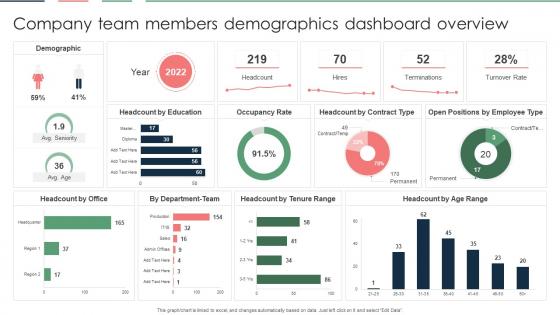
Company Team Members Demographics Dashboard Overview




Try Before you Buy Download Free Sample Product
 Impress Your
 Audience
 100%
100% Editable
 Save Hours
 of Time


Our Company Team Members Demographics Dashboard Overview are topically designed to provide an attractive backdrop to any subject. Use them to look like a presentation pro.
People who downloaded this PowerPoint presentation also viewed the following :
Company Team Members Demographics Dashboard Overview with all 7 slides:
Use our Company Team Members Demographics Dashboard Overview to effectively help you save your valuable time. They are readymade to fit into any presentation structure.





FAQs for Company Team Members
Start with the basics: age, gender, location, and income. Don't forget education and job status - I swear, half the dashboards I've worked on missed those and we paid for it later. Household size, ethnicity, marital status are solid additions too. For B2B stuff, throw in company size and what industry they're in. Honestly though? Begin with these core ones first. You can always add more granular stuff once your team figures out what decisions they're actually trying to make with the data.
Honestly, turning all those spreadsheet numbers into actual visuals is a total game-changer. People's eyes just glaze over with raw data tables - mine definitely do. But throw it into a chart or heat map? Suddenly everyone can spot the patterns instantly. Interactive dashboards are where it gets really cool because you can click around and explore different segments without losing track of the main story. I'd start simple though - basic bar charts and maps first. Once people get used to those (and stop being intimidated), then you can add the fancy interactive stuff. Trust me, your stakeholders will actually pay attention for once.
Set up updates based on what you're pulling in - daily for live feeds, weekly/monthly for surveys. Backup your old data first though, trust me on this. Always check everything before going live because explaining 150% male demographics is... not fun. I'd definitely set up alerts for weird data spikes. Document any changes you make so people don't freak out when numbers shift. Oh, and give users a heads up about when fresh data drops so they're not constantly asking "is this current?"
Look, demographics are just figuring out who's actually buying your stuff so you don't sound like an alien when you talk to them. Gen Z? Hit up TikTok with casual vibes. Baby Boomers? Facebook with proper grammar - they still care about that stuff. Age, income, where they live, education level... it all matters for picking your channels and even pricing. You wouldn't push luxury cars the same way in small-town Iowa versus NYC, obviously. Your data should show these patterns so you're not just burning cash on ads that miss the mark completely.
Tableau and Power BI are your best bets for demographics stuff - they handle population data really well and the interactive charts look clean. If you want to get fancy with customization, Python with Plotly/Dash is solid but takes way more time to build. Google Data Studio is surprisingly decent for basic demos projects (and it's free, which is nice). Your team more into stats? R with Shiny might be the move. I'd honestly just start with whatever your company already pays for, then mess around with the free tools to see what feels right. Way easier than convincing your boss to buy new software.
Demographics dashboards are honestly such a lifesaver for policy work. You get real-time population data - age groups, income levels, migration patterns, all that stuff. Makes resource allocation way less of a guessing game, you know? Like, instead of randomly picking where to build schools, you can actually see where families with kids are clustered. Same with healthcare funding for aging areas. The visual setup makes trends super obvious too, which helps when you're trying to convince people about budget decisions. Oh, and definitely figure out your top 3 priorities first - then match the demographic factors that affect those most.
Honestly, privacy stuff is huge right now - you can't mess around with demographic data. Get explicit consent for anything sensitive like race or religion. Only grab what you actually need for the dashboard, then anonymize whatever you can. People are super paranoid about their data these days, and rightfully so. Be upfront about how you'll use it and let them control their info. Oh, and definitely run this by legal first - I learned that one the hard way. Clear retention policies are a must too.
People with disabilities get overlooked constantly, plus mixed-race folks and anyone outside major cities. Your dashboard probably just shows the basic urban categories by default. Also, there's this weird thing where older Gen Z gets lumped with younger millennials even though they're totally different. We always focus on the biggest segments and accidentally erase everyone who doesn't fit the standard boxes. Worth checking if your filters can actually break out data for these groups - stakeholders have been asking about this way more lately. Short answer: the "invisible" populations are usually the ones that matter most.
Demographic data shows you who's *actually* using your stuff vs who you think is. That gap? Pure gold for finding new opportunities. I've watched teams completely flip their roadmaps after discovering their "typical user" was totally made up. You'll catch underserved groups, figure out which feature requests actually matter, and spot trends early. The real trick is checking if your dev priorities match your real users - not those personas from forever ago that nobody looks at anymore. Honestly, most assumptions about users are just wrong.
Ugh, data quality is gonna be your biggest headache. Different sources use totally different terms - like one says "Hispanic/Latino" and another goes with "Latinx." Sample sizes get way too small when you dig into specific groups, which makes everything unreliable. Also, census data is always behind by like 2-3 years, so you're never really seeing what's happening now. Super frustrating tbh. Just make sure you write down all your sources and flag the messy parts so people know what they're getting into.
Honestly, culture totally flips how you read the same data. Multi-gen households? Could mean families are struggling financially, or it's just how that culture works - strong family bonds and all that. Income patterns mean different things too depending on where you are. I learned this the hard way on a project last year. Age distributions, lifestyle stuff - context is everything. Before you make any big calls from your dashboard, grab someone local to check your thinking. You'll save yourself from some pretty embarrassing misreads.
Look at where your customers actually are versus where you're spending money - that's where the gold is. Say your Southwest customers have way higher incomes but you're dumping marketing budget into the Northeast. Red flag right there. I'd honestly start simple: grab your top 3 regions and compare them side by side. Age groups, income, lifestyle stuff - it all matters for pricing and what products you push. The real trick is finding those mismatches between what the data shows and where your resources are going. Once you see those patterns, you can actually do something about it.
Honestly, start with just one data source to test everything out first - way less headache that way. Most tools like Tableau or Power BI already have connectors built in, so you can set them to pull from census APIs, survey platforms, whatever you need. Just make sure your pipeline won't crash under the data load (trust me on this one). Real-time doesn't always mean real-time either - hourly updates work fine for demographic stuff. Social media feeds are different though, those you might want updating constantly. The refresh rates are totally customizable based on what you're actually tracking.
Focus on your top 3-5 demographic questions first - everything else is just noise. Don't throw every metric onto one dashboard because nobody wants to decode that mess. Pie charts with tiny segments? Skip them entirely, they're impossible to read. I learned this the hard way on a project last year. Always show your sample sizes too. Cherry-picking timeframes will bite you later when someone asks follow-up questions. Pick demographics that actually matter for your audience instead of showing off every data point you've got. Build around what users really need to know.
So basically you pull demographic data for your area - income, age, education, all that stuff - and see where the gaps are. Compare it to who's actually using your programs. Are you missing whole neighborhoods or age groups? The dashboard saves you from drowning in census spreadsheets, which honestly is a godsend. Start with your service area first. Map out where people live and what they're dealing with, then check if your participants match up. It's like having GPS for figuring out who needs help but isn't getting it.
-
I can say with full confidence that all your business, academic, or professional work requirements will be sufficed with SlideTeam. Their gallery is as rich as 2Million+!!
-
“The presentation template I got from you was a very useful one.My presentation went very well and the comments were positive.Thank you for the support. Kudos to the team!”