

Containerization Technology Powerpoint Presentation Slides




Try Before you Buy Download Free Sample Product
 Impress Your
 Audience
 100%
100% Editable
 Save Hours
 of Time


Check out our efficiently designed Containerization PowerPoint Presentation. It briefly explains the containerization technology, including its various types, technologies used, benefits, and more. In this, we have covered the market analysis of containerization, architecture, design principles, lifecycle phases, and components such as container images, engines, runtime, and building blocks. In addition, this Runtime Environment Containers PPT contains the containerization orchestration overview, tools, business benefits, and security essentials. It also defines the best practices to secure container environments, as well as compliance challenges and solutions. Also, the Lightweight Application Units PPT presentation includes the primary steps for containerization deployment strategy, container management overview, process, importance, benefits, and challenges. It also consists of the comparative analysis of containerization with other technologies, such as virtual machines and serverless computing. Furthermore, this Automated Deployment Modules template caters to the Container as a Service CaaS introduction and features, architecture, layers, benefits, best providers, and best practices. Moreover, this Next-Gen Application Containers deck comprises a training program and training and deployment budget, a 30 60 90 days plan, a timeline, a roadmap, and a dashboard for performance monitoring. Lastly, this Agile Deployment Containers PowerPoint Presentation compares the before and after containerization deployment situation of the company, a case study, and use cases. Get access now.
People who downloaded this PowerPoint presentation also viewed the following :
Content of this Powerpoint Presentation
Slide 1: This slide introduces Containerization. State your company name and begin.
Slide 2: This slide states Agenda of the presentation.
Slide 3: This slide shows Table of Content for the presentation.
Slide 4: This slide highlights title for topics that are to be covered next in the template.
Slide 5: This slide gives an overview of the containerization technology and its characteristics.
Slide 6: This slide presents Primary types of container technology for applications.
Slide 7: This slide displays Popular containerization technology types used by developers.
Slide 8: This slide presents Popular containerization technology types used by developers contd..
Slide 9: This slide displays How Docker and Kubernetes relate to containers.
Slide 10: This slide highlights title for topics that are to be covered next in the template.
Slide 11: This slide represents Diverse functions and purpose of container technology.
Slide 12: This slide showcases Containerization benefits for developers and development teams.
Slide 13: This slide highlights title for topics that are to be covered next in the template.
Slide 14: This slide shows Application container global projected market by region.
Slide 15: This slide presents Market share of top containerization technologies.
Slide 16: This slide displays Application container market analysis summary.
Slide 17: This slide highlights title for topics that are to be covered next in the template.
Slide 18: This slide represents Working and architecture of containerization technology.
Slide 19: This slide showcases Design principles for container-based application architecture.
Slide 20: This slide shows Containerized application development lifecycle phases.
Slide 21: This slide highlights title for topics that are to be covered next in the template.
Slide 22: This slide gives an overview of the container images used in containerization technology.
Slide 23: This slide presents Understanding container engines technology and functions.
Slide 24: This slide gives an overview of the container runtime and its various types.
Slide 25: This slide displays Key building blocks of containerized applications.
Slide 26: This slide highlights title for topics that are to be covered next in the template.
Slide 27: This slide describes the overview of container orchestration and various tools available in the market.
Slide 28: This slide represents Business benefits of container orchestration technology.
Slide 29: This slide highlights title for topics that are to be covered next in the template.
Slide 30: This slide showcases Container security essentials to manage risks.
Slide 31: This slide shows Security best practices to protect containerized environments.
Slide 32: This slide highlights title for topics that are to be covered next in the template.
Slide 33: This slide presents Key challenges of containerization compliance.
Slide 34: This slide displays Solutions to comply with PCI DSS in containerized environment.
Slide 35: This slide highlights title for topics that are to be covered next in the template.
Slide 36: This slide represents Main steps for containerization deployment strategy.
Slide 37: This slide highlights title for topics that are to be covered next in the template.
Slide 38: This slide gives an overview of container management and the strategy of it.
Slide 39: This slide showcases Importance of efficient container management solutions.
Slide 40: This slide shows Business benefits of container management solutions.
Slide 41: This slide presents Potential container management platform challenges.
Slide 42: This slide highlights title for topics that are to be covered next in the template.
Slide 43: This slide highlights the key differences between containerization technology and virtualization.
Slide 44: This slide highlights the differences between containerization and virtual machines.
Slide 45: This slide displays Comparative analysis of containers and serverless computing.
Slide 46: This slide highlights title for topics that are to be covered next in the template.
Slide 47: This slide gives an overview of the Container as a Service and its features.
Slide 48: This slide represents Salient features of Containerization as a Service solutions.
Slide 49: This slide shows Overview of Container as a Service architecture.
Slide 50: This slide presents Main layers of Container as a Service architecture.
Slide 51: This slide displays Benefits of Container as a Service (CaaS) architecture.
Slide 52: This slide represents Prominent Container as a Service platform providers.
Slide 53: This slide showcases Container as a Service adoption best practices.
Slide 54: This slide highlights title for topics that are to be covered next in the template.
Slide 55: This slide shows Containerization deployment training program for IT teams.
Slide 56: This slide presents Budget for containerization deployment training program.
Slide 57: This slide displays Efficient container deployment budget allocation.
Slide 58: This slide highlights title for topics that are to be covered next in the template.
Slide 59: This slide represents 30 60 90 days plan for containerization implementation.
Slide 60: This slide highlights title for topics that are to be covered next in the template.
Slide 61: This slide showcases Timeline for strategic and seamless containerization deployment.
Slide 62: This slide highlights title for topics that are to be covered next in the template.
Slide 63: This slide shows Roadmap for successful containerization deployment journey.
Slide 64: This slide highlights title for topics that are to be covered next in the template.
Slide 65: This slide presents Container dashboard for IT systems and infrastructure monitoring.
Slide 66: This slide displays Container dashboard to monitor time-series data metrics.
Slide 67: This slide highlights title for topics that are to be covered next in the template.
Slide 68: This slide represents Before vs. After containerization strategy adoption.
Slide 69: This slide highlights title for topics that are to be covered next in the template.
Slide 70: This slide showcases Overview of Kubernetes case study on Adidas.
Slide 71: This slide shows Real world use cases of containerization technology.
Slide 72: This slide contains all the icons used in this presentation.
Slide 73: This slide is titled as Additional Slides for moving forward.
Slide 74: This slide shows Container vs Docker vs Kubernetes.
Slide 75: This slide presents Challenges and limitations of containerized applications.
Slide 76: This slide presents Bar chart with two products comparison.
Slide 77: This is a Timeline slide. Show data related to time intervals here.
Slide 78: This slide depicts Venn diagram with text boxes.
Slide 79: This slide contains Puzzle with related icons and text.
Slide 80: This is Our Goal slide. State your firm's goals here.
Slide 81: This is an Idea Generation slide to state a new idea or highlight information, specifications etc.
Slide 82: This slide presents Roadmap with additional textboxes.
Slide 83: This is a Thank You slide with address, contact numbers and email address.
Containerization Technology Powerpoint Presentation Slides with all 91 slides:
Use our Containerization Technology Powerpoint Presentation Slides to effectively help you save your valuable time. They are readymade to fit into any presentation structure.
-
Containerization Technology
-

Agenda for containerization Technology
-

Table of contents for containerization Technology
-

Table of content for containerization Technology
-

About containerization technology Introduction and features
-

Primary types of container technology for applications
-
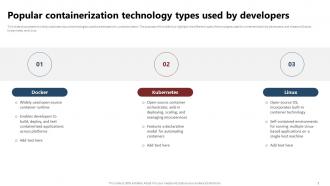
Popular containerization technology types used by developers
-

Popular containerization technology types used by developers contd
-

How Docker and Kubernetes relate to containers
-

Table of content for containerization Technology
-

Diverse functions and purpose of container technology
-

Containerization benefits for developers and development teams
-

Table of content for containerization Technology
-

Application container global projected market by region
-

Market share of top containerization technologies
-

Application container market analysis summary
-

Table of content for containerization Technology
-

Working and architecture of containerization technology
-

Design principles for container based application architecture
-

Containerized application development lifecycle phases
-

Table of content for containerization Technology
-

About container images overview and system
-

Understanding container engines technology and functions
-

About container runtime overview and types
-

Key building blocks of containerized applications
-
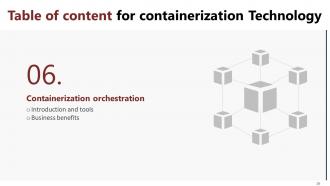
Table of content for containerization Technology
-

About container orchestration introduction and tools
-

Business benefits of container orchestration technology
-

Table of content for containerization Technology
-

Container security essentials to manage risks
-

Security best practices to protect containerized environments
-

Table of content for containerization Technology
-

Key challenges of containerization compliance
-

Solutions to comply with PCI DSS in containerized environment
-

Table of content for containerization Technology
-

Main steps for containerization deployment strategy
-

Table of content for containerization Technology
-

About container management overview and process
-

Importance of efficient container management solutions
-

Business benefits of container management solutions
-

Potential container management platform challenges
-

Table of content for containerization Technology
-

Comparison between containerization and virtual machines 1 2
-

Comparison between containerization and virtual machines 2 2
-

Comparative analysis of containers and serverless computing
-

Table of content for containerization Technology
-

About Container as a Service overview and characteristics
-

Salient features of Containerization as a Service solutions
-

Overview of Container as a Service architecture
-

Main layers of Container as a Service architecture
-

Benefits of Container as a Service CaaS architecture
-

Prominent Container as a Service platform providers
-

Container as a Service adoption best practices
-

Table of content for containerization Technology
-

Containerization deployment training program for IT teams
-

Budget for containerization deployment training program
-

Efficient container deployment budget allocation
-

Table of content for containerization Technology
-

30 60 90 days plan for containerization implementation
-

Table of content for containerization Technology
-

Timeline for strategic and seamless containerization deployment
-

Table of content for containerization Technology
-

Roadmap for successful containerization deployment journey
-

Table of content for containerization Technology
-

Container dashboard for IT systems and infrastructure monitoring
-

Container dashboard to monitor time series data metrics
-

Table of content for containerization Technology
-

Before vs After containerization strategy adoption
-

Table of content for containerization Technology
-

Overview of Kubernetes case study on Adidas
-

Real world use cases of containerization technology
-

Icons slide for containerization Technology
-

Additional Slides
-

Container vs Docker vs Kubernetes
-

Challenges and limitations of containerized applications
-

Bar chart
-

Timeline
-

Venn
-

Puzzle
-

Our Goal
-

Idea Generation
-

Roadmap
-

Thank You
-

-

-

-

-

-

-

-

FAQs for Containerization Technology
Containers share your host OS kernel, while VMs spin up entirely separate operating systems. That makes containers super lightweight - they boot in seconds vs minutes for VMs. VMs isolate better since each one's completely independent (perfect if you need different OS types), but containers crush it for resource efficiency. Most apps these days honestly work better with containers unless you specifically need that hardcore OS separation. Quick scaling? Microservices? Yeah, containers are probably your answer. Though I'll admit VMs still have their place when you really need that bulletproof isolation.
Dude, container orchestration is basically your lifesaver when you're dealing with tons of microservices. It automatically deploys containers across different machines and restarts them when they inevitably crash. Plus it handles all the networking headaches and load balancing between services. Scaling happens automatically based on traffic too, which is pretty sweet. Trust me, managing dozens of containers manually would make you lose your mind - I've seen people try it and it's not pretty. You'd spend all day just figuring out what's running where instead of actually coding. Definitely try Kubernetes first, though Docker Swarm's easier if you're just starting out.
Docker's like the engine that actually runs your containers - builds them, manages them, the whole deal. It became the standard for how containers work, which is honestly why every app has a Docker image now (good luck finding one that doesn't). Basically it packages your app with all its dependencies so it runs the same everywhere. You know that "works on my machine" nightmare? Docker fixes that. Build it locally with Docker Desktop, then deploy those exact containers to production. No surprises, no weird environment issues.
So containers basically wrap up your app with all its stuff - dependencies, libraries, config files, the whole deal. Your app runs the same way everywhere because the container brings its own mini OS environment with it. No more "works on my machine" headaches, which honestly used to drive me nuts back in the day. Docker's probably your best bet here - just make sure you pick a base image that actually matches what you're running in production. I've seen too many people mess this up and wonder why things break later. The container literally becomes your consistent environment across dev, staging, and prod.
Honestly, container security isn't that scary once you break it down. Start with scanning your images for vulnerabilities - I can't stress this enough, outdated base images are basically asking for trouble. Runtime monitoring comes next so you catch weird behavior early. Don't hardcode credentials (seriously, use proper secrets management), and set up network segmentation between containers. Least-privilege access is your friend here. Image scanning tools are probably the easiest place to start, then build from there. It's more manageable than it sounds initially.
Okay so containers are way lighter because they just package your app and its dependencies - no full operating system like VMs do. VMs are honestly kind of overkill since they include the entire OS, which makes them huge and slow to boot up. It's like... containers just ship your stuff in a box, but VMs ship your entire moving truck every time (so wasteful lol). Since containers share the host OS kernel, you'll get startup times in seconds instead of minutes. If you're deploying a lot, containers are definitely the way to go for speed.
Honestly, skip containers if you're dealing with old monolithic apps that are married to the OS - they just don't play nice. High-performance computing stuff needs bare metal, so containers will just slow you down. Your team actually needs to know what they're doing too, because orchestration gets messy fast (learned that the hard way). Simple apps that barely change? Don't bother with the overhead. Stateful applications get weird with containers. Look, half the time people containerize just because everyone else is doing it. Ask yourself if it actually fixes something you're struggling with first.
Dude, containerization is a total game changer for your DevOps stuff. Basically you package your app with everything it needs, so no more "works on my machine" headaches - seriously, that phrase haunts me lol. Everything runs exactly the same across dev, staging, and production. Containers boot up crazy fast too, which means deployments are quick and scaling is painless. When stuff breaks? Rolling back is actually simple for once. Docker plays well with CI/CD tools and Kubernetes handles the orchestration side. Honestly just start with Docker on one service - you'll see the difference immediately.
honestly the biggest thing is just cleaning up your dockerfile - i see so many bloated images it's crazy. start with alpine or another minimal base and don't throw in random packages you won't use. multi-stage builds help shrink things down too. set cpu/memory limits so your containers aren't fighting each other for resources. oh and use the latest container runtime version if you can. readiness probes are clutch for orchestration stuff. most performance issues i've seen come down to people just not being picky about what actually needs to go in their images.
So Kubernetes basically takes your containers and makes them manage themselves - pretty wild when you see it working. You don't have to manually restart stuff or worry about traffic distribution anymore. It's like having an ops team that actually works 24/7 (unlike some people I know lol). Failed containers? Restarted automatically. Need to scale up? Done. Rolling updates happen without breaking anything. Honestly the best part is you can stop thinking about all that orchestration headache and just focus on building your app. I'd say spin up a local cluster first - seeing it auto-manage everything is kind of addictive.
Honestly, the biggest pain points are security headaches and just how complex everything gets. Your current monitoring setup? Yeah, that's gonna need a complete overhaul for containers. Networking becomes this whole thing too, especially with older apps that weren't built for it. The learning curve is brutal - I'm not gonna sugarcoat it. Kubernetes will make your team's brain hurt for a while. My advice? Pick one small project first instead of going full send on everything. You can figure out all the weird edge cases without accidentally nuking production. Trust me on this one.
So containers are basically like cramming way more apps onto your servers by sharing the OS kernel instead of running full VMs for everything. A server that maybe handles 3-5 VMs can suddenly run 10-50 containers - the efficiency is actually insane. Plus they start in seconds instead of minutes, which is clutch when traffic spikes and Kubernetes needs to spin up more instances fast. Honestly I'd just pick some non-critical app and containerize it first. You'll probably be shocked at how much server capacity you free up. Way better than buying more hardware right away.
Honestly, just start with Docker - it's pretty much required these days. Kubernetes handles the orchestration part, though managing your own cluster is kind of a nightmare. For registries, Docker Hub's fine to mess around with, but you'll want AWS ECR or Google Container Registry for anything serious. Docker Compose is clutch for local dev when you're juggling multiple containers. Oh, and if you're doing cloud stuff, managed Kubernetes like EKS or GKE will save you so much headache. My advice? Learn Docker and Compose first, then move to Kubernetes once you actually need it.
So immutability means your containers are locked down - can't modify them once they're running. The cool part? Same image works identically everywhere, no more "but it worked fine on my laptop" drama. Something breaks? Just kill the container and spin up a fresh one instead of digging around trying to fix whatever got corrupted. Rollbacks are dead simple too since you're just switching back to an older image. Oh and next time you hit those weird environment issues, don't bother patching - just rebuild the whole thing from scratch. Way cleaner.
Yeah, containers are way better for the environment than VMs or bare metal. They share the host OS kernel, so you can fit tons more apps on the same hardware without running multiple operating systems. Fewer servers needed = less power and cooling costs. Kubernetes does this cool auto-optimization thing too - honestly saves so much waste. I'd start by checking what resources you're actually using right now. You'll probably be shocked at how much you can consolidate. The performance boost is just a nice bonus on top of shrinking your footprint.
-
The team is highly dedicated and professional. They deliver their work on time and with perfection.
-
I was never satisfied with my own presentation design but SlideTeam has solved that problem for me. Thank you SlideTeam!