

Crawl walk run fly with silhouette





Try Before you Buy Download Free Sample Product
 Impress Your
 Audience
 100%
100% Editable
 Save Hours
 of Time


Do you want to develop a creative and professional way to showcase your presentation slides? Here is our crawl walk run fly with silhouette PowerPoint template. This crawl walk run fly PPT design contains the concept of business analysis which can be used for business and management related presentations. Use this visual and build a professional presentation for your viewers. A linear process can be used to denote a step wise procedure for your business operations. Apart from this, the content or information related to your project can be changed easily as the slide is completely editable as per your business requirement. Just download this clip art and leave the right impression on your audience. We have many other similar slides which can serve your purpose. Browse the awesome collection of professionally designed business presentation slides on our site. Introduce the journal with our Crawl Walk Run Fly With Silhouette. Give a detailed account of the contents.
People who downloaded this PowerPoint presentation also viewed the following :
Content of this Powerpoint Presentation
Description:
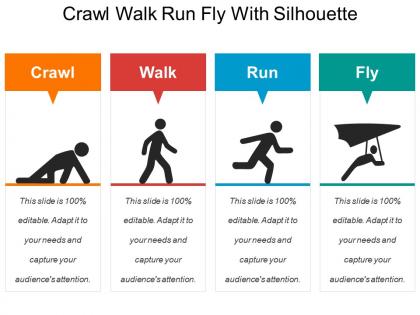
The image is a PowerPoint slide titled "Crawl Walk Run Fly With Silhouette," depicting the progression or maturity stages of a process or business growth. It uses the metaphor of human movement development to represent stages of growth and learning:
1. Crawl:
Illustrated with a silhouette of a person on all fours, indicating the beginning stage where basics are learned.
2. Walk:
Showcased by a silhouette of a person walking, symbolizing the next stage of development, where stability is achieved.
3. Run:
Represented by a running person, denoting a more advanced stage of faster progress and greater confidence.
4. Fly:
Illustrated with a silhouette of a person with a wing suit, suggesting the pinnacle of progress, innovation, and reaching new heights.
Use Cases:
This metaphorical approach is versatile and can be applied across various industries:
1. Startups:
Use: Demonstrating stages of company growth from inception to market leadership.
Presenter: Startup Founder
Audience: Investors, team members
2. Product Development:
Use: Describing the lifecycle of product development from concept to market release.
Presenter: Product Manager
Audience: Development team, marketing staff
3. Education:
Use: Outlining student learning progression from basic knowledge to mastery.
Presenter: Educational Consultant
Audience: Teachers, educational administrators
4. Healthcare:
Use: Showing patient recovery stages from initial treatment to full recovery.
Presenter: Healthcare Provider
Audience: Patients, medical staff
5. Marketing:
Use: Explaining campaign development from planning to full-scale execution.
Presenter: Marketing Director
Audience: Marketing team, stakeholders
6. Fitness Industry:
Use: Tracking fitness levels from beginner to advanced training.
Presenter: Fitness Coach
Audience: Clients, gym members
7. Personal Development:
Use: Coaching individuals through growth stages from self-awareness to achieving potential.
Presenter: Life Coach
Audience: Seminar participants, clients
Crawl walk run fly with silhouette with all 5 slides:
Give folks cause to grab a copy of the journal with our Crawl Walk Run Fly With Silhouette. They will go by your endorsement.


FAQs for Crawl walk run
Ok so presentations basically break down into three parts - opening, body, closing. Hook them immediately with a question or crazy stat, something that grabs attention. For the body, stick to 2-4 main points tops because honestly people zone out fast these days. Back up each point with solid examples. Your closing should hit the main takeaways and give them something specific to do next. Oh, and those transitions between sections? Practice them until they're smooth - nothing kills momentum like awkward pauses. I always outline using this structure first, then fill in details.
Think of it like telling a good story - you start somewhere simple and build up to the good stuff. Your audience wants to follow breadcrumbs that actually lead somewhere interesting. Each point should connect naturally to the next one (otherwise people just get lost or zone out). I always outline my main ideas first, then shuffle them around until the order feels right. You know how some conversations just flow and others feel all over the place? Same thing here. Short punchy points work great. But you also need some longer explanations that give people time to process what you're saying before hitting them with the next thing.
Think of storytelling as your GPS through confusing data dumps. People follow stories way better than random bullet points - we're literally built for it. Structure your presentation with beginning, middle, end. Use conflict and resolution to connect your main points smoothly. Your audience stays hooked instead of zoning out halfway through. Honestly, presentations without a story arc feel like reading a manual. Map yours out as a simple narrative first, then fill in the details. You'll notice people actually remember what you said afterward. Build toward your big conclusion naturally instead of just... ending abruptly.
Think of visuals like breadcrumbs leading your audience along. Charts work great for showing patterns, diagrams connect relationships, and honestly? I'm obsessed with a clean flowchart. Map out your main points first, then build visuals that bridge each step. Each slide should feel like the obvious next move - nobody wants to suddenly feel lost halfway through. Oh, and those simple arrow graphics are underrated for linking concepts together. The whole thing works when every visual builds on what came before it.
Honestly, transitional phrases are a lifesaver - stuff like "building on that" or "now that we've covered X." Don't underestimate visual consistency either. Same fonts, colors, layout. Otherwise it looks messy. Make sure each slide flows logically from the last one. Progressive disclosure works great too - reveal info bit by bit instead of overwhelming people. Oh, and here's a neat trick: read your slide titles in order. They should actually tell a story on their own. Sounds obvious but you'd be surprised how many presentations fail this test!
Ok so transitions are like the glue holding your whole presentation together. They stop your audience from getting whiplash when you jump between topics lol. Instead of awkward silence, you use stuff like "building on that idea" or "let's pivot to..." - basically breadcrumbs so people can follow where you're going. Honestly, presentations without smooth transitions feel super choppy even if your content rocks. Oh and pro tip - jot down your transition phrases beforehand. Trust me, you don't want to be standing there like "um... so... yeah" while your brain blanks on how to connect your points.
Honestly, it's all about reading the room. Execs want the punchline first - give them conclusions, then work backwards if they ask. Technical people are the opposite - they need you to build up from the basics. I bombed a C-suite meeting once by jumping straight into methodology... ouch. General audiences? They're gonna need way more context and story to keep them hooked. Mixed groups are tricky - hit the highlights early, then dive deeper for whoever wants details. Oh, and always have a plan B to speed things up or slow down based on how they're reacting.
Honestly, the worst thing you can do is dump way too much info in each section - people just zone out. Also those awkward jumps between topics with zero flow? Brutal. I always mess up the timing too, like I'll get super into my intro and then have to speed through everything else lol. Oh and when your slides don't match what you're saying at all, that's confusing as hell. Practice those transitions out loud beforehand though - sounds dumb but it actually helps. Most people skip that part but smooth connectors between points make such a difference.
So I always pause at key moments to check if people are actually following me. Quick questions work - "making sense so far?" - but honestly, just watching faces tells you everything. Those blank stares? Yeah, time to switch gears. I bombed a product demo once because I ignored all the confused looks and just kept going. Now I build natural stopping points into every presentation. If people look lost, I'll slow down or explain more. If they're nodding along, I can pick up the pace. Makes it way more conversational than just talking at everyone for 20 minutes straight.
Oh, definitely check out Bloom's Taxonomy first - it's classic for a reason, takes people from basic memorization all the way up to creating stuff. ADDIE works great if you want something more systematic for designing the whole experience. Gagne's Nine Events is solid too, though I find it a bit... I dunno, mechanical? For hands-on skills, scaffolding is your best bet. You gradually pull back support until they're doing it solo. Really depends on what you're teaching and who you're teaching it to. Some frameworks just click better with certain content types, you know?
Dude, time management is literally everything for presentations. You rush the beginning? Your main points get crushed at the end when everyone's zoned out. I've watched so many people bomb because of this - it's painful. What works: plan backwards from your conclusion. Figure out how long each section needs, then actually stick to it. Practice with a timer (seriously). Good pacing builds momentum naturally. Your setup points need breathing room so the big arguments actually hit. Otherwise you're just word-vomiting at people who stopped listening ten minutes ago.
Okay so here's what works for me - always connect new stuff to what you just talked about or something they already get. Like, give people something to mentally grab onto, you know? I do this "here's why you should care" thing before jumping into details because otherwise people just check out immediately. Honestly, nobody wants to sit through random info dumps. Try phrases like "building on that" or "this ties right into what we covered." Keep your intros short but clear about where you're headed. Oh and definitely pause after dropping a new concept - let it marinate a bit before you pile on more complexity.
Your theme and progression have to work together, period. I've watched so many presentations fall flat because people had solid points but they didn't connect to anything bigger. Map out how each section actually advances your main theme before you even touch the slides. Each part should build momentum toward your conclusion - like, your audience should feel pulled forward by the logic. If your roadmap doesn't match your destination, you'll just confuse people. Oh, and don't try to cram every good idea in there. Focus beats everything.
Think of pacing like music - you need rhythm to keep people hooked. Rush through the hard stuff and everyone's lost. Go too slow and they're checking their phones (honestly, can you blame them?). I always pause after big points so people can actually absorb what I just said. Speed up during examples or when you're connecting ideas. The real skill is watching faces - if someone looks confused, slow down. If they're nodding along, you can pick up the pace. Oh, and those awkward silences? They're actually good. Gives brains time to catch up.
Watch their faces constantly - glazed eyes and phone checking means speed up or switch gears. People leaning in asking questions? That's gold, slow down and go deeper. I bombed a quarterly review once doing this wrong lol. Build in natural spots where you can actually ask "make sense?" or "want more detail here?" Don't just bulldoze through your slides. Honestly, the best presentations feel like conversations anyway. Let their vibe tell you if you should breeze through something or camp out on it longer.
-
Visually stunning presentation, love the content.
-
Colors used are bright and distinctive.