

Dependencies gantt chart ppt sample presentations




Try Before you Buy Download Free Sample Product
 Impress Your
 Audience
 100%
100% Editable
 Save Hours
 of Time


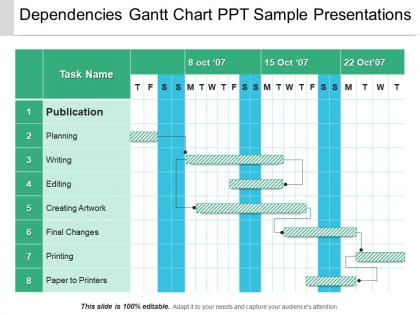
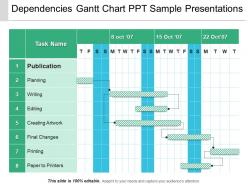
Use this dependencies Gantt chart PPT sample presentation if you wish for the fast growth and development of your business organization that so without putting in a lot of efforts. Our business experts have designed this tables and matrix PPT presentation using high resolution and premium quality slides which will help you raise the standard of your work. We know that business professionals like you do not always have time to sit and craft the slides themselves that is why to help you save your precious time and energy we bring to you this flowchart PowerPoint presentation. If you download and use this Gantt chart business template you will be able to discuss a number of processes like publication, planning, writing, editing, creating artwork, final changes, printing, paper to printers, etc. Also, we promise you that by using this dependencies communication PPT template you will be able to discuss the performance of your company on particular tasks on a weekly or day to day basis. Our Dependencies Gantt Chart Ppt Sample Presentations take your ideas forward. They get the eyeballs they deserve.
People who downloaded this PowerPoint presentation also viewed the following :
Dependencies gantt chart ppt sample presentations with all 5 slides:
Curb any drift with our Dependencies Gantt Chart Ppt Sample Presentations. Get the focus back again.
FAQs for Dependencies gantt chart
Honestly, it's a game-changer because you can actually see how everything links together. Those tasks that'll totally wreck your timeline if they go sideways? They jump right out at you. I mean, it's basically like having a map that shows you exactly which routes you can't mess up. When things inevitably go off track (and they will), you can point to the chart and show people why everything's now pushed back three weeks. Makes those stakeholder conversations way less painful too - no more guessing at dates. Even a rough version will save you from constantly explaining delays.
So Gantt charts basically show you the critical path - that's the chain of tasks that sets your minimum project timeline. Late tasks on this path? Those are your bottlenecks right there. Think of it like traffic backing up on the main highway. The visual makes it pretty obvious which delays actually matter versus ones with some buffer time. You'll also see how dependencies work - when one team falls behind, it snowballs into other people's work. Honestly, I always check the critical path stuff first when reviewing these things. Way more useful than getting lost in all the other details.
You'll need tasks with clear start/end dates and how they connect to each other - like which ones can't start until others finish. Duration and who's doing what is crucial too (seriously, half the project fails happen here). Throw in milestone markers for big deliverables. Progress tracking is clutch so you can see what's actually done. Build in some buffer time because things always shift around. When one task gets delayed, you want to see exactly how it screws with everything else downstream. That ripple effect visualization is honestly the whole point of doing this. Start basic with main dependencies, then add the complicated stuff later.
Different line styles help tons - dotted for finish-to-start, solid for start-to-start, that kind of thing. Group related stuff together visually. Sometimes the messiest charts are actually the most honest ones, but don't try cramming everything in at once. Start with your critical path dependencies, then add others as you go. Oh, and definitely label those dependency lines - otherwise people just stare at it like some weird puzzle. Breaking complex chains into phases works great too. I learned that one the hard way after presenting a chart that looked like spaghetti.
For complex stuff, Microsoft Project is honestly your go-to - it handles messy dependencies better than anything else. Smartsheet and Asana are decent if you want something less overwhelming. Monday.com looks pretty nice too. Excel or Google Sheets work fine for basic projects, though you'll be clicking around more. Oh, and if you're doing dev work, Jira's got Gantt charts built right in. I'd probably just check what your team's already using first before jumping ship to something new.
Honestly, Gantt charts are lifesavers for this stuff. They show you exactly when each task needs people and resources, so you can catch conflicts early. Like, you'll instantly see if your best developer is somehow assigned to three different projects at once (been there). The visual timeline makes spotting bottlenecks pretty obvious. You can also track how one delay might mess up everything else down the line. Basically just map out who needs what and when, then shuffle things around so nobody gets completely swamped. Way better than trying to keep it all in your head.
First thing - go straight into your project tool and fix the actual dates and task lengths. Dependencies are where it gets annoying though, since changing one thing basically breaks everything else. You'll have to go through all those predecessor/successor links, especially if stuff that used to run back-to-back now happens at the same time (or the other way around). Oh, and milestones need updating too obviously. Just work through it step by step instead of bouncing around randomly - trust me on this one. Once you're done, shoot everyone an update so they don't freak out about the new timeline.
So arrows and lines are your best friend here. Most people use finish-to-start (basically one task ends, next one begins) - just draw a line from the first task's end to the second's start. Start-to-start connects beginnings, finish-to-finish connects endings. Pretty straightforward stuff. Gantt tools usually let you mess around with colors and arrow styles, though honestly I think some people go overboard with the visual flair. Just pick one style and don't change it halfway through - your team will thank you for not making them decode a rainbow of different arrows every time they look at the chart.
Don't overcomplicate your dependency links - seriously, I've seen project schedules that look like someone threw spaghetti at a wall. Only link tasks that genuinely can't start without the previous one being done. Buffer time is your best friend because nothing ever goes according to plan (learned this the hard way). You don't need every single task depending on another task. Watch out for circular dependencies too - where Task A needs B finished, but then B somehow needs A. That'll break your brain trying to figure out. Start with the critical path, keep it simple, then add complexity if you actually need it.
Honestly, Dependencies Gantt charts are game-changers for team stuff. Everyone can actually see who's blocking who instead of playing that guessing game we always end up in. No more "wait, was I supposed to wait for Sarah?" moments. You'll spot problems way before they blow up your timeline. The best part? Stakeholder meetings become so much easier - just point at the chart instead of rambling through status updates for twenty minutes. I'd say start small though. Map out whatever project you're working on now and throw it up in your next standup. You'll be surprised how quickly people get it.
Honestly, Gantt charts are like having x-ray vision for your project timeline. You'll catch those nasty bottlenecks before they bite you. Say Task B needs Task A finished first but there's literally no wiggle room? Yeah, that's trouble waiting to happen. The visual layout makes it super obvious where you might have resource clashes or deadlines that are just... unrealistic. I always color-code the sketchy dependencies so they stand out immediately. Plus you can play around with different scenarios - move a deadline here, see what breaks there. Way better than finding out the hard way that everything's connected.
Yeah totally! Just shrink the timeframes down to sprints instead of those crazy long waterfall phases. I actually find Gantt charts super useful for messy sprints where stories are all tangled up together. Update yours after each planning session and run it next to your usual burndown charts. Don't go overboard though - I've seen teams get so obsessed with perfect charts that they forget to actually build stuff. Start simple with just the critical dependencies. Short sprints work way better than trying to map out entire releases anyway.
Gantt charts show you the whole timeline - when stuff happens, how tasks overlap, all that. CPM is different though. It cuts through the mess and shows you exactly which tasks can't be delayed without screwing up your deadline. Honestly, Gantt charts get messy fast with complex projects. Too much visual clutter. CPM strips that away and highlights your critical path - basically the chain of tasks that determines how long everything takes. I'd use Gantt when you're presenting to stakeholders since they love seeing timelines. But if you're trying to figure out where delays will actually bite you? CPM all the way.
Color coding is a game changer for this stuff. I always use the same color family for tasks that depend on each other - so if Task A connects to Task B, they both get different shades of blue or whatever. Warm colors work great for critical path items since they naturally grab your attention more. You can also organize by team so cross-department dependencies pop out immediately. Just stay consistent with whatever system you choose (learned that the hard way). Start by highlighting your main task chains first - you'll catch bottlenecks and scheduling problems right away.
Tell the story first - walk them through your critical path and big milestones before getting into dependencies. People zone out if you dive straight into the weeds. I'm totally obsessed with making blocked tasks bright red because honestly, who's gonna miss that? Focus on what's actually at risk and what needs their approval or budget, not every tiny task detail. Have backup slides ready with the full breakdown though. Someone always asks "but what about the integration testing" or whatever. End with clear next steps and who owns each blocker you've called out.
-
Use of icon with content is very relateable, informative and appealing.
-
Very unique, user-friendly presentation interface.