

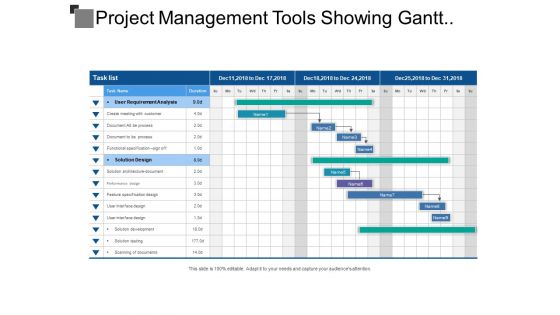
Project management tools showing gantt chart with task list





Try Before you Buy Download Free Sample Product
 Impress Your
 Audience
 100%
100% Editable
 Save Hours
 of Time


Act flawlessly with our Project Management Tools Showing Gantt Chart With Task List. They will keep your finger out.
People who downloaded this PowerPoint presentation also viewed the following :
Project management tools showing gantt chart with task list with all 5 slides:
Break down complex equations with our Project Management Tools Showing Gantt Chart With Task List. Explain it in easy to fathom installments.
FAQs for Project management tools showing gantt chart
Honestly, start with the basics - task management, team collab, and timeline stuff. You want to assign tasks, set deadlines, see progress without hunting for updates. File sharing and real-time comments will save your sanity (email chains are literally the devil). Oh, and make sure it plays nice with whatever you're already using - Slack, Google Drive, etc. Nobody wants to juggle a million apps. Write down what's driving your team crazy right now, then test out maybe 2-3 tools that actually fix those specific problems.
So basically these tools give everyone a place to see what's actually happening instead of drowning in email threads. You get task boards, real-time updates, file sharing - the whole thing. People can tag each other and comment directly on projects, which honestly saves so much time vs those weird "um how's that project going" check-ins. The transparency factor is huge for cutting confusion. Oh and pick ONE tool - I've seen teams try three different ones and it defeats the whole point. Once everyone's actually using the same system consistently, that's when communication really clicks.
Honestly, these tools are lifesavers for figuring out who's doing what. You can see everyone's workload in one place and catch when someone's completely swamped while others are just sitting around. The dashboards show utilization rates instantly - no more guessing games. I used to be terrible at this stuff before I started using project management software. You'll spot bottlenecks way earlier and can shuffle tasks around before things get crazy. Best part? No more accidentally assigning the same work to multiple people. Just map out your current projects first and see where you're over or under-staffed. Trust me, the gaps become super obvious once it's all laid out visually.
Honestly, Gantt charts are game-changers for project timelines. You can see exactly when stuff starts, how long it takes, and what's blocking what. Super helpful for catching problems early. The drag-and-drop thing is clutch - when deadlines shift (and they always do), just move tasks around and everything else updates automatically. I got obsessed with them last year, no joke. Start small though! Pick something simple first to figure out how task dependencies work. Trust me, it's way less confusing than it sounds and you'll wonder how you managed projects without them.
Oh dude, Kanban boards are so much better than those clunky Gantt charts! You've got these simple columns - To Do, In Progress, Done - and you just drag cards around. Super satisfying when something finally hits "Done" (maybe I'm weird but whatever). Traditional tools lock you into rigid timelines and force all this upfront planning. Kanban just flows with whatever chaos hits your project. Plus bottlenecks become obvious fast - like when your "In Progress" pile gets insanely tall, you know something's broken. Honestly, try it on your next small project and see how it compares to your usual method.
Hey! So project management tools basically connect through APIs and webhooks - sounds techy but it's pretty straightforward. You can hook up Slack for notifications, Google Drive for files, time trackers, email stuff. Most sync in real-time too, which is honestly clutch because when you change a deadline, your calendar updates automatically. Oh and tools like Zapier work as like a translator between apps that don't normally talk to each other. I'd definitely scope out what integrations your current setup supports first though - learned that the hard way when I switched platforms last year and lost half my connections.
Honestly? Go with cloud tools like Asana or Monday.com unless you've got crazy security requirements. You can work from anywhere, your team collaborates way better, and no dealing with server headaches. The costs are way more reasonable too - no massive upfront investment. On-premise stuff gives you total control over your data, which banks and healthcare companies need for compliance stuff. But most teams don't actually need that level of control. Cloud solutions scale up so much easier when you're hiring. I mean, unless your internet is terrible or you're in a super regulated industry, why make it harder on yourself?
Honestly, these tools are game-changers for tracking where your project actually is vs where it should be. You'll see task completion, deadlines, bottlenecks before they blow up - the usual stuff. Dashboards show progress bars and milestone status at a glance. I'm weirdly obsessed with watching those completion percentages tick up (don't judge me). Budget burn rates, timeline slippage - it's all there in reports. Pick one tool though and keep it updated. Otherwise you're just making extra work for yourself, which defeats the whole point.
Honestly, the worst thing you can do is go for something way too complicated. Like, your team doesn't need 47 features if they're only gonna use 3. Don't just pick the cheapest option either - the learning curve might kill you. Make sure it plays nice with whatever you're already using because juggling multiple platforms is honestly the worst. Oh, and actually ask the people who'll use it daily, not just whoever signs the checks. They always have different ideas about what's "user-friendly." Run a trial first with real work, not just demo stuff.
Oh dude, mobile access is a game changer! You can update tasks and check deadlines from literally anywhere instead of being stuck at your desk. I actually clear my task notifications during my morning coffee run - probably weird but whatever. The best part? You'll catch problems before they blow up into disasters. Quick approvals while you're traveling, unblocking teammates between meetings, responding to urgent stuff. Those tiny 2-minute actions end up preventing way bigger headaches later. Start with push notifications for the critical items first - trust me on this one.
Check if people are actually using it first - that's the big one. No point measuring anything else if the tool's just sitting there collecting dust. Project completion rates compared to before you rolled it out will show you real impact. How fast are people cranking out project plans now? That's usually where you see the biggest time savings. Honestly, I'd just send out a quick survey about whether people like it or not - user happiness matters more than most companies think. Also look at collaboration stuff like file sharing and team updates. Those five metrics should give you what you need.
Honestly, these tools are game-changers for remote teams. Everything lives in one spot - tasks, deadlines, who's doing what. No more hunting through email chains or wondering if Sarah actually started that thing. The best part? People can jump in and update stuff whenever, so you're not stuck waiting for someone in a different time zone. I mean, we still end up Slacking each other constantly anyway. But at least there's a single source of truth. Fair warning though - getting everyone to actually USE the tool consistently is like herding cats. Pick something simple and stick with it.
Okay so first things first - encryption is non-negotiable, both when data's moving around and when it's just sitting there. Multi-factor authentication too, obviously. Role-based permissions are clutch because not everyone needs to see everything, you know? I can't tell you how many horror stories I've heard about terrible password policies coming back to bite people. Audit trails are super helpful for tracking who touched what. Oh, and if you can get single sign-on working, it's actually way more secure than you'd think. Just compare whatever you're using now against this list and see what's missing.
Honestly, training is what makes or breaks whether people actually adopt your PM tool. Nobody wants to figure out software on their own - they'll just go back to emailing everything to death. Focus on showing each team how it'll solve their specific problems, not just random features. Set up some champions on each team who can answer questions when people get stuck (because they will). Role-specific sessions work way better than generic demos. Oh, and make sure support is actually helpful - nothing kills adoption faster than crickets when someone needs help. Trust me, invest in this upfront or you'll be dealing with complaints forever.
Honestly, the coolest stuff coming is AI that'll predict when your projects are about to crash and burn before it happens. Real-time collaboration is getting way better too. Some tools can already auto-adjust your timelines when someone's swamped, plus they'll suggest who should handle what tasks. There's even voice commands and AR being tested - though talking to a Gantt chart feels pretty weird to me lol. The thing that'll actually matter most? Everything finally playing nice with the apps you're already stuck using. Definitely check out any beta features your current platform drops.
-
Great quality product.
-
Very unique, user-friendly presentation interface.