

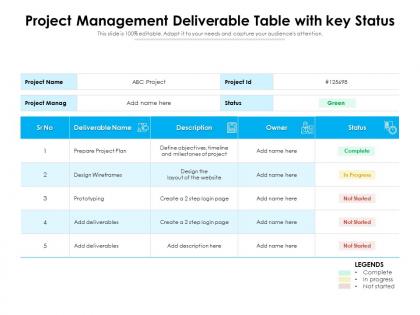
Project management deliverable table with key status




Try Before you Buy Download Free Sample Product
 Impress Your
 Audience
 100%
100% Editable
 Save Hours
 of Time


Our Project Management Deliverable Table With Key Status are topically designed to provide an attractive backdrop to any subject. Use them to look like a presentation pro.
People who downloaded this PowerPoint presentation also viewed the following :
Project management deliverable table with key status with all 2 slides:
Use our Project Management Deliverable Table With Key Status to effectively help you save your valuable time. They are readymade to fit into any presentation structure.
FAQs for Project management deliverable table
A project management status table should include task names, assigned team members, completion percentages, current status indicators, deadlines, priority levels, and identified risks or blockers. These components enable project managers to track progress systematically, identify bottlenecks quickly, and reallocate resources effectively, with many organizations finding that comprehensive status tracking ultimately delivers improved deadline adherence and enhanced team accountability.
**INPUT**: How do you determine the appropriate frequency for updating a project management status table? **OUTPUT**: Update frequency depends on project complexity, stakeholder requirements, team size, and milestone density, typically ranging from daily for agile sprints to weekly or bi-weekly for traditional projects. Organizations find that aligning updates with sprint cycles, client reporting schedules, and critical path activities streamlines communication while maintaining operational efficiency, ultimately delivering better project visibility and stakeholder engagement.
Customization methods include stakeholder-specific views, role-based access controls, adjustable reporting frequencies, customizable metrics dashboards, and tailored communication formats. These approaches enable project managers to deliver relevant information by filtering data complexity, highlighting priority metrics, and adjusting detail levels, with executives receiving high-level summaries while technical teams access comprehensive operational data, ultimately enhancing decision-making efficiency.
Visual elements enhance project management status tables by incorporating color-coded statuses, progress bars, milestone indicators, risk flags, and interactive dashboards that enable instant status recognition. These visual tools streamline decision-making by transforming complex data into digestible insights, with many project teams finding that visual dashboards reduce status meeting time while improving stakeholder engagement and accountability.
Best practices for tracking project milestones include establishing clear milestone definitions, using consistent date formats, implementing color-coded status indicators, maintaining regular update schedules, and incorporating percentage completion metrics. These approaches streamline project visibility by enabling stakeholders to quickly assess progress, identify potential delays, and make informed decisions, with many organizations finding that structured milestone tracking ultimately reduces project overruns and enhances team accountability.
A project management status table helps in risk management by providing real-time visibility into project health, enabling early identification of potential issues, and tracking risk mitigation progress across all project components. Through centralized status monitoring, project managers can quickly spot deviations from planned timelines, budget overruns, and resource constraints, ultimately delivering proactive risk response and enhanced project success rates.
Key metrics include task completion percentage, budget utilization, timeline adherence, resource allocation efficiency, and risk assessment scores. These indicators enable project managers to identify bottlenecks, reallocate resources strategically, and communicate progress transparently to stakeholders, with many organizations finding that prioritizing completion rates and budget variance delivers the clearest oversight for decision-making.
Project management status tables achieve clarity through standardized terminology, color-coded status indicators, concise progress descriptions, and consistent formatting across all entries. By limiting each status update to essential information, using quantifiable metrics like percentage completion, and maintaining uniform column structures, teams can quickly assess project health, identify bottlenecks, and make informed decisions, ultimately streamlining communication and enhancing operational efficiency.
Color coding enhances project management status tables by providing instant visual recognition of project health, progress levels, risk indicators, and priority rankings. This visual system enables project managers and stakeholders to quickly identify critical issues, track milestone achievements, and allocate resources more effectively, ultimately streamlining decision-making processes and improving overall project oversight across complex portfolios.
Teams leverage project management status tables for remote collaboration by centralizing task visibility, tracking progress updates, managing deadlines, and facilitating transparent communication across distributed team members. These tables enable remote teams to maintain project alignment, coordinate deliverables seamlessly, and identify bottlenecks quickly, with many organizations finding that centralized status tracking reduces meeting overhead while enhancing accountability and productivity.
**INPUT**: What tools or software are recommended for creating an effective project management status table? **OUTPUT**: Recommended tools include Microsoft Project, Asana, Trello, Monday.com, Smartsheet, and Jira, each offering customizable templates and real-time collaboration features. These platforms streamline project tracking by automating status updates, enabling team collaboration, and providing visual dashboards, with many organizations finding that integrated reporting capabilities ultimately deliver enhanced transparency and faster decision-making across departments. **Word count: 58 words**
Incorporating stakeholder feedback into project status tables involves adding dedicated columns for stakeholder comments, risk assessments, priority adjustments, and action items based on their input. Through regular review cycles, project managers can update milestone timelines, resource allocations, and deliverable specifications while maintaining transparent communication channels, ultimately ensuring stakeholder alignment and improved project outcomes.
Common pitfalls include overcrowding with excessive details, inconsistent status definitions, outdated information, poor visual hierarchy, and lack of stakeholder input during design. These issues undermine clarity and decision-making, with many organizations finding that streamlined tables focusing on critical metrics, automated updates, and intuitive layouts ultimately deliver better project visibility and enhanced team communication.
Historical data enhances future project status tables by identifying recurring patterns, predicting potential bottlenecks, and establishing more accurate baseline metrics for timeline and resource estimates. Through trend analysis and performance benchmarking, organizations can refine their tracking methodologies, implement proactive risk mitigation strategies, and ultimately deliver more reliable project forecasting and stakeholder communication.
A project management status table facilitates team accountability by providing transparent task ownership, clear deadline visibility, progress tracking, and performance documentation for all stakeholders. Through real-time updates and standardized reporting formats, teams can identify bottlenecks, address delays proactively, and maintain consistent communication, with many organizations finding that this transparency significantly enhances individual responsibility and collective project success.
-
Much better than the original! Thanks for the quick turnaround.
-
Design layout is very impressive.