

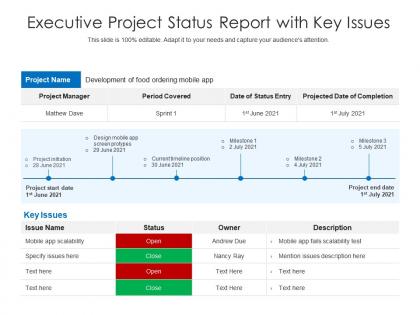
Executive project status report with key issues




Try Before you Buy Download Free Sample Product
 Impress Your
 Audience
 100%
100% Editable
 Save Hours
 of Time


Our Executive Project Status Report With Key Issues are topically designed to provide an attractive backdrop to any subject. Use them to look like a presentation pro.
People who downloaded this PowerPoint presentation also viewed the following :
Executive project status report with key issues with all 2 slides:
Use our Executive Project Status Report With Key Issues to effectively help you save your valuable time. They are readymade to fit into any presentation structure.
FAQs for Executive project status report
Timeline and budget status are your bread and butter - gotta know if you're on track. Flag any roadblocks early before they blow up the whole thing. Team morale matters more than people think honestly, because stressed teams make terrible decisions. Milestone updates keep everyone aligned on what's actually getting done. Risk stuff is huge - call out anything sketchy you see coming. Oh and stakeholder happiness if you've got demanding clients breathing down your neck. Charts help but don't go overboard. Always end with what decisions you need from the bosses.
Weekly updates are usually the sweet spot, but honestly it depends on what you're dealing with. High-stress or fast projects? Maybe twice a week. Something more chill and predictable could be every two weeks. I've totally seen update fatigue happen when people go overboard - everyone just starts ignoring the emails. Nobody wants that. Just start weekly and see how it goes. If your stakeholders keep bugging you for info between updates, bump it up. If you notice people aren't really engaging anymore, dial it back to bi-weekly. You'll figure out what works pretty quick.
Honestly, less is more with these presentations. Skip the text walls - charts beat bullet points every time. Progress bars and red/yellow/green status indicators are your best friends for quick updates. One main point per slide, and don't be afraid of white space (I know it feels weird at first). Start strong with your biggest wins or roadblocks. Nobody cares about the small stuff until you've covered what really matters. Always end sections by telling people exactly what you need from them. Oh, and definitely run it by someone who wasn't knee-deep in the project - they'll catch confusing parts you missed.
Here's what saved my sanity - create a shared Google Doc or Notion page where everyone updates their own section throughout the week. No more crazy Friday scrambles! Each person just adds stuff as it happens instead of trying to remember everything last minute. Pick someone to be the "compiler" who makes it all look consistent at the end. Oh, and set your internal deadline like 24 hours early. Trust me on this one - you'll always find something that needs tweaking, and it's way better than discovering gaps right before it's due.
Honestly, I'd just stick with whatever project management tool your team already uses - Asana, Monday, Trello, whatever. They track everything automatically so you don't have to chase people down for updates. For the actual visuals, Google Sheets works fine most of the time (I know, boring but effective). Canva makes things look way more professional if you've got five minutes to spare. Tableau's nice if you're feeling fancy with data visualization. The thing is, switching between a bunch of different platforms gets old fast. Start simple and only upgrade when you're actually hitting walls with what you have.
Honestly, just give people what they actually want to hear. Executives? Hit them with budget, timeline, big risks - done. Your team needs the real details about tasks and what's blocking them. Clients care about features they'll actually use. I used to blast everyone with these massive 10-page updates (spoiler: nobody read them). Now I write different versions for different people. Short and relevant to whatever they're dealing with. Start with what matters to THEM first, then throw in extra details if you think they need it. Way more effective.
Be straight up about problems from the start - nobody wants the real story buried under fluff. Skip technical details your audience won't get, and always bring solutions when you raise issues. I swear, half the updates I see are just "we're good!" when clearly things are falling apart. Timeline-wise, be realistic instead of telling people what they want to hear. Don't waste time pointing fingers at who screwed up. Focus on what's actually happening now and what comes next. Always end with specific action items and who's doing what.
Start with your biggest wins - people want the good stuff first. Skip the vague "everything's fine" nonsense and hit them with actual numbers and results. When you get to problems (and you will have them), don't just dump a pile of issues on everyone's lap. That's honestly the worst thing you can do. Instead, pair each challenge with your plan to fix it or what support you need. I'd organize it by timeline or different work areas so it's not all over the place. Be real about what's happening, but show you're on top of managing both the good and messy parts.
Honestly, getting feedback on your status updates is a game changer. Without it, you're basically shooting in the dark and hoping people actually read them. I made this mistake early on - sent super technical updates to executives who just wanted the high-level stuff. Awkward. Ask stakeholders what they need more of, or what's confusing them. You'll figure out pretty quickly which metrics different people care about. Some want all the details, others just the bottom line. Oh and definitely ask "what would make these more useful?" after your next couple reports. Makes a huge difference.
Be super specific - actual numbers, dates, what you delivered instead of "everything's fine." Vague updates just bite you later, trust me. Put your wins AND problems right up front. Don't hide the bad stuff at the bottom hoping nobody notices lol. Make a template so people know where to look for the important bits. Send regular updates even when it's boring - radio silence freaks everyone out way more than just saying "still working on X, no changes this week." They'll imagine disasters if you go quiet.
Honestly, stick to 10-15 minutes tops with maybe 5-10 slides. People zone out super quick otherwise - I've been in those painful 30-minute "updates" that should've just been an email, ugh. Hit the main stuff: where you're at, what's blocking you, any timeline shifts, and next steps. That's literally all they care about. Your stakeholders want the highlights so they can make decisions, not hear every tiny detail. Questions can happen after if needed. Oh and definitely practice timing yourself beforehand - going over always looks bad.
Oh totally! Call out specific people who killed it that week - like "Sarah's design work got us 20% closer to launch." People eat that recognition up. Frame setbacks as lessons learned instead of failures. Show how close you are to hitting big milestones and what that means for everyone. Honestly, I think the key is making it feel like you're all on the same team working toward something exciting. Skip the boring spreadsheet stuff. Make it more like gathering everyone around and saying "look what we built together this week!"
Honestly, just ask your audience what they want first - saves you so much time later. Executives usually love dashboards or one-pagers with key metrics and timelines they can scan quickly. Stakeholders who need documentation? Give them the full detailed report. Meetings work best with slideshows since people can actually discuss stuff. I've watched so many gorgeous reports get completely ignored because nobody had time to read them. Short sentences hit different sometimes. Match how people actually want to consume info and you're golden.
Honestly, visual updates are a game changer. Charts and progress bars let people see what's happening instantly - way better than making them read through tons of text. Your stakeholders are already swamped, so they'll appreciate quick visual checks. Gantt charts work great for timelines, or you could do those red/yellow/green status things (though I know some people find those cheesy). Point is, you'll catch problems faster and people will actually want to check your updates. Makes celebrating the wins more obvious too.
Honestly, just cut to the chase with what actually matters - wins, roadblocks, what's next. I always throw the budget/deadline stuff up front because that's what they really care about. Most people will zone out if you get too technical anyway. Break messy problems into bullets and ditch the jargon. That traffic light thing works great too - green, yellow, red for status updates. People skim these things like crazy, so make it scannable. Oh and always end with who's doing what next. Otherwise you'll get those awkward follow-up emails asking "so... what now?"
-
Attractive design and informative presentation.
-
The content is very helpful from business point of view.
-
Great quality slides in rapid time.
-
Easy to edit slides with easy to understand instructions.