

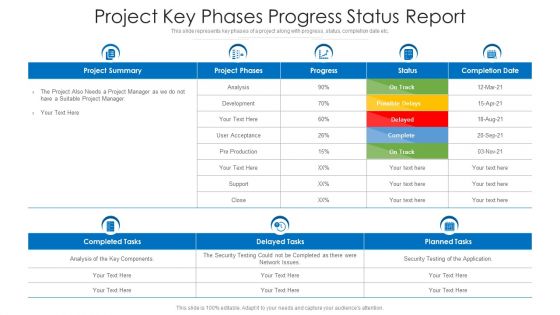
Project key phases progress status report




Try Before you Buy Download Free Sample Product
 Impress Your
 Audience
 100%
100% Editable
 Save Hours
 of Time


This slide represents key phases of a project along with progress, status, completion date etc.
People who downloaded this PowerPoint presentation also viewed the following :
Project key phases progress status report with all 2 slides:
Use our Project Key Phases Progress Status Report to effectively help you save your valuable time. They are readymade to fit into any presentation structure.
FAQs for Project key phases
Hit these five things: current status vs milestones, budget vs actual spend, timeline updates (including delays), key risks/blockers, and next period plans. Leadership honestly cares way more about the risks section than people think - don't skip it. Be specific with numbers and dates instead of saying vague stuff like "on track." Behind schedule? Explain why and your recovery plan. Keep it short but give enough context so stakeholders can actually make decisions. Oh, and create a template once - you'll thank yourself later when you're not starting from scratch every week.
Honestly, I'd go with weekly reports for most stuff. You'll catch problems before they get ugly, but you won't spend half your life writing updates. Daily reports? Total overkill unless everything's on fire. Monthly ones are way too slow - I got burned once when a project completely fell apart between check-ins and nobody knew until it was too late. Bi-weekly works if things are super complicated or risky. Just pick whatever and stick with it. People need to know when updates are coming so they're not constantly bugging you about status.
Dude, visual aids are a game changer for progress reports. Nobody wants to read through walls of text - I learned that the hard way. Charts and graphs make your data way easier to digest, like showing budget burn or timeline stuff at a glance. Screenshots and diagrams help people quickly see where you're at versus where you should be. Even basic color coding works. I've sat through too many meetings where people seemed lost because the report was just endless bullet points. Add 2-3 visuals to your next one and you'll definitely see better engagement.
Honestly, just stick to the basics - are you hitting deadlines, staying on budget, and delivering quality stuff? Those three will tell you everything. Team velocity is clutch too if you're doing sprints or iterations. I see so many PMs get obsessed with tracking like 15 different things that don't actually matter. Pick maybe 4-5 max and check them weekly. The fancy dashboards look impressive but they're mostly just noise. What really matters is finding the metrics that actually predict if your specific project will succeed or crash and burn.
Hit them with the bad news first - don't hide it halfway through your report. What broke, why it broke, how it's screwing with your timeline and budget. I swear, half the reports I see just ramble around the problem with fancy business language that nobody understands. Give them real details so they actually get what's happening. Then boom - here's how you're fixing it and when things'll be back on track. Honestly, being straight up about problems while showing you've got a plan? That's way better than pretending everything's fine when it's not.
Honestly, visuals are your best friend here - charts and dashboards beat walls of text every time. Start with the wins first, then hit the problems. Match your content to who's reading it too... execs want the 30,000 foot view while team leads need the nitty-gritty details. I always throw in a "what's next" section because people care more about where you're headed than where you've been. Oh, and don't just dump info on them - ask for specific feedback or decisions. Makes it way more interactive. Nobody wants to feel like they're just getting lectured at, you know?
Honestly, automation changed my life with reports. Start with tools like Asana or Monday - they'll pull all your task data automatically so you're not chasing people for updates. Real-time dashboards are clutch too, way prettier than my sad PowerPoint attempts. You can even get AI to draft sections (though double-check those, they sometimes go rogue). My advice? Get the data collection part working first. Then add the flashy visual stuff later - I learned that the hard way trying to do everything at once.
Look, your progress reports are basically what drive every major decision on a project. Stakeholders need those clear numbers on timelines and budgets to figure out where to put their money and energy. A good report makes everyone feel way more confident about what's actually going down - I've seen bad reporting tank projects that were doing fine. Decision-makers use these to decide whether to keep going, change direction, or pull the plug entirely. Don't sugarcoat the problems though. They need both the wins AND the messy stuff to make smart calls about what comes next.
Honestly, getting feedback from your team is like 90% of writing a decent progress report. Without their input, you're basically guessing at everything. Ask specific questions though - not just "how's it going?" because you'll get useless answers. What deliverables are done? Any roadblocks? Timeline issues? Their real-world perspective shows you what's actually happening vs. what your pretty project plan claims should be happening. Plus they catch risks early and mention wins you'd totally miss otherwise. I mean, you can't be tracking every single detail yourself, right?
Honestly, just give each group what they actually want to hear. Executives care about budgets, timelines, and big risks - they'll zone out if you dump technical details on them. Your team needs the real stuff though: task updates, what's blocking them, resources they need. I learned this the hard way when my boss got annoyed at a 5-page report that could've been bullet points. Write the detailed version first for your team, then pull out the key bits for leadership. Way less work than trying to go the other direction, trust me.
Don't sugarcoat stuff - people want the truth, not fairy tales. Call out problems right at the top instead of hiding them in paragraphs nobody reads. Skip the play-by-play of every tiny task (trust me, stakeholders' eyes will glaze over). What actually matters? Progress that moves things forward, roadblocks stopping you, and what you need from others. Always throw in clear next steps with timelines that won't come back to bite you later. Your report should nail three things: current status, what's screwing things up, and the plan ahead. Keep it real and actionable.
Yeah, totally! Progress reports are perfect for showing off those wins. I'd throw in a "milestones achieved" section right at the top - honestly, starting with good news makes everyone actually want to keep reading. Call out specific people who crushed it and add numbers when you can. Like "Sarah's team finished the redesign 3 days early" or whatever. It's huge for morale, plus stakeholders love seeing concrete progress. Sometimes I get carried away listing every tiny accomplishment, but the big stuff definitely deserves its moment. Trust me, celebrating wins in writing hits different than just mentioning them in meetings.
Honestly, visual dashboards are your best friend here - show real-time progress and risks so people can see what's actually happening. Don't just say "we're on track" in your updates. Give them real data. I've learned the hard way that admitting when stuff isn't going well actually builds more trust than pretending everything's fine. Also, explain your methodology so they understand how you're measuring success. Oh, and create templates for your reports - sounds boring but it keeps things consistent and people know where to find what they need.
Agile actually makes this super easy since you're already tracking everything in sprints. Just pull from your sprint reviews and burndown charts - no extra work needed. Focus on velocity and completed story points instead of those old-school milestone reports. You're doing mini-reports every two weeks anyway, right? Package that sprint data however your stakeholders want it. Automated dashboards are clutch if you can swing it. Otherwise, make a simple template that grabs from your existing stuff. Daily standups give you the blockers info too. Honestly, it's way more natural than traditional reporting once you get the hang of it.
Definitely reach out within a week to catch any questions. People's brains are basically sieves - they'll forget half the details by Tuesday. Shoot them a quick email hitting the main points and what happens next. Calendar reminders are your friend for tracking action items. Oh, and if anyone looked totally lost during your presentation (you know the face), offer a one-on-one deep dive. Don't wait around for them to ask though. Being proactive saves everyone headaches later, plus it keeps your project moving instead of stalling out.
-
Very nice
-
The Designed Graphic are very professional and classic.