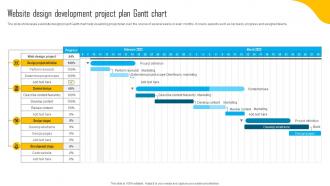
Website Design Development Project Plan Gantt Chart
Try Before you Buy Download Free Sample Product
Audience
Editable
of Time
The slide showcases a website design project Gantt chart help visualizing project plan over the course of several weeks or even months. It covers aspects such as key tasks, progress and assigned teams.
People who downloaded this PowerPoint presentation also viewed the following :
Website Design Development Project Plan Gantt Chart with all 6 slides:
Use our Website Design Development Project Plan Gantt Chart to effectively help you save your valuable time. They are readymade to fit into any presentation structure.
FAQs for Website Design Development Project
You'll want to break everything down into actual tasks first - like, specific stuff people can check off. Then map out your timeline with start and end dates. Dependencies are huge though - seriously, this trips up so many projects because people don't think about what has to happen before other things can start. I'd also throw in some milestones for the big deliverables. Don't forget to assign owners for each task. Oh, and make sure you can update progress easily - there's nothing worse than a chart that just sits there getting more outdated by the day.
Gantt charts are basically visual timelines for your entire project. You can see which tasks are on the critical path and what's falling behind schedule. Dependencies become super obvious too - like when one delay will mess up everything downstream. They're honestly game-changers for avoiding those awkward "um, we're three weeks behind" conversations with your boss. Plus stakeholders love them because they get updates without bugging you constantly. I'd start simple though - maybe just focus on major milestones first? You can always add more detail later once you get the hang of it.
Oh man, biggest mistake is making your tasks way too detailed - you'll go crazy updating every little thing. Always leave buffer time because stuff WILL go wrong (trust me on this one). When you chain a million dependencies together, one delay screws everything up. I used to think my charts had to be perfect from day one, but honestly? They're meant to change as you go. Start basic, give yourself breathing room, and don't stress about keeping it updated constantly. Way better than cramming everything together with zero wiggle room.
Honestly, Gantt charts are a game-changer for keeping everyone on track. Your whole team can see who's doing what and when stuff's due - no more awkward "I thought you were handling that" conversations. They help you catch bottlenecks early too, which is huge. When deadlines inevitably shift (because they always do, right?), you just update the chart and boom - everyone knows what's changed. The key is making sure it's actually accessible to your team, not buried in some folder nobody checks. Trust me, once you get one set up properly, it becomes like your project bible that everyone actually refers to.
Honestly, if your company's already using Microsoft Project, just stick with that - though it's pretty overkill for basic stuff. Asana and Monday.com are way easier to learn, especially for teams who don't want to spend forever figuring things out. ProjectLibre is free but looks like it's from 2005 or something. Oh, and Smartsheet's cool if you're one of those people who lives in Excel but wants actual Gantt features. Really though, pick whatever your team won't abandon after a week - I've seen too many beautiful charts that nobody bothers updating.
Yeah, totally works! Focus on the big stuff though - milestones, releases, major deadlines. Don't get bogged down tracking every sprint task on there. Agile purists hate this combo but honestly? It's super helpful for talking to stakeholders and leadership. Keep your daily sprint work in Jira or whatever, then use the Gantt for epic timelines and team dependencies. The key is staying flexible - you'll be updating it constantly as priorities change. I actually think it strikes a nice balance between agile flexibility and giving executives that visual timeline they always want.
Honestly, I'd update it weekly at minimum - or right when something major shifts with your tasks. The biggest screwup I see? People create these beautiful charts then never touch them again. Update your completion percentages as you go and shift future dates based on what's actually happening. When stuff gets delayed (and it will), immediately look at what that breaks downstream and fix those dates too. Otherwise your team stops trusting the timeline and the whole thing becomes useless. Keep it fresh so people can actually make decent decisions about who's doing what.
Honestly, Gantt charts are total game-changers for figuring out who's doing what and when. You can spot right away if someone's drowning in work while another person has nothing to do. Just map out your tasks on the timeline, assign people to each one, and the conflicts become super obvious. Like, you'll see Sarah's booked solid for three weeks straight while Mike's calendar is empty - not ideal. The visual layout makes it way easier to move stuff around and actually balance things out. Oh, and definitely check the resource view before you start anything. Trust me on that one.
Honestly, Gantt charts are terrible for anything unpredictable. Agile projects? Forget it. Research work where everything changes weekly? Total nightmare. I learned this the hard way on a creative project last year - spent more time updating the damn chart than actually working. Don't bother with simple stuff either. Making a Gantt for three blog posts is just... why? They only make sense when tasks actually depend on each other. Plus they're useless if you need flexible timelines or want to track who's doing what instead of just when things happen. Save yourself the headache.
Color coding is your best friend here - use different colors for phases, teams, or priorities. Throw in some diamond or star shapes for milestones so they actually stand out. Honestly, grouping related tasks together makes such a huge difference, way more than you'd think. Don't forget a legend though, otherwise people will just stare at it confused. Progress bars inside each task bar are clutch for showing completion. The whole point is making it super scannable - your execs will love not having to decode some messy timeline that hurts their eyes.
Okay so dependency management is basically what makes your Gantt chart actually work. It's all about mapping out which tasks have to finish before others can start - without that, your timeline is just wishful thinking. You set up these links between tasks (like "B can't start until A wraps up") and then when stuff inevitably gets delayed, everything shifts automatically. Honestly, that auto-adjustment feature is a lifesaver. The trick is figuring out your real dependencies first - not just what seems logical, but what actually blocks other work. Don't even open the Gantt tool until you've got that sorted.
So basically you drop milestones onto your Gantt chart as little diamond shapes or lines at major deadlines - kickoff, design sign-off, testing done, launch, whatever. They're zero-duration markers that keep your timeline anchored. Super helpful for seeing if you're actually gonna hit those key dates based on current progress. Most tools let you link dependencies too, which is clutch - when Task A runs late, you'll instantly see how it screws with downstream milestones. I'm probably obsessive but I check mine constantly during busy periods. Oh, and definitely turn on alerts so you get heads up before deadlines sneak up on you.
Honestly, your Gantt chart is already packed with useful data. Check your completion percentage first - that's the easiest win for status reports. Schedule variance is huge too (planned vs actual progress). The critical path stuff? Game changer. Shows you which delays actually matter instead of stressing about everything. Track how you're hitting milestones and watch for bottlenecks where tasks keep running behind. Resource utilization is in there too, though I'd focus on completion rates and schedule variance first since stakeholders love those numbers. The visual layout makes it pretty obvious where you're crushing it vs where things consistently go sideways.
Honestly, cloud-based tools are a game changer for remote Gantt charts - Asana or Monday work great. You'll need way more detail than usual though. Time zones, who owns what tasks, communication checkpoints. Color-coding by team member helps a ton too (I'm obsessed with color coding everything tbh). Can't just pop over to someone's desk anymore, right? Schedule regular check-ins and bug people to actually update their status. Otherwise your beautiful chart becomes total fiction within like two weeks.
Honestly, Kanban boards are where it's at - you've seen them in Trello, right? Tasks just flow through "To Do," "In Progress," "Done." Way simpler than those overwhelming Gantt charts. Scrum boards are similar but built around sprints. Calendar views work great when you're deadline-focused. Timeline views in Asana give you that visual schedule without all the messy dependency lines everywhere. I'd honestly just try a couple different tools and see what feels right for how your team actually works. Sometimes the simplest option wins out anyway.
-
The quality of PowerPoint templates I found here is unique and unbeatable. Keep up the good work and continue providing us with the best slides!
-
Appreciate the research and its presentable format.