

Developing work streams powerpoint templates





Try Before you Buy Download Free Sample Product
 Impress Your
 Audience
 100%
100% Editable
 Save Hours
 of Time


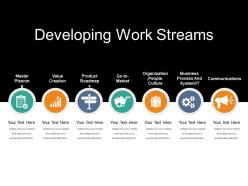
Develop a successful business project, using our developing work streams PowerPoint templates. Develop your business planning and organize various tasks through this engaging experience. We have shown a seven-step procedure here in this PPT layout to demonstrate the concept through work streams. This predesigned layout will assist you to come up with steady content marketing planning and approaching an audience through work stream PPT format. Stages showed here are, mater planning, value creation, product roadmap, go to market, organization people culture, business process and system/it, and communication. High contrast images with big icons are shown herein this work streams, gantt chart, swimlanes PPT layout. Enable your business agendas and preparing to reach the coveted customers through this design. Generate better outcomes through our developing work streams PowerPoint templates. Download this work stream layout in a snap. Our Developing Work Streams Powerpoint Templates contain authenticated information. The data is displayed after due certification.
People who downloaded this PowerPoint presentation also viewed the following :
Developing work streams powerpoint templates with all 5 slides:
Handle attempts to induce discord with our Developing Work Streams Powerpoint Templates. Address any biased journalism.
FAQs for Developing work
You'll want clear objectives and deliverables first - that's non-negotiable. Timeline with milestones, who's doing what, and how you'll measure success. Dependencies between tasks matter too, plus some kind of risk plan. Oh, and communication protocols so people aren't constantly asking "wait, what's happening?" I swear half the templates out there are just pretty garbage that nobody actually uses. Keep it simple with status tracking - red/yellow/green works great. Don't overthink it initially. You can always add more bells and whistles once your team gets the hang of it.
Honestly, these templates are game-changers for big projects. They've already mapped out the phases, deadlines, and who does what - so you're not reinventing the wheel every single time. No more staring at a blank page wondering where to start. Your team actually knows their roles upfront, which saves you from those awkward "I thought you were handling that" conversations later. I probably should've started using them way sooner. Just grab one that fits your project type and tweak it however you need. Way less planning headaches, more time getting stuff done.
Honestly, just think about what makes your industry tick and bake that stuff right in. Healthcare? You need HIPAA checkpoints everywhere - those patient safety protocols aren't optional. Financial services are super strict about audit trails and getting regulatory sign-offs (compliance teams will hunt you down otherwise). Manufacturing companies should add quality control stops and safety reviews. Tech folks usually want sprint planning built in, plus code reviews and deployment steps. Really depends on your space though. I'd start by writing down your top 3 non-negotiables - the stuff that'll get you in trouble if you skip it.
Start with your base template, then cut or add phases depending on how complex your project is. Smaller stuff? Consolidate milestones or just skip approval gates that don't make sense. Big projects need way more detail - extra review cycles, stakeholder check-ins, maybe compliance workstreams if you're dealing with that nightmare. Map your actual project needs against the template first. Then be ruthless about cutting template bloat versus what you genuinely need. People get way too in the weeds on this step honestly. Focus on deliverables that actually matter for your scope.
Dude, visual design makes or breaks these templates. Clean layouts = people actually use them. Messy ones get ignored no matter how good the content is. I've watched teams abandon perfectly useful templates just because they looked like a hot mess! White space is your friend here - gives everything room to breathe. Bold headers help too since people need to scan quickly and find their stuff. When it looks professional, your team trusts it more. Don't overthink it though. Two simple fixes and you're golden.
Honestly, work stream templates are game changers for team collaboration. Everyone follows the same playbook instead of winging it (which never ends well). You get consistent processes and clear handoffs between people. Dependencies become way more obvious, and tracking progress isn't a nightmare anymore. New team members can actually figure out what's going on without asking a thousand questions - though they'll still ask some anyway. I'd start with just one type of project you do repeatedly and template that first. You'll notice the difference pretty fast once people aren't constantly improvising.
Don't just copy-paste templates and call it a day - that's the classic newbie move. Strip out the stuff you don't need first. Honestly, most templates are way too bloated anyway. Add sections that actually matter for your project size and timeline. Your team needs to know what's flexible vs. what's set in stone, otherwise they'll stress about every little detail. Oh, and resist making it super complicated just because you can. Start basic, see what works, then tweak from there. Templates should make your life easier, not give you more busywork.
Get your stakeholders to actually help build the templates instead of just looking them over later. Ask each group what's driving them crazy about how things work now - makes them feel heard plus gives you good material for your pitch. I made this mistake once where I thought I'd created the perfect template and literally nobody used it lol. Show them how it fixes their actual problems with a quick before/after, then ask what they'd change. People will actually use stuff they helped create. Oh, and definitely follow up in a couple weeks to see how it's going.
Honestly, just track if teams are actually hitting their deadlines more often - that's the biggest tell. Cycle time matters too, plus whether the quality is staying consistent. Oh and resource waste - good templates should stop that annoying scope creep thing. But here's what I've learned the hard way: templates can look amazing but be total garbage in real life. The best indicator? People keep using it without being forced to. That tells you everything. I'd pick maybe 2-3 of these metrics first, get your baseline numbers, then see what happens after you roll it out.
Look, the biggest win is automating all that repetitive template stuff you're probably sick of doing. Real-time data syncing keeps everyone on the same page without those annoying "wait, which version are we using?" moments. Progress tracking dashboards are actually pretty helpful - you'll spot bottlenecks way faster. Start with whatever manual process makes you want to throw your laptop out the window. Then find tools that fix those specific problems first. Don't go crazy trying to automate everything at once (been there). The analytics piece is solid too - gives you a clearer picture of where your resources are going.
Honestly, start with super specific deliverables and timelines that actually make sense. Define who's doing what upfront - trust me on this one. I've watched so many templates crash because the milestones were basically useless gibberish. Keep your dependencies visible and definitely pad your timeline because everything takes forever. Oh, and use naming conventions that don't make people want to scream. Write instructions your team can follow without a PhD. Test it on something small first though. You'll find the weird issues before they blow up your big project.
So waterfall templates are super linear - you finish requirements, then move to design, then development, etc. Each phase has to wrap up before the next starts. Agile's totally different though. Everything runs in parallel sprints and honestly gets messy fast if you're not organized. Your waterfall setup will have strict checkpoints and dependencies mapped out. Agile templates are way more fluid - different work streams overlap and iterate together constantly. I'd go waterfall for projects where scope won't change much. Choose agile when you know you'll be pivoting and adjusting as you go.
Honestly, I'd hit up Monday.com or Asana first - their template libraries are pretty solid and you can tweak them however you want. ClickUp's another good one. Microsoft Project works great if your team's already on that ecosystem. Template.net has free options that honestly work just as well as the expensive stuff half the time. LinkedIn's weirdly good for this too - people are always posting templates there. My move? Grab like 3-4 different ones and mix them together based on what you actually need. Way better than trying to force one template to do everything.
Start with a master template that covers your standard sections and formatting rules. Honestly, I've watched projects crash and burn when everyone's doing their own thing with naming conventions. Have one person control template updates - they review changes before anything goes live. Check your existing templates regularly so nothing drifts too far off course. Oh, and actually make people use the approved library instead of just hoping they will. Regular audits help catch problems early. The governance part sounds boring but it's what keeps everything from turning into chaos.
Just start simple - pick one feedback method per template or you'll annoy everyone. Checkpoint surveys work great for getting quick usability ratings. Retrospectives after milestones are honestly where the best insights come from, people will tell you exactly what sucked. Automated prompts when templates are done catch feedback while it's fresh. Track completion times too - bottlenecks show up pretty fast that way. Oh, and don't forget the obvious stuff like letting people suggest tweaks as they go. Build from there once you see what sticks.
-
Excellent design and quick turnaround.
-
Very well designed and informative templates.