


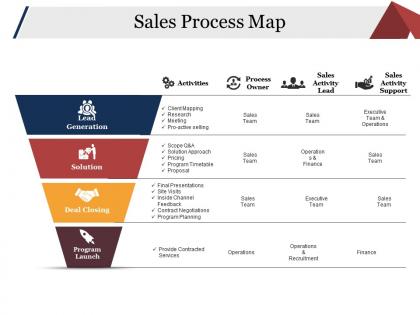
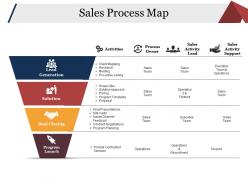
Sales process map ppt examples slides




Try Before you Buy Download Free Sample Product
 Impress Your
 Audience
 100%
100% Editable
 Save Hours
 of Time


Our Sales Process Map Ppt Examples Slides create acceptance. Eliminate any friction that exists.
People who downloaded this PowerPoint presentation also viewed the following :
Sales process map ppt examples slides with all 5 slides:
Handle existing conditions with our Sales Process Map Ppt Examples Slides. Don't allow any adverse impact.
FAQs for Sales process map
So here's how it works: prospecting → qualification → needs assessment → proposal → objections → close → follow-up. You can't really jump around because each step builds on the last. Honestly, qualification is where most deals die - people rush through it and regret it later. I always tell people to map out where their current deals are sitting in this process. That way you know your next move instead of just winging it. Oh, and each conversation should create momentum toward the close. Short answer: don't skip steps or you'll miss crucial info about your prospect.
Think of a sales process map like GPS for your team - nobody's wandering around lost anymore. Your reps know exactly what step comes next instead of just improvising every deal. Honestly, I've seen too many promising deals just disappear because someone forgot to follow up or skipped a crucial step. New hires pick it up way faster when they can actually see the whole thing mapped out. Oh, and it's weird how much this cuts down on those awkward "wait, what are we supposed to do next?" moments. Start with whatever you're doing now, then figure out where things usually go sideways.
Honestly, start with conversion rates between stages - that's where you'll catch bottlenecks fast. Time spent in each stage matters too since deals that sit forever usually just die off slowly. Volume of opportunities, average deal size, win/loss reasons are solid basics. Oh and activity stuff - calls, emails, meetings per stage. Don't go crazy with metrics though. Pick like 3-4 key ones per stage or you'll drown in spreadsheets. I'd focus on conversion rates and cycle time first - those two will show you exactly where things are falling apart.
Honestly, mapping out your sales process is a game changer. You start seeing exactly where customers bail or get confused - like those awkward moments where they're clearly lost but don't know how to ask for help. Once you've got everything laid out, patterns jump out at you. Maybe deals always stall at the pricing conversation, or people ghost you after the demo. The cool part is you can actually fix those sticky spots before they become problems. Plus you can tailor your approach depending on where someone's at instead of using the same pitch for everyone.
So here's the thing - technology basically makes your whole sales process visible, which is huge for finding where things get stuck. CRM systems track every interaction with prospects. Sales automation handles the boring repetitive stuff (thank god). Analytics show you exactly where people bail out. Honestly, the data visualization part blew my mind when I first saw it - patterns just jump out that you'd never catch in boring spreadsheets. AI tools can even predict your best leads now based on past data. My advice? Map out what you're doing now digitally first, then add automation where it actually makes sense. Don't go crazy with it.
Dude, having that sales process map is a total lifesaver for new people. Instead of them wandering around confused, they can see exactly what to do next. Walk them through it their first week - seriously, don't skip this part. They'll spot where deals usually crash and burn, which honestly saves everyone headaches later. Way better than the whole "just follow Karen around and hope for the best" thing we used to do. Your new reps won't feel lost anymore. They'll close deals faster and actually get why each step matters when they're working their first opportunities.
Don't overcomplicate it - that's the
-
Thanks for all your great templates they have saved me lots of time and accelerate my presentations. Great product, keep them up!
-
Qualitative and comprehensive slides.