


Digital Bank Account Opening Process




Try Before you Buy Download Free Sample Product
 Impress Your
 Audience
 100%
100% Editable
 Save Hours
 of Time


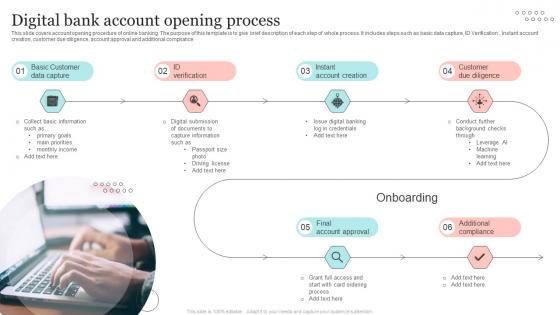
This slide covers account opening procedure of online banking. The purpose of this template is to give brief description of each step of whole process. It includes steps such as basic data capture, ID Verification, Instant account creation, customer due diligence, account approval and additional compliance.
People who downloaded this PowerPoint presentation also viewed the following :
Digital Bank Account Opening Process with all 6 slides:
Use our Digital Bank Account Opening Process to effectively help you save your valuable time. They are readymade to fit into any presentation structure.





FAQs for Digital Bank
Grab your ID, Social Security number, and something for proof of address - utility bill works fine. You gotta be 18 and live in the US obviously. The whole thing's done through their app so make sure you're not in some dead zone lol. They'll have you snap pics of your documents and take a selfie for verification. Takes maybe 10 minutes if you have everything ready. Initial deposits are all over the place - some banks want nothing, others ask for like $25-100. Honestly the photo part is kinda awkward but whatever, it's fast.
Honestly, the biggest thing is just how you open it - digital banks let you do everything online in like 10 minutes instead of trekking to some branch with a stack of papers. They're usually way cheaper too since they don't have all those brick-and-mortar costs. Plus their apps are actually decent. Downside is when something breaks, you're stuck with chat support instead of talking to a real person. Though honestly, half the time bank tellers can't help with tech issues anyway. Once you're up and running though? Pretty much the same experience. If you don't mind doing everything on your phone, digital's probably your best bet.
So digital banks actually layer their security pretty thick - encryption for your data, biometric logins, multi-factor auth, the whole deal. They'll ask for your fingerprint plus a text code or authenticator app. Plus they watch transactions constantly and will lock things down fast if anything seems sketchy. Honestly? I think they're usually safer than old-school banks since they built everything fresh with current tech instead of patching ancient systems. Just turn on all their security options and don't be lazy with your password.
Dude, you should seriously look into digital banks. The apps blow traditional banks out of the water - instant transfers, check deposits with your camera, real-time notifications when you spend money. They automatically sort your expenses into categories which is weirdly satisfying. Most don't charge fees either since they're not paying rent on a million branches. Oh and the budgeting tools actually make sense instead of being completely useless. I've been using one for like two years now and can't go back. Just try a few different apps and see which one doesn't make you want to throw your phone.
Usually takes 1-3 days, though some open instantly if verification goes smooth. You'll probably get basic access within hours - the full features come after they finish checking your documents and stuff. Way better than old-school banks that made you wait forever. Really depends on whether your ID verification hits any snags or if there's weird stuff in your credit history they need to look at manually. Oh, and definitely have your ID and a recent pay stub ready when you start. Speeds things up big time.
Yeah, digital banks are usually way cheaper! Most don't charge those annoying monthly fees that regular banks love - like seriously, who wants to pay $15 just to have an account? You might still get hit with overdraft fees or out-of-network ATM charges though. Some of them actually reimburse ATM fees which is pretty cool. Wire transfers can cost you too, but honestly that's not something most people do often anyway. I'd definitely look at their fee list before picking one since they're all a bit different, but you'll save money compared to traditional banks for sure.
So opening a digital bank account is pretty straightforward. First they'll ask you to upload your ID and take a selfie - make sure the lighting's decent or you'll be retaking it forever. Then their system matches everything up, though sometimes a real person has to check it too. A few banks do video calls which is kinda weird but whatever, it's quick. After that you link your current bank account or make a deposit to prove you're legit. The whole process? Usually takes like 1-3 days. Oh and honestly, have your documents ready beforehand - saves time.
So digital banks have all the basics - checking, savings, debit cards, transfers, mobile payments. The budgeting tools are actually pretty solid, way better than Chase or whatever. You get real-time spending alerts and categorization too. Most have free ATM networks and mobile check deposits. Oh, and customer support is usually chat or phone based. Obviously no physical branches, which my mom would hate, but honestly? Better rates and way fewer random fees. If you're cool with doing everything on your phone, it's kind of a no-brainer.
Nah, digital banks are pretty picky about where you live. They've got all these licensing rules so most only take customers from specific countries or states. Super annoying when you're trying to open something while traveling! You'll need proof of address and residency docs anyway. Some banks are worse than others - like they want you physically there to even apply. I learned this the hard way last year. Just check their requirements first because each one's different. Honestly saves you from filling out forms for nothing.
Definitely check out their customer support before committing to anything. You'll need them when the app glitches or verification gets weird - and trust me, it will. Since there's no physical branch, they're literally your only lifeline. Look for multiple contact options like chat and phone. I'd actually test them out during any trial period you get. Slow responses or clueless reps are huge warning signs. The really good ones will even notice if you're stuck and reach out first, which is pretty cool. But yeah, if they suck early on, run.
Yeah they do have limits, but it's all over the place depending which bank. ATM withdrawals are usually capped around $500-$1,500 daily. Monthly transfers get limited too, plus mobile check deposits sometimes. Some digital banks are actually pretty chill about it, others are stingy as hell. Most will bump up your limits once you've been with them a while or get direct deposit going. Oh and pro tip - you can always call and ask them to raise limits if you need it. I'd definitely peek at the fine print before signing up though.
Yeah so basically just download their app or go to the website on whatever device you're using. Same login info works everywhere - your username and password from when you signed up. Everything syncs automatically which is pretty cool, so your balance and stuff will look the same on your phone vs your laptop. Oh and definitely grab the official app from the app store, not some random one. Log out if you're on someone else's computer or whatever. You should probably turn on two-factor authentication too, makes it way more secure.
Honestly, fees will kill you if you're not careful - monthly maintenance, ATM charges, overdraft stuff adds up fast. Their ATM network matters too since you'll need cash way more than you think. FDIC insurance is obviously a must. Customer service should actually exist when you need help, not just some chatbot hell. Oh and definitely try their app first - you'll be staring at that thing constantly so it better not suck. I always check recent reviews to see if people are complaining about anything weird.
Yeah so digital banks crush traditional ones on interest rates - like 4-5% APY vs the joke 0.01% most big banks give you. No physical branches means they save money and pass it to customers. High-yield savings accounts are where you'll see the biggest difference, plus some checking accounts too. Obviously everything's online which isn't for everyone, but honestly? You could make hundreds more per year just by switching. Oh and definitely shop around first - even 0.2% more adds up way faster than you'd think.
Tax-wise, digital banks work exactly like regular ones. Interest still counts as taxable income - you'll get those 1099-INT forms if you earn over $10. The IRS doesn't really distinguish between your Chase account and some online-only bank. Actually, digital banks make tax season easier since you can download everything instead of digging through paper statements. I learned this the hard way last year! All your transactions get tracked the same way too. Just save your monthly statements as PDFs, especially if you're doing any freelance work.
-
I downloaded some of the presentations for work. They were simple to modify and saved me a lot of time and effort.
-
The way SlideTeam professionals work is exceptional. Thanks for being so helpful!