


Disaster Recovery Implementation Plan Powerpoint Presentation Slides





Try Before you Buy Download Free Sample Product
 Impress Your
 Audience
 100%
100% Editable
 Save Hours
 of Time


Disaster recovery implementation plan is a standard strategy or procedure intended to help companies perform recovery operations in the event of a disaster to safeguard corporate IT infrastructure and, more broadly, encourage recovery. Check our professionally designed Disaster Recovery Implementation Plan template that will state the problems faced by companies due to the lack of a disaster recovery implementation plan and the creation of an effective strategy. This presentation covers sections on the reasons for the IT downtime of the company, the introduction, and the need for the disaster recovery implementation plan. In addition, this PPT contains the various types of steps for creating an effective disaster recovery implementation plan and working on the project. Furthermore, the template includes the DR plans execution steps, such as risk mitigation, preparedness for disasters, response to disasters, recovery from disasters, and a testing plan for disaster recovery. Moreover, this PPT showcased information about the disaster recovery reference architecture, training program to activate the DR plan, RACI matrix, and disaster recovery implementation plan budget. Download it now.
People who downloaded this PowerPoint presentation also viewed the following :
Content of this Powerpoint Presentation
Slide 1: This slide introduces Disaster Recovery Implementation Plan (IT). State Your Company Name and begin.
Slide 2: This is an Agenda slide. State your agendas here.
Slide 3: This slide presents Table of Content for the presentation.
Slide 4: This is another slide continuing Table of Content for the presentation.
Slide 5: This slide highlights title for topics that are to be covered next in the template.
Slide 6: This slide represents the disaster recovery company overview.
Slide 7: This slide highlights title for topics that are to be covered next in the template.
Slide 8: This slide presents Problems Faced by Companies Due to Lack of DR Plan.
Slide 9: This slide shows Data Loss Statistics due to Lack of DRP.
Slide 10: This slide depicts the current situation of the client company by displaying the total number of breaches.
Slide 11: This slide shows Reasons for IT Downtime of Client Company.
Slide 12: This slide highlights title for topics that are to be covered next in the template.
Slide 13: This slide presents disaster recovery plan and various steps of an effective DR plan.
Slide 14: This slide represents the importance of having a disaster recovery plan to keep businesses running smoothly.
Slide 15: This slide displays Essential Elements of Disaster Recovery Plan.
Slide 16: This slide shows Disaster Recovery Plan and Business Continuity Plan.
Slide 17: This slide highlights title for topics that are to be covered next in the template.
Slide 18: This slide presents Virtualization Disaster Recovery Plan.
Slide 19: This slide defines another type of DR plan, which is a network disaster recovery plan.
Slide 20: This slide displays Cloud-Based Disaster Recovery Plan.
Slide 21: This slide represents another DR type that is a data center disaster recovery plan.
Slide 22: This slide shows Disaster Recovery as a Service (DRaaS) Plan.
Slide 23: This slide highlights title for topics that are to be covered next in the template.
Slide 24: This slide shows Checklist to Follow While Making Disaster Recovery Plan.
Slide 25: This slide displays Steps to Create an Effective Disaster Recovery Plan.
Slide 26: This slide represents phase 1 of the DR plan, an audit of all business resources.
Slide 27: This slide depicts the second phase of the disaster recovery plan, which determines the mission-critical information.
Slide 28: This slide presents the third phase of a DR plan which is a declaration of roles and responsibilities.
Slide 29: This slide defines the fourth stage of a DR plan, which is setting up the recovery goals and prioritizing data.
Slide 30: This slide describes the fifth stage of the DR plan, which is to choose a remote data storage solution.
Slide 31: This slide represents the sixth phase of the DR plan, which is testing the disaster recovery plan.
Slide 32: This slide highlights title for topics that are to be covered next in the template.
Slide 33: This slide depicts the preparation of risk assessment, and it includes risk probability and risk severity levels.
Slide 34: This slide describes the risk attributes to consider while analyzing the risks.
Slide 35: This slide explains the working of a disaster recovery plan.
Slide 36: This slide highlights title for topics that are to be covered next in the template.
Slide 37: This slide shows Phases of Executing Disaster Recovery Plan.
Slide 38: This slide represents phase one of execution of the disaster recovery plan.
Slide 39: This slide describes the preparedness for disasters phase of the execution disaster recovery plan.
Slide 40: This slide depicts the response to the phase of the disaster management plan.
Slide 41: This slide represents the recovery from disasters phase of disaster recovery plan execution.
Slide 42: This slide highlights title for topics that are to be covered next in the template.
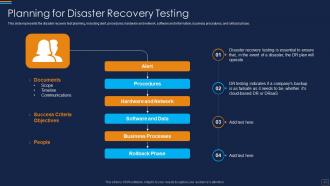
Slide 43: This slide represents the disaster recovery test planning, including alert, procedures, etc.
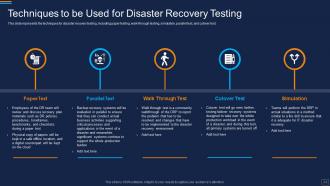
Slide 44: This slide shows Techniques to be Used for Disaster Recovery Testing.
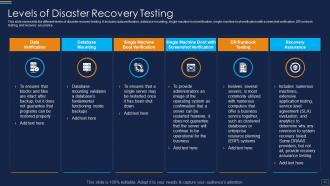
Slide 45: This slide represents the different levels of disaster recovery testing.
Slide 46: This slide highlights title for topics that are to be covered next in the template.
Slide 47: This slide shows On-premises Data Center to Cloud – Cold Recovery.
Slide 48: This slide presents on-premises data center to cloud- warm recovery architecture.
Slide 49: This slide defines the cloud region-to-region- cold recovery architecture.
Slide 50: This slide highlights title for topics that are to be covered next in the template.
Slide 51: This slide represents the training program for employees to activate the disaster recovery plan.
Slide 52: This slide explains the RACI matric for a disaster recovery plan.
Slide 53: This slide highlights title for topics that are to be covered next in the template.
Slide 54: This slide displays Disaster Recovery Planning in Healthcare Organizations.
Slide 55: This slide represents the role of disaster recovery planning in the supply chain industry.
Slide 56: This slide shows Disaster Recovery Planning in Manufacturing Industry.
Slide 57: This slide presents Disaster Recovery Planning in Banking Industry.
Slide 58: This slide highlights title for topics that are to be covered next in the template.
Slide 59: This slide represents the cost details for the disaster recovery plan services.
Slide 60: This slide highlights title for topics that are to be covered next in the template.
Slide 61: This slide shows 30-60-90 Days Plan for Disaster Recovery Plan.
Slide 62: This slide highlights title for topics that are to be covered next in the template.
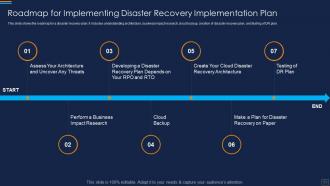
Slide 63: This slide shows Roadmap for Implementing Disaster Recovery Plan.
Slide 64: This slide displays Icons for Disaster Recovery Implementation Plan.
Slide 65: This slide is titled as Additional Slides for moving forward.
Slide 66: This is About Us slide to show company specifications etc.
Slide 67: This slide depicts Venn diagram with text boxes.
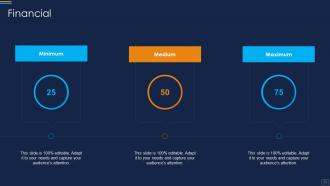
Slide 68: This is a Financial slide. Show your finance related stuff here.
Slide 69: This slide provides Clustered Column chart with two products comparison.
Slide 70: This is Our Mission slide with related imagery and text.
Slide 71: This is a Timeline slide. Show data related to time intervals here.
Slide 72: This is an Idea Generation slide to state a new idea or highlight information, specifications etc.
Slide 73: This slide contains Puzzle with related icons and text.
Slide 74: This is a Thank You slide with address, contact numbers and email address.
Disaster Recovery Implementation Plan Powerpoint Presentation Slides with all 79 slides:
Use our Disaster Recovery Implementation Plan Powerpoint Presentation Slides to effectively help you save your valuable time. They are readymade to fit into any presentation structure.
-

Disaster Recovery Implementation Plan IT
-
Agenda for Disaster Recovery Implementation Plan
-
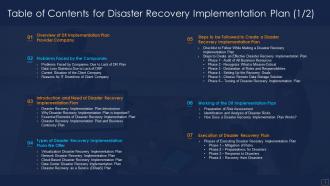
Table of Contents for Disaster Recovery Implementation Plan 1 2
-
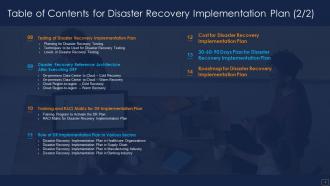
Table of Contents for Disaster Recovery Implementation Plan 2 2
-
Table of Contents for Disaster Recovery Implementation Plan
-
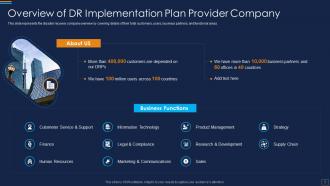
Overview of DR Implementation Plan Provider Company
-
Table of Contents for Disaster Recovery Implementation Plan
-
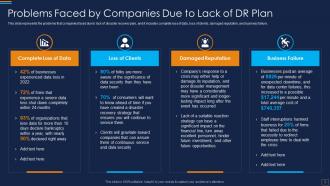
Problems Faced by Companies Due to Lack of DR Plan
-
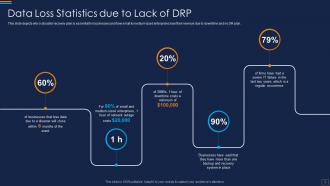
Data Loss Statistics due to Lack of DRP
-
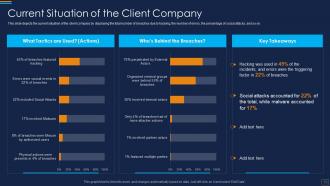
Current Situation of the Client Company
-
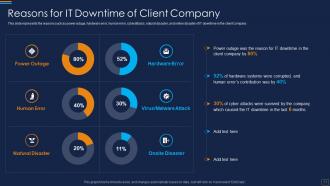
Reasons for IT Downtime of Client Company
-
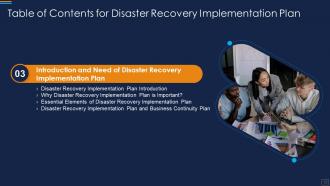
Table of Contents for Disaster Recovery Implementation Plan
-
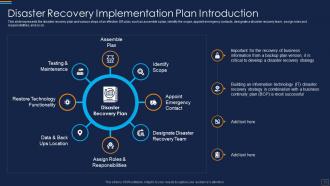
Disaster Recovery Implementation Plan Introduction
-
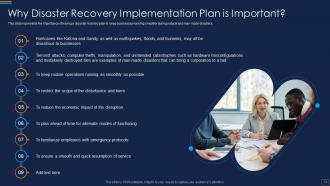
Why Disaster Recovery Implementation Plan is Important
-
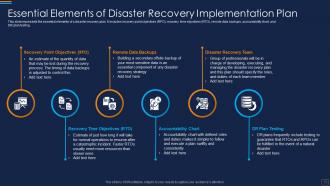
Essential Elements of Disaster Recovery Implementation Plan
-
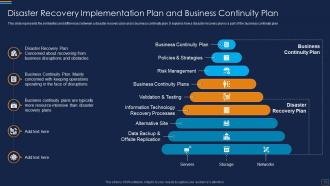
Disaster Recovery Implementation Plan and Business Continuity Plan
-
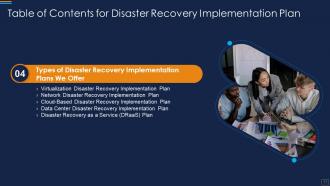
Table of Contents for Disaster Recovery Implementation Plan
-
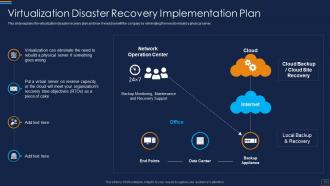
Virtualization Disaster Recovery Implementation Plan
-
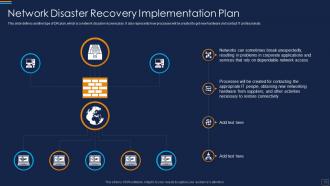
Network Disaster Recovery Implementation Plan
-
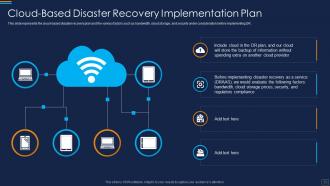
Cloud Based Disaster Recovery Implementation Plan
-
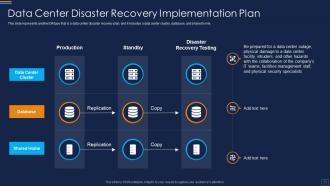
Data Center Disaster Recovery Implementation Plan
-
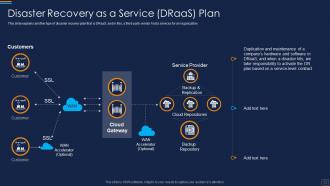
Disaster Recovery as a Service DRaaS Plan
-
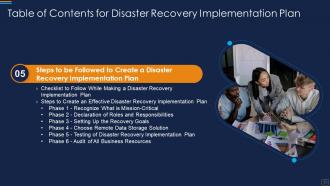
Table of Contents for Disaster Recovery Implementation Plan
-
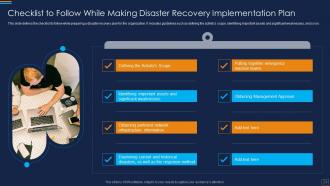
Checklist to Follow While Making Disaster Recovery Implementation Plan
-
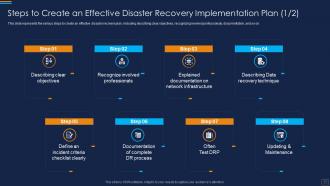
Steps to Create an Effective Disaster Recovery Implementation Plan 1 2
-
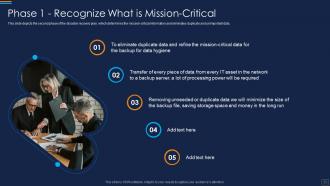
Phase 1 Recognize What is Mission Critical
-
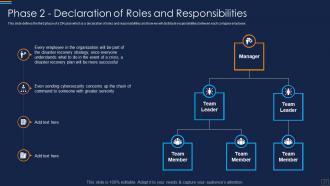
Phase 2 Declaration of Roles and Responsibilities
-
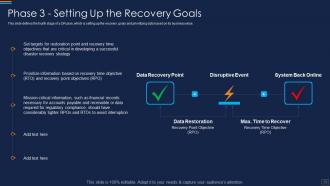
Phase 3 Setting Up the Recovery Goals
-
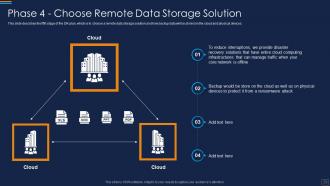
Phase 4 Choose Remote Data Storage Solution
-
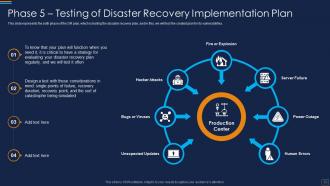
Phase 5 Testing of Disaster Recovery Implementation Plan
-
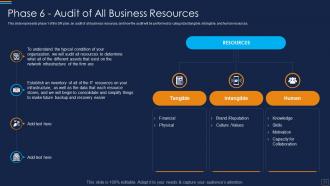
Phase 6 Audit of All Business Resources
-
Table of Contents for Disaster Recovery Implementation Plan
-
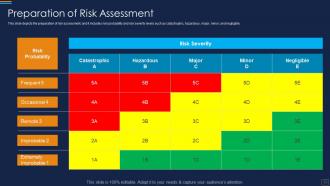
Preparation of Risk Assessment
-
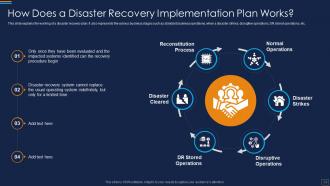
How Does a Disaster Recovery Implementation Plan Works
-
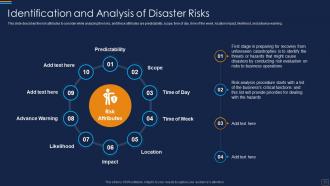
Identification and Analysis of Disaster Risks
-
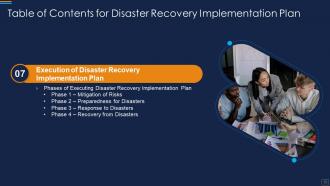
Table of Contents for Disaster Recovery Implementation Plan
-
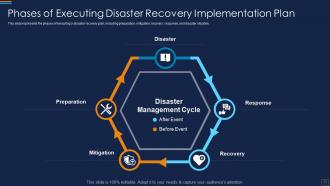
Phases of Executing Disaster Recovery Implementation Plan
-
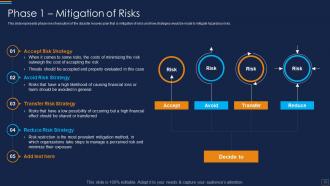
Phase 1 Mitigation of Risks
-
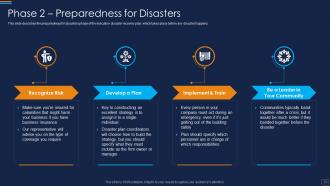
Phase 2 Preparedness for Disasters
-
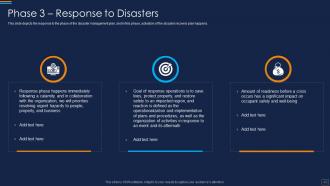
Phase 3 Response to Disasters
-
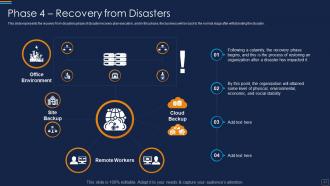
Phase 4 Recovery from Disasters
-
Table of Contents for Disaster Recovery Implementation Plan
-
Planning for Disaster Recovery Testing
-
Techniques to be Used for Disaster Recovery Testing
-
Levels of Disaster Recovery Testing
-
Table of Contents for Disaster Recovery Implementation Plan
-
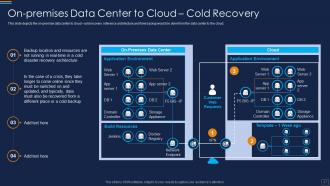
On premises Data Center to Cloud Cold Recovery
-
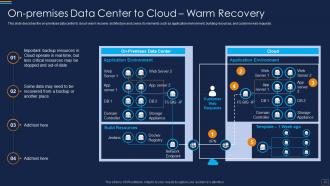
On premises Data Center to Cloud Warm Recovery
-
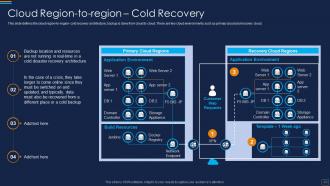
Cloud Region to region Cold Recovery
-
Table of Contents for Disaster Recovery Implementation Plan
-
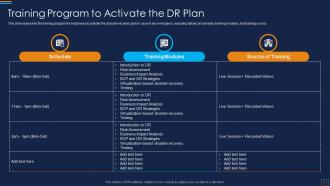
Training Program to Activate the DR Plan
-
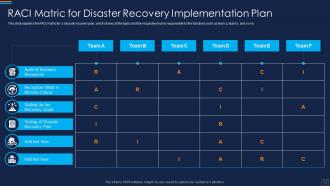
RACI Matrix for Disaster Recovery Implementation Plan
-
Table of Contents for Disaster Recovery Implementation Plan
-
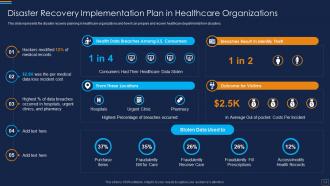
Disaster Recovery Implementation Plan in Healthcare Organizations
-
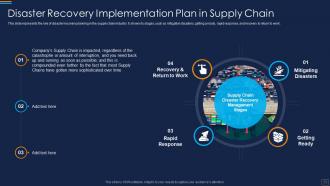
Disaster Recovery Implementation Plan in Supply Chain
-
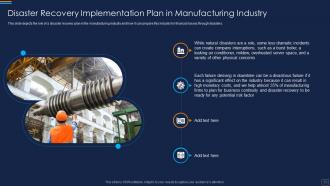
Disaster Recovery Implementation Plan in Manufacturing Industry
-
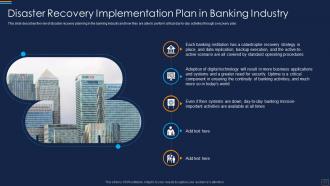
Disaster Recovery Implementation Plan in Banking Industry
-
Table of Contents for Disaster Recovery Implementation Plan
-
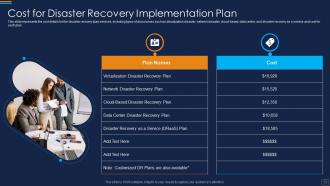
Cost for Disaster Recovery Implementation Plan
-
Table of Contents for Disaster Recovery Implementation Plan
-
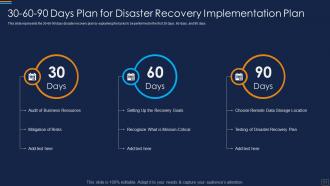
30 60 90 Days Plan for Disaster Recovery Implementation Plan
-
Table of Contents for Disaster Recovery Implementation Plan
-
Roadmap for Implementing Disaster Recovery Implementation Plan
-
Icons Slide for Disaster Recovery Implementation Plan
-

Additional Slides
-

About Us
-

Venn
-
Financial
-
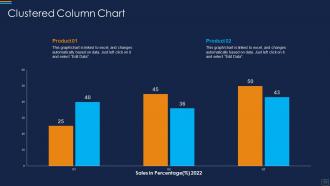
Clustered Column Chart
-

Our Vision Mission and Goal
-

Timeline
-
Idea Generation
-
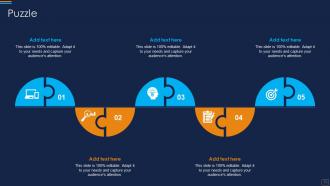
Puzzle
-

Thank You
-

-

-

-

-

FAQs for Disaster Recovery Implementation Plan
You'll need four main things: risk assessment, backup strategies, recovery procedures, and communication plans. First, figure out which systems and data are absolutely critical. Set up backup schedules with both onsite and offsite storage - trust me, you don't want all your eggs in one basket. Document your recovery steps for different disasters and assign roles to specific people. Emergency contact lists are crucial too. Oh, and set recovery time objectives so your team knows what to prioritize first. Here's the thing though - testing is everything. Run actual drills regularly because a dusty binder won't help when everything's on fire.
Test it twice a year minimum, but honestly? Most places I've worked barely do it once and then freak out when stuff hits the fan. Mix up your testing - sometimes just do tabletop discussions, other times run partial drills. Save the full chaos simulation for when you're feeling brave. Update the plan whenever you change major systems, get new people in critical roles, or learn something the hard way from an actual outage. Oh, and set those calendar reminders right now because you'll definitely forget otherwise. Trust me on that one.
Honestly, cloud backup has been a game changer for disaster recovery. Your data gets automatically copied to different locations, so when disaster hits - whether it's a fire or some ransomware mess - you're back online in hours, not weeks. Way cheaper than building your own backup facility too (which, let's be real, most companies can't swing anyway). Just don't forget to actually test your recovery process regularly. I've seen too many businesses think they're covered until they try restoring and... nothing works. That's a fun panic moment you definitely want to avoid.
Okay so checksums are your best friend here - they're like digital fingerprints that catch data corruption before it screws you over. Run automated integrity checks on your backups regularly, not just when everything's on fire. Trust me, finding out your backups are toast during an actual disaster is the worst feeling ever (been there, done that). Test your recovery process monthly with real data - none of that theoretical BS. Keep copies in different locations too. Oh, and document everything so your teammates aren't completely lost if you're not around. Basically verify twice, assume nothing.
Think about both natural disasters and human-caused ones. Floods, earthquakes, fires, hurricanes hit hard. Power outages too. Then you've got cyberattacks, data breaches, equipment dying on you. Key people quitting suddenly - that one's brutal. Pandemics obviously (ugh, 2020). Don't just plan for "building burns down" stuff. Anything that'd mess up your operations for hours needs coverage. List what could actually happen in your area and industry first. I'd rank them by how likely they are versus how badly they'd wreck things. Some disasters are sneaky common.
Do a business impact analysis first - figure out what functions your company literally can't survive without. Look at each one and ask how fast you'd lose money, piss off customers, or get in trouble with regulators if it crashed. The stuff that screws you over quickest becomes your top priority. Pretty obvious when you put it like that, right? Set recovery time goals for each tier, with critical functions getting restored first. Oh, and map out your system dependencies too - there's no point fixing payroll if your employee database is still toast.
Honestly, it varies so much based on your company size and what you actually need. Basic cloud backups and automated systems are pretty affordable to start with. Then there's staff training, testing, redundant systems - oh and offsite facilities if you wanna go all out. Cloud storage fees add up too but they're not terrible. My advice? Don't try to build some crazy bulletproof setup right away. Start small, see what works, then expand from there. Get quotes for doing it in phases - way less sticker shock that way. Match your spending to how much downtime you can actually handle.
Look, your disaster recovery plan is worthless if nobody knows how to use it. Training turns that binder collecting dust into something that'll actually save you when everything goes sideways. Regular drills mean your team won't panic and waste precious hours figuring out who does what. Honestly, I've watched companies with amazing plans completely crash because they never practiced. Your trained staff also catch problems early - way before they blow up into real disasters. Don't just write the plan and forget it. Run through scenarios, make sure everyone can find the thing when the lights go out.
Definitely focus on RTO and RPO first - that's recovery time and how much data you actually lost. Those two tell the real story. Staff response time matters too, plus how well everyone communicated during the chaos. I've seen teams nail the technical stuff but completely fall apart coordination-wise, which honestly causes more headaches than the original problem. Don't forget to measure what percentage of critical systems came back within your target windows. Oh, and run these metrics during drills too - way better to find gaps when it's just practice instead of when everything's actually on fire.
Honestly, compliance runs the whole show when it comes to DR planning. You can't just figure it out as you go. Healthcare's got HIPAA breathing down their necks, finance deals with SOX, and GDPR is a nightmare if you touch any EU data. Each one sets hard rules for recovery times and how you protect stuff. They want regular testing too, which is actually kind of smart when you think about it. Here's what I'd do - figure out which regulations hit you first, then build everything around those rules. Way easier than trying to squeeze compliance into an existing plan later.
Most companies screw up by not testing their backup plans - like ever. They just assume everything will work when disaster hits (spoiler: it won't). Everyone obsesses over the tech side but forgets basics like where people should meet or how to actually communicate. Oh, and those giant binders nobody opens? Totally useless. Don't put all your backups in one location either - learned that one the hard way at my old job. Start small, test constantly, and write something that actually matches how your business runs, not some generic template you found online.
Honestly, just figure out what would totally screw you if it disappeared tomorrow - customer info, employee contacts, vendor details. Google Drive works fine for most stuff, don't overthink it. Cloud backups are your friend here. Make a simple one-page sheet with emergency contacts and who's handling what when things go sideways. The expensive enterprise software? Skip it until you're actually making bank. Test your backups monthly - I learned this the hard way when I thought files were saving but they weren't. Simple plan that actually works beats complicated mess every time.
So disaster recovery is just the tech side - getting servers back up, restoring data, that whole mess. Business continuity is way broader though. It's about keeping your entire company running when things go sideways - where people work, how they communicate, backup processes. Honestly, most companies think DR is enough but it's not. You need both plans talking to each other. What's the point of fixing your systems if nobody knows how to actually run the business while you're scrambling to get everything back online?
Look, risk assessments stop you from building disaster plans that are total garbage. You'll actually know what threats matter instead of preparing for zombie apocalypses or whatever. Figure out which systems would screw you over most if they died, plus what disasters actually happen where you live. Way smarter than trying to plan for literally everything - that approach is honestly pretty useless. List your critical stuff first. Then work backwards from there to see what could kill it. Helps you spend money on real problems instead of made-up ones.
Cloud backups are definitely the way to go - you can restore stuff from anywhere and spin up VMs super fast. Snapshot tech and database replication are clutch too since they make real-time copies of your critical systems. Honestly, it's night and day compared to those ancient tape backups we used to deal with. VMware and similar platforms let you migrate entire server setups quickly, which is pretty sweet. But here's the thing - you gotta test this stuff regularly or you'll find out during an actual emergency that your "quick" restore actually takes half a day.
-
Use of different colors is good. It's simple and attractive.
-
Amazing product with appealing content and design.