


Disaster Recovery As A Service Process Framework




Try Before you Buy Download Free Sample Product
 Impress Your
 Audience
 100%
100% Editable
 Save Hours
 of Time


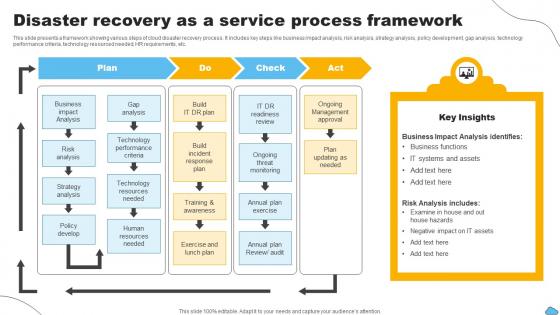
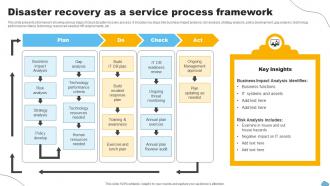
This slide presents a framework showing various steps of cloud disaster recovery process. It includes key steps like business impact analysis, risk analysis, strategy analysis, policy development, gap analysis, technology performance criteria, technology resourced needed, HR requirements, etc.
People who downloaded this PowerPoint presentation also viewed the following :
Disaster Recovery As A Service Process Framework with all 6 slides:
Use our Disaster Recovery As A Service Process Framework to effectively help you save your valuable time. They are readymade to fit into any presentation structure.





FAQs for Disaster Recovery As A
Honestly, you need four main things: risk assessment, backups, recovery steps, and testing. Figure out what systems/data are critical first. Set up automated backups with offsite storage - trust me on this one. Document every single recovery step for different scenarios because when stuff hits the fan, your brain goes blank. Oh, and assign team roles plus communication plans. Maybe scout backup work locations too. But here's the thing - test quarterly or your plan is just fancy paperwork. I've seen too many companies skip testing then panic when they actually need it.
Start with a solid risk assessment - look at what could actually hit your area and industry. Figure out which processes are make-or-break for your business. Supply chain stuff is huge right now, so definitely include that. Run some tabletop exercises with your team where you pretend different disasters happened. Super helpful for catching problems early. Oh, and don't forget about those single points of failure that'd totally wreck you if they went down. Honestly? Just get a risk meeting on the calendar this quarter. You'll be glad you did it when something eventually goes sideways.
Dude, training is literally what makes or breaks your disaster recovery plan. Without it, you're basically crossing your fingers that people will magically know what to do when everything goes sideways. Run quarterly drills - actual hands-on stuff, not death-by-PowerPoint sessions. Focus on evacuation routes, who talks to who, and what everyone's specific job is during different scenarios. I've watched companies with solid plans totally crash because nobody practiced. Oh, and train your key people first - they'll help get everyone else up to speed. Makes a huge difference when things get real.
Honestly, twice a year minimum but quarterly's way better if you can pull it off. Don't just run the same boring server crash scenario every time though - mix it up with different disasters. Your team will hate you for interrupting their regular work, but when stuff actually breaks they'll thank you later. Document everything that goes sideways during each drill and actually fix those issues before the next one. Oh and consistency matters more than perfection - better to do mediocre drills regularly than perfect ones never.
Cloud backup is your lifeline - gotta have offsite storage you can grab from anywhere. Virtualization lets you fire up whole systems on whatever hardware you've got lying around. Automated failover is clutch because who wants to flip switches manually when everything's on fire? Load balancers keep traffic moving when your main stuff craps out. Here's the thing though - even the slickest setup is useless if you never test it. Run DR drills monthly or you'll find out what's broken at the worst possible moment. Trust me on this one.
Honestly, cloud backup is a game-changer for disaster recovery. You can automatically send your data offsite and get systems running again in hours instead of days - way better than rebuilding physical servers from scratch. The cost thing is pretty sweet too since you're only paying when you actually need the recovery resources, not maintaining a bunch of expensive backup hardware year-round. Oh, and you can access everything from anywhere with decent internet. Just make sure you test your recovery plan beforehand though. Trust me, you don't want to be figuring that stuff out when everything's already on fire.
So disaster recovery is just the tech stuff - getting your servers and databases back up after something crashes. Business continuity is way broader though. It covers keeping your whole operation going during any mess, whether that's ransomware, COVID, or honestly even if your star employee quits without notice. DR happens after things already went sideways. BC is more about planning ahead so you don't completely fall apart. Like, what happens if your main office floods? Most companies think they need fancy DR solutions first, but you're actually better off mapping out which processes absolutely can't stop. Then build from there.
Honestly, cloud backups are your best bet - Backblaze or Carbonite run about $50-60/month and handle everything automatically. Also write down your important processes and vendor contacts somewhere you can actually find them later. Google Drive works too if money's super tight. I can't stress this enough after our office got flooded last year... what a nightmare that was! Oh, and test your backup recovery every few months or so. You don't want to discover your system's broken when you're already panicking. Just pick one critical thing and back it up this week.
Dude, you really need backups - I can't stress this enough. Ransomware hits, your hard drive dies, boom - everything's gone without them. Saw a local business completely fold because they trusted their RAID system (which honestly isn't even a real backup). Follow the 3-2-1 thing: keep three copies of important stuff, use two different storage types, put one somewhere else entirely. Oh and actually test restoring files sometimes! Can't tell you how many "backups" turn out to be corrupted when people finally need them.
First figure out what regulations hit your industry - HIPAA, SOX, GDPR, whatever applies to you. Document absolutely everything about your DR plan and testing because auditors are obsessed with paper trails (learned this the hard way). Test your backups constantly and keep records of everything - test results, recovery times, failures, all of it. Oh and don't treat this like a one-and-done thing. It's ongoing. Set up quarterly reviews so your DR plan doesn't get stale when regulations change. Honestly, staying ahead of compliance beats scrambling later.
Dude, the worst mistake? Never actually testing your disaster recovery plan. I've watched "bulletproof" setups crumble because teams never practiced them. Also, don't be wishy-washy about who's responsible for what - chaos hits and people need to know exactly what their job is. Third-party dependencies will bite you too. Your main system's backed up, sure, but what about all the APIs it needs? Oh, and don't assume it'll go perfectly (spoiler: it won't). Document everything step-by-step and run drills quarterly with your real team, not just whoever's around.
Look, risk assessment frameworks are basically your way to figure out what actually matters when everything goes sideways. You can't protect everything - that's just reality. So these frameworks help you map out your critical stuff first, then work backwards from there. They give you a method to spot threats, find weak points, and understand how badly different disasters could mess up your operations. Honestly, most people are shocked at how much clearer things become once you start prioritizing this way. You'll end up putting your recovery budget where it can actually help instead of spreading it thin everywhere.
Honestly, communication can totally make or break your recovery. You'll want clear channels so teams can coordinate and stakeholders know what's happening. Otherwise you get duplicated work, missed steps, and executives breathing down your neck every two seconds asking if you're back online yet. Set up specific protocols beforehand - who talks to who, how often, what channels. Have backup methods too because disasters love screwing with your primary comms. Oh, and pick someone to lead communications before anything goes wrong. Trust me on this one.
Look, natural disasters will make you realize risks you never even thought about. My old company had backup servers in the basement - total nightmare when flooding hit. Earthquakes are tricky because your main data center could literally split apart, so you need backups spread out geographically. First step is figuring out what disasters actually threaten your area. Then build redundancy around those specific risks. The biggest mistake I see? People put their recovery sites in the same danger zones as their main operations. Don't do that.
Test your DR plan quarterly with tabletop exercises, then do full failover tests yearly. Honestly, I'd start with just one system first - full tests turn into absolute chaos if you're not ready. Document every single thing that breaks during testing because that's where you'll find the real issues. Oh, and schedule your next test immediately after finishing one, otherwise you'll keep putting it off (we all do this). Update the plan whenever you add systems or change vendors. Also after any actual incidents - learned that one the hard way. Think of it as something that evolves, not a static document you write once.
-
Commendable slides with attractive designs. Extremely pleased with the fact that they are easy to modify. Great work!
-
Presentation Design is very nice, good work with the content as well.