


Disaster recovery planning powerpoint presentation slides





Try Before you Buy Download Free Sample Product
 Impress Your
 Audience
 100%
100% Editable
 Save Hours
 of Time


Our Disaster Recovery Planning Powerpoint Presentation Slides are topically designed to provide an attractive backdrop to any subject. Use them to look like a presentation pro.
People who downloaded this PowerPoint presentation also viewed the following :
Content of this Powerpoint Presentation
Slide 1: This slide introduces Disaster Recovery Planning. State Your Company Name and begin.
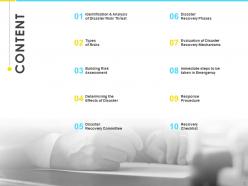
Slide 2: This slide show Contents of the presentation.
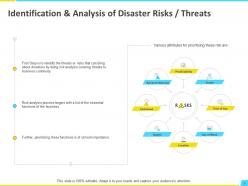
Slide 3: This slide presents Identification & Analysis of Disaster Risks / Threats.
Slide 4: This slide displays Types of Risks with major categories as- Data Systems Risks, Departmental Risks, External Risks, Facility Risks.
Slide 5: This slide represents Building Risk Assessment in tabular form.
Slide 6: This slide showcases Determining the Effects of Disaster with related imagery.
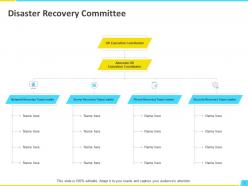
Slide 7: This slide shows Disaster Recovery Committee in hierarchy table.
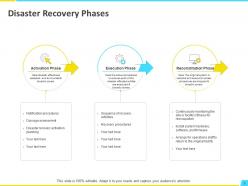
Slide 8: This slide presents Disaster Recovery Phases including- Execution Phase, Activation Phase, Reconstitution Phase.
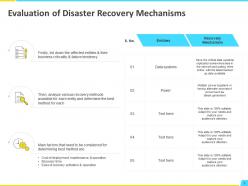
Slide 9: This slide displays Evaluation of Disaster Recovery Mechanisms.
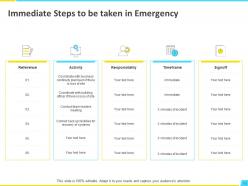
Slide 10: This slide represents Immediate Steps to be taken in Emergency.
Slide 11: This slide shows Response Procedure with alert levels from normal to vey high.
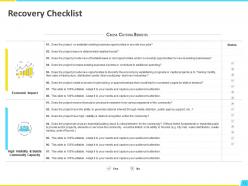
Slide 12: This slide presents Recovery Checklist with economic impact and High visibility & builds community capacity.
Slide 13: This slide displays Disaster Recovery Planning Icons.
Slide 14: This is About Us slide to show company specifications etc.
Slide 15: This is Meet Our Team slide with names and designation.
Slide 16: This is a Timeline slide to show information related with time period.
Slide 17: This slide is titled as Post it Notes. Post your important notes here.
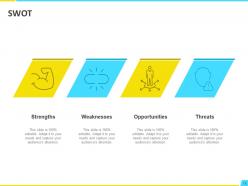
Slide 18: This is a SWOT slide. Show your firm's Strengths, Weaknesses, Opportunities, and Threats.
Slide 19: This is a Lego slide with additional text boxes.
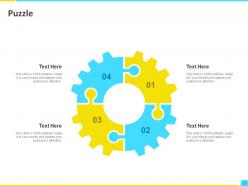
Slide 20: This is a Puzzle slide with text boxes to show information.
Slide 21: This is an optional Puzzle slide.
Slide 22: This is a Venn slide with text boxes.
Slide 23: This is a Thank You slide with address, contact numbers and email address.
Disaster recovery planning powerpoint presentation slides with all 23 slides:
Use our Disaster Recovery Planning Powerpoint Presentation Slides to effectively help you save your valuable time. They are readymade to fit into any presentation structure.










FAQs for Disaster recovery planning
So you'll need four main things: risk assessment, backup procedures, recovery timelines, and communication plans. Figure out what systems and data are absolutely critical first. Then map out your backup strategy and storage locations. RTO and RPO are key - that's how fast you need to bounce back and how much data loss is acceptable. Honestly, the communication piece trips up most people though. Make sure your team knows who does what during an outage and how to actually reach each other when everything's broken. Oh, and test this stuff regularly because something always fails differently than you'd expect.
Start with a good risk assessment - map out everything that could hit your area and industry. Natural disasters, cyber attacks, power outages, supply chain mess-ups, you name it. Make a chart ranking each by how likely it is vs how much damage it'd cause. I know it sounds boring but trust me on this one. Check your buildings, IT setup, and who you depend on for stuff. Your local emergency office probably has useful data too. Be really honest about where you're weak - no point sugarcoating it. Oh and update this thing every year or you'll regret it later.
Look, if your disaster recovery plan doesn't have solid backups, you're basically screwed when things go sideways. I learned this the hard way once. Your backups are literally what save you when systems crash or data gets corrupted. Don't put everything in one place though - spread copies across cloud storage, offsite locations, whatever works. Here's the thing that trips up most people: you've got to actually test those backups regularly. Can't tell you how many horror stories I've heard about corrupted backup files discovered at the worst possible moment. Start by figuring out what you're currently backing up and find the gaps.
Test it twice a year minimum, but honestly quarterly is better - I've seen too many companies get burned because they waited too long. Every time you change infrastructure or key people, update the plan. Here's the thing though: don't just check if your backups exist. Actually restore stuff and walk through the whole mess like it's a real disaster. Most tests I've seen are way too clean and miss the chaos of actual emergencies. Oh, and write down everything that breaks during testing! You'll thank yourself later when something actually goes wrong.
Your disaster recovery plan needs to be stupidly detailed - like actual commands and phone numbers, not just vague bullet points. I learned this the hard way watching a coworker fumble through a "plan" that was basically useless fluff. Write it so anyone can follow the steps at 3am during a crisis. Include contact info, recovery objectives, exact restoration procedures. Store copies everywhere - digital, physical, multiple locations. Oh and test it regularly! Systems change constantly, so your plan should too. An outdated plan will screw you over worse than having nothing at all.
Dude, cloud disaster recovery is a game changer. You can spin up VMs in minutes instead of waiting days to rebuild physical servers - it's honestly night and day. The cost thing is smart too since you're only paying during actual disasters, not constantly maintaining backup hardware. Most providers spread your data across multiple regions, so even if one goes down you're covered. Oh, and definitely test your recovery process every few months or so. Trust me, finding out something's broken during an actual emergency is the worst possible timing. The whole setup just gives you way more flexibility than traditional backup methods.
Track your RTO (how fast you get back online) and RPO (how much data loss you can handle). Those are the big ones. Also measure actual downtime during tests and whether your recovery steps actually work. Honestly, most companies obsess over financial metrics but miss the basics. Time your team on each recovery step too - you'd be surprised how long simple tasks take under pressure. Run these tests quarterly, not just when you remember to. Otherwise you're basically flying blind when things go sideways.
Honestly? Run drills every few months - it's the only thing that actually works. Most places just dump a manual on people and wonder why everyone freaks out during real emergencies. Walk your team through different scenarios so they know exactly what they're supposed to do. Make simple checklists they can grab when everything's going sideways. Oh, and test your communication stuff regularly - like, actually call people and make sure the systems work. Have backup ways to reach everyone too. I swear, companies that skip the practice part always regret it when things hit the fan.
For DR automation, I'd definitely look at cloud backup tools like Veeam or Acronis - they'll replicate your data and spin up VMs automatically when things go sideways. Azure Site Recovery and AWS Disaster Recovery are solid for handling failover sequences without you having to babysit everything. Ansible or Terraform can rebuild your whole infrastructure from code, which beats doing it manually by a mile. Oh, and test this stuff regularly! I learned that the hard way when our "foolproof" system had gaps we didn't know about until we actually needed it.
Look, regulations basically force you to get your DR stuff together whether you want to or not. HIPAA, SOX, GDPR - they all have specific rules about recovery times and data protection. Finance and healthcare are especially brutal about it. But honestly? It's not the worst thing because otherwise most companies would just ignore disaster recovery until something actually breaks. I'd map out what rules apply to your business first, then build everything around those requirements. Way easier than trying to make your existing setup compliant later - trust me on that one.
Honestly, most companies just overthink the hell out of these plans. Keep it simple - complex stuff breaks down when you're actually panicking. Test quarterly or it's useless. Also, people always focus on huge disasters but ignore the boring stuff that actually happens, like power going out or getting hit with ransomware. I've seen so many beautiful disaster recovery binders just collecting dust on shelves somewhere. Get people from different departments involved, not just your IT guys. Oh, and train everyone on the plan! Can't tell you how many places skip that part. Short version: simple plans, regular testing, actual training.
Honestly, build communication into your disaster plan from the start - don't treat it like an afterthought. Set up contact trees and have multiple ways to reach people: email, Slack, phones, even good old SMS. Write template messages ahead of time for different disaster scenarios. Your customers and vendors need updates too when stuff hits the fan. Here's the thing though - test everything regularly because I've seen too many companies realize their backup email was toast right when they needed it most. Oh, and pick one person to handle communications so you don't have chaos.
So basically, a business impact analysis is like making a priority list before everything goes to hell. You map out which systems would totally screw you over if they crashed, then figure out how long you can actually survive without them. Honestly, most companies think they know this stuff until they're actually dealing with an outage at 2am. The whole point is ranking your business functions by how critical they are and setting realistic recovery times. That way when something does break, you're not wasting hours trying to fix your email server while your payment system is still down. Makes the chaos way more manageable.
Do a Business Impact Analysis first - basically figure out what breaks your company fastest if it goes down. Revenue stuff and customer-facing services obviously come first, plus anything regulatory (because fines suck). Here's the tricky part though: sometimes you gotta restore the boring backend systems before the pretty customer portal will even work. Map out those dependencies or you'll be running in circles. Set Recovery Time Objectives for each function based on how much money you'll lose. Make a simple priority matrix - critical, important, whatever - so when everything's on fire, your team actually knows what to fix first.
So DR is just one piece of the business continuity puzzle, you know? Your disaster recovery plan gets the tech stuff back up - servers, databases, all that. But business continuity? That's the whole shebang. It covers how your team keeps working, whether vendors can still deliver supplies, customer communication - basically everything that keeps the doors open. Honestly, I've seen companies nail their DR testing but totally forget about the human side of things. You really can't have one without the other. When you're testing your disaster recovery, throw in some of those bigger business scenarios too.
-
Best way of representation of the topic.
-
Great designs, really helpful.
-
Editable templates with innovative design and color combination.
-
Great experience, I would definitely use your services further.
-
Qualitative and comprehensive slides.