


Disaster recovery plan it disaster recovery plan and business continuity plan




Try Before you Buy Download Free Sample Product
 Impress Your
 Audience
 100%
100% Editable
 Save Hours
 of Time


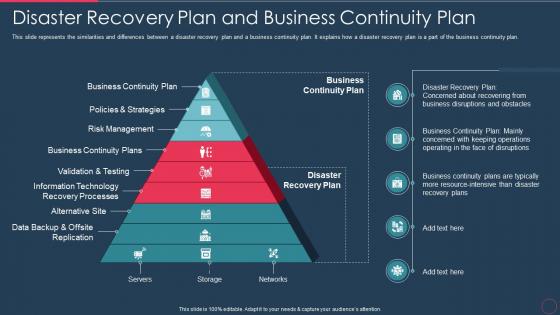
This slide represents the similarities and differences between a disaster recovery plan and a business continuity plan. It explains how a disaster recovery plan is a part of the business continuity plan.
People who downloaded this PowerPoint presentation also viewed the following :
Disaster recovery plan it disaster recovery plan and business continuity plan with all 9 slides:
Use our Disaster Recovery Plan It Disaster Recovery Plan And Business Continuity Plan to effectively help you save your valuable time. They are readymade to fit into any presentation structure.









FAQs for Disaster recovery plan it disaster recovery plan and
So you'll want to start with a risk assessment - basically figure out what could actually blow up. Then get your backup and recovery stuff sorted for critical systems. Communication plans are huge too, otherwise nobody knows who to call when things go sideways. Write out step-by-step recovery procedures that are so simple even someone having a meltdown can follow them. Test everything regularly because I've seen way too many "bulletproof" plans completely crumble during actual emergencies. Oh, and assign specific people to handle specific things - that whole "someone else will do it" mentality kills response times. Focus on your most critical systems first, then work down from there.
So business continuity is like the whole game plan for keeping your company alive when shit hits the fan. Disaster recovery? That's just the tech piece - getting your servers and data back online. Business continuity covers way more stuff - backup offices, how to reach employees, all that. DR is more narrow, like "our systems crashed, now what?" Honestly, most people mix these up. You really need both though. DR fixes your tech problems, but without the bigger continuity plan, you're still screwed if everything else falls apart around you.
Look, you gotta figure out what could actually go wrong before you plan anything else. List your most important systems first, then think about what threatens them - cyber stuff, floods, even just losing power for hours. Honestly, most teams I've seen just guess at this part and it shows. Some places spend forever preparing for zombie apocalypse scenarios while ignoring basic things like ransomware. You'll either waste time on random threats or get blindsided by obvious ones. Work backwards from your critical systems and be realistic about what's likely to happen in your area.
Honestly, the 3-2-1 rule is your best friend here - three copies of everything, two on different types of storage, one offsite or in the cloud. Test your backups regularly though! I learned this the hard way when a "perfect" backup turned out to be completely useless. Document your recovery steps so clearly that even your most panicked teammate could follow them. Back up often enough that you won't cry over losing whatever gets created between cycles. Oh, and actually try restoring something this week - you'd be surprised how many people skip this step.
Honestly, you've gotta figure out who's talking to who way before things go sideways. Pick your spokespeople now and map out the whole chain - employees, customers, media, whoever matters. Write template messages for different disasters because when you're panicking, your brain basically turns to mush. Also super important: have backup communication methods ready. Your main systems might crash, so think mobile hotspots or even those old phone trees our parents used. I'd test everything every few months and - this is crucial - keep those contact lists fresh. Nothing worse than calling a number that's been disconnected for six months.
Honestly? Test that thing twice a year minimum. Quarterly's better if you're not swamped. I've seen so many people assume everything works perfectly until they actually need it - spoiler alert: it doesn't. Document whatever breaks during testing and fix it right away. Update your contact lists and vendor info whenever you change systems or hire new people. Oh, and set those calendar reminders now because you'll totally forget otherwise. Trust me, treat it like changing your smoke detector batteries. Boring but necessary.
Cloud backup is your lifesaver when everything goes sideways. Get virtualization set up too - it's honestly night and day compared to rebuilding servers from nothing. Automated failover systems are clutch. You'll need continuous data replication and network redundancy, plus monitoring that actually alerts you before stuff breaks. Oh, and start by figuring out what'll screw you over the most if it fails. I learned that one the hard way at my last job.
Ugh, regulations are such a pain but they actually make you build way better DR plans. Healthcare, finance, utilities - they've all got crazy strict rules about data recovery and how fast you need to bounce back. HIPAA, SOX, PCI-DSS will make your life hell if you ignore them. Here's the thing though - figure out which regs hit your business first, then design everything around those. Don't try to slap compliance on later, trust me. The testing requirements are annoying paperwork but honestly they catch stuff you'd miss otherwise. Way easier than scrambling during an actual disaster.
Look, you can have the world's best disaster recovery plan, but if your team doesn't actually know how to use it? You're screwed. People panic when stuff hits the fan - it's just what happens. Regular drills are huge so everyone knows their role and how to communicate. I've watched companies with solid plans totally crumble because nobody ever practiced them. Honestly, reading through docs once a year is pretty much useless. You need hands-on training that feels real. Short drills work better than marathon sessions too.
Look, you can't just wait for disasters to think about resilience - build it into daily stuff. Run actual drills where you test systems, not those boring conference room walkthroughs (honestly, those are useless). Cross-train people so you're not screwed if someone quits or gets sick. Build backup processes for anything critical. Here's the key part: reward people who point out problems or suggest fixes. You want staff thinking "what if this breaks?" instead of staying quiet because they're worried about looking negative. Practice makes perfect, and all that.
Honestly, the worst thing companies do is create this massive DR plan then never touch it again. Like, what's the point? When disaster hits, they realize half the contact info is wrong or key systems changed months ago. Companies also get obsessed with backing up servers but totally forget about basic stuff - where will people actually work? How do we communicate? Oh, and here's what drives me crazy: they don't involve the right people in planning. So when chaos strikes, everyone's just standing around confused. Run practice drills every few months and update that thing regularly. Trust me on this one.
Honestly, outsourcing usually makes more sense cost-wise. You get round-the-clock monitoring and people who actually know what they're doing without dropping serious cash upfront. Most companies just can't keep up with the expertise needed for complex disasters - it's brutal trying to stay current. Recovery times are often faster with good providers since that's literally all they do. The catch? You're stuck relying on their infrastructure and hoping they respond quickly. I'd go outsourced unless you've got mission-critical stuff that absolutely cannot leave your building. Then maybe do hybrid where you keep the really important functions in-house.
Track your RTO first - how fast you actually recover vs your target time. RPO matters too (data loss during outages). Don't forget response time to alerts and overall success rate. Here's what nobody talks about though - communication is huge. How quickly do you tell customers what's happening? Most teams nail the technical recovery but completely bomb the messaging part. Run drills regularly, both tabletop and real tests. The question isn't just "did our backup work" but "can we execute this when it's 2am, half the team's asleep, and everything's on fire?" That's when you find out if your process actually works.
Honestly, cloud computing is a game changer for backup stuff. You don't need to drop crazy money on your own disaster recovery site anymore - just replicate everything to the cloud. When your main systems crash, you're back up in minutes instead of waiting days (which is honestly such a relief). The cool thing is you can instantly spin up whatever resources you need during emergencies. Your data automatically gets stored across multiple locations too, so even if a hurricane wipes out one area, you're still good. I'd start with backing up your most critical systems first - don't try to do everything at once.
Look, recent disasters made it pretty clear - if you don't have backup systems spread across different regions, you're screwed. Those companies that bounced back fast? They'd already moved critical stuff to multiple cloud locations and figured out who makes decisions when everything's on fire. Honestly, those annoying quarterly DR tests everyone skips actually save your ass. The organizations still limping along months later are finding out their "foolproof" backup plans were garbage when it mattered. Test your failover stuff when it's stressful, not during some peaceful Sunday maintenance window. Also don't assume your main systems will work - they probably won't.
-
Very well designed and informative templates.
-
Easy to edit slides with easy to understand instructions.