


E learning platform pitch deck ppt template




Try Before you Buy Download Free Sample Product
 Impress Your
 Audience
 100%
100% Editable
 Save Hours
 of Time


An e-learning platform is a web space or portal for educational content and resources that provide students with everything they need in one location, including lectures, resources, opportunities to meet and chat with other students, and more. In the e-learning industry globally, the fastest-growing market in the Asia Pacific APAC and the largest market in North America. Here is a professionally designed pitch deck on the E-Learning platform that presents a summary of the platform Market, showing challenges and solutions offered by E-Learning Platforms, etc. This PPT template presents global market trends, top market players, growth drivers, and more. The PowerPoint presentation also exhibits information for pitfalls and challenges and market segmentation of E-Learning Platforms. Also, this deck provides details of E-Learning Platforms application overview, E-Learning Platforms key activities, E-Learning Platforms value proposition, competitive analysis, and business model of E-Learning Platforms. Additionally, this pitch deck provides information about the most popular E-Learning Platform critical people involved in E-Learning Platform Leadership, addressing SWOT analysis for E-Learning Sector and future initiatives by E-Learning Platforms. Get access now.
People who downloaded this PowerPoint presentation also viewed the following :
Content of this Powerpoint Presentation
Slide 1: This slide displays title i.e. 'E-Learning Platform Pitch Deck'.
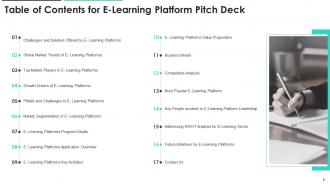
Slide 2: This slide presents table of contents.
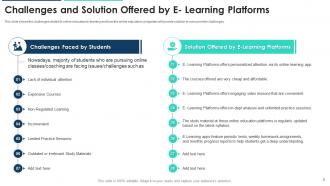
Slide 3: This slide shows the challenges related to online education/e-learning.
Slide 4: This slide shows some of the global market trends of E-Learning Platforms worldwide.
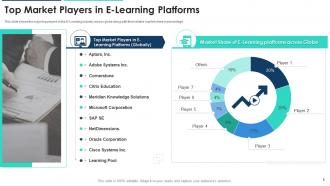
Slide 5: This slide shows the major top players in the E-Learning industry across globe along with their relative market share in percentage.
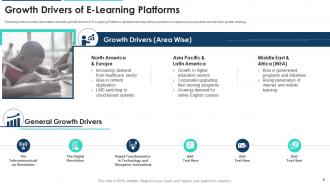
Slide 6: This slide provides information about the growth drivers of E-Learning Platforms globally.
Slide 7: This slide provides information about the pitfalls and issues in E-Learning Platforms globally.
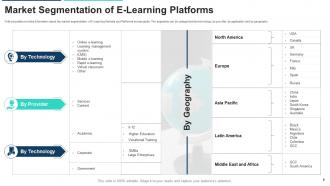
Slide 8: This slide provides information about the market segmentation of E-Learning Markets and Platforms across globe.
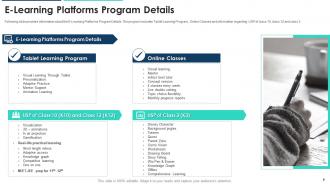
Slide 9: This slide provides information about the E-Learning Platforms Program Details.
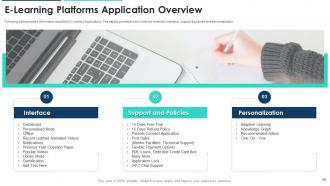
Slide 10: This slide provides information about the E-Learning Applications.
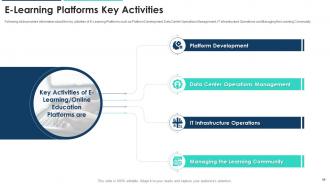
Slide 11: This slide provides information about the key activities of E-Learning Platforms such as Platform Development, Data Center Operations Management, etc.
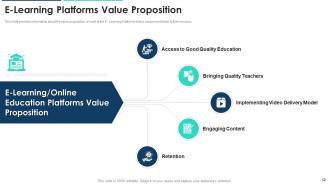
Slide 12: This slide provides information about the value proposition of most of the E- Learning Platforms that is unique and leads to their success.
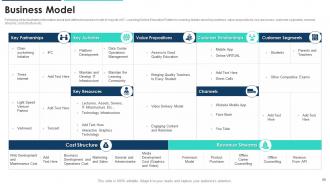
Slide 13: This slide illustrates information about well defined business model of majority of E- Learning/Online Education Platforms.
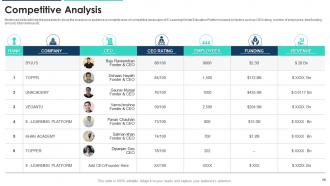
Slide 14: This slide will help the presenter to show the investors or audience a complete view of competitive landscape.
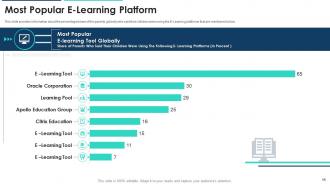
Slide 15: This slide provides information about the percentage/share of the parents globally who said their children were using the E-Learning platforms.
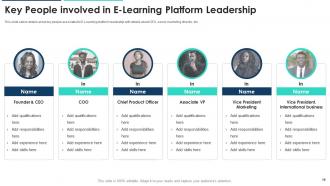
Slide 16: This slide caters details about key people associated to E-Learning platform leadership with details about CEO, senior marketing director, etc.
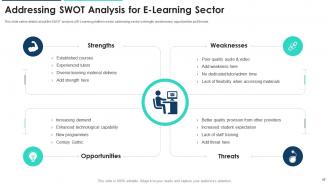
Slide 17: This slide caters details about the SWOT analysis of E-Learning platform sector addressing sector’s strength, weaknesses, opportunities and threats.
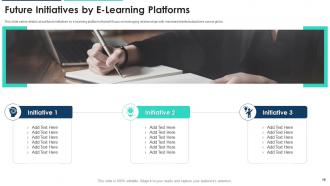
Slide 18: This slide caters details about future initiatives by e-learning platforms that will focus on leveraging relationships.
Slide 19: This slide exhibits contact details of company.
Slide 20: This is the icons slide.
Slide 21: This slide presents title for additional slides.
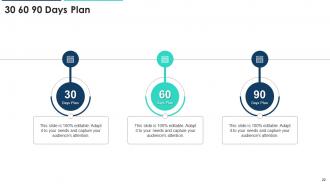
Slide 22: This slide depicts 30-60-90 days plan for projects.
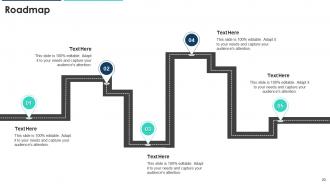
Slide 23: This slide shows roadmap.
Slide 24: This slide showcases financials.
Slide 25: This slide exhibits yearly timeline.
Slide 26: This slide displays Venn.
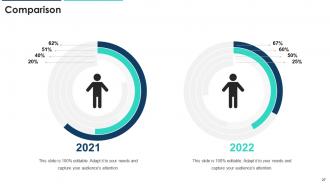
Slide 27: This slide highlights comparison of products based on selects.
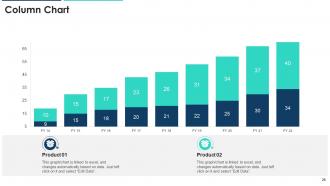
Slide 28: This slide exhibits yearly column charts for different products. The charts are linked to Excel.
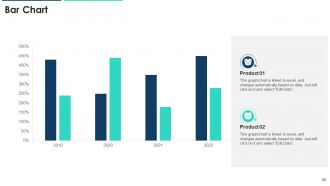
Slide 29: This slide presents bar charts for different products. The charts are linked to Excel.
Slide 30: This slide depicts posts for past experiences of clients.
Slide 31: This is thank you slide & contains contact details of company like office address, phone no., etc.
E learning platform pitch deck ppt template with all 36 slides:
Use our E Learning Platform Pitch Deck Ppt Template to effectively help you save your valuable time. They are readymade to fit into any presentation structure.










FAQs for E learning platform pitch
Okay so basically you need three things: easy navigation, mobile-friendly design, and fast loading speeds. If people can't figure out your platform in like 30 seconds, they're gone. Good search features are clutch, plus progress tracking so learners know where they stand. Bookmarking stuff for later is really helpful too. Videos have to play smoothly - buffering will kill the whole experience. Here's what I'd do: actually test drive the platform yourself during demos. I swear, if you're getting annoyed just trying it out, your users will hate it even more.
So gamification is huge for keeping people hooked - like leaderboards, badges, that kind of stuff. Quizzes and videos work way better than just reading walls of text. You can track where students are dropping off and tweak those spots. Forums help too since online learning can feel pretty isolating otherwise. Honestly, personalizing the learning path based on how fast someone's moving through material makes a massive difference. I'd probably start with just one gamified element first and see how it goes. Oh, and discussion boards - don't underestimate those for building community.
So gamification is basically making learning feel like a game - you know, points, badges, those progress bars that fill up. It's weirdly addictive! People actually stick with courses way more when there's that competitive element. Honestly, it feels a bit manipulative but whatever works, right? Your brain gets those little dopamine hits from "achieving" stuff. The research backs it up too - better retention, higher completion rates. Even something simple like showing progress can make a huge difference. If you're putting together any training stuff, definitely throw in some game elements. Works like magic.
Honestly, integration with your current systems should be your first priority - data silos are such a pain to deal with later. Budget matters obviously, but think bigger picture about scalability too. The user experience can make or break everything; if it's annoying to use, people will just avoid it completely. Mobile compatibility is pretty much non-negotiable these days. Check out their content creation tools and what kind of analytics they offer. Also, their tech support better be decent because you'll inevitably run into issues. My advice? Test a few options with real users first - saves you from making an expensive mistake.
So first thing - survey your learners about what they actually prefer, because assumptions are usually wrong. Then mix up your content formats. Videos work great for visual people, audio helps auditory learners, and interactive stuff keeps the hands-on folks engaged. Self-paced modules are perfect for independent types, while discussion forums give social learners their fix. Don't forget basics like captions, speed controls, and mobile access. The cool part is how much choice you can give people now - they pick what works for their brain.
Look for platforms that actually show useful stuff - student engagement, time spent on materials, quiz breakdowns. Real-time reporting is key because waiting a week for data is pointless. Assignment analytics help you spot where kids are struggling so you can pivot your approach. Progress tracking per student is clutch for catching who needs help early. Honestly, skip the fancy dashboards with meaningless graphs - they look impressive but don't help your teaching. Make sure you can export data easily too. You'll probably want to mesh it with other tools down the road.
Hey! So most e-learning platforms have accessibility stuff built in now - screen reader support, captions, keyboard navigation, text sizing. The decent ones follow WCAG guidelines (those web accessibility standards). Some even auto-generate alt text for images which is honestly pretty neat. You should check if your platform does multiple formats too - like audio versions of text or visual alternatives for audio. Oh, and definitely test this stuff with real users if you can swing it. I've seen things that look great on paper but are actually a pain to use in reality.
Oh man, data compatibility is going to be your worst nightmare - nothing ever syncs up cleanly between systems. Teachers will probably hate you at first too since they're comfortable with their current setup. Who wants to relearn everything, right? Budget way more training hours than seems reasonable. Single sign-on always breaks something unexpected, and grade syncing? Good luck with that mess. Definitely do a pilot run with like one department first. I made the mistake once of rolling out campus-wide and it was chaos. Trust me on this one.
Mix up your question types - go beyond multiple choice and use drag-and-drop, interactive scenarios, that kind of stuff. Most platforms have these built in already. Immediate feedback is huge for retention, trust me on that one. Branching scenarios work great too since they actually feel like real decisions you'd make at work. Oh, and definitely randomize your questions and set time limits or people will just screenshot everything. I always start with what I'm trying to teach first, then figure out the best way to test it. Makes the whole process way easier.
Encryption first - both stored data and anything moving around. Can't mess around with student privacy. MFA is absolutely critical too, especially for admin accounts. Passwords by themselves are a joke at this point. Get that SSL certificate sorted if you haven't already - it's literally the bare minimum. Regular security audits will save your butt later, plus you need solid backup systems. Oh, and don't forget data retention policies so you're not sitting on mountains of personal info you don't actually need anymore.
Honestly, breakout rooms are amazing for small group work - total game changer. Discussion forums and group project spaces help too, but I'd mix video calls with forums so people can jump in whenever. Shared whiteboards are great when students tackle problems together. You can also set up peer reviews and collaborative docs where everyone builds knowledge bases. My advice? Don't go crazy at first. Pick maybe 2-3 features to start or you'll overwhelm everyone. The synchronous/asynchronous combo works because not everyone's free at the same time, you know?
Honestly, AI personalization is where it's at right now - students want stuff that actually adapts to how fast they learn. Microlearning too, those quick bite-sized chunks people can finish during lunch breaks or whatever. VR/AR is cool but still feels gimmicky to me, though it's getting cheaper. The real game-changer though? Social features. People don't just want to consume content anymore, they want to connect with other learners. Oh, and everything needs to work perfectly on mobile since that's how most people access courses now. I'd start testing shorter, interactive modules and see what happens to your engagement numbers.
Look, pricing can totally make or break who actually uses your learning platform. Monthly subscriptions are solid if you've got a steady budget, but they'll price out individual learners pretty fast. Pay-per-course is way more flexible - people grab what they actually need. Freemium gets folks in the door, though let's be real, the useful content is always locked behind payments. Corporate deals work great for teams but are pointless for solo learners. Honestly, just think about who you're trying to reach and what they can realistically afford.
Dude, look at Coursera first - they teamed up with real universities and now have like 100 million users. Their free-content-plus-paid-certificates thing was brilliant. Khan Academy completely changed how kids learn with those personalized paths, and honestly Duolingo's gamification is almost too good (people get legit addicted to those streaks). Oh, and big companies saw crazy results too - IBM and McDonald's cut their training costs by 40-50% with internal platforms. If you're building something, figure out what made these sticky. Usually it's either killer partnerships, smart game mechanics, or they just solved one specific problem really well. Start there and you'll find your angle.
Oh man, cultural differences are huge for e-learning design! Some cultures love group work while others prefer solo studying. Communication styles vary too - direct feedback works great in some places but feels rude elsewhere. Even colors matter (red = danger vs luck depending where you are). Western learners usually want that step-by-step linear approach, but other cultures expect more big-picture context first. Your examples and case studies should actually reflect their world, not just generic Western scenarios. Honestly, just do your homework on the audience before building anything - it'll save you so much headache later.
-
Really like the color and design of the presentation.
-
Excellent products for quick understanding.