


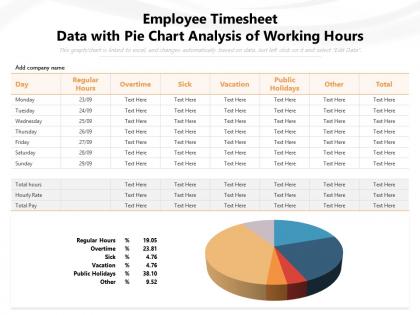
Employee timesheet data with pie chart analysis of working hours




Try Before you Buy Download Free Sample Product
 Impress Your
 Audience
 100%
100% Editable
 Save Hours
 of Time


Our Employee Timesheet Data With Pie Chart Analysis Of Working Hours are topically designed to provide an attractive backdrop to any subject. Use them to look like a presentation pro.
People who downloaded this PowerPoint presentation also viewed the following :
Employee timesheet data with pie chart analysis of working hours with all 2 slides:
Use our Employee Timesheet Data With Pie Chart Analysis Of Working Hours to effectively help you save your valuable time. They are readymade to fit into any presentation structure.
FAQs for Employee timesheet data with pie chart analysis
So focus on time per project, how accurate your estimates are, and break habits. If someone's always blowing past estimates, they either need training or you're terrible at scoping (probably both honestly). Watch for red flags too - people skipping breaks will burn out fast. Also track billable vs non-billable hours if clients are involved. The weirdest thing I've noticed? Some people spend forever on random low-priority stuff. Pull weekly reports and spot your biggest time drains first. That's gonna give you the most bang for your buck.
Honestly, just pull your timesheet data monthly and you'll catch the imbalances fast. Like when Sarah's logging 50+ hours every week but Jake's barely hitting 32 - that's your smoking gun right there. Way better than relying on those "everything's fine!" responses people give in meetings. Look for the patterns: some folks consistently doing overtime while others wrap up early or dodge the bigger projects. Once you spot it, redistribute before anyone burns out. I swear the data tells the real story about who's actually drowning vs who could handle more work.
Honestly, the worst thing is when people just dump everything into "miscellaneous" - drives me crazy! You'll also get hit with inconsistent logging and people scrambling to fill out timesheets at the last second when they can't remember what they did. Vague project codes are another nightmare for analysis later. Daily entry works way better than weekly dumps, trust me. Set actual deadlines with reminders, and make your project categories super specific so people know exactly where things go. The whole thing needs to feel automatic, not like this huge chore they're dreading.
Honestly, tracking timesheets is a game-changer for accurate budgeting. You'll finally know what stuff actually costs instead of just throwing numbers around. Look at your last three projects and compare estimated vs real hours - I bet you'll find some eye-opening patterns. Database tasks probably take way longer than you think (they always do for some reason). Once you see where you're consistently wrong, pricing gets so much easier. No more awkward "we went over budget" calls with clients. Just pull up that historical data and boom - way better estimates.
Dude, automated timesheets are a game changer - they cut out all the human mess ups like forgetting to clock in or those "oh I'll just round up 15 minutes" moments we're all guilty of. Your team won't have to remember to track anything since it pulls data automatically from whatever apps they're already using. Biometric scanners work great too if you're into that. The validation happens instantly instead of discovering issues weeks later during payroll hell. Real-time tracking means your data's actually trustworthy for once, which is honestly refreshing.
Pull your timesheet data from the past year or so - that's where the gold is. You'll see which departments are always swamped and which ones have people twiddling their thumbs. Seasonal patterns jump out too, like how accounting goes nuts during tax season (obviously). Look for tasks that consistently take way longer than they should - usually means you need training or better people in those spots. I swear it's better than Netflix once you get into it. The bottlenecks become super obvious when you map everything out.
Toggl Track, Clockify, or Harvest are solid if you want dedicated time tracking tools with analytics built in. Excel or Google Sheets work surprisingly well too - assuming your data isn't a mess and you know pivot tables. Power BI and Tableau are where it gets interesting though. Those'll give you sick visualizations and help you spot patterns in productivity, overtime, project allocation, all that stuff. I'd honestly start simple first. Figure out what metrics actually matter to your team, then you can always level up the tools later. No point going overboard right away.
Dude, timesheet analysis is basically your digital proof you're not screwing over employees. You'll catch overtime violations before they bite you - like someone hitting 45 hours without proper pay. Missing meal breaks? The system flags it. I've seen companies get slammed by DOL audits, but having this data already organized saves your ass. Set up alerts for excessive overtime and missed breaks so you're not playing catch-up later. Honestly beats scrambling through paper records when investigators show up. It spots those sneaky patterns like people working 12 days straight without rest.
Honestly, turning those timesheet numbers into charts is a game changer. You'll spot the problem projects way faster than scrolling through spreadsheets forever. Like that one client who always seems to eat up way more hours than planned? Bar charts make it super obvious. Plus you can see when your team's most productive, catch billing mistakes before they become awkward conversations, and figure out which work actually makes money. I started with simple hour-per-project charts - nothing fancy. But man, it's wild how quickly patterns jump out at you.
Yeah, timesheet accuracy gets weird across cultures. Some people think detailed time tracking feels like you're watching over their shoulder, so they'll just round everything to the nearest hour. Meanwhile others obsess over logging every single minute - honestly both extremes make the data pretty useless. Break time and overtime get reported totally differently too depending on where someone's from. I'd just be upfront about what you need and explain it's for planning projects, not keeping tabs on anyone. Otherwise you're gonna be stuck trying to make sense of completely inconsistent data.
Start with the big picture stuff - trends, patterns, those dashboard visuals managers actually get. Trust me, I once buried my boss in spreadsheet hell and it was painful for everyone. Show business impact first: attendance issues, overtime bleeding money, productivity drops. Bring solutions, not just a laundry list of problems. When you spot concerning patterns, yeah use specific examples but spin it as "hey, here's how we can improve our process" instead of pointing fingers at employees. Oh and always end with concrete next steps and when you'll circle back. Makes you look like you've got it together.
Honestly, timesheet data is super useful for performance reviews - way better than just winging it with your gut feelings. Pull reports on project completion times and billable hours first. That'll show you who's consistently hitting deadlines versus who's struggling. I've found it's great for spotting workload issues too, like if someone's drowning in projects while others coast by. The data doesn't lie, but don't rely on it completely. You'll still need actual conversations with people since timesheets miss a lot of context about *why* things happened the way they did.
Ugh, inaccurate timesheets are the worst - they throw off your entire payroll and people end up getting paid wrong amounts. That kills morale so fast it's not even funny. You're also looking at compliance headaches since labor laws are pretty strict about accurate wages. Overtime gets miscalculated too, which can turn into a legal nightmare. Your budget forecasting goes out the window. I learned this the hard way at my last job actually. Best thing you can do is set up some validation checks in your system to catch mistakes before they hit payroll processing.
Get regular feedback from your team - like monthly check-ins or quick anonymous surveys about what's annoying them with timesheets. Trust me, they already know what's broken way before you do! Ask about categories that don't match their real work, approval processes that take forever, or if the mobile app sucks. Actually use their suggestions though - don't just collect feedback and ignore it. Tell them what you changed based on their input. Maybe start with a simple survey next week asking for their biggest two timesheet headaches. It's honestly the fastest way to fix things.
Honestly, automated reminders work like magic - send them out a day or two before your deadline. Pick something consistent like every Friday at 5pm and don't budge on it. Your managers need to submit theirs on time too because people notice that stuff. Some light consequences help, maybe they need approval for their next timesheet if they're late. Oh, and I've seen teams do recognition for people who always get theirs in on time - sounds cheesy but it actually works. Start with just the reminder system though, that alone usually fixes most of the problem.
-
Excellent Designs.