

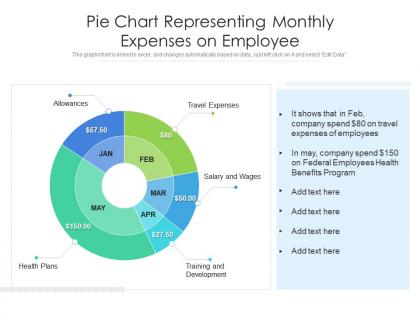
Pie chart representing monthly expenses on employee




Try Before you Buy Download Free Sample Product
 Impress Your
 Audience
 100%
100% Editable
 Save Hours
 of Time


This graph or chart is linked to excel, and changes automatically based on data. Just left click on it and select Edit Data.
People who downloaded this PowerPoint presentation also viewed the following :
Pie chart representing monthly expenses on employee with all 2 slides:
Use our Pie Chart Representing Monthly Expenses On Employee to effectively help you save your valuable time. They are readymade to fit into any presentation structure.

FAQs for Pie chart representing monthly
Most companies cover the obvious stuff - flights, hotels, meals when you're traveling for work. Office supplies and equipment too. Mileage reimbursement is pretty standard if you're driving around for meetings. Professional development like conferences usually gets approved, and client dinners are fair game. Some places will even cover your home office setup or phone bill, though that really depends on how generous they are. Finance is gonna want receipts for everything though, trust me on that one. Your employee handbook should have all the specific limits and categories listed out.
Get a digital expense app - Expensify or Concur work great. Your employees can just snap pics of receipts and submit everything from their phones, which honestly beats sorting through crumpled paper receipts any day. Set up automatic approvals for small stuff but route bigger expenses through managers. Oh, and definitely write out clear policies first so people know what they can actually expense. Connect it to your accounting software too. I'd test it with just one team initially - way easier to fix problems before everyone's using it.
Yeah, if you set up reimbursements the right way, they're deductible for you and tax-free for your employee. The trick is having what they call an "accountable plan" - basically just requiring receipts, business purposes, and getting stuff submitted on time. Without that? The IRS counts it as regular wages, which sucks for everyone. You can write off all the normal stuff - travel, meals, supplies, training. I learned this the hard way my first year in business, honestly. Just keep decent records and follow those accountable plan rules. Trust me, it's way better than dealing with payroll taxes on reimbursements.
Honestly, the tax rules change so much it's annoying - you'll want to check both IRS stuff and your state laws pretty regularly. Document everything with receipts, dates, business reasons, the whole nine yards. Your expense system should track current mileage rates and meal limits according to federal guidelines. Train your managers on what's actually deductible because people always think random stuff should be covered. Oh, and definitely have a solid reimbursement policy in writing. When something seems sketchy, just ask your tax advisor first - way better than dealing with an audit later.
Honestly, Expensify is probably your best bet - the receipt scanning actually works (which is shocking). Concur's solid too if you're already stuck with SAP stuff. Ramp is this newer one that does expenses AND corporate cards together, pretty clever actually. Budget-wise, Zoho Expense or FreshBooks won't break the bank. Here's what I'd do though: grab free trials of like 2-3 options and get your team to mess around with the mobile apps. That's where people will actually enter their expenses anyway, so if the app sucks, nobody's gonna use it. Most companies I know swear by these tools once they find the right fit.
Okay so first thing - figure out what you're actually covering and set dollar limits for meals, travel, all that stuff. Have managers approve anything over like $100 or whatever makes sense. The reimbursement timeline matters SO much because people get pissed waiting weeks for their money back. Oh and definitely spell out the receipt thing - what formats you need, what to do if someone loses theirs (happens more than you'd think). Put it somewhere everyone can actually find it when they're scrambling to submit expenses. Honestly though, none of this matters if you don't enforce it consistently.
Ugh, expense management disasters are the worst. Cash flow gets weird when people wait forever for reimbursements. Missing receipts? Say goodbye to tax deductions. The IRS will absolutely come for you over undocumented business expenses - learned that the hard way. Manual tracking is such a pain and mistakes happen constantly. Your team starts getting annoyed with slow processes too, which honestly makes sense. Set up clear policies first with actual deadlines people can follow. Then maybe look into automating approvals? Catching problems early beats dealing with a total mess later.
Oh yeah, this stuff gets tricky fast. Receipt rules are all over the place - some countries are super strict about it, others are way more relaxed. Business dinners with alcohol? Totally normal in places like Japan, but you'd get in trouble elsewhere. Spouse joining work meals varies tons too depending where you are. Honestly, tipping alone will make your head spin with how different expectations are. Your best bet is chatting with local HR before you write anything official. Build in some wiggle room but keep clear limits, you know? Otherwise you'll end up with policies that work nowhere.
Track spending per employee and watch those month-over-month trends - spikes usually tell you something's up. Travel, meals, and office supplies are typically your biggest money drains, so start there. I'd pull reports on your top three expense categories first to see where cash is actually disappearing. Also check approval times and policy violations since slow approvals drive people crazy and violations show process gaps. Compare departments or similar roles to find outliers. Some people just need different spending limits or a quick coaching chat. Honestly, most companies overthink this - just focus on the big buckets first.
Make a simple one-page cheat sheet first - cover what's allowed, receipt requirements, stuff like that. Then do a quick training session so people can ask about the confusing stuff (meals are always tricky). Honestly, most employees are just guessing at the rules anyway. Send regular reminders through email or whatever system you use. Share examples of good vs bad submissions too - that really helps. The whole point is being super clear upfront so you're not dealing with messy reimbursements later.
Honestly, everyone's going mobile-first now - those AI expense apps that scan your receipts are actually pretty decent. Real-time payouts are huge too instead of waiting forever for reimbursements. Remote work changed everything. Companies cover home office stuff, coworking spaces, even internet bills now. Smart ones are just giving corporate cards to frequent travelers so there's no reimbursement drama at all. The automation trend is legit - spreadsheets are basically dead. I'd say look at where your approval process is slowest and start there. Way better than the old manual nightmare we used to deal with.
Honestly, you've gotta catch this stuff before it happens - way easier than dealing with the mess later. Make everyone submit actual receipts (none of that blurry photo nonsense). Set up approval chains so managers sign off first, and cap spending by whoever's role. I'd throw in random audits too since people straighten up real quick when they think you're watching. The biggest thing though? Crystal clear policies upfront. When people know exactly what flies and what doesn't, the "oops I didn't know" excuses basically disappear. Oh, and get software that catches duplicate submissions automatically - saves you tons of headaches.
Dude, mobile apps are seriously changing the expense game. They can scan your receipts instantly and sort everything automatically - no more shoebox full of crumpled paper! GPS tracks your mileage without you thinking about it, plus you can just talk to add notes while driving. Some even catch duplicate entries or flag stuff that breaks company rules. I tried one last month and it was actually pretty slick, though the voice thing was kinda wonky at first. Just make sure whatever you pick plays nice with your company's accounting system before you get too attached to it.
Dude, just tell people what's actually happening with their expense reports. Like, spell out your policies and timelines upfront so they're not sitting there wondering if you lost their Starbucks receipt. I swear, the worst thing is submitting stuff and then... nothing. Radio silence for weeks. When delays happen (and they will), just give people a heads up instead of making them hunt you down. Maybe set up those automated update emails? Trust me, employees will appreciate knowing where their money stands way more than being left in the dark.
Look at your last 2-3 years of spending data first - that's where the real patterns hide. Break everything into clear buckets like travel, training, gear, whatever makes sense. Department heads are honestly your best friends here since they actually know what's coming down the pipeline. Always pad things with a buffer because something random will definitely pop up (it always does). Monthly check-ins against your budget are huge - don't wait until year-end to realize you're screwed. Oh, and do rolling forecasts instead of just that annual budget thing. Way more flexible when priorities shift.
-
The Designed Graphic are very professional and classic.