

Enterprise Assets Management Powerpoint Presentation Slides




Try Before you Buy Download Free Sample Product
 Impress Your
 Audience
 100%
100% Editable
 Save Hours
 of Time


If you need to give a presentation on the concept of enterprise assets management, then download our content ready enterprise assets management PowerPoint presentation. Use these enterprise resources management presentation slides to outline, optimize, implement, and record the required maintenance tasks with the related priorities, abilities, materials, tools, and data. This predesigned EAM PPT presentation covers slide on various relevant subjects such as introduction, functional area overview, ERP system architecture, task categories of ERP systems, ERP project progress by stage, an overview of implementation process, planning and selection phase, implementation phase, enterprise resource planning funnel, project preparation, and situational analysis. It also includes a slide on the software selection process, software selection criteria, realization and implement, v model for implementation of ERP systems, ERP system selection tips, ERP technical requirement, ERP functional need, and ERP implementation-selection phase. Our graphic designers have used the stunning graphics of tables, charts and graph, pie charts, icons, and many more for the better graphical representation of the concept. Do not delay, download these editable enterprise resource planning presentation slides and impress your audience. Explain the aerodynamics with our Enterprise Assets Management Powerpoint Presentation Slides. Elaborate on the forces acting on big jets.
People who downloaded this PowerPoint presentation also viewed the following :
Content of this Powerpoint Presentation
Slide 1: This slide introduces with the topic that is Enterprise Assets Management. State Your Company Name and begins.
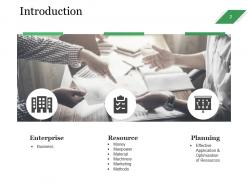
Slide 2: This slide showcases Introduction and these are three main part of any business management. Enterprise, Resource, Planning.
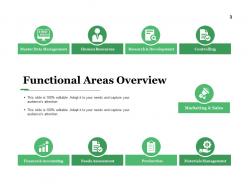
Slide 3: This slide shows Functional Areas Overview with some of the listed areas- Marketing & Sales, Master Data Management, Human Resources, Research & Development, Controlling, Materials Management, Production, Needs Assessment, Finance & Accounting.
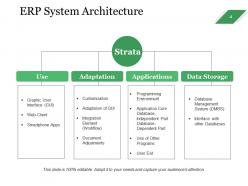
Slide 4: This slide presents ERP System Architecture. This slide also includes Strata with these four paramenters- Use, Adaptation, Applications, Data Storage.
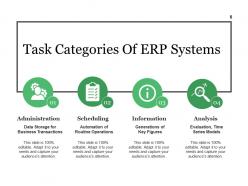
Slide 5: We have categorized for ERP systems in to four most common just to give a basic idea on classification which can be altered by you as per your requirement. Administration, Scheduling, Information, Analysis.
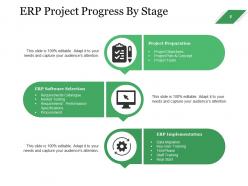
Slide 6: This slide showcases Project progress by stage and those are described as follows- Project Preparation, ERP Software Selection, ERP Implementation.
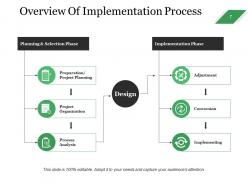
Slide 7: This slide presents Overview Of Implementation Process which is mainly categorize in two phases. Planning & Selection Phase, Implementation Phase. You can alter them as per your requirements
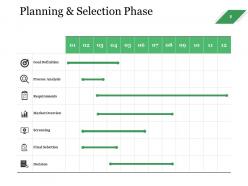
Slide 8: This slide displays about Planning & Selection Phase. Slide also include several parameters you can use according to requirement.
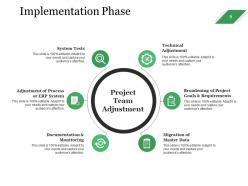
Slide 9: This slide presents Implementation Phase with the Project Team Adjustment and it also includes parameters like- Technical Adjustment, Broadening of Project Goals & Requirements, Migration of Master Data, Documentation & Monitoring, Adjustment of Process or ERP System, System Tests.
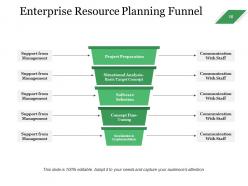
Slide 10: This slide displays Enterprise Resource Planning Funnel with these various categories- Realization & Implementation, Situational Analysis- Basic Target Concept, Software Selection, Concept Fine- Tuning.
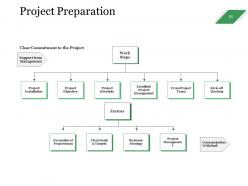
Slide 11: This slide presents Project Preparation flow chart. we have listed few work steps and factors.
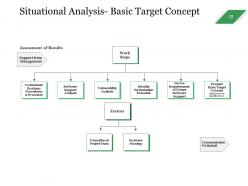
Slide 12: This slide Situational Analysis- Basic Target Concept with work steps and factors involves are these - Assessment of Results, Support from Management, Understand Business Procedures & Processes, Software Support Analysis, Vulnerability Analysis, Identify Optimization Potential, Derive Requirements of Future Software Support, Prepare Basic Target Concept, Formation of Project Team, Business Strategy, Communication With Staff.
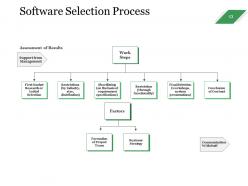
Slide 13: This slide is about Software Selection Process. You can use it as per your requirement.
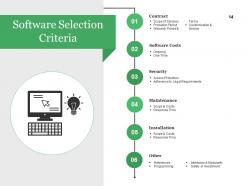
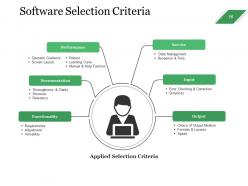
Slide 14: This slide displays Software Selection Criteria. We have categorized most common categories just to give a basic idea on classification which can be altered by you as per your requirement.
Slide 15: This slide showcases Software Selection Criteria with following categories- Contract, Software Costs, Security, Installation, Response Time, maintenance.
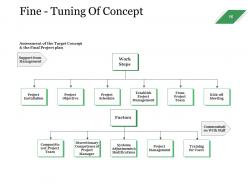
Slide 16: This slide displays Fine - Tuning Of Concept with some of the steps or stages listed.
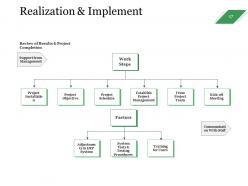
Slide 17: This slide presents Realization & Implement. It also includes some of the work steps and factors.
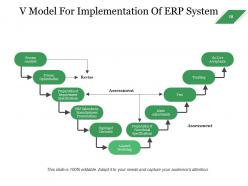
Slide 18: This slide sshowcases V Model For Implementation Of ERP System. We have added few process- Process Analysis, Process Optimization, Preparation of Requirement Specifications, Signing of Contracts, Launch Workshop, Training, Preparation of Functional Specifications, Make Adjustments, Test, Go-Live Acceptance, ERP Selection by Manufacturers Presentations, Assessment, Revise, Assessment, You can use it as per requirement.
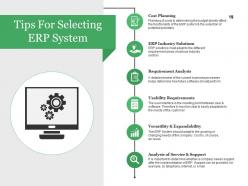
Slide 19: This slide displays Tips For Selecting ERP System Cost Planning, ERP Industry Solutions, Requirement Analysis, Usability Requirements, Versatility & Expandability, Analysis of Service & Support.
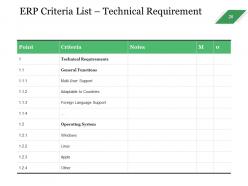
Slide 20: This slide presents ERP Criteria List – Technical Requirement. You can fill according to your requirement.
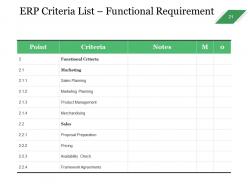
Slide 21: This slide displays ERP Criteria List – Functional Requirement. Add/edit as per your requirement.
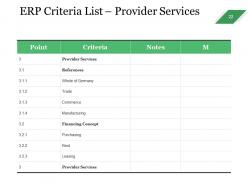
Slide 22: This slide showcases ERP Criteria List – Provider Services. With this slide you can add your own business requirement.
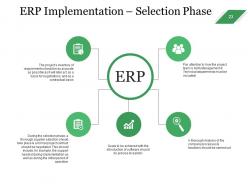
Slide 23: This slide showcases ERP Implementation – Selection Phase. With this you can make your phases.
Slide 24: This is a Coffee Break slide to halt. You may change it as per requirement.
Slide 25: This slide is titled Charts & Graphs to move forward.
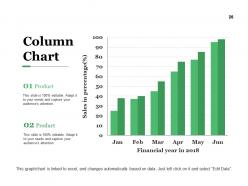
Slide 26: This is a Column Chart slide for product/entity comparison.
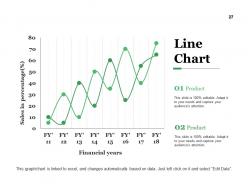
Slide 27: This is a Line Chart slide for product/entity comparison.
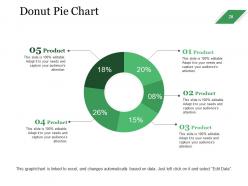
Slide 28: This is a Donut pie chart. You can compare four product in this.
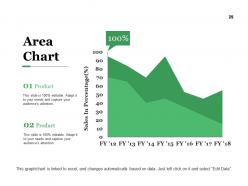
Slide 29: This is an Area Chart slide for product/entity comparison.
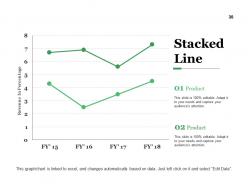
Slide 30: This slide shows a Stacked Line graph in terms of percentage and years for comparison of Product 01, Product 02 etc.
Slide 31: This slide is titled Additional Slides.
Slide 32: This slide represents Our Mission. State your mission, goals etc.
Slide 33: This is an About Us slide. State company or team specifications here.
Slide 34: This is Our team slide with names and designation.
Slide 35: This slide shows Comparison of two entities in butterfly chart form.
Slide 36: This is an Our Goal slide. State them here.
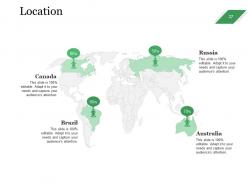
Slide 37: This is a Location slide of World map to show global presence, growth etc.
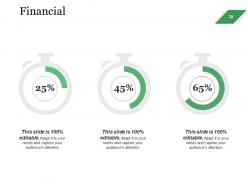
Slide 38: This is a Financial score slide. State financial aspects etc. here.
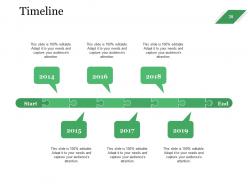
Slide 39: This is a Timelines slide to show- Plan, Budget, Schedule, Review.
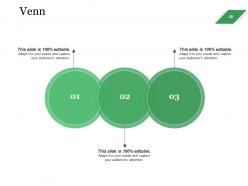
Slide 40: This slide displays a Venn diagram image.
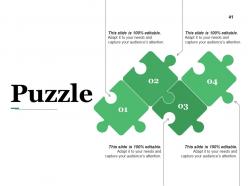
Slide 41: This slide presents a PUZZLE slide with the following subheadings- Integrity and Judgment, Critical and Decision Making, Leadership, Agility.
Slide 42: This is a Target slide. State your targets here.
Slide 43: This slide shows a Magnifying glass with text boxes.
Slide 44: This is a Bulb or Idea slide to state a new idea or highlight specifications/information etc.
Slide 45: This is a Thank You slide with Address# street number, city, state, Contact Number, Email Address.
Enterprise Assets Management Powerpoint Presentation Slides with all 45 slides:
Attracting customers is our Enterprise Assets Management Powerpoint Presentation Slides forte. They are extremely effective in acquiring clients.



FAQs for Enterprise Assets Management
Honestly, the biggest difference is you'll actually know what equipment you have and when it needs work. No more waiting for stuff to randomly break - you can plan maintenance ahead of time. Your downtime drops like crazy. Cost-wise, it's a lifesaver - no surprise repair bills or buying parts you already have somewhere. Having everything in one place beats the hell out of spreadsheets everywhere. The budget planning gets so much easier with real data. Oh, and start with your most critical equipment first. That's where you'll see results fastest and can prove it actually works.
So basically EAM talks to your other systems through APIs and data syncing. The ERP connection is pretty smooth - purchase orders, costs, depreciation all flow automatically between them. CMMS integration can get weird though since they both handle maintenance stuff, but EAM gives you the big picture while CMMS is more about daily work orders. Honestly some vendors make this way more complicated than it should be with their proprietary connectors (super annoying). You'll want real-time data sharing so you're not typing the same asset details into three different places. Map out what data goes where first - it'll save you headaches later.
So you'll definitely need asset visibility, lifecycle management, and predictive maintenance stuff. Real-time data on what you own and where it all is - super critical. Without that you're just guessing constantly. Workflow automation for work orders makes a huge difference too. Most places totally botch the integration part though, which is annoying because your EAM has to connect with CMMS, ERP, all that financial stuff smoothly. Mobile access for field crews is pretty much mandatory now. Oh and audit your asset data quality first - seriously, garbage data will kill everything else. Clean reporting dashboards help sell it to management.
So basically you want all your asset data and maintenance records in one place - that's where EAM shines. IoT sensors feed right into the system so you can actually see failure patterns developing. It'll automatically schedule maintenance based on equipment condition instead of just calendar dates. Plus (and this is huge) it alerts you before stuff breaks down and costs a fortune. Management loves the ROI story when you're asking for new sensors too. Just make sure your team enters good data consistently or you're screwed. Oh, and don't try to do everything at once - start with your most critical equipment first.
So data analytics is what makes your EAM system actually useful instead of just a fancy spreadsheet. It takes all that asset info and shows you what's really going on - like catching maintenance issues before they blow up your budget. You'll see which equipment keeps giving you headaches and when stuff's starting to decline. The predictive maintenance alerts are genuinely game-changing once you get them dialed in. Plus it helps figure out the best maintenance schedules and when to replace things. My advice? Start with your most critical assets and don't try to do everything at once.
Honestly, just set up automated tracking for all your compliance stuff - safety inspections, calibrations, maintenance schedules, whatever. Your system will ping you before deadlines hit. Auditors are basically bloodhounds for missed inspections, so you don't want that headache. Make sure it keeps detailed records of who did what work and when. That audit trail is everything. Oh, and set up automatic report generation too - way better than panicking when regulators randomly show up. I learned this the hard way at my last job. Get those workflows running now and you'll actually sleep during audit season.
Dude, data migration is gonna be your worst nightmare - seriously, plan for like double the time you think it'll take. Years of messy records, duplicates, missing info... it's brutal. Your team will probably hate learning new workflows too, which honestly makes sense since change sucks. Oh and if you've got older systems? Good luck making everything play nice together. Do yourself a favor and audit your data super early. Also throw way more money at training than feels reasonable - trust me on this one.
So asset lifecycle management is basically your roadmap for each piece of equipment - from when you buy it until you finally scrap it. EAM is the bigger system that handles everything. But lifecycle management? That's what tells you when to do maintenance, when to budget for replacements, all that stuff. Honestly, most companies skip this part and wonder why their EAM setup feels chaotic. You can't really optimize anything if you don't know whether your equipment is brand new or about to die. I'd start by just figuring out where your most critical assets are in their lifecycle right now - that'll show you what needs attention first.
Track about 5-6 key metrics to see if your EAM is actually working. Asset uptime and maintenance costs per asset are obvious ones. MTBF matters too. The planned vs unplanned maintenance ratio? That'll shock you - most teams are way worse than they think. OEE and inventory turnover rates round it out nicely. Pull these monthly and build a dashboard that's not confusing. Oh, and make sure people actually look at it instead of letting it collect dust.
So EAM basically helps you track energy use and figure out when your equipment actually needs maintenance instead of just guessing. Prevents those awful emergency breakdowns where you're scrambling for whatever parts you can find - usually expensive ones. Your assets last way longer when you're not running them into the ground. Plus you can make smarter calls about whether to fix something or just replace it entirely. Honestly, the inventory management alone saves a ton of waste. I'd start with tracking energy on your biggest equipment first since that's where you'll see results fastest.
Dude, IoT sensors are seriously game-changing for asset management. Stick them on your equipment and you'll get real-time data on everything - temperature, vibration, performance metrics. Then AI takes all that info and predicts when stuff's about to break down. Honestly feels like having a crystal ball sometimes. Digital twins are getting pretty solid too, so you can test scenarios without messing with actual gear. Machine learning keeps getting smarter at scheduling maintenance and figuring out resource allocation. My advice? Start with IoT on your most critical equipment first - don't try to do everything at once or you'll go crazy.
So with EAM you get this full picture of how your assets are doing - it uses predictive analytics to catch stuff before it breaks. When things do go sideways, you've got all your maintenance history and failure patterns right there for digging into what went wrong. It'll actually rank your equipment by risk level instead of you just guessing which ones matter most (though honestly, sometimes your instincts are spot on). Oh and definitely set up those automated alerts for critical gear - nobody has time to babysit dashboards all day.
Oh man, you're gonna want to hit both the tech stuff and process training hard. Basic navigation first - logging work orders, updating assets, running reports. Your maintenance crew needs serious mobile training since they'll live on those tablets. Data entry is huge too (garbage in, garbage out, you know?). Supervisors need the workflow and scheduling bits down cold. Honestly, skip the PowerPoint death - do hands-on workshops instead. Oh and definitely plan refresher sessions because people totally forget the fancy features they barely use.
So basically your field techs can scan asset tags and pull up all the maintenance history right on their phones. They log work orders instantly, snap photos of problems, update asset conditions - all without being stuck at a computer. Honestly it's huge for accuracy since nothing gets lost on random scraps of paper anymore. Response times get way faster too. The data entry mistakes practically disappear when people aren't trying to remember what they wrote down hours later. I'd start with whatever field process is driving everyone crazy and fix that one first.
First thing - get specific people assigned to own this stuff, don't just leave it to whoever's free that day. Trust me on this one. You need consistent naming rules and required fields, otherwise different departments will do their own thing and create chaos. Most places totally skip doing regular check-ups on their data quality and then wonder why everything's a mess later. Lock down who can edit what with proper access controls. The smart move? Start with your most important assets and build automated checks that catch problems early. Way easier to fix bad data before it spreads everywhere.
-
Good research work and creative work done on every template.
-
Innovative and attractive designs.