


Event planning overlapping timeline showing six activity




Try Before you Buy Download Free Sample Product
 Impress Your
 Audience
 100%
100% Editable
 Save Hours
 of Time


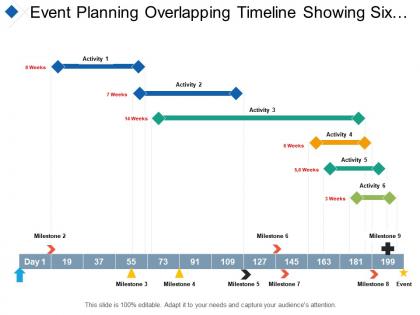
Designing a professional presentation on event planning is not an easy task. You need a lot of time and the best quality graphics. So, to assist you out, we have come up with a predesigned event planning overlapping timeline showing six activity PowerPoint template design using which you can easily showcase the weekly event plans. We understand how hard it could be for you to make a format design that keeps up the focus point of the viewers. Our designers have created this stunning event planning PPT template layout which can be used to highlight the progress of each task. This event planning overlapping timeline presentation slide design throws the light on the progress of six activities as per the week. It represents a timeline from day 1 to 199 with various milestones. As the event management slide design is editable, you can change the overall look and feel of the template as per the requirements. A presentation on event management, project management, strategic marketing, event scheduling, business agenda, and business development can be created using this unique event planning timeline template design. Do not delay, download this editable PPT template design. Handle defeatist attitudes with our Event Planning Overlapping Timeline Showing Six Activity. Act against demoralising factors.
People who downloaded this PowerPoint presentation also viewed the following :
Event planning overlapping timeline showing six activity with all 5 slides:
Get decisions implemented immediately with our Event Planning Overlapping Timeline Showing Six Activity. It helps you accomplish the business.
FAQs for Event planning overlapping timeline
Honestly, work backwards from your event date - that's the only way this won't turn into chaos. Book your venue first, then nail down catering and speakers. Marketing should start early but don't forget the unsexy stuff like permits (learned that one the hard way). Day-of needs a tight schedule: setup, tech checks, when everyone arrives. After it's over, send thank-yous and collect feedback while it's fresh. Build in extra time because I promise something will go wrong. Share the timeline with your team so you're not the only one tracking everything.
Honestly, a good timeline saves your sanity. It breaks everything down so you're not staring at this massive to-do list wondering where to even start. Plus you can actually see who's doing what and when - super helpful when Sarah from catering is three days behind and it's gonna mess up setup. I learned this the hard way on my first big event (total disaster). You'll spot problems way before they blow up, and your boss will love the updates. Start at least 6 months out for anything major. Short deadlines make everyone cranky and things get sloppy.
Honestly, I'd start with your big milestones first, then fill in everything else around them. Way less overwhelming that way. Pick some colors or icons and stick with them so it flows nicely - and don't cram everything together! White space actually makes it look professional (I've seen some truly chaotic timelines lol). Your text should be short but still tell the story. Oh, and here's what really works: show it to someone who wasn't part of the project. If they get confused, you know you need to simplify it more.
Honestly, drag-and-drop tools like Asana or Monday.com are total lifesavers for this stuff. Even Google Sheets works if you're keeping it simple. You can auto-fill dates, link tasks together, and share everything instantly with your team. No more of those annoying email threads where everyone's asking "wait, did we reschedule the venue thing?" Real-time updates mean everyone sees changes right away. People can comment directly on tasks too, which I actually love. Most platforms let you export to PDFs for those stakeholders who still print everything out (you know the type). Just pick whatever tool your team's already using daily.
Okay so first thing - figure out your hard deadlines, like when the venue contract expires or when your keynote speaker flies out. Those are non-negotiable. Then work backwards from there to map out everything else you need to do. I learned this the hard way after nearly missing a catering deadline once, ugh. Start with the scariest immovable dates because honestly? Those will make or break everything. Build in some buffer time around your big milestones too - I'd say 10-15% extra because something always goes sideways. Trust me on this one.
Honestly, think of event timelines like a group project tracker that actually works. They show who's doing what and when, so you don't get those panic moments where someone realizes they forgot something major. I love how you can spot problems early - like if two big tasks are scheduled at the same time. Makes it way easier to explain stuff to your boss too, since they can see everything visually instead of digging through random spreadsheets. Just update it weekly and stick it somewhere everyone can find it. Trust me, your future stressed-out self will thank you.
For event timelines, I'd go with Gantt chart tools first - Asana, Monday.com, or Microsoft Project are solid for tracking dependencies. People definitely overcomplicate this stuff though. If your team's already living in spreadsheets, Smartsheet gives you that visual timeline power without the learning curve. Simple events? Google Sheets with some conditional formatting honestly works fine. Airtable's pretty nice too - kind of bridges the gap between database and timeline view. But real talk, whatever tool your team will actually keep updated is the winner here.
Oh man, virtual events are a whole different beast! Build in like 15-30 minutes before each session just for tech issues - someone's always having audio problems or can't find the mute button. Keep sessions short because staring at screens is brutal. I learned this the hard way at a 3-hour webinar that felt like torture. Breaks are your friend, plus interactive stuff like polls keeps people awake. Breakout rooms? They take forever to set up and people get lost. Also schedule actual networking time since nobody can just chat by the coffee machine anymore. Give yourself 25% more time than seems reasonable - seriously, everything takes longer online.
Check your milestones against actual delivery dates first - anything over 10-15% late needs a closer look. Then survey stakeholders about communication quality and timing. The surprise factor kills projects honestly - nobody should be blindsided by timeline shifts. I'd also count how often you're revising schedules since that usually screams bad initial planning. Oh, and get these metrics set up before your next project starts, not during. Track stakeholder satisfaction too because hitting deadlines means nothing if everyone's pissed about how things went down.
Get everyone in a room (or Zoom, whatever) and have them dump all their needs on the table. Ask marketing when they need stuff approved - they'll probably say "yesterday" but push for real dates. IT will definitely take longer than they estimate, so factor that in. Each team needs to call out their dependencies and bottlenecks upfront. Honestly, a shared doc works great for this - everyone can see how their piece fits with others. Don't skip the alignment meeting though. You'll catch conflicts early when people realize their timelines don't actually work together. The goal is mapping out what's truly critical vs what's just nice-to-have.
Oh god, timing is always the killer. I always think setup will take like an hour and it ends up being three - every single time! Plus you can't just stack everything back-to-back without breathing room. Weather screws things up, vendors are late, approvals drag on forever. Honestly, I just add 20% buffer time to everything now because something always goes sideways. Put your critical stuff way earlier than feels necessary and have backup plans ready. Also maybe don't schedule your most important thing the day before like I did once... learned that lesson fast.
Honestly, just bake in extra time from day one - like 10-15% buffer for each milestone because stuff ALWAYS takes longer than you think. I've learned to plan around milestones instead of rigid daily schedules since you can shuffle things easier that way. Figure out your critical path early and know which tasks you can move around if things go sideways. Oh, and don't be that person who waits until the deadline to tell everyone you're behind - give your team a heads up as soon as you see delays coming. Quick check-ins help catch problems before they snowball too.
Look, first nail down the stuff you can't mess with - venue, main speakers, any permits you need. Work backwards from your event date and figure out what depends on what. I'm totally neurotic about color-coding everything but honestly whatever keeps you organized works. Knock out the easy wins early so you feel like you're actually getting somewhere. Build in extra time because trust me, something will go wrong. Oh and prioritize anything that'll directly hit your attendees' experience - the backstage chaos can wait if needed.
Honestly, your timeline is going to save your butt when things go wrong. You'll know exactly which vendors and speakers get affected if you need to switch things up. Short notice changes? No problem - you can spot what's flexible vs. what's set in stone. The best part is giving stakeholders actual realistic deadlines instead of wild guesses. I learned this the hard way at my last event (total disaster lol). Just keep updating it as you go so it's not some useless document sitting in your files. Trust me, when chaos hits you'll be so glad you have that roadmap.
Honestly, visuals are a game-changer for timelines. Nobody wants to scroll through a wall of text and dates - that's just painful. Icons and colors help people actually *see* the flow between events instead of getting lost in bullet points. Complex stuff becomes way easier to follow too. You can spotlight the big moments that would totally disappear in regular text. Oh, and stick with one visual style throughout (sounds obvious but you'd be surprised how many people mix random fonts and colors). Guide people's eyes to what matters most - that's the whole point.
-
Great experience, I would definitely use your services further.
-
Professional and unique presentations.