


Project overlapping timeline showing six tasks and milestone




Try Before you Buy Download Free Sample Product
 Impress Your
 Audience
 100%
100% Editable
 Save Hours
 of Time


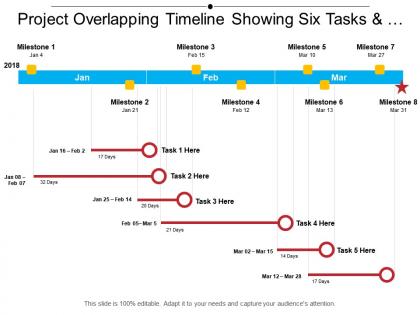
Facilitate the development with our project overlapping timeline showing six tasks and milestone PPT deck. Following timeline, design comprises of project status over time. Elaborate multiple projects heading towards the deadline in a concurrent process through this PPT diagram. This SlideTeam graphic has been designed with a stunning visual which is displaying the complete solution for the simultaneous working of multiple business projects in your companies. We have shown the working of the system in a three-month process, smile shine and various tasks can be shown through this design. Get a head start in your smart design through our, project overlapping timeline showing six tasks and milestone PPT layout, make the new easier to digest. Ease the change with our Project Overlapping Timeline Showing Six Tasks And Milestone. Make the new easier to digest.
People who downloaded this PowerPoint presentation also viewed the following :
Project overlapping timeline showing six tasks and milestone with all 5 slides:
Cover for any delays with our Project Overlapping Timeline Showing Six Tasks And Milestone. Generate action to counter it's effect.

FAQs for Project overlapping timeline showing six
So you'll want clear milestones and realistic timelines for each task - don't be overly optimistic here because we both know everything takes twice as long as planned. Map out which activities depend on others, then figure out your critical path (that's the chain of tasks that sets your minimum timeline). I'd start with your big deliverables first, break those into smaller pieces. Assign owners to everything and build in regular check-ins. Oh, and definitely add buffer time! The sweet spot is detailed enough to actually track progress but not so micro-managed that you're constantly updating spreadsheets.
Honestly, you gotta nail down the big milestone dates first - like client reviews or stuff other teams are waiting for. Those are non-negotiable. But between those? Give yourself wiggle room with time blocks instead of exact dates. I totally screwed this up on my last project by making everything too rigid. Regular check-ins are your friend - you can pivot without blowing up the whole timeline. Oh, and definitely work backwards from your must-hit deadlines. That way you're protecting what actually matters while staying flexible on the day-to-day stuff. Trust me on this one!
Microsoft Project is solid if your company already has it, but honestly it's overkill for most stuff. I'd probably just go with something like TeamGantt or Monday.com - way easier to use and your team won't hate you for it. Smartsheet's decent too. If you're being cheap (no judgment), Google Sheets works fine for basic timelines. Oh and here's the thing - whatever you pick, make sure everyone will actually use it. I've seen so many fancy tools just sit there collecting digital dust. Start simple, you can always upgrade later if you need more bells and whistles.
Start with your big deliverables and decision points - those are your natural milestones. I'm talking completion of design phase, stakeholder sign-offs, beta launch, stuff like that. Don't go crazy though, maybe 5-7 tops or it gets messy. Space them out at spots where you can actually stop and check how things are going. Make each one super specific so everyone knows what "finished" means. Oh and make them pop visually in whatever tool you're using - I swear bright colors help people actually pay attention to them instead of just scrolling past.
Honestly, the worst thing you can do is be way too optimistic about timing. I learned this the hard way lol. Never promise dates without asking your team first - that's like project management suicide. Map out everything realistically, then add 20% padding because trust me, weird stuff always happens. Dependencies will bite you too - approvals, vendor delays, all that fun stuff. Oh and work backwards from your end date to see if it's even possible. Short sentences help when you're planning this out. Makes it less overwhelming.
Don't just dump a finished timeline on people - that's asking for pushback. Instead, bring them into the process. Show your thinking behind each milestone and explain why tasks need certain timeframes. Dependencies matter, and people get it when you walk them through the logic. I always sneak in buffer time (just don't call it that obvs). The risky part? Compressed timelines blow up later. Ask for their input upfront and actually listen to what they're saying. Way better to let them poke holes now than deal with surprises down the road.
Honestly, prioritization is what makes or breaks your timeline. Figure out your must-haves first - the stuff that everything else depends on. I made this mistake last year and it was a disaster! You can't just cram everything in or give equal time to every task. That's not how real projects work. Start by ranking deliverables based on business impact and what's blocking other work. Then build your schedule around those top items. The nice-to-haves? Squeeze them in after. Short deadlines force you to be ruthless about what actually matters, which isn't fun but it's necessary.
Honestly, I check mine every few days - just a quick look to see if anything's going sideways. Weekly deep dives are pretty standard though. Complex projects? Daily checks become your best friend, especially around big milestones. The whole point is catching problems before they snowball into disasters. Don't stick to some rigid schedule if your gut says something's wrong - I've learned that the hard way. Set phone reminders or you'll totally forget. Oh, and dependencies are timeline killers, so watch those like a hawk.
Don't wait until the last second - that's the worst thing you can do. Tell them what happened and why, plus give a real timeline (not some BS optimistic one). I always break down how it'll affect each person's stuff so they're not guessing. If it's a big change, do a quick call instead of just email - people get weird about major news in their inbox. Let them vent or ask questions. Oh, and if you screwed up, just say so. Nobody respects the blame-shifting thing. Focus on fixing it moving forward.
Ugh, time zones will seriously mess with your project timelines if you don't plan for it. Like, someone submits work at 5pm but your reviewer won't even see it until the next morning - there goes your quick feedback loop. I've seen projects get delayed by 1-2 days per round just from this. What's worked for me is building in extra buffer time and making sure you've got at least 2-3 hours where key people overlap. Also, be super specific about deadlines - always include the actual time zone or people get confused. Oh, and handoffs become way more important when you can't just slack someone immediately.
Okay so buffer time is basically your cushion for when stuff goes sideways - and trust me, it will. Tasks always take longer than you think. Someone gets sick, approvals drag on forever, random bugs pop up. My first project was a total disaster because I didn't account for this! Without buffers you're just asking for missed deadlines and everyone freaking out. I usually add like 20-30% extra time to the critical stuff. Oh and definitely tell stakeholders about these buffers upfront so they know what's realistic.
For project timelines, I'd go with Gantt charts if you need to show how tasks connect - though they can get messy fast. Milestone timelines are perfect when you're presenting to higher-ups who just want the big picture stuff. Sometimes I honestly just use a basic horizontal bar chart because it gets the job done without overthinking it. PowerPoint works fine, or Google Slides if you're collaborating. Oh, and Lucidchart's pretty solid too. Just match what you show to who's watching - your team wants all the details, but executives? They'll glaze over if there's too much going on.
Honestly, the key is connecting your project timeline to what actually matters to the business. Like if you're building something to boost retention, don't launch it right when your busy season ends - timing matters. Figure out which deliverables will actually impact revenue or whatever metrics your leadership obsesses over. I've watched so many "successful" projects completely whiff on the business side. Schedule regular check-ins with stakeholders because priorities change constantly. Each phase should clearly move you closer to those bigger company goals - otherwise what's the point?
You need to track three things when timelines shift: what changed, why it happened, and who gets affected. I just use a basic change log with dates - honestly, nothing fancy works better than simple chronological notes. The tricky part? Don't just update some random document nobody reads. Actually tell people right away when stuff changes. Communication beats documentation every time. Also, maybe start a shared doc where your whole team can see timeline updates in real-time. Transparency keeps everyone sane and prevents those awkward "wait, when did this change?" moments later.
Look at your old projects and find the patterns - how long stuff actually took vs what you thought it would take. We're all pretty bad at guessing time upfront, but at least the real numbers don't sugarcoat anything. Check out projects that were similar in size and complexity. Where did things always get stuck? Factor those problem spots into your new timeline with some extra buffer. Also track if specific people or handoffs are always the holdup - that's super telling. Oh, and start keeping a basic spreadsheet of this data. Future you will thank you when estimates actually make sense.
-
Excellent work done on template design and graphics.
-
The Designed Graphic are very professional and classic.