


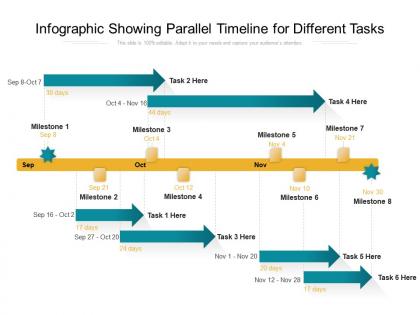
Infographic showing parallel timeline for different tasks




Try Before you Buy Download Free Sample Product
 Impress Your
 Audience
 100%
100% Editable
 Save Hours
 of Time


Establish the correct course to be charted with our Infographic Showing Parallel Timeline For Different Tasks. It allows you to grab hold of the helm.
People who downloaded this PowerPoint presentation also viewed the following :
Infographic showing parallel timeline for different tasks with all 2 slides:
Arrive at a compromise formula with our Infographic Showing Parallel Timeline For Different Tasks. Get former foes to agree to be friends.
FAQs for Infographic showing parallel timeline
Start by sketching it out on paper first - saves you from redoing the whole thing later. Use different colors and icons for each timeline so they don't blur together. Keep your date intervals consistent across all tracks (this is where I always screw up initially). Chronological alignment is honestly the trickiest part. Add milestone markers for major events but don't go overboard with details or it'll look like a mess. Brief descriptions work best. Oh, and definitely include a legend at the end explaining your symbols and color scheme. People get confused without it.
Dude, parallel timelines are a game changer! You can show multiple storylines happening at once instead of that boring one-after-another format. Works amazing for comparing scenarios side-by-side or tracking how different teams' projects evolved during the same timeframe. Your audience actually gets the full picture without having to mentally connect dots later. I use them all the time for "what if" scenarios too. They're perfect when you need to show competing strategies or how departments' work overlapped. Trust me, way more engaging than linear storytelling - people stay awake!
I'd start with **Lucidchart** - their parallel timeline templates are actually pretty decent and the free version should work fine. **Creately** is another good option with similar features. If you want something that looks really polished, **Canva** has some nice design templates, though they're more style over substance. **Figma** gives you total creative freedom but honestly, it's kind of overkill unless you're super picky about design. There's also **Timeline JS** if you don't mind getting your hands dirty with some light coding - I know that's not everyone's thing though. Try Lucidchart first and see how it goes before overthinking it.
Okay so first thing - list out all your major events, then find natural break points. Decades are perfect for history stuff, quarters work for business timelines. I always just eyeball it initially to see what feels right, honestly. Test it after by checking if each section has similar visual weight. One part crammed with events while another's totally empty? That's gonna look weird. Short sentences work great for readability. The whole point is someone should scan it quickly and get the story. Oh and don't stress too much about making it mathematically perfect - sometimes the natural flow of events matters more than rigid spacing.
Okay so for parallel timelines, definitely use different colors for each one - makes a huge difference. Dotted lines or arrows between related events help people connect the dots. Icons beat wall-of-text every time, seriously. You can make some timelines thicker or taller to show which stuff matters more. If it's digital, hover effects are pretty slick. Otherwise callout boxes work great for the big moments. Oh and start with your main timeline first, then layer the others. People get confused fast when there's too much going on at once. The whole point is visual hierarchy so they don't lose track of what's happening when.
Don't group similar events together - that's where most people mess up. Instead, slice by time periods. Like, show what's happening in China, Europe, and the Americas all during 1750-1800. Way more interesting connections pop up that way. Use different colors for each civilization so it doesn't look like a mess. Make sure your time scales match up perfectly though, or the whole thing falls apart. I'd probably start with just 3-4 major civilizations first - easier to test out before you go crazy with it.
Pick your color palette first - that's honestly the most important step. Give each timeline its own color and don't mess with it throughout the whole thing. Your audience will thank you for not making them guess which line connects to what. I always choose colors that look different enough for colorblind people too (learned that one the hard way). Whatever color you pick needs to show up everywhere - titles, lines, data points, all of it. Short version: be consistent or you'll confuse everyone. Also pro tip - test your colors on different screens if you can.
Dude, animation totally saves boring timelines! Start simple - fade-ins work great for showing events chronologically. You can also use arrows or color changes to connect related stuff between timelines. Here's what I'd do: animate one timeline first, let people follow that story, then show how they connect. Don't just throw in flashy effects because they look neat (guilty of this myself lol). The whole point is guiding where people look and making relationships clearer. Test one animation before going crazy with more - sometimes less is actually better for keeping people focused.
Don't cram everything onto your timeline - seriously, less is more here. People's brains just shut down when there's too much info. Pick different colors that actually look different (I've seen way too many timelines where everything blends together). Your dates need to line up correctly between both tracks or you'll confuse the hell out of everyone. Oh, and be consistent with your formatting! Maybe sketch it out first? I always do that before jumping into whatever design program I'm using. Short sentences work. Longer ones help break up the rhythm naturally.
So parallel timelines are perfect when you want to show stuff happening at the same time - like WWII battles while scientists were making crazy discoveries, you know? Different civilizations creating writing systems works great too. I use them tons for interdisciplinary stuff - art movements developing during major historical events and all that. Students always get excited seeing connections they missed! Just don't go overboard though. Stick to maybe 2-3 tracks so it doesn't look like a mess. Oh, and definitely add a clear legend or your kids will get lost trying to follow everything.
So basically you'll want to stack different tracks horizontally - one for each data source. Keep the timeline consistent across all of them so stuff actually lines up. Colors and icons help a ton for telling sources apart, especially when you're juggling like market data, company events, and industry news simultaneously. Honestly, I'd start with your most critical dataset first and build around that. Makes the whole thing less overwhelming. Don't forget a legend though - your future self will thank you. The visual hierarchy thing really works if you layer secondary sources underneath your main one.
These work great when your audience needs to compare stuff happening at the same time - like historians looking at different civilizations or project managers juggling multiple deadlines. Your viewers should know the basics already since these get messy fast (trust me, tiny text everywhere). Perfect for analytical people who love connecting dots between parallel events. Oh, and students comparing theories that developed simultaneously? Gold mine. If someone's asking "what else was going on during this time?" - bingo, you've got the right format.
So for digital timelines, definitely go interactive - clickable events, zoom stuff, hover details. Print's trickier since people can't click around, so you gotta put way more info upfront. Digital's honestly where parallel timelines really shine though. You can do cool animations between branches that actually make sense of the concept. Print needs rock-solid visual hierarchy and more explanatory text baked in. Oh, and here's what worked for me - design the print version first, then add all the fancy digital bells and whistles. That way your main idea translates no matter what format someone's looking at.
Make sure your timelines all use the same scale - otherwise people can't actually compare anything, which defeats the whole point. Color code each one but don't go crazy with it. I'd stick to maybe 3-4 colors max that actually look good together. Keep your labels consistent and in the same spots so people aren't hunting around. The spacing between everything should feel uniform too. Honestly, if someone can't figure out what's happening within like 5 seconds of looking at it, you probably need to simplify. Show it to a friend first - they'll tell you real quick if it's confusing.
Dude, parallel timelines are a game changer. You can see all your project streams at once instead of drowning in those awful Gantt charts. Dependencies and resource conflicts just pop right out - no more endless scrolling through task lists. I've been obsessed with them lately, honestly. Different teams, phases, comparing what you planned vs what actually happened - it all sits in one view. Stakeholders finally understand how everything connects (which is... kind of a miracle). Seriously, try it on your next big project. Those resource fights you always have? Way easier to sort out.
No Reviews