

Parallel timeline





Try Before you Buy Download Free Sample Product
 Impress Your
 Audience
 100%
100% Editable
 Save Hours
 of Time


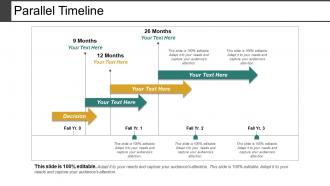
Introducing Parallel Timeline slide which helps you to present the achievements of your organization. This time chart PPT graphic can be incorporated to strategize managerial and technical methods of attaining the business goals on schedule. Showcase the accomplishments of your organization in an effective way by using this PPT background infographic. Take the assistance of this PowerPoint layout to mention the five phases of the project management which are project initiation, planning, execution, monitoring, and control, closure. Employ this business roadmap PPT slideshow to reveal the future endeavors of your company. With this implementation timeline PowerPoint visual you can depict the responsible parties and estimated time for task execution. Also, high-quality icons will make your presentation much informative and reliable. Thus, make an amazing presentation by downloading this visual attention grabbing milestone PPT slide.
People who downloaded this PowerPoint presentation also viewed the following :
Parallel timeline with all 5 slides:
Ensure good ideas continue to be generated with our Parallel Timeline. It will increase the inflow.
FAQs for Parallel timeline
Start by mapping out your big milestones first. You'll want clear time markers and dates as anchors throughout - but honestly, don't jump around chronologically or you'll lose people. Most folks mess this up by bouncing between timelines too much! Each event should connect logically to the next one. Your transitions need to show actual cause-and-effect, not just "and then this happened." Oh, and establish your timeline scope upfront so readers know what they're getting into. Fill in supporting details after you've got the main sequence down.
Your presentation basically becomes a story people can follow instead of just random info thrown at them. Timelines work because our brains process stuff sequentially anyway - you're not fighting how people think. They create that "what happens next?" feeling that keeps everyone awake (trust me, way better than bullet points). You can show cause and effect or build up to big moments. Color-coding different storylines helps too, or adding visual markers for key events. Honestly, it just makes everything flow better and feel more natural.
Honestly, just go with **Canva** first - it's free and you can whip something up in like 30 minutes. **Adobe Timeline** is another good bet with solid templates. If you need team collaboration, **Lucidchart** and **Creately** work well for that. PowerPoint's SmartArt actually doesn't look terrible if you're already paying for Office anyway. **Tiki-Toki** does these cool interactive web timelines, but fair warning - there's definitely a learning curve there. Oh, and **Venngage** makes really slick infographic-style ones that look way more professional than they should. I'd honestly stick with Canva though unless you need something specific.
Oh man, this stuff is way more complicated than you'd think! Western histories just go in a straight line, but Hindu and Buddhist cultures see time as these repeating cycles. Indigenous groups often organize everything around seasons or family stories instead of actual dates - which honestly makes way more sense to me sometimes. Then you've got Islamic chronology starting from the Hijra, Chinese from different dynasties... it's a mess if you're trying to compare them. My advice? Figure out their cultural framework first. Don't just slap Western timeline expectations on everything or you'll miss the whole point of how they actually think about history.
Okay so basically you can't figure out what caused what unless you know the order things happened in. Like, if Event A happens after Event B, then obviously A didn't cause B - that'd be backwards, right? It's kinda like saying the fire started the match (which makes zero sense). Here's what I do: map out your timeline first, then look for causes. Otherwise you'll end up thinking random stuff that just happened around the same time actually caused each other. Timeline first, then detective work.
So I'd break everything into phases with actual start/end dates - working backwards from your deadline is honestly the smartest way to do this. Figure out your major milestones first, then fill in all the smaller tasks that need to happen before each one. Gantt charts are super helpful for seeing how everything connects (though they look intimidating at first). If that's too much, just use numbered lists or block time on your calendar. The main thing is figuring out which tasks can't start until others finish. Oh, and definitely set time limits for each phase or you'll procrastinate forever.
Ugh, information overload is the worst part honestly. Your audience gets lost juggling all those timelines and dates - like when stuff happened vs why it actually mattered. Plus let's be real, most people find dates mind-numbing. You'll end up jumping between time periods and confusing everyone. I always focus on the big turning points instead of cramming every single date in there. Visual aids help tons. Oh, and don't get stuck in the weeds with details - you'll lose the bigger story. Connect everything back to outcomes people care about.
Dude, interactive timelines will totally change how you do chronological stuff. Timeline JS and Tiki-Toki let people click around and explore at their own speed - way better than boring slides. The fact-checking features are clutch too since they'll catch date errors automatically. You can drop in videos, audio, photos right into each timeline point. Makes everything feel way more real, you know? I'd start simple though - maybe try Google's timeline template first to see if you like it. Once you get the hang of it, your presentations will actually be engaging for once.
Honestly, chronological stories don't have to be boring timelines if you mix things up. Try starting with a flash-forward or hook that makes people wonder how you ended up there. Most writers just dump events in order - don't do that. Add dialogue, reactions, sensory stuff between the plot points. Foreshadowing's your friend too, dropping hints without giving everything away. Speed through boring transitions but slow down for the big moments. Oh, and make sure there's emotional stakes at each major beat or people will zone out. Works every time.
Oh this is actually pretty doable! Drop in little "meanwhile in 1995..." markers so people don't get lost when you jump around. Color-code different time periods or throw date stamps on your slides. What really works well is dropping hints about what's coming next or referencing stuff you covered earlier - keeps everything connected. You could also make a master timeline slide that pops up showing where you are currently. Honestly the visual cues are clutch here. Just give people some kind of chronological anchor they can grab onto, even when your presentation order is totally scrambled.
So linear stories feel like you're heading somewhere specific - your readers expect answers and can track how everything connects. Circular ones? Totally different vibe. They're more about fate and themes, less about "what happens next." Think mystery novel vs Groundhog Day (though honestly that movie's genius either way). Linear gives you momentum and urgency. Circular lets you dig into deeper meaning and hit people with that emotional gut punch when things come full circle. Go linear for clear resolutions, circular when you want philosophical weight.
Pick your 3-5 biggest moments first, then add multimedia there - not everywhere. I learned this the hard way after making a timeline that looked like a stock photo explosion. Videos and images work best at natural transition points between periods. Random photos on every date just kill the flow, honestly. Choose stuff that actually shows change over time or gives real context. Oh, and keep file sizes decent so your timeline doesn't take forever to load. Alt text is clutch for accessibility too. The whole thing should feel like one story, not decorations slapped on afterward.
Think about who you're talking to first. Kids need recent stuff they actually remember, plus maybe some Marvel references or whatever they're into. Adults can handle way more historical background without getting bored. I always pick 2-3 big events my audience definitely knows, then hang everything else on those. Like, everyone remembers COVID starting, right? Use that kind of stuff as your anchor. Also - and this might sound weird - but I literally run my timeline past someone from that group beforehand. What makes total sense to me can be completely lost on them.
Check out Ken Burns stuff like "The Civil War" - he's amazing at mixing chronology with personal stories and visuals. The New York Times does these interactive timeline things that are honestly pretty addictive to scroll through. Museums get this right constantly (Holocaust Memorial's permanent exhibit blew me away). Even Apple's product launches build this narrative tension with their timelines, weirdly enough. Don't just dump dates though - you want momentum and cause-and-effect connections. Map out your big moments first, then figure out what story links them together. That's where the magic happens.
Look, when you mess up dates or get the order wrong, people lose track of what caused what - super confusing for everyone following along. Small timeline errors make your audience question everything else you're saying, which honestly makes total sense. I've seen tiny mistakes turn into huge credibility problems. Always double-check your sources first. Oh, and if you're not 100% sure about a date? Just say so upfront. People actually respect that honesty way more than finding out you were wrong later.
-
Great designs, Easily Editable.
-
Informative presentations that are easily editable.