


Project timeline powerpoint slides templates





Try Before you Buy Download Free Sample Product
 Impress Your
 Audience
 100%
100% Editable
 Save Hours
 of Time


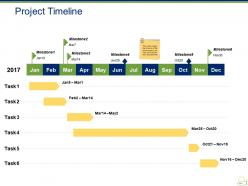
Introducing Project Timeline PowerPoint Slides templates to plan your activities in a synchronized manner. A series of data can be best represented visually through this PowerPoint timeline template. Get this ready-to-use PowerPoint theme and make an awesome presentation for representing your yearly goals. Use this creative timeline PPT visual to give an overview of the events that are to be completed within a year. With this, it will be easier for you to show to the people, the sequence of tasks that have been done and that needs to be done. This monthly timeline PowerPoint slideshow can also be used for setting the objectives or goals on a monthly basis which will lead to the achievement of the organization's main goal. With the help of our content-ready PPT slide, you can also get to know how long it took to you reach from the start of the project to the end. Download this timeline PowerPoint template to portray your data in a chronological manner.
People who downloaded this PowerPoint presentation also viewed the following :
Project timeline powerpoint slides templates with all 5 slides:
Blend creativity and content with our Project Timeline Powerpoint Slides Templates. They contain the best of both.
FAQs for Project timeline
Okay so for your timeline template, definitely include the basics: project phases, task names with descriptions, start and end dates, plus who's doing what. Dependencies are crucial too - like which tasks need to happen before others can start. Oh and add a status column! Seriously, tracking what's done vs in progress vs completely stuck will save your sanity. Buffer time is non-negotiable because things always take longer than expected. I'd throw in a notes section for random important stuff that comes up. Start simple though - you can always make it fancier later based on what your team actually needs.
Most industries start with a basic timeline then modify it for their specific chaos. Construction builds in permit delays and inspection holds - weather screwups too. Software dev is all about sprints and testing cycles, plus those fun deployment windows. Healthcare gets crazy strict with compliance checks and safety reviews (honestly, rightfully so). Marketing campaigns? Creative reviews, approval rounds, coordinating launches across different channels. You want to spot your industry's biggest pain points and recurring slowdowns first. Then build those directly into your template from day one instead of panicking when they inevitably pop up later.
Honestly, visual timelines are so much better than text lists. Your brain just processes pictures way faster - you can spot bottlenecks and dependencies instantly instead of hunting through paragraphs. Everyone stays more engaged in meetings too (beats staring at bullet points, trust me). The connections between tasks are right there with colors and arrows, no guesswork needed. I made the switch to Gantt charts last year and wow, what a difference. Stakeholders actually understand where we are without me having to explain everything. You should definitely try it on your next project.
Honestly, timeline templates are game-changers because everyone finally sees the same roadmap. No more "wait, what's my deadline again?" confusion. Your team knows who's doing what and when stuff's due. Way better than those endless email threads that pile up in everyone's inbox (seriously, who reads those?). The best part? People actually understand how their work fits with everyone else's. Less time wasted in meetings asking for updates since it's all right there. I'd start simple and tweak it based on what actually works for your team.
Honestly, Microsoft Project is super powerful but it's way too much unless you're managing something huge. Asana and Monday.com are probably your best bet - their drag-and-drop stuff is actually pretty smooth. Google Sheets works fine too if you add some Gantt chart extensions, especially if your team's already on Google everything. Trello's good for simpler projects but can get messy fast. My old manager swore by Monday.com but I think it's kinda overpriced. Whatever you pick, just make sure everyone will actually use it consistently - that's honestly half the battle.
So I'd start by making your template modular - like foundation, build, test, deploy phases that you can copy across teams. Map out dependencies between workstreams first (trust me, learned this the hard way on a massive 200-person project). Always add buffer time since bigger projects are messier. Consistent naming helps too, and assign owners for each section. Here's the thing though - build in checkpoint reviews where you can actually adjust based on real progress, not just wishful thinking. Oh, and clone your core template instead of starting fresh every time. Saves so much headache.
Honestly, timeline templates are a game-changer for stakeholder updates. You just update the visual and boom - everyone sees milestones, dependencies, the whole picture. Way better than those status emails that get ignored anyway. When scope creep hits (and it always does), you can actually show people how it'll push deadlines instead of just saying "we're behind." I started using mine in weekly check-ins instead of boring status reports. It's like having a dashboard that everyone gets, not just PM speak. Makes my life so much easier.
Honestly, the worst thing you can do is treat those templates like they're set in stone. They're just starting points! I always customize mine based on what my team can actually handle - don't just slap dates in there and walk away. Oh, and seriously resist cramming every tiny task into the schedule. Some timelines I've seen are absolutely insane. Leave buffer time because stuff always goes wrong. Dependencies between tasks? Be realistic about those too. Here's what really works though - get your team to review everything before you finalize it. They'll spot things you totally missed.
Honestly, color-coding changed everything for me. You just pick colors for different stuff - like blue for marketing tasks, red for urgent deadlines, green for Bob's assignments, whatever works. Once you get the hang of it, you'll scan your timeline and instantly know what's going on without reading every single task. Way faster than squinting at text all day. Just don't go crazy with too many colors or your team will get confused. I learned that the hard way when I used like 8 different shades and nobody could remember what purple meant. Keep it simple and stick with the same system across projects.
Okay so basically you want to spread your milestones out like checkpoints - hit the big moments like "design approved" or "testing done." I'd stick to maybe 5-7 tops because otherwise it just looks messy. Make them pop visually with different colors or whatever so they're not buried in all the other stuff. Here's the thing though - each one needs to actually matter to the people who care about your project. I usually start with the biggest deliverables first, then figure out what smaller milestones make sense leading up to them. Don't overthink it.
Honestly, it depends on who's gonna see it. Executives? Keep it super high-level with just the big milestones. Your actual team needs way more detail - like specific tasks and all those annoying dependencies. Duration matters too - a two-week thing obviously doesn't need the same breakdown as something running all year. Here's what I do: ask yourself what decisions people will actually make with this info. That tells you everything. Oh, and start broad first, then get into the weeds for whatever sections really matter. Way easier than trying to plan every detail upfront.
So basically, ditch the traditional timeline and work in 2-4 week sprint blocks instead. Focus on what you can actually deliver each cycle rather than trying to map everything out perfectly from day one - trust me, that never works anyway. Your template should track sprint goals, backlog stuff, and demo dates. Flexibility is huge here since scope will definitely change. Most teams screw this up by being too rigid. Update everything after retrospectives so it matches how you actually work, not some fantasy process. Oh, and keep those major milestones visible but don't stress about the detailed task sequences.
Drag-and-drop is your best friend here. You'll want pre-built templates with simple visual editing - just click to change text, dates, milestones without hunting through menus. Color-coding saves so much time too, makes everything instantly readable. Auto-formatting is clutch because it keeps spacing consistent when you're moving stuff around (honestly, that's where most timelines look janky). Oh, and grab something with team collaboration built in. Nothing worse than someone "helping" and completely destroying your layout. Templates with intuitive interfaces are worth paying extra for - trust me on this one.
Honestly, timeline templates are lifesavers for catching problems before they blow up. You map out all your dependencies and critical paths right from the start, which makes bottlenecks super obvious. I always flag the riskiest tasks first - like, the ones that'll definitely cause drama if they go sideways. Then you can work backwards and build in buffer time around those trouble spots. The visual aspect is huge too. You'll actually see which delays matter versus the ones that just stress you out but won't kill your deadline. Oh, and identifying backup resources early? Total game-changer when things inevitably get messy.
Honestly, your old timelines are goldmines for figuring out where you always mess up estimates. I used to think I just sucked at planning, but everyone struggles with the same stuff! Design reviews? They're always longer than you think. Stakeholder feedback loops are total time-sucks. Check which teammates deliver early vs. who needs extra buffer time. The real trick is spotting your "usual suspects" - those tasks that always explode beyond their original scope. Once you see the patterns, you can actually build realistic buffers into future projects instead of being overly optimistic every damn time.
-
The Designed Graphic are very professional and classic.
-
Professional and unique presentations.